


 【RT-Thread学习笔记】如何优雅地退出QEMU模拟器?
描述
1 问题场景
相信很多人也跟我一样,刚接触RT-Thread不久,正在学习RT-Thread的路上,然而学习一款嵌入式实时操作系统,没有一个硬件开发板,在我之前的认知里面,这应该很难把RTOS的内核代码调试起来吧?
直到了解了RT-Thread,我才知道原来有QEMU模拟器这么个东西。
所以我很快就参考相关教程,把QEMU给装起来了,结合RT-Thread编译bsp的方法,很快我选择的qemu-vexpress-a9固件很快就编译出来了。
看了bsp目录下有好几个启动脚本:
-
bsp/qemu-vexpress-a9$ ls -al *.sh -
-rwxr-xr-x 1 recan system 168 Sep 6 10:43 qemu-dbg.sh -
-rwxr-xr-x 1 recan system 187 Oct 22 17:41 qemu-nographic.sh -
-rwxr-xr-x 1 recan system 166 Sep 6 10:43 qemu.sh
我逐个尝试,发现在我的环境下,只有./qemu-nographic.sh能够跑起来。
-
bsp/qemu-vexpress-a9$ ./qemu-nographic.sh -
qemu-system-arm: -no-quit is only valid for GTK and SDL, ignoring option -
WARNING: Image format was not specified for 'sd.bin' and probing guessed raw. -
Automatically detecting the format is dangerous for raw images, write operations on block 0 will be restricted. -
Specify the 'raw' format explicitly to remove the restrictions. -
ALSA lib confmisc.c:767:(parse_card) cannot find card '0' -
ALSA lib conf.c:4732:(_snd_config_evaluate) function snd_func_card_driver returned error: No such file or directory -
ALSA lib confmisc.c:392:(snd_func_concat) error evaluating strings -
ALSA lib conf.c:4732:(_snd_config_evaluate) function snd_func_concat returned error: No such file or directory -
ALSA lib confmisc.c:1246:(snd_func_refer) error evaluating name -
ALSA lib conf.c:4732:(_snd_config_evaluate) function snd_func_refer returned error: No such file or directory -
ALSA lib conf.c:5220:(snd_config_expand) Evaluate error: No such file or directory -
ALSA lib pcm.c:2642:(snd_pcm_open_noupdate) Unknown PCM default -
alsa: Could not initialize DAC -
alsa: Failed to open `default': -
alsa: Reason: No such file or directory -
ALSA lib confmisc.c:767:(parse_card) cannot find card '0' -
ALSA lib conf.c:4732:(_snd_config_evaluate) function snd_func_card_driver returned error: No such file or directory -
ALSA lib confmisc.c:392:(snd_func_concat) error evaluating strings -
ALSA lib conf.c:4732:(_snd_config_evaluate) function snd_func_concat returned error: No such file or directory -
ALSA lib confmisc.c:1246:(snd_func_refer) error evaluating name -
ALSA lib conf.c:4732:(_snd_config_evaluate) function snd_func_refer returned error: No such file or directory -
ALSA lib conf.c:5220:(snd_config_expand) Evaluate error: No such file or directory -
ALSA lib pcm.c:2642:(snd_pcm_open_noupdate) Unknown PCM default -
alsa: Could not initialize DAC -
alsa: Failed to open `default': -
alsa: Reason: No such file or directory -
audio: Failed to create voice `lm4549.out' -
\ | / -
- RT - Thread Operating System -
/ | \ 4.0.4 build Nov 5 2021 -
2006 - 2021 Copyright by rt-thread team -
lwIP-2.1.2 initialized! -
[I/sal.skt] Socket Abstraction Layer initialize success. -
[I/SDIO] SD card capacity 65536 KB. -
[I/SDIO] switching card to high speed failed! -
hello rt-thread 99, 99 -
1, 2 -
1, 2 -
1, 2 -
msh />
不过问题来了,我想重新编译源码,再次运行新的代码,怎么办呢?如何才能退出这个QEMU命令行控制台?
2 尝试解决
2.1 牛刀小试
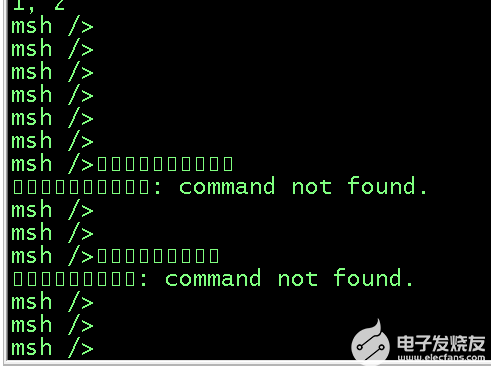
大家都知道,Linux退出一个控制台启动的程序,使用CTRL+C就可以把它退出来,我试了一下,发现它压根就不认CTRL+C,只是一直输出一些乱码符号。
2.2 我放大招
既然CTRL+C不能,那我用killall-9xxx总可以吧?难不成你还能逃脱Linux内核对你的管控?
于是另开一个控制台,直接killall-9qemu-system-arm,结果一试,的确可以退出QEMU(连进程都退出来了)。
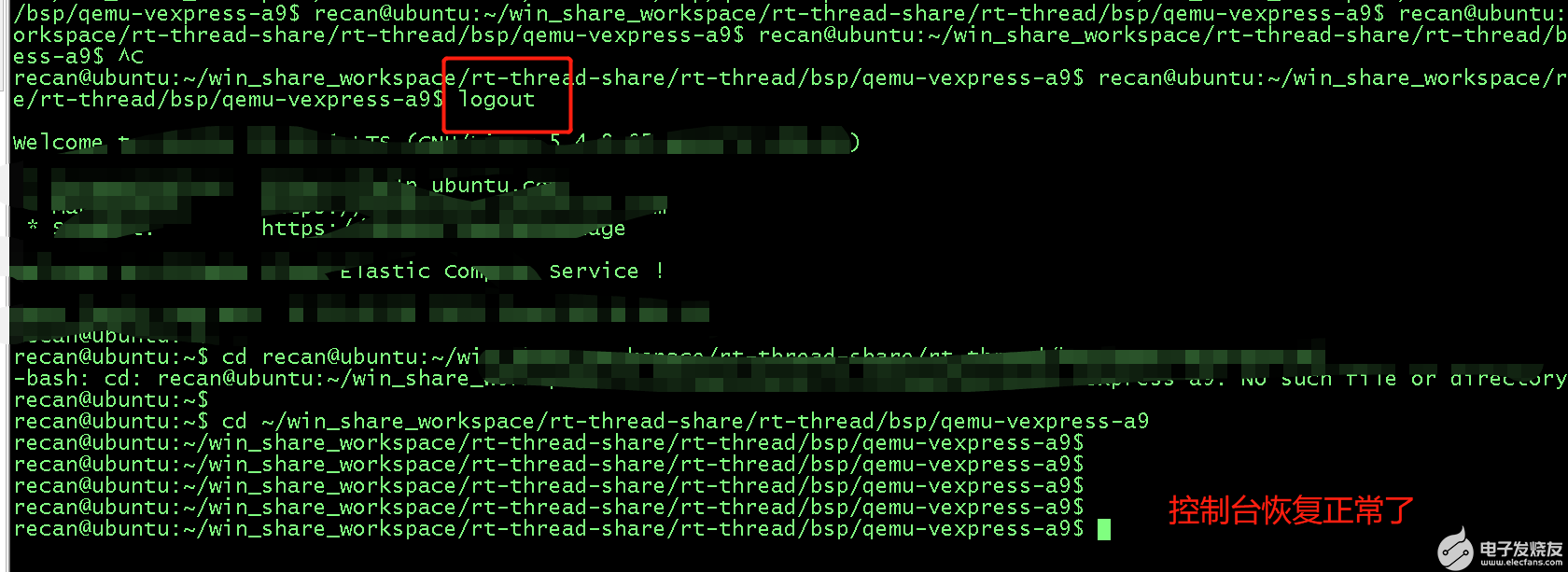
但是问题来了,退出QEMU之后,这个控制台感觉乱来了,我一瞧回车,它都不好好换行了,你看看!

这就很让人难受了,控制台没法用了,而且这个时候敲命令进去还不能回显,也不知道你敲对了没有,只好退出命令行,重新登入,控制台得以恢复。
2.3 黔驴技穷
上面的这种情况,显示是我不能接受的,这个我倒是想了一下,QEMU不可能不支持退出吧,会不会什么启动参数我搞错了,于是qemu-system-arm-h,找了几个看似跟这个问题相关的参数:
-
qemu-system-arm -h -
... -
-no-quit disable SDL window close capability -
... -
-no-reboot exit instead of rebooting -
... -
-no-shutdown stop before shutdown
于是在qemu-nographic.sh添加来尝试:
-
if [ ! -f "sd.bin" ]; then -
dd if=/dev/zero of=sd.bin bs=1024 count=65536 -
fi -
qemu-system-arm -M vexpress-a9 -smp cpus=2 -kernel rtthread.bin -nographic -sd sd.bin -no-shutdown -no-quit -no-reboot
运行之后,同样在另一个控制台使用killall-9qemu-system-arm退出,发现有的时候退出QEMU的控制台可以好好的,有的时候换行问题依然存在,没有找到规律,实在没办法,就不了了之了。
3 终极方案
3.1 发现新大陆
直到今天,我偶然翻到RT-Thread的官方文档,对RT-Thread Smart版本的介绍的时候,有一个章节是介绍使用QEMU模拟环境进行代码调试运行的,里面居然提到了如何退出QEMU!
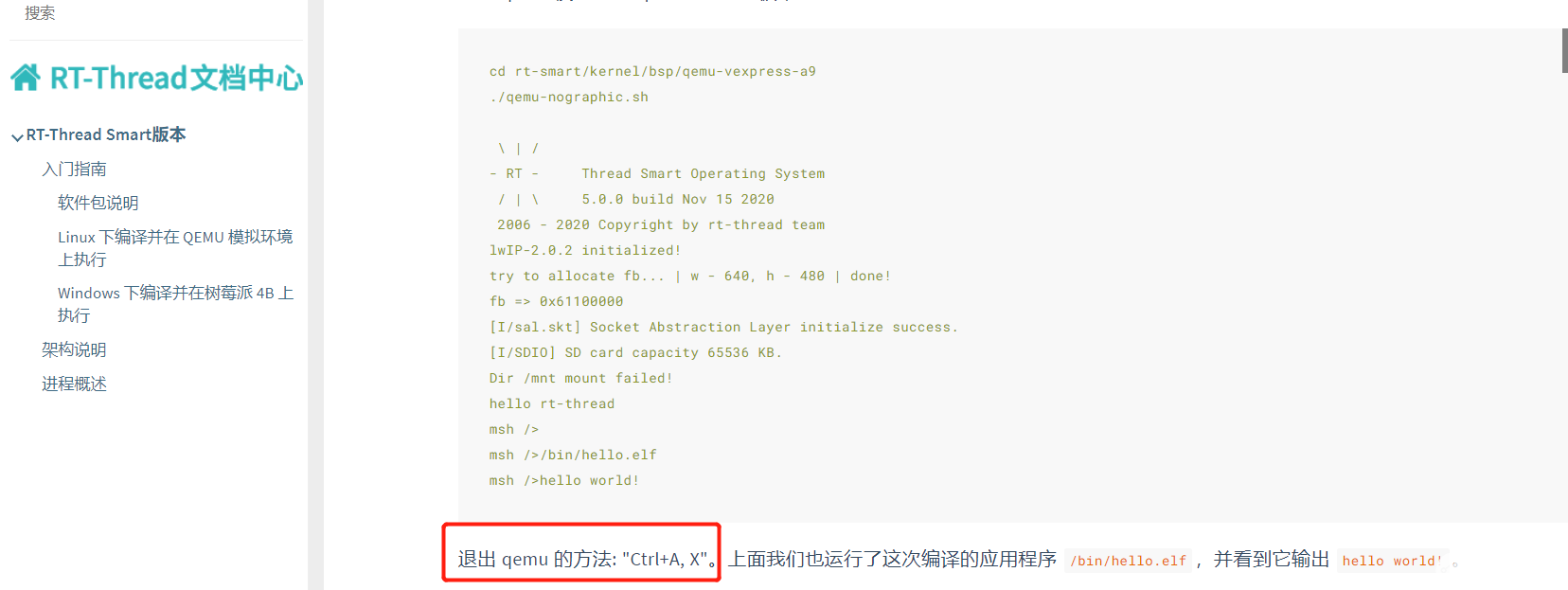
Word天呐,那种感觉简直像是发现新大陆一样。 马上登入QEMU开发环境做测试,果然,操作竟是如此的丝滑,爽就一个字!
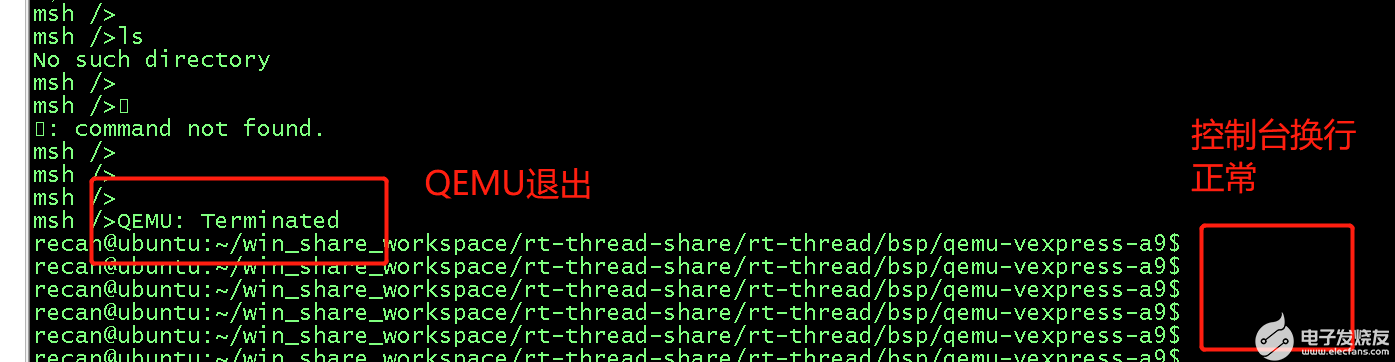
真的像是历史难题被解决的那种感觉。
3.2 扒一扒到底谁让QEMU退出了
第一感觉是不是RT-Thread的Finsh组件处理了这个CTRL+A,X? 于是找了Finsh的关键代码:
-
void finsh_thread_entry(void *parameter) -
{ -
int ch; -
/* normal is echo mode */ -
#ifndef FINSH_ECHO_DISABLE_DEFAULT -
shell->echo_mode = 1; -
#else -
shell->echo_mode = 0; -
#endif -
#if !defined(RT_USING_POSIX) && defined(RT_USING_DEVICE) -
/* set console device as shell device */ -
if (shell->device == RT_NULL) -
{ -
rt_device_t console = rt_console_get_device(); -
if (console) -
{ -
finsh_set_device(console->parent.name); -
} -
} -
#endif -
#ifdef FINSH_USING_AUTH -
/* set the default password when the password isn't setting */ -
if (rt_strlen(finsh_get_password()) == 0) -
{ -
if (finsh_set_password(FINSH_DEFAULT_PASSWORD) != RT_EOK) -
{ -
rt_kprintf("Finsh password set failed.\n"); -
} -
} -
/* waiting authenticate success */ -
finsh_wait_auth(); -
#endif -
rt_kprintf(FINSH_PROMPT); -
while (1) -
{ -
ch = (int)finsh_getchar(); -
if (ch < 0) -
{ -
continue; -
} -
/* -
* handle control key -
* up key : 0x1b 0x5b 0x41 -
* down key: 0x1b 0x5b 0x42 -
* right key:0x1b 0x5b 0x43 -
* left key: 0x1b 0x5b 0x44 -
*/ -
if (ch == 0x1b) -
{ -
shell->stat = WAIT_SPEC_KEY; -
continue; -
} -
else if (shell->stat == WAIT_SPEC_KEY) -
{ -
if (ch == 0x5b) -
{ -
shell->stat = WAIT_FUNC_KEY; -
continue; -
} -
shell->stat = WAIT_NORMAL; -
} -
else if (shell->stat == WAIT_FUNC_KEY) -
{ -
shell->stat = WAIT_NORMAL; -
if (ch == 0x41) /* up key */ -
{ -
#ifdef FINSH_USING_HISTORY -
/* prev history */ -
if (shell->current_history > 0) -
shell->current_history --; -
else -
{ -
shell->current_history = 0; -
continue; -
} -
/* copy the history command */ -
memcpy(shell->line, &shell->cmd_history[shell->current_history][0], -
FINSH_CMD_SIZE); -
shell->line_curpos = shell->line_position = strlen(shell->line); -
shell_handle_history(shell); -
#endif -
continue; -
} -
else if (ch == 0x42) /* down key */ -
{ -
#ifdef FINSH_USING_HISTORY -
/* next history */ -
if (shell->current_history < shell->history_count - 1) -
shell->current_history ++; -
else -
{ -
/* set to the end of history */ -
if (shell->history_count != 0) -
shell->current_history = shell->history_count - 1; -
else -
continue; -
} -
memcpy(shell->line, &shell->cmd_history[shell->current_history][0], -
FINSH_CMD_SIZE); -
shell->line_curpos = shell->line_position = strlen(shell->line); -
shell_handle_history(shell); -
#endif -
continue; -
} -
else if (ch == 0x44) /* left key */ -
{ -
if (shell->line_curpos) -
{ -
rt_kprintf("\b"); -
shell->line_curpos --; -
} -
continue; -
} -
else if (ch == 0x43) /* right key */ -
{ -
if (shell->line_curpos < shell->line_position) -
{ -
rt_kprintf("%c", shell->line[shell->line_curpos]); -
shell->line_curpos ++; -
} -
continue; -
} -
} -
/* received null or error */ -
if (ch == '\0' || ch == 0xFF) continue; -
/* handle tab key */ -
else if (ch == '\t') -
{ -
int i; -
/* move the cursor to the beginning of line */ -
for (i = 0; i < shell->line_curpos; i++) -
rt_kprintf("\b"); -
/* auto complete */ -
shell_auto_complete(&shell->line[0]); -
/* re-calculate position */ -
shell->line_curpos = shell->line_position = strlen(shell->line); -
continue; -
} -
/* handle backspace key */ -
else if (ch == 0x7f || ch == 0x08) -
{ -
/* note that shell->line_curpos >= 0 */ -
if (shell->line_curpos == 0) -
continue; -
shell->line_position--; -
shell->line_curpos--; -
if (shell->line_position > shell->line_curpos) -
{ -
int i; -
rt_memmove(&shell->line[shell->line_curpos], -
&shell->line[shell->line_curpos + 1], -
shell->line_position - shell->line_curpos); -
shell->line[shell->line_position] = 0; -
rt_kprintf("\b%s \b", &shell->line[shell->line_curpos]); -
/* move the cursor to the origin position */ -
for (i = shell->line_curpos; i <= shell->line_position; i++) -
rt_kprintf("\b"); -
} -
else -
{ -
rt_kprintf("\b \b"); -
shell->line[shell->line_position] = 0; -
} -
continue; -
} -
/* handle end of line, break */ -
if (ch == '\r' || ch == '\n') -
{ -
#ifdef FINSH_USING_HISTORY -
shell_push_history(shell); -
#endif -
if (shell->echo_mode) -
rt_kprintf("\n"); -
msh_exec(shell->line, shell->line_position); -
rt_kprintf(FINSH_PROMPT); -
memset(shell->line, 0, sizeof(shell->line)); -
shell->line_curpos = shell->line_position = 0; -
continue; -
} -
/* it's a large line, discard it */ -
if (shell->line_position >= FINSH_CMD_SIZE) -
shell->line_position = 0; -
/* normal character */ -
if (shell->line_curpos < shell->line_position) -
{ -
int i; -
rt_memmove(&shell->line[shell->line_curpos + 1], -
&shell->line[shell->line_curpos], -
shell->line_position - shell->line_curpos); -
shell->line[shell->line_curpos] = ch; -
if (shell->echo_mode) -
rt_kprintf("%s", &shell->line[shell->line_curpos]); -
/* move the cursor to new position */ -
for (i = shell->line_curpos; i < shell->line_position; i++) -
rt_kprintf("\b"); -
} -
else -
{ -
shell->line[shell->line_position] = ch; -
if (shell->echo_mode) -
rt_kprintf("%c", ch); -
} -
ch = 0; -
shell->line_position ++; -
shell->line_curpos++; -
if (shell->line_position >= FINSH_CMD_SIZE) -
{ -
/* clear command line */ -
shell->line_position = 0; -
shell->line_curpos = 0; -
} -
} /* end of device read */ -
}
通读代码之后,发现它并没有处理这个CTRL+A,X输入,那么到底是谁接管了这个指令呢? 看到QEMU退出的时候,有提示``,这个关键字给了我线索,于是我开始怀疑是QEMU自己接管的这个命令,于是下面的一顿操作终于把它揪出来了。
-
bsp/qemu-vexpress-a9$ whereis qemu-system-arm -
qemu-system-arm: /usr/bin/qemu-system-arm /usr/share/man/man1/qemu-system-arm.1.gz -
bsp/qemu-vexpress-a9$ -
bsp/qemu-vexpress-a9$ cp /usr/bin/qemu-system-arm . -
bsp/qemu-vexpress-a9$ -
bsp/qemu-vexpress-a9$ grep -rsn "Terminated" -
Binary file qemu-system-arm matches -
bsp/qemu-vexpress-a9$ -
bsp/qemu-vexpress-a9$ hexdump -C qemu-system-arm | grep -n "Terminated" -
699798:00b2b4a0 4d 55 3a 20 54 65 72 6d 69 6e 61 74 65 64 0a 0d |MU: Terminated..| -
bsp/qemu-vexpress-a9$ -
bsp/qemu-vexpress-a9$ hexdump -C qemu-system-arm > hexdump.log -
bsp/qemu-vexpress-a9$ -
bsp/qemu-vexpress-a9$ head -699797 hexdump.log | tail -1 -
00b2b490 73 20 68 65 6c 70 0a 0d 00 43 2d 25 63 00 51 45 |s help...C-%c.QE| -
bsp/qemu-vexpress-a9$ -
bsp/qemu-vexpress-a9$ head -699798 hexdump.log | tail -1 -
00b2b4a0 4d 55 3a 20 54 65 72 6d 69 6e 61 74 65 64 0a 0d |MU: Terminated..| -
bsp/qemu-vexpress-a9$
大致的流程就是对可执行文件qemu-system-arm进行grep检索,发现居然找到了Terminated这个关键log,证明这行退出的log正在qemu-system-arm打出来的,这也就从侧面证实了这个退出命令是被它接管了,并且处理了,然后才退出的。

4 经验教训
这个问题真的困扰了我至少2个月,每次一用QEMU,我就吐槽这个问题,没想到居然还是RT-Thread的指导文档拯救了我。
所以啊,凡事先查查别人已经整理好的问题,真的会事半功倍!
各位老铁,RT-Thread的文档中心,给我撸起来!!!
5 更多分享
架构师李肯
一个专注于嵌入式IoT领域的架构师。有着近10年的嵌入式一线开发经验,深耕IoT领域多年,熟知IoT领域的业务发展,深度掌握IoT领域的相关技术栈,包括但不限于主流RTOS内核的实现及其移植、硬件驱动移植开发、网络通讯协议开发、编译构建原理及其实现、底层汇编及编译原理、编译优化及代码重构、主流IoT云平台的对接、嵌入式IoT系统的架构设计等等。拥有多项IoT领域的发明专利,热衷于技术分享,有多年撰写技术博客的经验积累,连续多月获得RT-Thread官方技术社区原创技术博文优秀奖,荣获CSDN博客专家、CSDN物联网领域优质创作者、2021年度CSDN&RT-Thread技术社区之星、RT-Thread官方嵌入式开源社区认证专家、RT-Thread 2021年度论坛之星TOP4、华为云云享专家(嵌入式物联网架构设计师)等荣誉。坚信【知识改变命运,技术改变世界】!
欢迎关注我的github仓库01workstation,日常分享一些开发笔记和项目实战,欢迎指正问题。
同时也非常欢迎关注我的专栏;有问题的话,可以跟我讨论,知无不答,谢谢大家。
-
使用RT-Thread Master+QEMU模拟器进行RT-Thread原型快速开发2023-09-27 4750
-
RT-Thread qemu mps2-an385 bsp移植制作 :环境搭建篇2023-08-02 1891
-
基于RT-Thread Studio学习2023-05-15 6977
-
RT-Thread文档_Keil 模拟器 STM32F103 上手指南2023-02-22 872
-
【RT-Thread学习笔记】Makefile的FORCE2022-07-30 4256
-
【RT-Thread学习笔记】使用scons命令生成静态库2022-07-27 8912
-
RT-Thread 内核学习笔记 - 理解defunct僵尸线程2022-01-25 1051
-
RT-Thread Nano入门学习笔记2021-11-26 1609
-
如何在windows和linux平台使用RT-Thread QEMU BSP,并运行RT-ThreadGUI示例2018-02-08 16044
全部0条评论

快来发表一下你的评论吧 !
