


什么是Ingress?Igress对外访问的三种方案
描述
什么是Ingress
有了Service之后,我们可以访问这个Service的IP(clusterIP)来请求对应的Pod,但是这只能是在集群内部访问。 要想让外部用户访问此资源,可以使用NodePort,即在node节点上暴漏一个端口出来,但是这个非常不灵活。为了解决此问题,K8s引入了一个新的API资源对象Ingress,它是一个七层的负载均衡器,类似于Nginx。
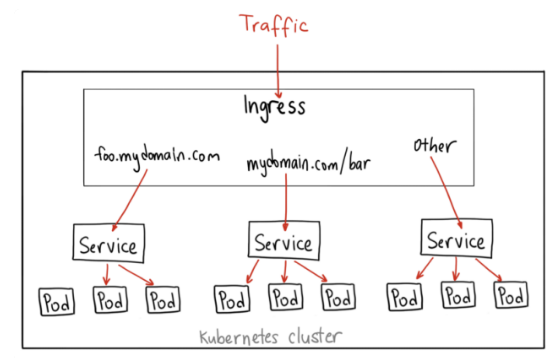
三个核心概念:Ingress、Ingress Controller、IngressClass
Ingress用来定义具体的路由规则,要实现什么样的访问效果;
Ingress Controller是实现Ingress定义具体规则的工具或者叫做服务,在K8s里就是具体的Pod;
IngressClass是介于Ingress和Ingress Controller之间的一个协调者,它存在的意义在于,当有多个Ingress Controller时,可以让Ingress和Ingress Controller彼此独立,不直接关联,而是通过IngressClass实现关联。
Ingress实战
1)编辑ingress YAML文件
vi  mying.yaml  #内容如下
apiVersion: networking.k8s.io/v1
kind: Ingress
metadata:
  name: mying  ##ingress名字


spec:
  ingressClassName: myingc  ##定义关联的IngressClass


  rules:  ##定义具体的规则
  - host: aminglinux.com  ##访问的目标域名
    http:
      paths:
      - path: /
        pathType: Exact
        backend:  ##定义后端的service对象
          service:
            name: ngx-svc
            port:
              number: 80
查看ingress
kubectl get ing
kubectl describe ing mying
2)编辑IngressClass YAML文件
vi myingc.yaml #内容如下
apiVersion: networking.k8s.io/v1
kind: IngressClass
metadata:
  name: myingc


spec:
  controller: nginx.org/ingress-controller  ##定义要使用哪个controller
查看ingressClass
kubectl get ingressclass
3)安装ingress-controller
首先做一下前置工作
curl -O 'https://gitee.com/aminglinux/linux_study/raw/master/k8s/ingress.tar.gz'
tar zxf ingress.tar.gz
cd ingress
./setup.sh  ##说明,执行这个脚本会部署几个ingress相关资源,包括namespace、configmap、secrect等
编辑controller YAML文件
vi  ingress-controller.yaml #内容如下
apiVersion: apps/v1
kind: Deployment
metadata:
  name: ngx-ing
  namespace: nginx-ingress


spec:
  replicas: 1
  selector:
    matchLabels:
      app: ngx-ing


  template:
    metadata:
      labels:
        app: ngx-ing
     #annotations:
       #prometheus.io/scrape: "true"
       #prometheus.io/port: "9113"
       #prometheus.io/scheme: http
    spec:
      serviceAccountName: nginx-ingress
      containers:
      - image: nginx/nginx-ingress:2.2-alpine
        imagePullPolicy: IfNotPresent
        name: ngx-ing
        ports:
        - name: http
          containerPort: 80
        - name: https
          containerPort: 443
        - name: readiness-port
          containerPort: 8081
        - name: prometheus
          containerPort: 9113
        readinessProbe:
          httpGet:
            path: /nginx-ready
            port: readiness-port
          periodSeconds: 1
        securityContext:
          allowPrivilegeEscalation: true
          runAsUser: 101 #nginx
          capabilities:
            drop:
            - ALL
            add:
            - NET_BIND_SERVICE
        env:
        - name: POD_NAMESPACE
          valueFrom:
            fieldRef:
              fieldPath: metadata.namespace
        - name: POD_NAME
          valueFrom:
            fieldRef:
              fieldPath: metadata.name
        args:
          - -ingress-class=myingc
          - -health-status
          - -ready-status
          - -nginx-status


          - -nginx-configmaps=$(POD_NAMESPACE)/nginx-config
          - -default-server-tls-secret=$(POD_NAMESPACE)/default-server-secret
应用YAML
kubectl apply -f ingress-controller.yaml查看pod、deployment:
kubectl get po -n nginx-ingress
kubectl get deploy -n nginx-ingress
将ingress对应的pod端口映射到master上临时测试:
kubectl port-forward -n nginx-ingress ngx-ing-547d6575c7-fhdtt 8888:80 &注意,测试前可以修改ng-deploy对应的两个pod里的/usr/share/nginx/html/index.html文件内容,用于区分两个pod。 使用curl测试:
curl -x127.0.0.1:8888 aminglinux.com
或者:
curl -H 'Host:aminglinux.com' http://127.0.0.1:8888
Igress对外访问的三种方案
上面对ingress做端口映射,然后通过其中一个节点的IP来访问ingress只是一种临时方案。那么正常如何做呢?有三种常用的方案:
1)Deployment+LoadBalancer
如果要把ingress部署在公有云,那用这种方式比较合适。用Deployment部署ingress-controller,创建一个type为LoadBalancer的service关联这组pod。 大部分公有云,都会为LoadBalancer的service自动创建一个负载均衡器,通常还绑定了公网地址。 只要把域名解析指向该地址,就实现了集群服务的对外暴露。
2)Deployment+NodePort
同样用deployment模式部署ingress-controller,并创建对应的服务,但是type为NodePort。这样,ingress就会暴露在集群节点ip的特定端口上。 由于nodeport暴露的端口是随机端口,一般会在前面再搭建一套负载均衡器来转发请求。该方式一般用于宿主机是相对固定的环境ip地址不变的场景。 NodePort方式暴露ingress虽然简单方便,但是NodePort多了一层NAT,在请求量级很大时可能对性能会有一定影响。
3)DaemonSet+nodeSelector
用DaemonSet结合nodeselector来部署ingress-controller到特定的node上,然后使用HostNetwork直接把该pod与宿主机node的网络打通(如,上面的临时方案kubectl port-forward),直接使用宿主机的80/433端口就能访问服务。 这时,ingress-controller所在的node机器就很类似传统架构的边缘节点,比如机房入口的nginx服务器。该方式整个请求链路最简单,性能相对NodePort模式更好。 缺点是由于直接利用宿主机节点的网络和端口,一个node只能部署一个ingress-controller pod。比较适合大并发的生产环境使用。
审核编辑:刘清
声明:本文内容及配图由入驻作者撰写或者入驻合作网站授权转载。文章观点仅代表作者本人,不代表电子发烧友网立场。文章及其配图仅供工程师学习之用,如有内容侵权或者其他违规问题,请联系本站处理。
举报投诉
-
Kubernetes Ingress Controller对比解析2026-04-09 414
-
redis三种集群方案详解2025-03-31 1766
-
HTTP海外访问优化:提升跨国网络性能的秘诀2024-10-15 1462
-
优化HTTP海外访问:技术挑战与解决方案2024-09-25 1004
-
从零到一:构建高效稳定的HTTP海外访问策略2024-09-24 1074
-
《中新社》关注“本源悟空”境外访问量美国排第一2024-07-06 969
-
刺激能量收集发展的三种解决方案2022-12-30 1444
-
C语言访问MCU寄存器的三种方式2021-10-28 882
-
三种访问过程映像的方法2021-02-02 3157
-
三种pads解决方案的对比2019-10-30 4730
-
访问集成Xilinx模数转换器的三种方法介绍2018-11-20 3370
-
阿里云Serverless Kubernetes通过Ingress提供7层服务访问2018-07-23 2144
-
Kubernetes Ingress 高可靠部署最佳实践2018-04-17 3054
-
三种电源方案2009-11-13 1310
全部0条评论

快来发表一下你的评论吧 !
