


GitHub访问速度慢怎么办?教你一招解决!
描述
GitHub
作为全球最大的****网站,GitHub可谓是又爱又恨,爱的是太多非常棒的开源项目了,有很大的参考价值,也方便我们自己托管项目,恨的是这个网站的访问实在是太不给力了,基本是随缘了,不同城市不同网络都各不相同,用宽带,手机流量也各不相同,大部分是不怎么好的。最近发现一个叫做Fetch Github Hosts的项目,也许能帮到大家,这里只针对网络不好的同学哈,fetch-github-hosts是主要为解决研究及学习人员访问Github过慢或其他问题而提供的免费的Github hosts同步服务,项目开源,有写具体的使用方法,有需要的同学可以前往学习一下。
简单粗暴的方法
手动添加hosts
访问https://hosts.gitcdn.top/hosts.txt这个网站,将网页的全部内容粘贴到你的hosts文件中。
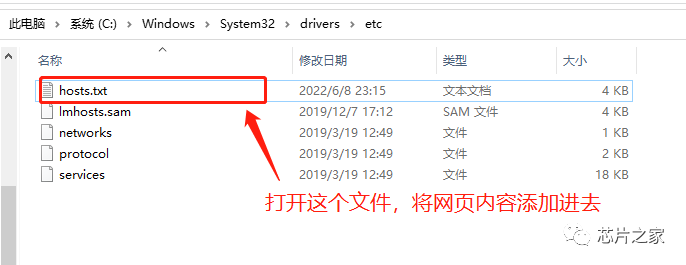
Linux / MacOS hosts路径:/etc/hostsWindows hosts路径:C:\Windows\System32\drivers\etc\host
这里也顺便贴出来,大家复制即可:
# fetch-github-hosts begin140.82.112.26 alive.github.com140.82.112.26 live.github.com185.199.108.154 github.githubassets.com140.82.112.21 central.github.com185.199.111.133 desktop.githubusercontent.com185.199.109.153 assets-cdn.github.com185.199.108.133 camo.githubusercontent.com185.199.108.133 github.map.fastly.net146.75.113.194 github.global.ssl.fastly.net52.192.72.89 gist.github.com185.199.108.153 github.io52.192.72.89 github.com192.0.66.2 github.blog52.69.239.207 api.github.com185.199.109.133 raw.githubusercontent.com185.199.109.133 user-images.githubusercontent.com185.199.111.133 favicons.githubusercontent.com185.199.109.133 avatars5.githubusercontent.com185.199.109.133 avatars4.githubusercontent.com185.199.109.133 avatars3.githubusercontent.com185.199.108.133 avatars2.githubusercontent.com185.199.109.133 avatars1.githubusercontent.com185.199.111.133 avatars0.githubusercontent.com185.199.111.133 avatars.githubusercontent.com52.193.111.178 codeload.github.com52.216.177.203 github-cloud.s3.amazonaws.com52.216.177.203 github-com.s3.amazonaws.com52.217.91.148 github-production-release-asset-2e65be.s3.amazonaws.com52.217.91.148 github-production-user-asset-6210df.s3.amazonaws.com52.217.91.148 github-production-repository-file-5c1aeb.s3.amazonaws.com185.199.109.153 githubstatus.com64.71.144.211 github.community52.237.112.130 github.dev140.82.112.21 collector.github.com13.107.42.16 pipelines.actions.githubusercontent.com185.199.108.133 media.githubusercontent.com185.199.108.133 cloud.githubusercontent.com185.199.108.133 objects.githubusercontent.com# last fetch time: 2022-06-11T2302+08:00# update url: https://hosts.gitcdn.top/hosts.txt# fetch-github-hosts end
特别注意,在windows中,大家修改完hosts之后,直接保存不了,保存的时候先另存在桌面,再拖进去覆盖即可!
刷新生效:
Linux: /etc/init.d/network restartWindows: ipconfig /flushdnsMacos: sudo killall -HUP mDNSResponder
试试访问效果
 开源仓库:
开源仓库:
https://github.com/Licoy/fetch-github-hosts
- 相关推荐
- 热点推荐
- GitHub
-
对I/O寄存器的访问速度慢是怎么回事?2024-07-12 376
-
教你一招如何分辨PCB板层数2021-04-23 4537
-
教你一招如何去实现傅立叶变换算法?2021-04-30 2112
-
教你一招怎样去选择合适的CPLD2021-05-06 2000
-
教你一招分分钟实现频谱仪带宽的正确设置2021-05-07 3399
-
教你一招定时器中断该怎么办?2021-05-14 2259
-
教你一招如何通过手机的芯片来判断手机的价格?2021-05-24 3090
-
教你一招如何去选择射频滤波器?2021-05-28 2314
-
教你一招RK31885.1蓝牙MAC怎样才能从模组中获取MAC地址2022-02-18 1731
-
笔记本电池出现问题怎么办?教你两招2010-01-19 1205
-
一招让手机屏立马干净2019-08-27 10149
-
九招教你提高国内访问GitHub速度2020-09-29 3080
-
宽带网络速度慢的原因和解决办法2020-12-19 41997
-
哪些晶体、谐振器和振荡器可旋转180°使用?一招儿教你快速识别2023-12-05 1250
全部0条评论

快来发表一下你的评论吧 !
