


 鸿蒙ArkTS声明式开发:跨平台支持列表【前景色设置】 通用属性
电子说
1.4w人已加入
描述
前景色设置
设置组件的前景色。
说明:
开发前请熟悉鸿蒙开发指导文档 :[gitee.com/li-shizhen-skin/harmony-os/blob/master/README.md]
从API Version 10开始支持。后续版本如有新增内容,则采用上角标单独标记该内容的起始版本。
属性
| 名称 | 参数类型 | 描述 |
|---|---|---|
| foregroundColor | [ResourceColor] | [ColoringStrategy] |
示例
示例1
// xxx.ets
@Entry
@Component
struct ForegroundColorExample {
  build() {
    Column({ space: 100 }) {
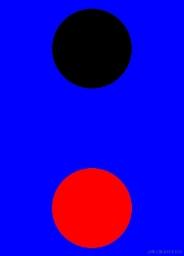
      // 绘制一个直径为150的圆,默认填充色为黑色
      Circle({ width: 150, height: 200 })
      // 绘制一个直径为150的圆,
      Circle({ width: 150, height: 200 }).foregroundColor(Color.Red)
    }.width('100%').backgroundColor(Color.Blue)
  }
}
示例2
// xxx.ets
@Entry
@Component
struct ColoringStrategyExample {
  build() {
    Column({ space: 100 }) {
      // 绘制一个直径为150的圆,默认填充色为黑色
      Circle({ width: 150, height: 200 })
      // 绘制一个直径为150的圆,设置前景色为组件背景色的反色
      Circle({ width: 150, height: 200 })
        .backgroundColor(Color.Black)
        .foregroundColor(ColoringStrategy.INVERT)
    }.width('100%')
  }
}

示例3
`HarmonyOS与OpenHarmony鸿蒙文档籽料:mau123789是v直接拿`
// xxx.ets
@Entry
@Component
struct foregroundColorInherit {
  build() {
    Column() {
      Button('设置前景色为橘色').fontSize(20).foregroundColor(Color.Orange).backgroundColor(Color.Gray)
      Divider()
      Button('未设置前景色继承自父组件').fontSize(20).backgroundColor(Color.Gray)
    }.foregroundColor(Color.Red)
  }
}

审核编辑 黄宇
声明:本文内容及配图由入驻作者撰写或者入驻合作网站授权转载。文章观点仅代表作者本人,不代表电子发烧友网立场。文章及其配图仅供工程师学习之用,如有内容侵权或者其他违规问题,请联系本站处理。
举报投诉
- 相关推荐
- 热点推荐
- 鸿蒙
-
鸿蒙ArkTS声明式开发:跨平台支持列表【文本通用】2024-06-13 1691
-
鸿蒙ArkTS声明式开发:跨平台支持列表【无障碍属性】 通用属性2024-06-11 1397
-
鸿蒙ArkTS声明式开发:跨平台支持列表【多态样式】 通用属性2024-06-07 1328
-
鸿蒙ArkTS声明式开发:跨平台支持列表【菜单控制】 通用属性2024-06-06 2300
-
鸿蒙ArkTS声明式开发:跨平台支持列表【栅格设置】 通用属性2024-06-05 1412
-
鸿蒙ArkTS声明式开发:跨平台支持列表【形状裁剪】 通用属性2024-06-04 1324
-
鸿蒙ArkTS声明式开发:跨平台支持列表【显隐控制】 通用属性2024-06-03 1772
-
鸿蒙ArkTS声明式开发:跨平台支持列表【图片边框设置】 通用属性2024-05-31 1773
-
鸿蒙ArkTS声明式开发:跨平台支持列表【尺寸设置】 通用属性2024-05-29 2132
-
鸿蒙ArkTS声明式开发:跨平台支持列表【按键事件】2024-05-28 2012
-
HarmonyOS/OpenHarmony应用开发-ArkTS的声明式开发范式2023-01-17 2080
全部0条评论

快来发表一下你的评论吧 !
