


多功能复合机器人设计方案
描述
本文中的案例介绍了如何将 myCobot 280 机械臂与 myAGV 移动底盘进行集成,以构建用于智能自动化的多功能复合机器人。
一、引言
想象一下,有一个可以在固定位置或桌面上执行抓取和操作任务的机械臂,以及一个能够在地面上运输物体的移动 AGV。单独来看,它们的功能是有限的。然而,当这两个组件结合在一起时,它们会解锁新的应用场景,增强机器人的灵活性和自动化能力。
在本文中,我将演示如何将 myCobot 280 Pi 机械臂与 myAGV Pi 移动 AGV 相结合,打造一款功能强大的复合机器人。通过跟随我的步骤,您将学习如何从硬件组装到编程控制,最终构建一个实用的智能系统,将机械臂与移动平台集成在一起。
二、项目准备
1、本项目所使用的设备
Elephant Robotics myAGV(包括其他附件,比如充电器)
Raspberry Pi 4 Model B
M5Stack ESP32 Basic Core IoT Development Kit
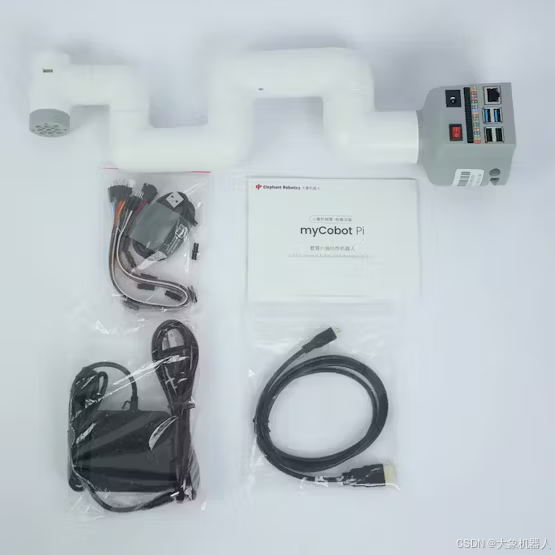
Elephant Robotics myCobot 280 pi
以及其他常规设备,电脑、鼠标、监控器等等
2、软件:
● PymyCobot(最新版本)
● ROS(确保安装了最新的 ROS 软件包)
注意:myCobot 280 Pi 中的 Raspberry Pi 系统预装了基础环境。您只需将 pymycobot 和 ROS 软件包更新到最新版本。
三、项目运行
1、机械臂的控制
myCobot 280 Pi 预装了 Ubuntu 系统,其控制通常是在 Python 环境中使用 pymycobot 库实现的。以下是如何使用 Python 控制myCobot 280 Pi 的摘要。
2、API概述
1.关节角度控制
Function:
`send_angles(degrees, speed)`

Purpose:
Send target angles to all joints of the robotic arm.

Parameters:
 `degrees`: (List[float]) A list containing the angles for all joints, e.g., `[20, 20, 20, 20, 20, 20]`.
 `speed`: (int) The movement speed of the robotic arm, ranging from `0` to `100`.

Return Value:
`1`
2.协调控制
Function:
`send_coords(coords, speed, mode)`

Purpose:
Move the robotic arm’s end-effector to a specific position and orientation in space.

Parameters:
 `coords`: (List[float]) A list of six coordinate values representing `[x, y, z, rx, ry, rz]`.
 `speed`: (int) The movement speed of the robotic arm, ranging from `0` to `100`.
 `mode`: (int) Determines the movement path:
 `0`: Non-linear (random planning) path. The end-effector moves to the target point, maintaining the specified posture.
 `1`: Linear path. The end-effector moves in a straight line to the target point using intelligent planning.

Return Value:
`1`
3.延迟执行
Function:
`time.sleep(t)`

Purpose:
Pause the execution for `t` seconds before proceeding to the next command.
4.抓手控制
Function:
`set_gripper_value(value, speed, gripper_type=None)`

Purpose:
Rotate the gripper to a specified position at a given speed.

Parameters:
 `value`: (int) Target position for the gripper, ranging from `0` to `256`.
 `speed`: (int) Speed of gripper movement, ranging from `0` to `100`.
 `gripper_type`: (int, optional) Specifies the gripper type:
 `1`: Adaptive gripper (default).
 `3`: Parallel gripper.
 `4`: Flexible gripper.

Return Value:
`1`
示例代码
from pymycobot.mycobot280 import MyCobot280
import time

# Initialize myCobot 280 Pi
mc = MyCobot280("/dev/ttyAMA0", 1000000)

# Retrieve and print the current coordinates of the end-effector
coords = mc.get_coords()
print(coords)

# Move the end-effector to specific coordinates with linear movement
mc.send_coords([57.0, -107.4, 316.3, -93.81, -12.71, -163.49], 80, 1)
time.sleep(1.5)

# Move the end-effector to another set of coordinates
mc.send_coords([-13.7, -107.5, 223.9, 165.52, -75.41, -73.52], 80, 1)
time.sleep(1.5)

# Adjust a single coordinate with speed 70
mc.send_coord(1, -40, 70)
3、注意事项
●在运行脚本之前,确保手臂的工作空间和环境没有障碍物。
●始终设置适当的速度,以防止可能损坏硬件的突然移动。
4、AGV的控制
由大象机器人公司开发的myAGV 2023 Pi是一款为研究、教育和个人制造商设计的移动机器人。它采用树莓派4B核心主板,运行定制的Ubuntu Mate 20.04操作系统,确保流畅和用户友好的操作。
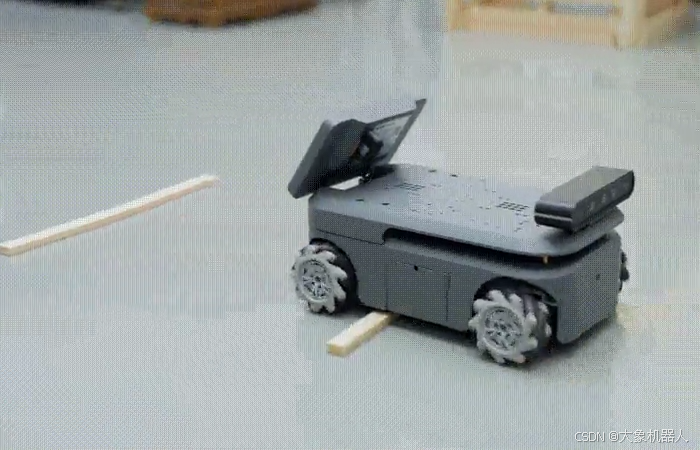
●配备树莓派4B,提供强大的性能和出色的可扩展性。
●包括360度激光雷达,用于全面扫描和环保意识。
●配备500万像素HD摄像头,用于物体识别和精确定位。
●运动竞赛级Mecanum车轮可进行全方位运动,在复杂地形上具有灵活性。
●支持图形化编程,使用户能够通过直观的可视化界面进行开发和调试。
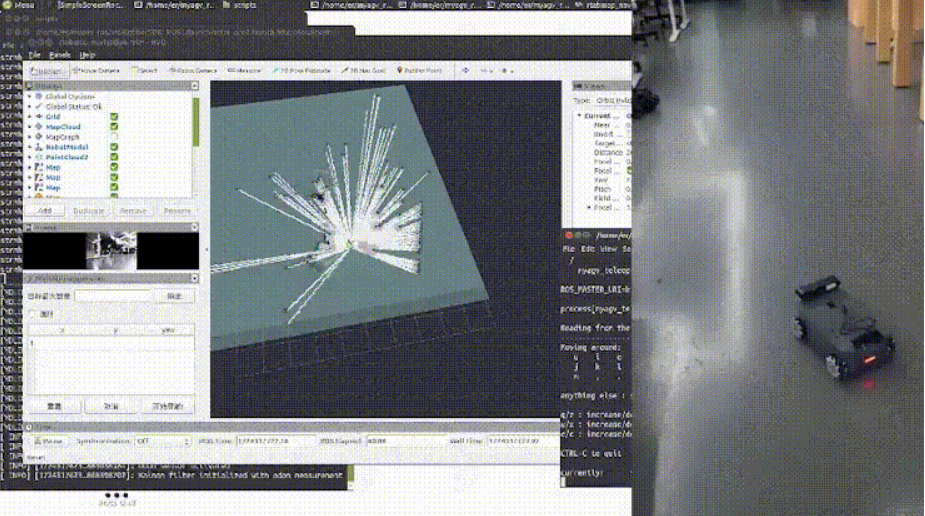
myAGV带有内置的映射和导航功能。您只需要调用适当的脚本即可使用这些功能。
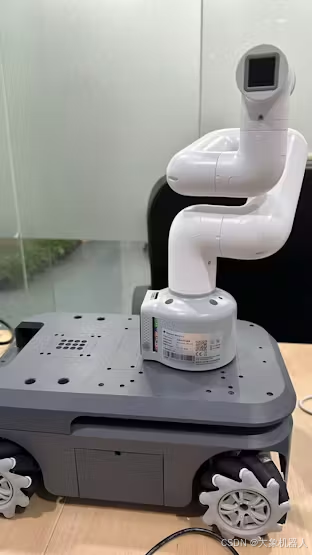
5、整合与通讯 安装 myCobot 280有两个用于安全连接的安装孔。
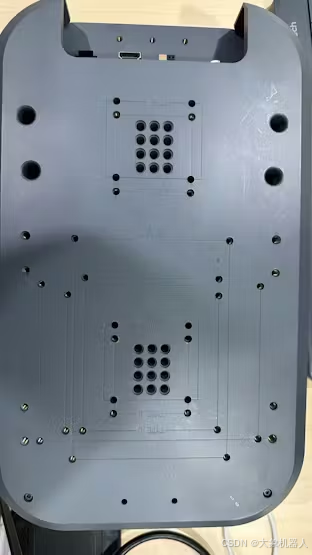
安装位置的选择取决于机械臂的预期任务。建议将手臂安装在myAGV的最前面位置,远离myAGV接口。
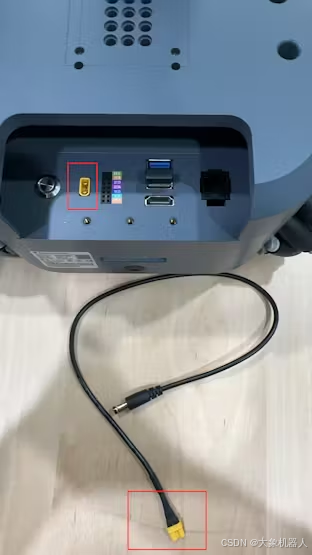
机械臂电源myAGV具有专用的12V电源输出接口,可为机械臂供电。这简化了设置并确保机械臂具有可靠的电源。
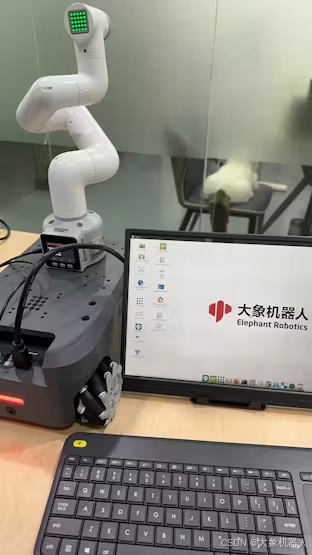
安装机械臂并为其供电后,连接键盘、鼠标和显示器。通过此设置,您可以开始对集成复合机器人进行编程。
通讯
要在AGV和机械臂之间建立通信,请执行以下步骤:
1.连接到同一个网络确保AGV和机械臂都连接到同一个本地网络(WiFi)。这允许设备之间的无缝通信。
2.在机械臂上启动服务器脚本在机械臂上运行服务器脚本以启用通信。
打开机械臂上的终端并执行以下命令:
python Server.py
3.测试AGV的连接
在AGV上创建一个新的Python脚本以检查与机械臂的连接是否正常运行。使用以下示例脚本:
from pymycobot import MyCobotSocket
import time

# Initialize the connection with the robotic arm
arm = MyCobotSocket("192.168.1.248")  # Replace with the actual IP address of the robotic arm

# Send initial angles to the robotic arm
arm.send_angles([0, 0, 0, 0, 0, 0], 50)
time.sleep(2)

# Adjust the angles to test movement
arm.send_angles([0, 0, 0, 0, 0, -90], 50)
四、实际应用示例
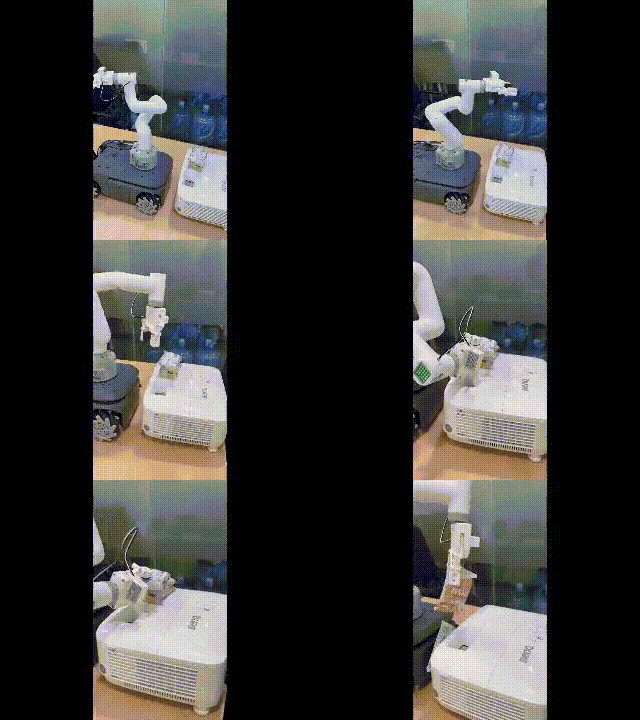
让我们尝试一个简单的运动控制任务,看看这个机器人能做什么。
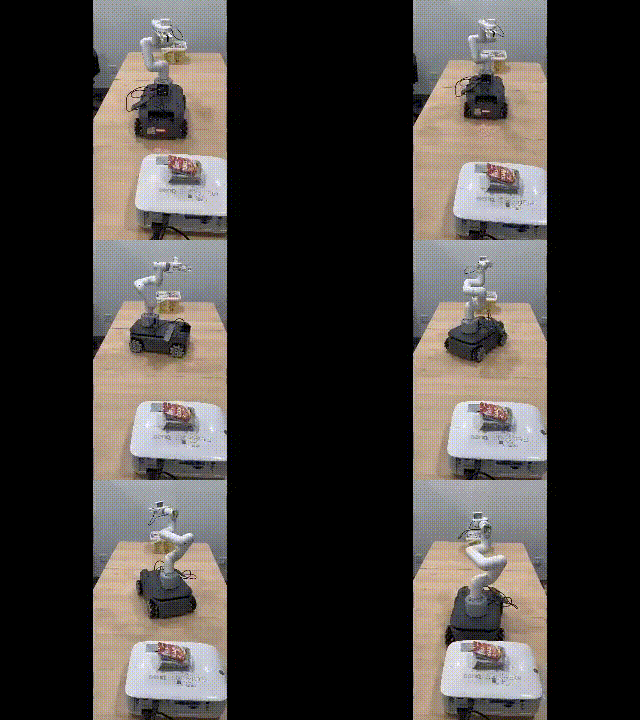
我想把多余的零食退回零食盒。首先,我控制移动平台移动到额外零食的位置。由于myAGV配备了全向轮子,它可以当场旋转。
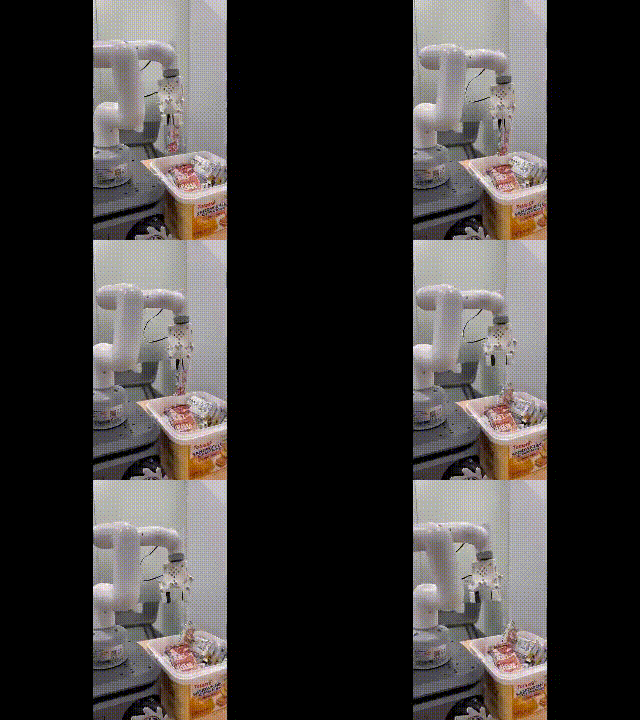
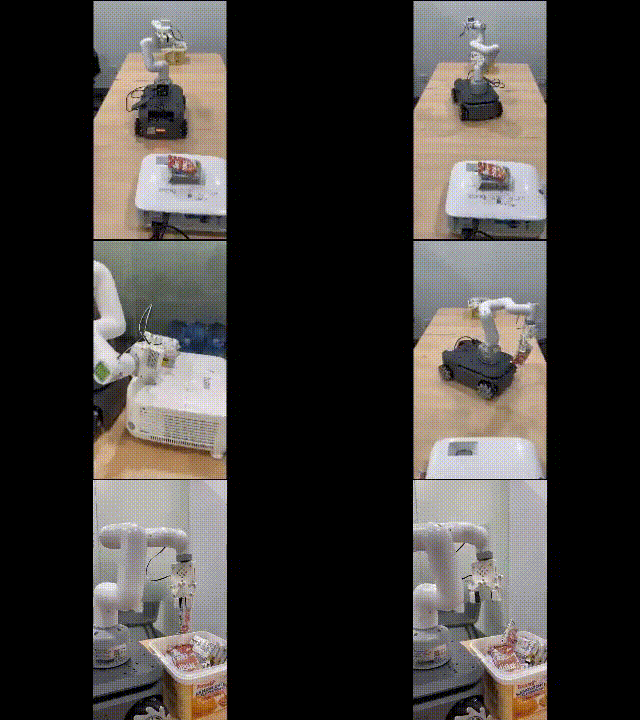
成功获得目标后,我们继续将零食放回原处。
小结
在本案例中,这一复合机器人结合了机械臂和移动AGV的功能,提供了具有巨大潜力的广泛应用前景。
比如在智能物流仓储中,它可以在仓库内执行智能运输任务。例如,机械臂可以处理拣货,而AGV将物品运送到指定位置。
或者在农业和户外应用中,复合机器人可用于水果采摘、作物检查等。机械臂可以处理采摘任务,而AGV则移动到下一个采摘点。
在上述的实操过程中,我们模拟了一个智能仓储场景,通过配备SLAM算法的移动AGV在将物体A运送到另一个位置的同时进行自主导航和检查。
如果你想用真实的机械臂进行模拟,可以试试mycobot系列产品。如果你有其他关于机械臂使用的好的想法想要实现的话,也欢迎在下方留言和我们沟通。
-
自主飞行空中机器人设计方案2013-09-26 3750
-
机器人设计方案,控制系统设计汇总2014-06-30 3000
-
求大神提供一个切实可行的机器人设计方案,要现在没有做出来的,实用、创新的。2017-01-06 3208
-
便携式自动割胶机器人设计方案2021-06-30 1244
-
新型手术制孔机器人设计方案2021-07-05 1222
-
复合机器人在磁钢上下料中的应用及其优势分析2024-04-18 1443
-
复合机器人仓库搬运方案2024-08-09 1656
-
复合机器人:开启智能仓储新篇章2024-10-12 1473
-
复合机器人:精密制造中的“微米级”精准助手2024-10-17 1157
-
复合机器人在3c电子行业的应用2024-12-06 2013
-
复合机器人抓取精度的影响因素及提升策略2025-04-12 1548
-
复合机器人为什么要使用单点纠偏算法?2025-04-20 1110
-
基于3D视觉引导的移动式复合机器人设计:智能自动化革命的核心技术2026-01-20 1112
-
国产复合机器人品牌:经世智能,工业复合机器人硬核引领者2026-04-30 7150
-
什么是复合机器人,有什么优势和特点?2026-05-19 1031
全部0条评论

快来发表一下你的评论吧 !
