


bitbake使用教程
描述
14.5.2 开发第一个应用程序
1安装工具链
对于需要在不同的HOST主机上针对于G2L RemiPI进行应用开发,我们需要手动安装上一章节生成的工具链程序,才可以进行后续的开发操作。
首先我们将poky-glibc-x86_64-myir-image-full-aarch64-myir-remi-1g-toolchain-3.1.20.sh工具链拷贝至ubuntu虚拟机家目录下,拷贝完成后,直接执行即可开始安装,参考步骤如下。
左右滑动查看完整内容
ubuntu@ubuntu2004:~$ ls poky-glibc-x86_64-myir-image-full-aarch64-myir-remi-1g-toolc
hain-3.1.20.sh -l
-rwxr-xr-x 1 ubuntu ubuntu 1967617427 May 9 05:23 poky-glibc-x86_64-myir-image-full-
aarch64-myir-remi-1g-toolchain-3.1.20.sh
ubuntu@ubuntu2004:~$ ./poky-glibc-x86_64-myir-image-full-aarch64-myir-remi-1g-toolch
ain-3.1.20.sh Each time you wish to use the SDK in a new shell session, you need to s
ource the environment setup script e.g.
$ . /opt/remi-sdk/environment-setup-aarch64-poky-linux
$ . /opt/remi-sdk/environment-setup-armv7vet2hf-neon-vfpv4-pokymllib32-linux-gnueab
i
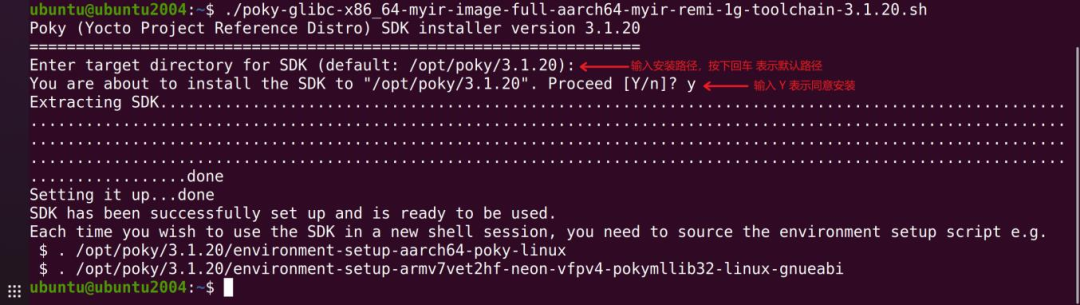
安装时,会弹出对话框,提示输入安装路径,以及是否安装,具体操作参考下图所示:
2测试工具链
执行`source /opt/poky/3.1.20/environment-setup-aarch64-poky-linux`与`$CC-v`两条命令:
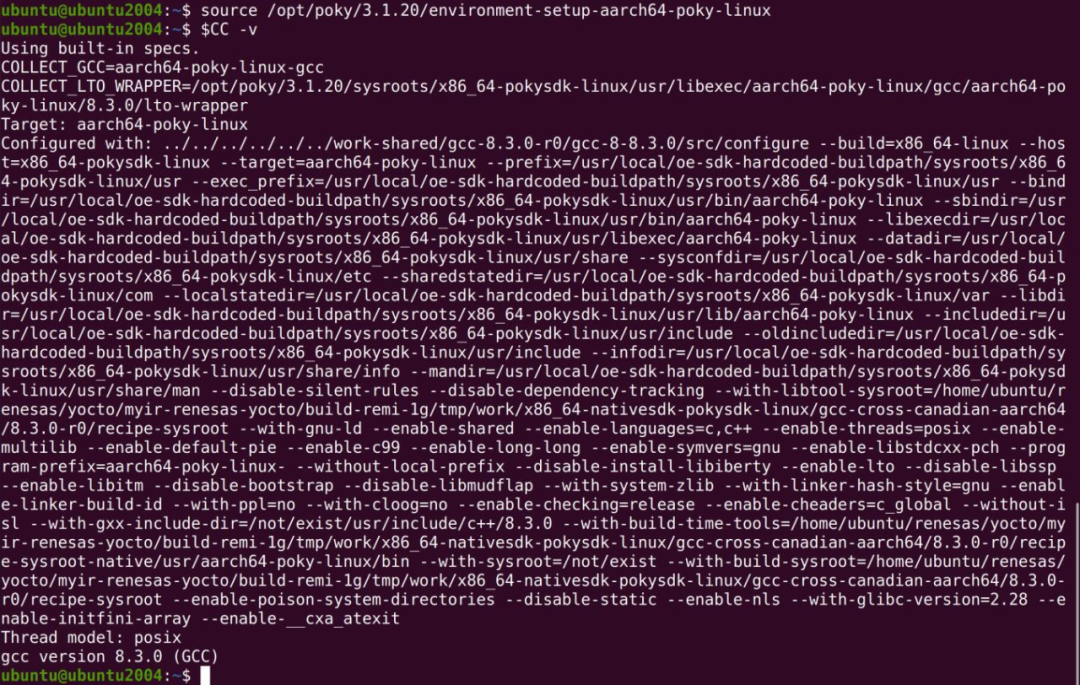
出现以上信息,表示SDK安装成功,接下来就可以直接使用安装好的SDK进行应用开发。
配置完成工具链以后会有一下编译器名称,分别是:
➢CC
➢CFLAGS
➢CXX
➢CXXFLAGS
➢LD
➢LDFLAGS
➢ARCH
➢CROSS_COMPILE
➢GDB
➢OBJDUMP
编译器。
C标志,由C编译器使用。
C++编译器。
C++标志,由CPP使用
链接器。
链接标志,由链接器使用。
芯片架构名称。
用于内核编译。
调试器。
objdump。
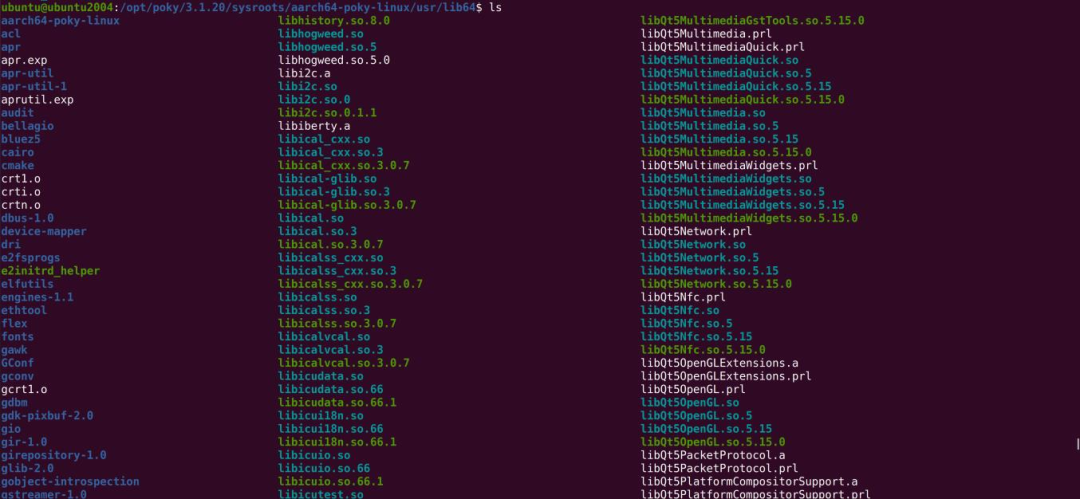
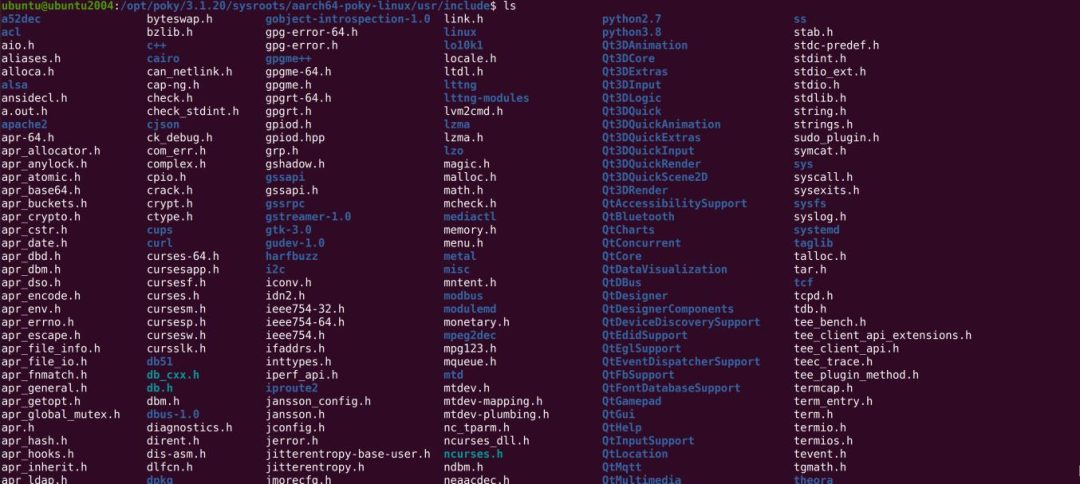
如果你需要编译系统镜像配套的应用程序,则需要在编译时指定sysroot对应的lib库与头文件。
lib64库路径
/opt/poky/3.1.20/sysroots/aarch64-poky-linux/usr/lib64
头文件路径
/opt/poky/3.1.20/sysroots/aarch64-poky-linux/usr/include
3编写应用程序
接下来使用c语言编写一个简单的helloword程序,通过前面我们安装好的工具链交叉编译,最后上传至G2L RemiPI安装。
左右滑动查看完整内容
#includeint main(int argc,char **argv) { printf("Hello RemiPi!! "); return 0; }
设置环境变量,编译hello.c文件。
左右滑动查看完整内容
ubuntu@ubuntu2004:~$ source /opt/poky/3.1.20/environment-setup-aarch64-poky-linux
ubuntu@ubuntu2004:~$ $CC hello.c -o hello
In file included from /opt/poky/3.1.20/sysroots/aarch64-poky-linux/usr/include/bits/
libc-header-start.h:33,
 from /opt/poky/3.1.20/sysroots/aarch64-poky-linux/usr/include/stdio.
h:27,
 from hello.c:1:
/opt/poky/3.1.20/sysroots/aarch64-poky-linux/usr/include/features.h:397:4: warning:
#warning _FORTIFY_SOURCE requires compiling with optimization (-O) [-Wcpp]
# warning _FORTIFY_SOURCE requires compiling with optimization (-O)
 ^~~~~~~
ubuntu@ubuntu2004:~$ file hello
hello: ELF 64-bit LSB shared object, ARM aarch64, version 1 (SYSV), dynamically linke
d, interpreter /lib64/ld-linux-aarch64.so.1, for GNU/Linux 3.14.0, BuildID[sha1]=eb5
28014693897face9614c09959056f19759777, with debug_info, not stripped
4上传并运行
编译完成后,通过前面章节介绍的SCP方式,发送到开发板内,然后运行,即可看到C程序打印的Hello RemiPi!!
左右滑动查看完整内容
ubuntu@ubuntu2004:~/C-Test$ scp hello root@192.168.5.9:/mnt/
hello 100% 13KB
2.1MB/s 00:00
在开发板上执行hello程序:
左右滑动查看完整内容
root@myir-remi-1g:/mnt# ls
hello
root@myir-remi-1g:/mnt# ./hello
Hello RemiPi!!
14.6bitbake使用
14.6.1 显示编译过程
bitbake-v <>
14.6.2 清除编译数据
bitbake-c cleanall recipe_name
清除包括clean、cleanall、cleanstate
14.6.3 编译过程的信息
附带debug信息:
bitbake-vDD
14.6.4 查看某个配方的任务
({recipe}_{version}.bb):
bitbake-c listtasks recipe_name
14.6.5 显示所有配方的版本
当前版本和首选版本:
bitbake-s
14.6.6 构建一个recipe
执行该recipe的所有tasks:
bitbade recipe-name
14.6.7 执行某个recipe的.bb文件
bitbake-b {recipe}_{version}.bb
14.6.8 只运行recipe中的某个task
bitbake-c your-task recipe-name
常见task:
左右滑动查看完整内容
do_build Default task for a recipe - depends on all other normal
tasks required to 'build' a recipe
左右滑动查看完整内容
do_checkuri Validates the SRC_URI value
左右滑动查看完整内容
do_checkuriall Validates the SRC_URI value for all recipes required t
o build a target
左右滑动查看完整内容
do_clean Removes all output files for a target
do_cleanall Removes all output files, shared state cache, and downl
oaded source files for a target
左右滑动查看完整内容
do_cleansstate Removes all output files and shared state cache for a t
arget
左右滑动查看完整内容
do_compile Compiles the source in the compilation directory
左右滑动查看完整内容
do_configure Configures the source by enabling and disabling any bui
ld-time and configuration options for the software being built
左右滑动查看完整内容
do_devpyshell Starts an interactive Python shell for development/deb
ugging
左右滑动查看完整内容
do_devshell Starts a shell with the environment set up for developm
ent/debugging
左右滑动查看完整内容
do_fetch Fetches the source code
左右滑动查看完整内容
do_fetchall Fetches all remote sources required to build a target
左右滑动查看完整内容
do_install Copies files from the compilation directory to a holdin
g area
左右滑动查看完整内容
do_listtasks Lists all defined tasks for a target
左右滑动查看完整内容
do_package Analyzes the content of the holding area and splits it
into subsets based on available packages and files
左右滑动查看完整内容
do_package_qa Runs QA checks on packaged files
左右滑动查看完整内容
do_package_qa_setscene Runs QA checks on packaged files (setscene version)
左右滑动查看完整内容
do_package_setscene Analyzes the content of the holding area and splits it
into subsets based on available packages and files (setscene version)
左右滑动查看完整内容
do_package_write_ipk Creates the actual IPK packages and places them in the
Package Feed area
左右滑动查看完整内容
do_package_write_ipk_setscene Creates the actual IPK packages and places them in the
Package Feed area (setscene version)
左右滑动查看完整内容
do_packagedata Creates package metadata used by the build system to ge
nerate the final packages
左右滑动查看完整内容
do_packagedata_setscene Creates package metadata used by the build system to g
enerate the final packages (setscene version)
左右滑动查看完整内容
do_patch Locates patch files and applies them to the source code
左右滑动查看完整内容
do_populate_lic Writes license information for the recipe that is coll
ected later when the image is constructed
左右滑动查看完整内容
do_populate_lic_setscene Writes license information for the recipe that is coll
ected later when the image is constructed (setscene version)
左右滑动查看完整内容
do_populate_sysroot Copies a subset of files installed by do_install into
the sysroot in order to make them available to other recipes
左右滑动查看完整内容
do_populate_sysroot_setscene Copies a subset of files installed by do_install into
the sysroot in order to make them available to other recipes (setscene version)
do_prebuilt
do_recipe_sanity
do_recipe_sanity_all
左右滑动查看完整内容
do_unpack Unpacks the source code into a working directory
下载(fetch)、解包(unpack)、打补丁(patch)、配置(configure)、编译(compile)、安装(install)、打包(package)、staging、做安装包
(package_write_ipk)、构建文件系统等。
14.6.9 有错继续执行
bitbake-k recipe-name
14.6.10 显示包的依赖关系
注意必须是发行版包含的包才可以显示

14.6.11 查看bitbake的版本信息
bitbake--version
14.6.12 bitbake使用说明
bitbake--help
-
求助:在使用bitbake时出现报错2024-07-03 3983
-
在IMX93自定义构建期间运行bitbake imx image full时遇到报错怎么解决?2025-04-10 1533
-
讲解bitbake的执行过程及涉及的变量2022-11-04 4253
-
bitbake期间出错这是个问题吗?我错过了什么?2022-12-01 494
-
使用bitbake PermissionError: [Errno 13] Permission denied: '/home/dev' 报错怎么解决?2022-12-07 653
-
如何对rpsmg-sdb-mod进行bitbake?2023-01-29 442
-
bitbake openocd-stm32mp有效,但bitbake openocd-stm32mp-native无效的原因?2023-02-01 365
-
如何对meta-toolchain-qt5进行bitbake?2023-02-07 635
-
在imx8 bsp L5.15.32-2.0.0中使用bitbake qtwebengine -cconfigure时报错怎么解决?2023-03-20 619
-
Yocto Bitbake Glibc构建失败了怎么解决?2023-03-24 907
-
bitbake -c clean core-image-minimal会起作用吗?还是有侵入性较小的修复方法?2023-04-07 775
-
bitbake元工具链编译错误如何解决?2023-04-10 662
-
在centos 5.9上bitbake fsl-image-minima时出现SDK错误怎么处理?2023-04-11 418
-
fsl-auto-yocto-bsp在bitbake fsl-image-base中给出错误是为什么?2023-05-10 768
-
bitbake imx-image-full时出现qt6错误怎么解决?2023-05-29 736
全部0条评论

快来发表一下你的评论吧 !
