


树莓派遇上ChatGPT,魔法热线就此诞生!
描述
尽管这种电话在几十年前就已过时,但许多人都对旋转拨号电话记忆犹新。这些旧电话,其实可以被改造成一个 ChatGPT 热线。这个由 Pollux Labs 开发的项目,让你可以将一部复古的旋转拨号电话连接到树莓派上,拿起听筒、拨号,就能享受由 AI 驱动的对话,仿佛回到了传统的电话时代。
树莓派负责语音识别、文本生成和语音播放,ChatGPT 会记住通话中的每一句话。这意味着你可以体验到将老式拨号与尖端人工智能相结合的独特互动。现在,让我们来看看这是如何实现的。
将旋转电话改造成 ChatGPT 热线的理由
许多人喜欢使用旋转电话的复古感,尽管通话内容是现代的,但它的拨号声和重量能把你带回过去。ChatGPT 增添了有趣且由语音驱动的体验,与在键盘上打字完全不同。你还可以欣赏将电话的扬声器、麦克风和拨号盘连接到树莓派的工程挑战。除此之外,这是一个有趣的方式,可以重用旧技术。
通过电话听到 ChatGPT 的回应可以激发创造力。你可以在转移到语音助手之前,整合音乐、新闻更新或引入其他 AI 服务。实践是学习的关键,这个项目同时探索了硬件和软件。它展示了简单电子设备的灵活性。最重要的是,旋转拨号与 AI 对话会让任何尝试过它的人感到惊喜和愉悦。
电话改造成 ChatGPT 热线所需的必备物品
首先,你需要一部有足够的空间容纳树莓派和电线的旋转拨号电话。70 年代或 80 年代的电话型号通常内部空间较大,你可以整理电线而无需钻孔。你至少需要一台树莓派 4B,但树莓派 5 的性能会更好。
你还需要一个麦克风来捕捉音频,并将树莓派的音频输出连接到电话的扬声器。一个 USB 领夹麦克风或小型 USB 麦克风适配器应该可以完美地安装在机壳内部。
你可能会问,为什么要使用领夹麦克风而不是电话听筒中内置的麦克风。事实证明,尝试使用听筒的麦克风很困难,特别是因为旋转拨号电话中使用的麦克风是模拟的而不是数字的。
接下来,收集必要的电子工具,如烙铁、剪线钳和万用表。这些工具可以帮助你确认拨号的脉冲线、测试连接,并将树莓派的音频输出连接到电话的扬声器线。你还需要与树莓派 GPIO 引脚匹配的跳线或连接器,可能还需要一个小按钮来检测听筒是在线还是离线。
在软件方面,安装用于语音识别、文本转语音和 OpenAI API 的 Python 库。获取 OpenAI API 密钥,并在你的 Python 脚本中引用它,以生成 ChatGPT 回复。
完成改造并构建 ChatGPT 热线的步骤
将电话和树莓派改造成新用途涉及仔细的接线和软件配置。在此指南中,你将学习如何拆卸电话、识别拨号脉冲,并设置树莓派以实现语音转文本和文本转语音转换。仔细验证每根电线和引脚分配,因为一个不匹配可能会导致错误。
1. 取下电话盖,找到扬声器线、旋转拨号线,以及任何可以连接按钮以检测挂钩状态的地方。
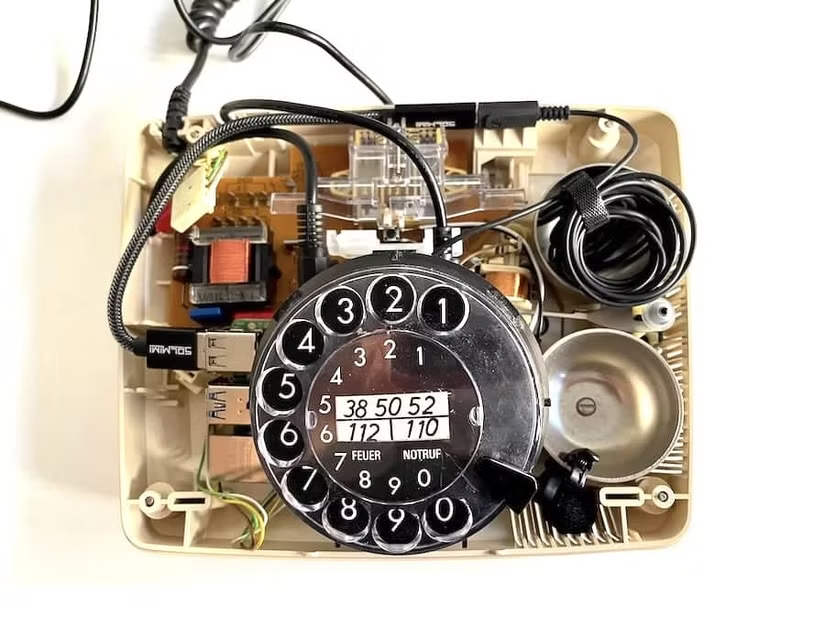
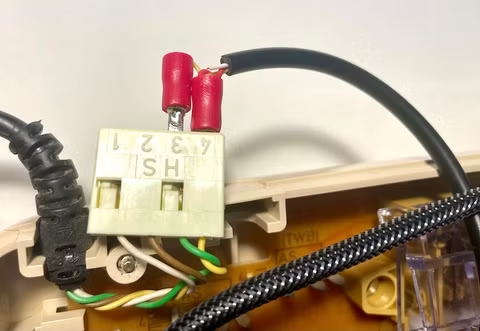
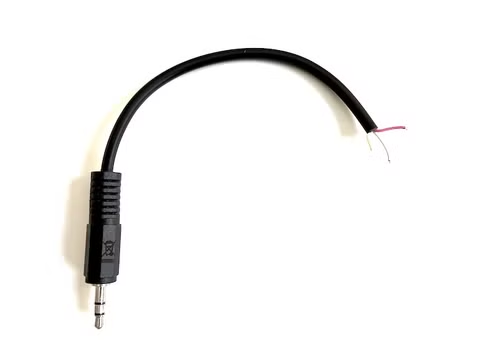
2. 剥去 3.5 毫米音频电缆的外皮,将 2.8 毫米平板连接器焊接到电话听筒的地线和一个声道线上。然后,将其连接到听筒的连接插座。
3. 在电话内部放置一个 USB 麦克风(或适配器),确保你的树莓派可以清晰地接收声音。
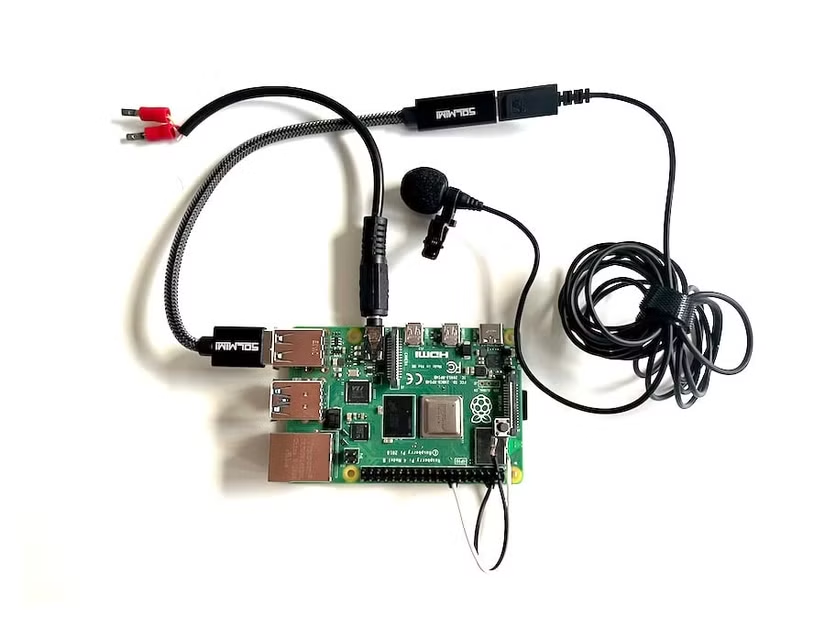
4. 使用万用表确认哪些拨号线承载脉冲。将这些线连接到 GPIO 引脚和地线。然后,连接挂钩按钮,使软件能够感应到何时提起听筒。
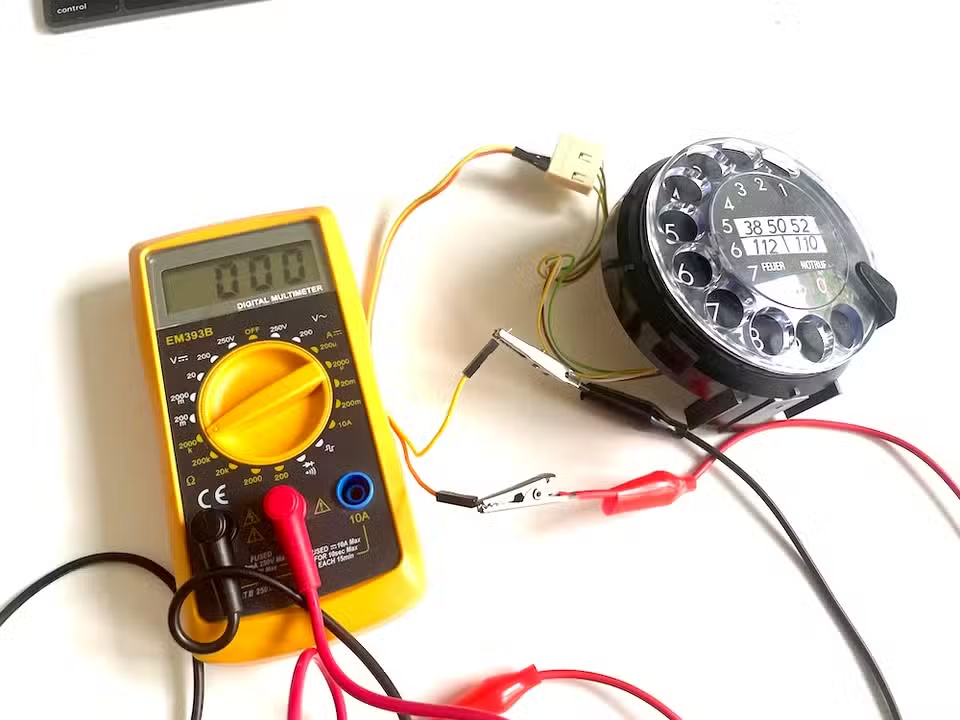
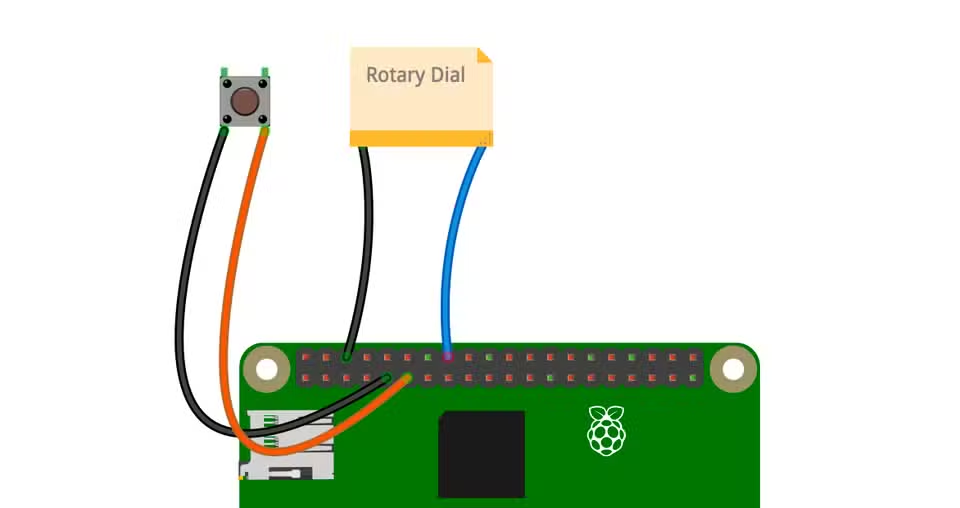
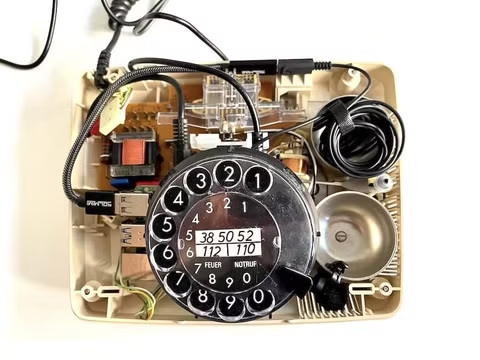
5. 在你的树莓派 上安装必要的音频库,包括 PyAudio、PyGame 和 OpenAI 客户端。下载或创建音频文件(如拨号音)以供播放,并将你的 OpenAI 密钥存储在 .env 文件中。
6. 接下来,你需要一个 Python 脚本,用于从麦克风捕获音频,将其发送到 ChatGPT 进行处理,并通过电话扬声器播放 AI 的回应。你可以编写自己的脚本或使用 Pollux Labs 编写的脚本。只需确保根据自己的需求调整 GPIO 引脚编号、音频设置和特殊文本提示。
7. 手动运行脚本以确认其正常工作。一旦你听到拨号音且 ChatGPT 对你的声音做出回应,添加一个系统服务,以便在树莓派启动时自动启动电话。
如果你无法访问脚本,以下是供你参考的脚本。
#!/usr/bin/env python3"""ChatGPT for Rotary Phonehttps://en.polluxlabs.netMIT LicenseCopyright (c) 2025 Frederik KumbartzkiPermission is hereby granted, free of charge, to any person obtaining a copyof this software and associated documentation files (the "Software"), to dealin the Software without restriction, including without limitation the rightsto use, copy, modify, merge, publish, distribute, sublicense, and/or sellcopies of the Software, and to permit persons to whom the Software isfurnished to do so, subject to the following conditions:The above copyright notice and this permission notice shall be included in allcopies or substantial portions of the Software.THE SOFTWARE IS PROVIDED "AS IS", WITHOUT WARRANTY OF ANY KIND, EXPRESS ORIMPLIED,
INCLUDING BUT NOT LIMITED TO THE WARRANTIES OF MERCHANTABILITY,FITNESS FOR A PARTICULAR PURPOSE AND NONINFRINGEMENT. IN NO EVENT SHALL THEAUTHORS OR COPYRIGHT HOLDERS BE LIABLE FOR ANY CLAIM, DAMAGES OR OTHERLIABILITY, WHETHER IN AN ACTION OF CONTRACT, TORT OR OTHERWISE, ARISING FROM,OUT OF OR IN CONNECTION WITH THE SOFTWARE OR THE USE OR OTHER DEALINGS IN THESOFTWARE."""import osimport sysimport timeimport threadingfrom queue import Queuefrom pathlib import PathAudio and speech librariesos.environ['PYGAME_HIDE_SUPPORT_PROMPT'] = "hide"import pygameimport pyaudioimport numpy as npimport wavefrom openai import OpenAIOpenAI API Keyfrom dotenv import load_dotenvload_dotenv()OPENAI_API_KEY = os.environ.get("OPENAI_API_KEY")if not OPENAI_API_KEY: print("Error: OPENAI_API_KEY not found.") sys.exit(1)Hardware librariesfrom gpiozero import ButtonConstants and configurationsAUDIO_DIR = "/home/pi/Desktop/callGPT"AUDIO_FILES =
{ "tone": f"{AUDIO_DIR}/a440.mp3", "try_again": f"{AUDIO_DIR}/tryagain.mp3", "error": f"{AUDIO_DIR}/error.mp3"}DIAL_PIN = 23 # GPIO pin for rotary dialSWITCH_PIN = 17 # GPIO pin for hook switchAudio parametersAUDIO_FORMAT = pyaudio.paInt16CHANNELS = 1SAMPLE_RATE = 16000CHUNK_SIZE = 1024SILENCE_THRESHOLD = 500MAX_SILENCE_CHUNKS = 20 # About 1.3 seconds of silenceDEBOUNCE_TIME = 0.1 # Time in seconds for debouncing button inputsclass AudioManager: """Manages audio playback and recording.""" def __init__(self): pygame.mixer.init(frequency=44100, buffer=2048) self.playing_audio = False self.audio_thread = NoneCreate temp directory self.temp_dir
= Path(__file__).parent / "temp_audio" self.temp_dir.mkdir(exist_ok=True)Preload sounds self.sounds = {} for name, path in AUDIO_FILES.items(): try: self.sounds[name] = pygame.mixer.Sound(path) except: print(f"Error loading {path}") def play_file(self, file_path, wait=True): try: sound = pygame.mixer.Sound(file_path) channel = sound.play() if wait and channel: while channel.get_busy(): pygame.time.Clock().tick(30) except: pygame.mixer.music.load(file_path) pygame.mixer.music.play() if wait: while pygame.mixer.music.get_busy(): pygame.time.Clock().tick(30) def start_continuous_tone(self): self.playing_audio = True if self.audio_thread and self.audio_thread.is_alive(): self.playing_audio = False self.audio_thread.join(timeout=1.0) self.audio_thread = threading.Thread(target=self._play_continuous_tone) self.audio_thread.daemon = True self.audio_thread.start() def _play_continuous_tone(self): try: if "tone" in self.sounds: self.sounds["tone"].play(loops=-1) while self.playing_audio: time.sleep(0.1) self.sounds["tone"].stop() else: pygame.mixer.music.load(AUDIO_FILES["tone"]) pygame.mixer.music.play(loops=-1) while self.playing_audio: time.sleep(0.1) pygame.mixer.music.stop() except Exception as e: print(f"Error during tone playback: {e}") def stop_continuous_tone(self): self.playing_audio = False if "tone" in self.sounds: self.sounds["tone"].stop() if pygame.mixer.get_init() and pygame.mixer.music.get_busy(): pygame.mixer.music.stop()class SpeechRecognizer: """Handles real-time speech recognition using OpenAI's Whisper API.""" def __init__(self, openai_client): self.client = openai_client self.audio = pyaudio.PyAudio() self.stream = None def capture_and_transcribe(self):Setup audio stream if not already initialized if not self.stream: self.stream = self.audio.open( format=AUDIO_FORMAT, channels=CHANNELS, rate=SAMPLE_RATE, input=True, frames_per_buffer=CHUNK_SIZE, )Set up queue and threading audio_queue = Queue() stop_event = threading.Event()Start audio capture thread capture_thread = threading.Thread( target=self._capture_audio, args=(audio_queue, stop_event) ) capture_thread.daemon = True capture_thread.start()Process the audio result = self._process_audio(audio_queue, stop_event)Cleanup stop_event.set() capture_thread.join() return result def _capture_audio(self, queue, stop_event): while not stop_event.is_set(): try: data = self.stream.read(CHUNK_SIZE, exception_on_overflow=False) queue.put(data) except KeyboardInterrupt: break def _process_audio(self, queue, stop_event): buffer = b"" speaking = False silence_counter = 0 while not stop_event.is_set(): if not queue.empty(): chunk = queue.get()Check volume data_np = np.frombuffer(chunk, dtype=np.int16) volume = np.abs(data_np).mean()Detect speaking if volume > SILENCE_THRESHOLD: speaking = True silence_counter = 0 elif speaking: silence_counter += 1Add chunk to buffer buffer += chunkProcess if we've detected end of speech if speaking and silence_counter > MAX_SILENCE_CHUNKS: print("Processing speech...")Save to temp file temp_file = Path(__file__).parent / "temp_recording.wav" self._save_audio(buffer, temp_file)Transcribe try: return self._transcribe_audio(temp_file) except Exception as e: print(f"Error during transcription: {e}") buffer = b"" speaking = False silence_counter = 0 return None def _save_audio(self, buffer, file_path): with wave.open(str(file_path), "wb") as
wf: wf.setnchannels(CHANNELS) wf.setsampwidth(self.audio.get_sample_size(AUDIO_FORMAT)) wf.setframerate(SAMPLE_RATE) wf.writeframes(buffer) def _transcribe_audio(self, file_path): with open(file_path, "rb") as audio_file: transcription = self.client.audio.transcriptions.create( model="whisper-1", file=audio_file, language="en" ) return transcription.text def cleanup(self): if self.stream: self.stream.stop_stream() self.stream.close() self.stream = None if self.audio: self.audio.terminate() self.audio = Noneclass ResponseGenerator: """Generates and speaks streaming responses from OpenAI's API.""" def __init__(self, openai_client, temp_dir): self.client = openai_client self.temp_dir = temp_dir self.answer = "" def generate_streaming_response(self, user_input, conversation_history=None): self.answer = "" collected_messages = [] chunk_files = []Audio playback queue and control variables audio_queue = Queue() playing_event = threading.Event() stop_event = threading.Event()Start the audio playback thread playback_thread = threading.Thread( target=self._audio_playback_worker, args=(audio_queue, playing_event, stop_event) ) playback_thread.daemon = True playback_thread.start()Prepare messages messages = [ {"role": "system", "content": "You are a humorous conversation partner engaged in a natural phone call. Keep your answers concise and to the point."} ]Use conversation history if available, but limit to last 4 pairs if conversation_history and len(conversation_history) > 0: if len(conversation_history) > 8: conversation_history = conversation_history[-8:] messages.extend(conversation_history) else: messages.append({"role": "user", "content": user_input})Stream the response stream = self.client.chat.completions.create( model="gpt-4o-mini", messages=messages, stream=True )Variables for sentence chunking sentence_buffer = "" chunk_counter = 0 for chunk in stream: if chunk.choices and hasattr(chunk.choices[0], 'delta') and hasattr(chunk.choices[0].delta, 'content'): content = chunk.choices[0].delta.content if content: collected_messages.append(content) sentence_buffer += contentProcess when we have a complete sentence or phrase if any(end in content for end in [".", "!", "?", ":"]) or len(sentence_buffer) > 100:Generate speech for this chunk chunk_file_path = self.temp_dir / f"chunk_{chunk_counter}.mp3" try:Generate speech response = self.client.audio.speech.create( model="tts-1", voice="alloy", input=sentence_buffer, speed=1.0 ) response.stream_to_file(str(chunk_file_path)) chunk_files.append(str(chunk_file_path))Add to playback queue audio_queue.put(str(chunk_file_path))Signal playback thread if it's waiting playing_event.set() except Exception as e: print(f"Error generating speech for chunk: {e}")Reset buffer and increment counter sentence_buffer = "" chunk_counter += 1Process any remaining text if sentence_buffer.strip(): chunk_file_path = self.temp_dir / f"chunk_{chunk_counter}.mp3" try: response = self.client.audio.speech.create( model="tts-1", voice="alloy", input=sentence_buffer, speed=1.2 ) response.stream_to_file(str(chunk_file_path)) chunk_files.append(str(chunk_file_path)) audio_queue.put(str(chunk_file_path)) playing_event.set() except Exception as e: print(f"Error generating final speech chunk: {e}")Signal end of generation audio_queue.put(None) # Sentinel to signal end of queueWait for playback to complete playback_thread.join() stop_event.set() # Ensure the thread stopsCombine all messages self.answer = "".join(collected_messages) print(self.answer)Clean up temp files self._cleanup_temp_files(chunk_files) return self.answer def _audio_playback_worker(self, queue, playing_event, stop_event): while not stop_event.is_set():Wait for a signal that there's something to play if queue.empty(): playing_event.wait(timeout=0.1) playing_event.clear() continueGet the next file to play file_path = queue.get()None is our sentinel value to signal end of queue if file_path is None: break try:Play audio and wait for completion pygame.mixer.music.load(file_path) pygame.mixer.music.play()Wait for playback to complete before moving to next chunk while pygame.mixer.music.get_busy() and not stop_event.is_set(): pygame.time.Clock().tick(30)Small pause between chunks for more natural flow time.sleep(0.05) except Exception as e: print(f"Error playing audio chunk: {e}") def _cleanup_temp_files(self, file_list):Wait a moment to ensure files aren't in use time.sleep(0.5) for file_path in file_list: try: if os.path.exists(file_path): os.remove(file_path) except Exception as e: print(f"Error removing temp file: {e}")class RotaryDialer: """Handles rotary phone dialing and services.""" def __init__(self, openai_client): self.client = openai_client self.audio_manager = AudioManager() self.speech_recognizer = SpeechRecognizer(openai_client) self.response_generator = ResponseGenerator(openai_client, self.audio_manager.temp_dir)Set up GPIO self.dial_button = Button(DIAL_PIN, pull_up=True) self.switch = Button(SWITCH_PIN, pull_up=True)State variables self.pulse_count = 0 self.last_pulse_time = 0 self.running = True def start(self):Set up callbacks self.dial_button.when_pressed = self._pulse_detected self.switch.when_released = self._handle_switch_released self.switch.when_pressed = self._handle_switch_pressedStart in ready state if not self.switch.is_pressed:Receiver is picked up self.audio_manager.start_continuous_tone() else:Receiver is on hook print("Phone in idle state. Pick up the receiver to begin.") print("Rotary dial ready. Dial a number when the receiver is picked up.") try: self._main_loop() except KeyboardInterrupt: print("Terminating...") self._cleanup() def _main_loop(self): while self.running: self._check_number() time.sleep(0.1) def _pulse_detected(self): if not self.switch.is_pressed: current_time = time.time() if current_time - self.last_pulse_time >
DEBOUNCE_TIME: self.pulse_count += 1 self.last_pulse_time = current_time def _check_number(self): if not self.switch.is_pressed and self.pulse_count > 0: self.audio_manager.stop_continuous_tone() time.sleep(1.5) # Wait between digits if self.pulse_count == 10: self.pulse_count = 0 # "0" is sent as 10 pulses print("Dialed service number:", self.pulse_count) if self.pulse_count == 1: self._call_gpt_service()Return to dial tone after conversation if not self.switch.is_pressed:
# Only if the receiver wasn't hung up self._reset_state() self.pulse_count = 0 def _call_gpt_service(self):Conversation history for context conversation_history = [] first_interaction = TrueFor faster transitions speech_recognizer = self.speech_recognizer response_generator = self.response_generatorPreparation for next recording next_recording_thread = None next_recording_queue = Queue()Conversation loop - runs until the receiver is hung up while not self.switch.is_pressed:If there's a prepared next recording thread, use its result if next_recording_thread: next_recording_thread.join() recognized_text = next_recording_queue.get() next_recording_thread = None else:Only during first iteration or as fallback print("Listening..." + (" (Speak now)" if first_interaction else ""))
first_interaction = FalseStart audio processing recognized_text = speech_recognizer.capture_and_transcribe() if not recognized_text: print("Could not recognize your speech") self.audio_manager.play_file(AUDIO_FILES["try_again"]) continue print("Understood:", recognized_text)Update conversation history conversation_history.append({"role": "user", "content": recognized_text
})
Start the next recording thread PARALLEL to API response next_recording_thread = threading.Thread( target=self._background_capture, args=(speech_recognizer, next_recording_queue) ) next_recording_thread.daemon = True next_recording_thread.start()Generate the response response = response_generator.generate_streaming_response(recognized_text, conversation_history)Add response to history conversation_history.append({"role": "assistant", "content": response})Check if the receiver was hung up in the meantime if self.switch.is_pressed: breakIf we get here, the receiver was hung up if next_recording_thread and next_recording_thread.is_alive(): next_recording_thread.join(timeout=0.5) def _background_capture(self, recognizer, result_queue): try: result = recognizer.capture_and_transcribe() result_queue.put(result) except Exception as e: print
(f"Error in background recording: {e}") result_queue.put(None) def _reset_state(self): self.pulse_count = 0 self.audio_manager.stop_continuous_tone() self.audio_manager.start_continuous_tone
() print("Rotary dial ready. Dial a number.") def _handle_switch_released(self): print("Receiver picked up - System restarting") self._restart_script() def _handle_switch_pressed(self): print("Receiver hung up - System
terminating") self._cleanup() self.running = FalseComplete termination after short delay threading.Timer(1.0, self._restart_script).start() return def _restart_script(self): print("Script restarting...") self.audio_manager.stop_continuous_tone() os.execv(sys.executable, ['python'] + sys.argv) def _cleanup(self):Terminate Audio Manager self.audio_manager.stop_continuous_tone()Terminate Speech Recognizer if it exists if hasattr(self, 'speech_recognizer') and self.speech_recognizer: self.speech_recognizer.cleanup() print("Resources have been released.")def main():Initialize OpenAI client client = OpenAI(api_key=OPENAI_API_KEY)Create and start the rotary dialer dialer = RotaryDialer(client) dialer.start
() print("Program terminated.")if name == "__main__": main()
回顾你所做的任何连接或配置的优化。每种电话型号都有细微差别,因此你可能需要进行一些实验。在电话外壳内给树莓派通电,以简化故障排除,直到你确信一切正常。一旦你通过听筒听到 ChatGPT 的回应,你的旋转电话热线就几乎完成了。
享受复古体验,同时访问现代 AI
用 ChatGPT 为旧式旋转电话注入活力,将怀旧与创新融为一体。拨打电话给 AI,展示了过去与现在技术之间的神奇互动。随着时间的推移,你可以通过不同的声音、语言或提示来个性化你的脚本,以改变 ChatGPT 的回应。
你甚至可以整合更多的 AI 服务,用于阅读新闻、播放播客或安排日程。这个项目可以让你接触电子设备和 Python 编程,因为你正在弥合模拟电话和数字 AI 之间的鸿沟。完成此项目后,你将拥有一部功能齐全的旋转电话,它充当 ChatGPT 的热线。享受你的复古未来主义对话,并探索为你的电话 AI 伙伴的新想法。
参考文章:
https://www.xda-developers.com/take-chatgpt-retro-raspberry-pi-powered-rotary-phone-hotline/
如果觉得文章不错记得点赞,收藏,关注,转发~
-
树莓派分类器:用树莓派识别不同型号的树莓派!2025-06-13 1862
-
树莓派GUI应用开发:从零到炫酷的魔法之旅!2025-04-04 1477
-
树莓派是x86还是arm2024-08-30 4231
-
树莓派控制步进电机2023-03-21 1123
-
树莓派3和树莓派4的原理图免费下载2020-01-07 5055
-
树莓派的深刻含义2019-08-06 3195
-
树莓派是什么树莓派的简单介绍2019-05-15 3641
-
树莓派有什么用_树莓派能用来做啥_树莓派新手入门教程2018-05-08 35228
-
树莓派3wifi配置_树莓派3开启wifi热点_树莓派3的wifi使用教程2017-12-08 32294
-
树莓派的种类_树莓派安装教程2017-11-27 6094
-
树莓派装机教程2015-11-25 1571
-
关于树莓派那个标签2011.122014-09-10 5150
-
树莓派创始人Eben中国行,联手创客改变世界2014-07-29 4581
全部0条评论

快来发表一下你的评论吧 !
