


你的冰箱会编程?树莓派5打造AI制冷系统的疯狂实验
描述
在这篇文章中,我们详细介绍了我们构建智能冰箱库存管理系统的旅程,该系统由Raspberry Pi 5和AI摄像头提供支持。使用安装在冰箱一侧的超声波传感器,我们的系统可以确定何时开始产品检测以及何时发送更新。通过我们定制的YOLOv8n模型(通过Roboflow导出为IMX500格式),摄像机可以识别关键产品——奶酪、可乐、鸡蛋、番茄酱、牛奶、pittas和schnitzels——并根据它们在帧中的位置进行分类。生成的“进”和“出”列表通过带SocketIO的Flask服务器实时传输到React仪表板,帮助您了解哪些库存,哪些需要重新进货。
"井然有序的冰箱,是健康生活的第一步。"——匿名
简介
想象一下,打开你的冰箱,让一个人工智能系统立即告诉你什么是可用的,什么是缺失的。我们的项目通过使用传感器触发器自动跟踪冰箱库存。当超声波传感器检测到冰箱门在50厘米以内时,人工智能摄像头就会开始分析产品放置。或者,使用PIR运动传感器,摄像机在感应到运动时立即开始检测,并在静止5秒后发送更新。这种嵌入式AI和全栈开发的无缝集成,让库存管理变得毫不费力。
观看示例:
观察系统的运行,它会实时更新你的冰箱库存。
硬件设置
我们的配置利用了传感器和尖端人工智能的组合:
Raspberry Pi 5–加工中心。
AI摄像头模块——配备我们定制的YOLOv8n型号(出口到IMX500 ),用于检测奶酪、可乐、鸡蛋、番茄酱、牛奶、pittas和schnitzels等产品。
超声波传感器——安装在冰箱侧,测量到门的距离。当距离小于50厘米时,系统激活产品检测。
PIR运动传感器(备选)–当检测到运动时触发检测,并在5秒钟无运动后发送更新。
带SocketIO的Flask服务器–处理实时通信。
React仪表板–显示两个列表:当前在冰箱中的物品和已过期的物品(用于补货)。
连接示意图:
下面是我们的Fritzing图,说明传感器和摄像头的连接:
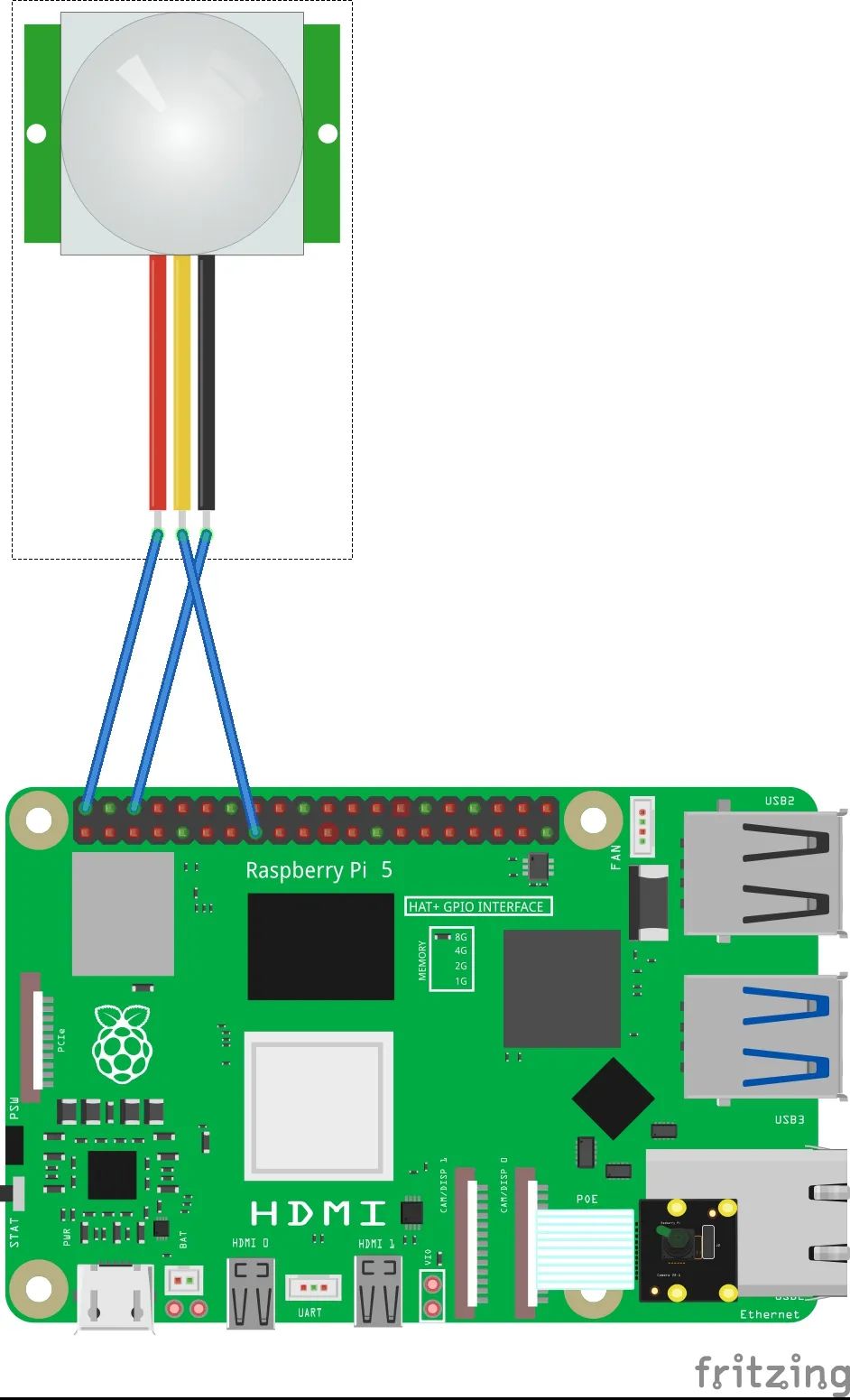
超声波传感器设置:
将传感器放在冰箱侧面,面向门。
传感器持续监控距离。如果门是关着的(50厘米),系统开始捕捉帧进行分析。当门移开(> 50厘米)时,它触发更新传输。
PIR运动传感器设置(可选):
安装传感器,检测冰箱附近的运动。
运动检测时,摄像机开始产品识别。如果5秒钟内没有检测到任何运动,将发送库存更新。
如需详细布线,请查看我们的Fritzing图。
嵌入式深度学习和产品识别
我们系统的核心是一个使用定制训练的YOLOv8n网络的人工智能摄像机。该模型经过优化,并通过Roboflow导出为IMX500兼容格式,可识别我们的主要产品,并区分“进”一半(冰箱内)和“出”一半(被移除或缺失)的产品。
产品识别逻辑代码片段
import cv2import numpy as np# Load the custom product detection model (YOLOv8n exported to IMX500)model = load_model('path_to_imx500_model')def detect_products(frame): # Preprocess the frame for the model processed_frame = preprocess_frame(frame) # Run inference detections = model(processed_frame) # Parse detections and categorize into 'in' and 'out' in_products = [] out_products = [] for det in detections: label = det['label'] x, y, w, h = det['bbox'] # Assume the frame is split vertically: left half is "IN", right half is "OUT" if x + w / 2 < frame.shape[1] // 2: in_products.append(label) else: out_products.append(label) return in_products, out_products# Helper functions: preprocess_frame() and load_model() are implemented elsewhere.
传感器集成和socket通信
超声波传感器逻辑
超声波传感器测量传感器和冰箱门之间的距离。当门在50厘米以内时,系统开始捕捉产品检测帧。一旦门移开(距离超过50厘米),累积的“进”和“出”列表被发送到服务器。
import timeimport socketio# Initialize SocketIO clientsio = socketio.Client()sio.connect('http://your-ngrok-url')THRESHOLD = 50 # Distance threshold in cmdef read_ultrasonic_sensor(): # Simulated sensor reading; replace with actual sensor logic. return get_distance()def sensor_loop(): detecting = False in_list = [] out_list = [] while True: distance = read_ultrasonic_sensor() if distance < THRESHOLD and not detecting: print("Fridge door detected! Starting inventory check...") detecting = True # Capture frame for product detection (simulate camera capture) frame = capture_frame() # Replace with actual camera capture logic in_list, out_list = detect_products(frame) elif distance >= THRESHOLD and detecting: print("Fridge door closed. Sending inventory data to server.") sio.emit('inventory_update', {'in': in_list, 'out': out_list}) detecting = False in_list, out_list = [], [] time.sleep(0.5) # Adjust sensor polling interval# Run sensor_loop() on the Raspberry Pi to continuously monitor door status.
PIR运动传感器(替代)逻辑
对于使用PIR传感器的环境,摄像机在运动检测时激活,如果5秒内没有检测到运动,则发送库存更新。
def pir_sensor_loop(): detecting = False last_motion_time = time.time() in_list = [] out_list = [] while True: motion_detected = read_pir_sensor() # Replace with actual sensor reading logic if motion_detected: last_motion_time = time.time() if not detecting: print("Motion detected! Initiating product recognition...") detecting = True frame = capture_frame() # Capture frame using the AI camera in_list, out_list = detect_products(frame) elif detecting and (time.time() - last_motion_time) > 5: print("No motion for 5 seconds. Transmitting inventory update.") sio.emit('inventory_update', {'in': in_list, 'out': out_list}) detecting = False in_list, out_list = [], [] time.sleep(0.5)
Flask+SocketIO服务器
我们的Flask服务器接收这些实时库存更新,并将它们广播给所有连接的客户端,确保React仪表板显示最新的数据。
from flask import Flaskfrom flask_socketio import SocketIOapp = Flask(__name__)socketio = SocketIO(app, cors_allowed_origins="*")@socketio.on('inventory_update')def handle_inventory_update(data): print("Received inventory update:", data) # Broadcast the update to connected dashboard clients socketio.emit('dashboard_update', data)if __name__ == '__main__': socketio.run(app, host='0.0.0.0', port=5000)
全栈集成(React仪表盘)
实时数据管道从Raspberry Pi通过我们的Flask服务器(通过ngrok公开)流向React仪表板。仪表板显示两个列表:冰箱中的产品和已取出的产品(用于补货)。
React仪表板代码片段
import React, { useEffect, useState } from "react";import io from "socket.io-client";const socket = io("http://your-ngrok-url");const FridgeInventory = () => { const [inventory, setInventory] = useState({ in: [], out: [] }); useEffect(() => { socket.on("dashboard_update", (data) => { setInventory(data); }); return () => { socket.off("dashboard_update"); }; }, []); return (
Fridge Inventoryh2> In Fridgeh3> {inventory.in.map((item, index) => ( {item}li> ))} ul> div> Out for Restockingh3> {inventory.out.map((item, index) => ( {item}li> ))} ul> div> div> );};export default FridgeInventory;部署和故障排除
部署这样的边缘人工智能解决方案伴随着挑战:
传感器校准:
微调超声波传感器的阈值(50厘米),并确保PIR传感器(如果使用)放置正确。
网络稳定性:
通过ngrok运行Flask服务器需要可靠的互联网连接。监控连接质量和延迟。
模型优化:
利用轻量级框架,并确保您的定制产品识别模型针对实时推理进行了优化。
记录和监控:
在传感器环路和服务器中实施可靠的日志记录,以快速诊断任何问题。
结论
该项目将嵌入式系统、深度学习和全栈开发结合在一起,创建了一个智能冰箱库存管理解决方案。有了Raspberry Pi 5,一个使用定制YOLOv8n模型的人工智能摄像头和传感器触发的检测,你可以自动跟踪你的冰箱里有什么,什么需要重新进货-所有这些都是实时的。
准备好让你的厨房自动化了吗?分叉我们的存储库,设置您的Raspberry Pi,并开始以前所未有的方式管理您的冰箱库存。祝您愉快,享受更智能、更有条理的厨房!
如有任何问题或反馈,请随时联系我们的GitHub知识库或在上面提出问题。
打开APP阅读更多精彩内容
In Fridgeh3> {inventory.in.map((item, index) => ( {item}li> ))} ul> div> Out for Restockingh3> {inventory.out.map((item, index) => ( {item}li> ))} ul> div> div> );};export default FridgeInventory;部署和故障排除
部署这样的边缘人工智能解决方案伴随着挑战:
传感器校准:
微调超声波传感器的阈值(50厘米),并确保PIR传感器(如果使用)放置正确。
网络稳定性:
通过ngrok运行Flask服务器需要可靠的互联网连接。监控连接质量和延迟。
模型优化:
利用轻量级框架,并确保您的定制产品识别模型针对实时推理进行了优化。
记录和监控:
在传感器环路和服务器中实施可靠的日志记录,以快速诊断任何问题。
结论
该项目将嵌入式系统、深度学习和全栈开发结合在一起,创建了一个智能冰箱库存管理解决方案。有了Raspberry Pi 5,一个使用定制YOLOv8n模型的人工智能摄像头和传感器触发的检测,你可以自动跟踪你的冰箱里有什么,什么需要重新进货-所有这些都是实时的。
准备好让你的厨房自动化了吗?分叉我们的存储库,设置您的Raspberry Pi,并开始以前所未有的方式管理您的冰箱库存。祝您愉快,享受更智能、更有条理的厨房!
如有任何问题或反馈,请随时联系我们的GitHub知识库或在上面提出问题。
打开APP阅读更多精彩内容
Out for Restockingh3> {inventory.out.map((item, index) => ( {item}li> ))} ul> div> div> );};export default FridgeInventory;部署和故障排除
部署这样的边缘人工智能解决方案伴随着挑战:
传感器校准:
微调超声波传感器的阈值(50厘米),并确保PIR传感器(如果使用)放置正确。
网络稳定性:
通过ngrok运行Flask服务器需要可靠的互联网连接。监控连接质量和延迟。
模型优化:
利用轻量级框架,并确保您的定制产品识别模型针对实时推理进行了优化。
记录和监控:
在传感器环路和服务器中实施可靠的日志记录,以快速诊断任何问题。
结论
该项目将嵌入式系统、深度学习和全栈开发结合在一起,创建了一个智能冰箱库存管理解决方案。有了Raspberry Pi 5,一个使用定制YOLOv8n模型的人工智能摄像头和传感器触发的检测,你可以自动跟踪你的冰箱里有什么,什么需要重新进货-所有这些都是实时的。
准备好让你的厨房自动化了吗?分叉我们的存储库,设置您的Raspberry Pi,并开始以前所未有的方式管理您的冰箱库存。祝您愉快,享受更智能、更有条理的厨房!
如有任何问题或反馈,请随时联系我们的GitHub知识库或在上面提出问题。
部署和故障排除
部署这样的边缘人工智能解决方案伴随着挑战:
传感器校准:
微调超声波传感器的阈值(50厘米),并确保PIR传感器(如果使用)放置正确。
网络稳定性:
通过ngrok运行Flask服务器需要可靠的互联网连接。监控连接质量和延迟。
模型优化:
利用轻量级框架,并确保您的定制产品识别模型针对实时推理进行了优化。
记录和监控:
在传感器环路和服务器中实施可靠的日志记录,以快速诊断任何问题。
结论
该项目将嵌入式系统、深度学习和全栈开发结合在一起,创建了一个智能冰箱库存管理解决方案。有了Raspberry Pi 5,一个使用定制YOLOv8n模型的人工智能摄像头和传感器触发的检测,你可以自动跟踪你的冰箱里有什么,什么需要重新进货-所有这些都是实时的。
准备好让你的厨房自动化了吗?分叉我们的存储库,设置您的Raspberry Pi,并开始以前所未有的方式管理您的冰箱库存。祝您愉快,享受更智能、更有条理的厨房!
如有任何问题或反馈,请随时联系我们的GitHub知识库或在上面提出问题。
-
5款制冷系统原理的动态图解 制冷系统原理图的重要作用2023-08-30 5492
-
制冷系统部件构成有哪些类型 制冷系统部件检查内容有哪些2023-08-14 3678
-
树莓派能做什么2021-09-10 2194
-
基于AI和大数据技术的冷冻水制冷系统2020-12-03 2622
-
冷库制冷系统的工作原理2020-04-05 63875
-
制冷系统的组成_制冷系统的工作原理2019-08-02 29333
-
树莓派用什么语言编程_树莓派python编程详解2018-01-15 39878
-
电冰箱不制冷的原因?电冰箱不制冷怎么解决?2013-06-15 4804
-
[转帖]排除冰箱制冷系统管道油堵故障2010-03-11 3674
-
[转帖]冰箱制冷系统连接管道出现内漏故障2010-03-02 2430
-
制冷系统讲座2009-10-19 2969
-
模糊控制的微型制冷系统2009-05-31 1056
-
空调制冷系统原理图2008-06-28 11742
全部0条评论

快来发表一下你的评论吧 !

赚取积分