


安信可GP-02-Kit测试过程+GPS 时钟制作
描述
以下作品由安信可社区用户
无垠的广袤测试及制作
产品介绍
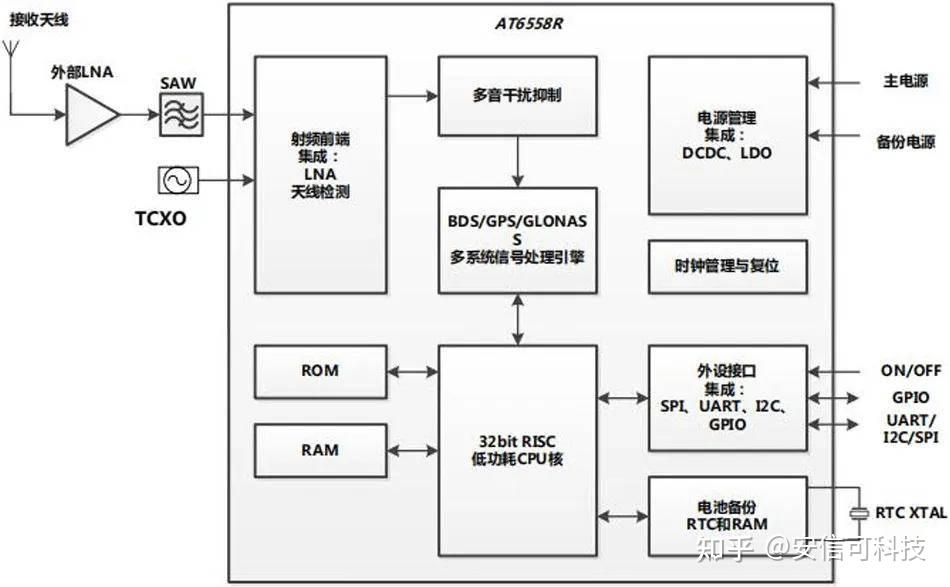
GP-02-Kit是一款高集成带有陶瓷天线、高性能 BDS/GNSS 多模卫星导航接收机SoC 开发板,主芯片为AT6558R卫星定位芯片。集成了射频前端,数字基带处理器,32 位的 RISC CPU,电源管理和有源天线检测与保护功能。支持多种卫星导航系统,包括北斗卫星导航系统 BDS、 GPS、GLONASS,可实现多系统联合定位。
该开发板遵循NMEA协议,通过串口通讯发送指令来控制开发板的工作内容。
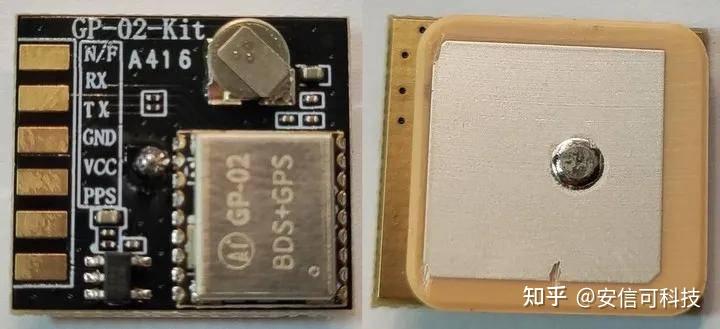
详见:GPS 模组系列 | 安信可科技 https://docs.ai-thinker.com/gps
芯片架构
GP-02 模组架构
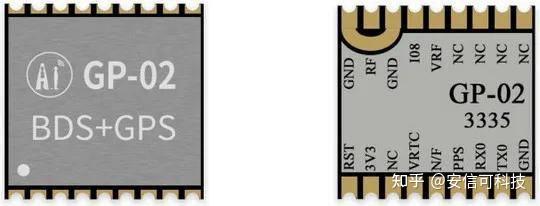
模组外观
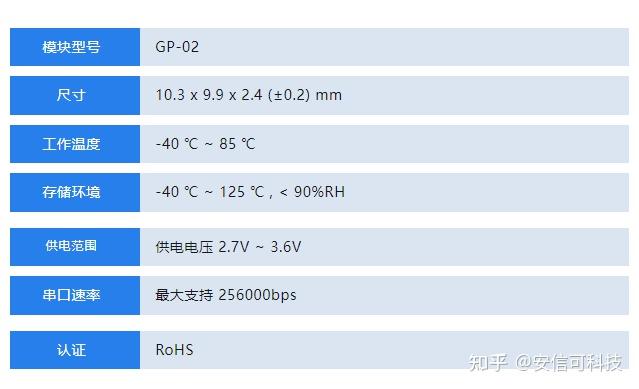
参数特性
特点
●支持
BDS/GPS/GLONASS/GALILEO/QZSS/SBAS 多系统联合定位和单系统独立定位
●支持D-GNSS 差分定位,A-GNSS 辅助定位,星历预测,DR 组合导航应用,最快数据更新率 10Hz
●32位应用处理器,最高频率 133MHz,支持频率动态调整
●支持 PPS 输出
●外设接口:UART
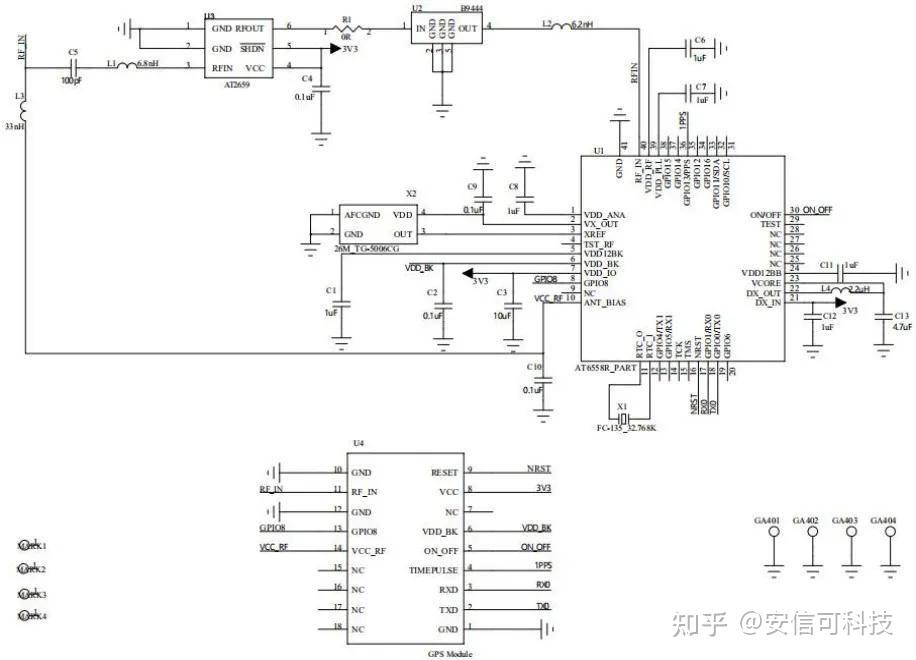
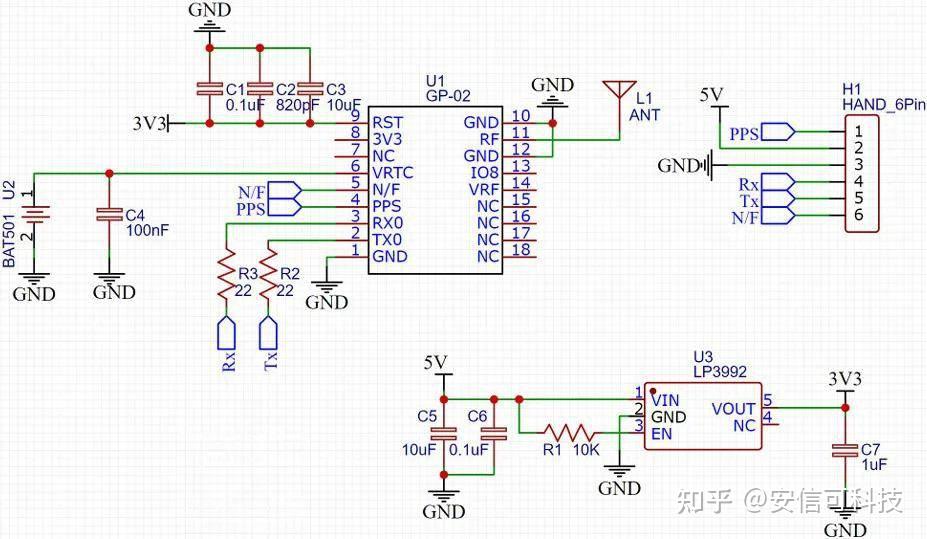
原理图
模组原理图
开发板原理图
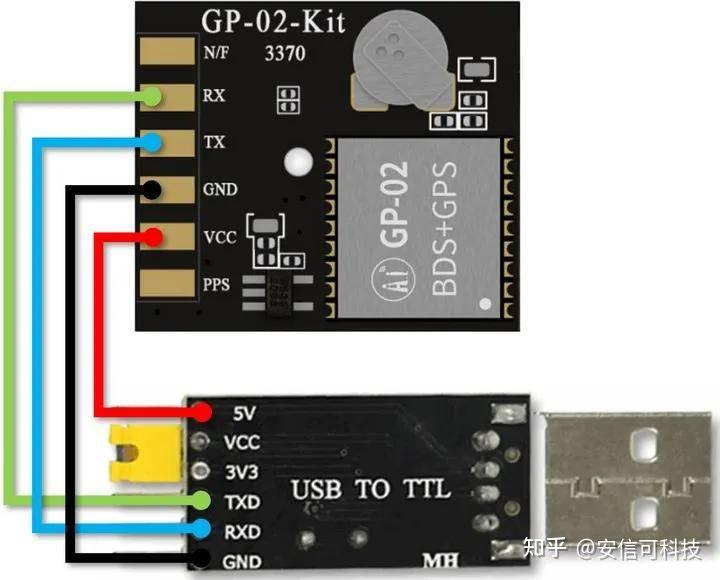
硬件连接
使用 USB 转 TTL 串口工具连接开发板和电脑
上电测试
通过 USB 转 TTL 工具连接 GP-02-Kit 和电脑,使用安信可串口调试助手获取串口输出信息。
串口打印(波特率默认 9600 bps)
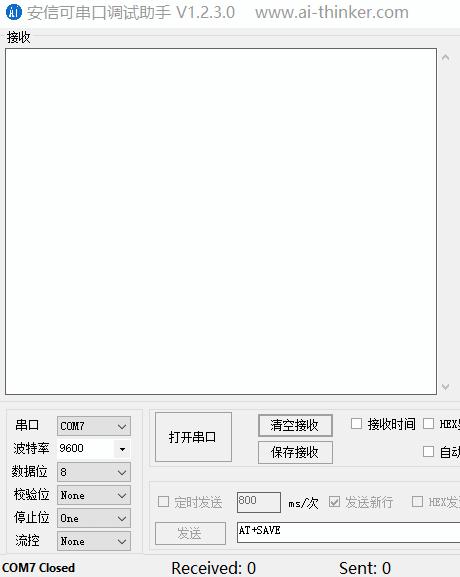
输出信息
$GNGSA,A,1,,,,,,,,,,,,,25.5,25.5,25.5,4*04 $GPGSV,1,1,00,0*65
$BDGSV,1,1,00,0*74 $GNRMC,,V,,,,,,,,,,N,V*37 $GNVTG,,,,,,,,,N*2E
$GNZDA,,,,,,*56 $GPTXT,01,01,01,ANTENNA OPEN*25
输出信息为 NMEA 格式,具体定义如下
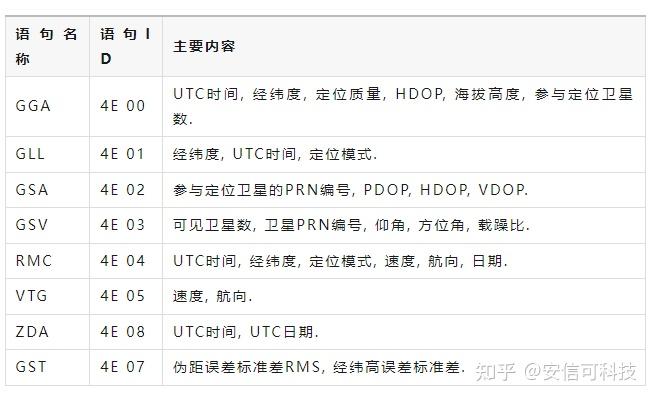
软件测试
下载并运行GnssToolKit3软件。
点击主菜单上的 串口 菜单项, 打开 串口菜单 (该菜单用于配置串口)
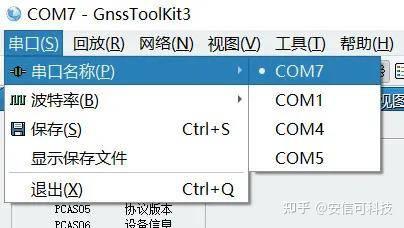
选择 波特率 菜单项,列出对接收机有效的波特率。
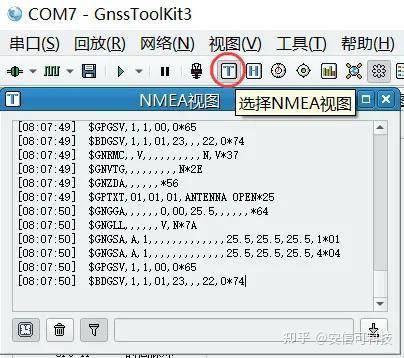
NMEA 视图
波特率默认为 9600, 用户需要根据接收机的实际情况选择相应的值。
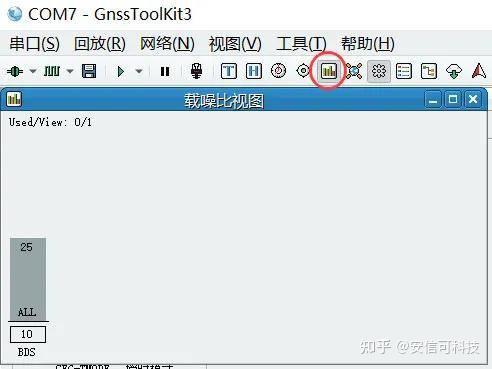
载躁比柱状图
用柱状图显示卫星的载噪比, 每个柱状条代表一颗卫星。
星位视图
在 视图 菜单中, 选择 星位图, 打开 星位图视图。
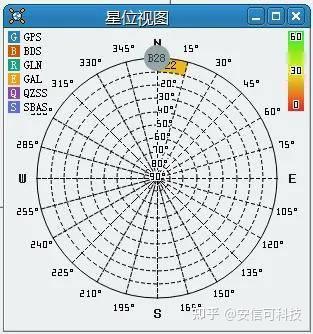
这里没有将产品拿到室外进行测试,因此获取的卫星信号较弱。
好了,来用安信可 GP-02-Kit 开发板结合 Arduino IDE 实现 GPS 时钟吧。
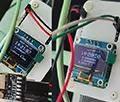
GPS时钟
GP-02-Kit 结合Arduino IDE 实现 GPS 时钟
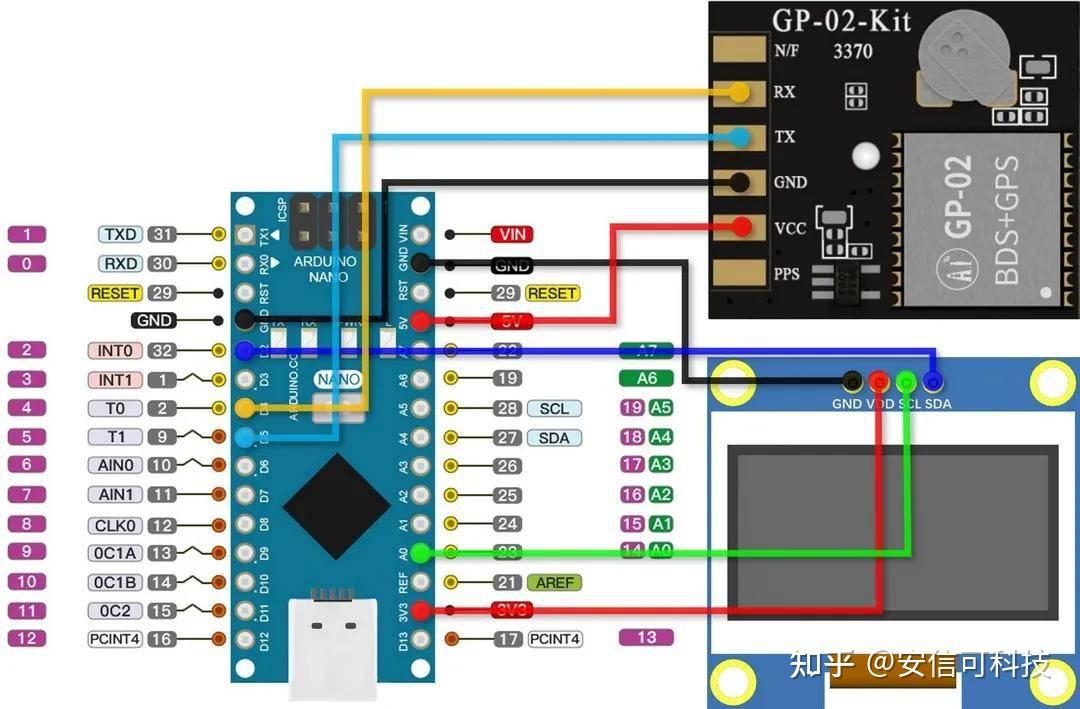
硬件连接
OLED_SCL -> 14
OLED_SDA -> 02
GP-02-Kit_RX -> 04
GP-02-Kit_TX -> 05
示意图
代码
#include
#include
#include
#include
#include
#include
// I2C款接线说明
// NodeMCU开发板 0.96寸OLED 引脚连接对应关系
// GND GND
// 3V3 VCC
// SCL D1 (GPIO 5)
// SDA D2 (GPIO 4)
#define SCREEN_WIDTH 128 // OLED display width, in pixels
#define SCREEN_HEIGHT 64 // OLED display height, in pixels
#define OLED_SDA 02 // SDA引脚,gpio2(D4)
#define OLED_SCL 14 // SCL引脚,gpio14(D5)
#define OLED_RESET 13 // 重置引脚
#define SCREEN_ADDRESS 0x3C // OLED 显示屏的地址,固化在芯片上
Adafruit_SSD1306 display(SCREEN_WIDTH, SCREEN_HEIGHT, &Wire, OLED_RESET); // 创建实例
// gps模块引脚定义
#define RXPin 4 // GPIO 12 对应nodemcu D6
#define TXPin 5 // GPIO 14 对应nodemcu D5
// The serial connection to the GPS device
SoftwareSerial ss(RXPin, TXPin);
// The TinyGPSPlus object
TinyGPSPlus gps;
// 一些需要使用的变量
int Year, Month, Date, Hour, Minute, Second, Yea, Mon, Dat, Hou;
double Lat, Lng;
String sMonth, sDate, sHour, sMinute, sSecond;
void setup() {
Wire.begin(OLED_SDA, OLED_SCL);
Serial.begin(9600);
WiFi.mode(WIFI_OFF); //关闭WIFI模块省电
WiFi.forceSleepBegin();
ss.begin(9600); //GPS模块虚拟串口
// SSD1306_SWITCHCAPVCC = generate display voltage from 3.3V internally
if (!display.begin(SSD1306_SWITCHCAPVCC, SCREEN_ADDRESS)) {
Serial.println(F("SSD1306 allocation failed"));
for (;;)
; // Don't proceed, loop forever
}
display.clearDisplay(); // 清屏
display.setTextColor(WHITE); // 设置字体颜色为白色
display.display(); // 显示
//OLED屏初始化代码
}
void loop() {
boolean newData = false;
for (unsigned long start = millis(); millis() - start < 300;) {
while (ss.available()) {
if (gps.encode(ss.read())) {
newData = true;
}
}
} //上面是GPS数据接收的固定代码
Yea = gps.date.year(); //年
Mon = gps.date.month(); //月
Dat = gps.date.day(); //日
Hou = gps.time.hour(); //时
Minute = gps.time.minute(); //分
Second = gps.time.second(); //秒
Lng = gps.location.lng(); //经度
Lat = gps.location.lat(); //纬度
//年月日时转换部分,将UTC时间转换为北京时间,并消除错误
Hour = Hou + 8; //修正时区
if (Hour >= 24) {
Hour = Hour - 24; //修正小时超程
}
if (Hou + 8 >= 24) {
Date = Dat + 1;
if ((Mon == 1 || Mon == 3 || Mon == 5 || Mon == 7 || Mon == 8 || Mon == 10 || Mon == 12) && (Date > 31)) {
Date = Date - 30;
Month = Mon + 1; //大月进位
} else {
Month = Mon;
Year = Yea;
}
if ((Mon == 4 || Mon == 6 || Mon == 9 || Mon == 11) && (Date > 30)) {
Date = Date - 29;
Month = Mon + 1; //小月进位
} else {
Month = Mon;
Year = Yea;
}
if ((Yea % 4 == 0) && (Date > 29)) {
Date = Date - 28;
Month = Mon + 1; //闰月判定并进位
} else {
Month = Mon;
Year = Yea;
}
if ((Yea % 4 != 0) && (Date > 28)) {
Date = Date - 27;
Month = Mon + 1; //非闰月判定并进位
} else {
Month = Mon;
Year = Yea;
}
if (Month > 12) {
Month = Month - 12;
Year = Yea + 1; //年超程进位
}
} else {
Date = Dat;
Month = Mon;
Year = Yea;
}
//结果显示部分
display.setTextColor(SSD1306_WHITE);
display.setCursor(38, 0);
display.setTextSize(1);
display.print(Year);
display.setCursor(63, 0);
display.setTextSize(1);
display.print("-");
display.setTextSize(1);
display.setCursor(71, 0);
sMonth = formatNumber(Month, 2);
display.print(sMonth);
display.setCursor(83, 0);
display.setTextSize(1);
display.print("-");
display.setTextSize(1);
display.setCursor(91, 0);
sDate = formatNumber(Date, 2);
display.print(sDate);
display.setTextSize(2);
display.setCursor(26, 13);
sHour = formatNumber(Hour, 2);
display.print(sHour);
display.setCursor(46, 13);
display.setTextSize(2);
display.print(":");
display.setTextSize(2);
display.setCursor(56, 13);
sMinute = formatNumber(Minute, 2);
display.print(sMinute);
display.setCursor(76, 13);
display.setTextSize(2);
display.print(":");
display.setTextSize(2);
display.setCursor(86, 13);
sSecond = formatNumber(Second, 2);
display.print(sSecond);
display.setTextSize(1);
display.setCursor(35, 33);
display.print(gps.location.lng(), 8);
display.setTextSize(1);
display.setCursor(35, 43);
display.print(gps.location.lat(), 8);
display.setCursor(105, 53);
display.setTextSize(1);
display.print("m");
display.setCursor(50, 53);
display.setTextSize(1);
display.print("km/h");
display.setTextSize(1);
display.setCursor(80, 53);
display.print(gps.speed.mps());
display.setTextSize(1);
display.setCursor(25, 53);
display.print(gps.speed.kmph());
display.display();
delay(500);
display.clearDisplay();
}
// 格式化数字的函数
String formatNumber(int number, int digits) {
String formatted = "";
if (number < pow(10, digits - 1)) {
formatted = String(number, DEC);
while (formatted.length() < digits) {
formatted = "0" + formatted;
}
} else {
formatted = String(number, DEC);
}
return formatted;
}
编译代码,选择端口号并上传固件,短按 RST 复位运行程序。
效果
选择室外或窗边放置天线,保持连接状态,上电首次通信需 30 秒左右便能接收并识别出时钟、坐标和速度等信息。
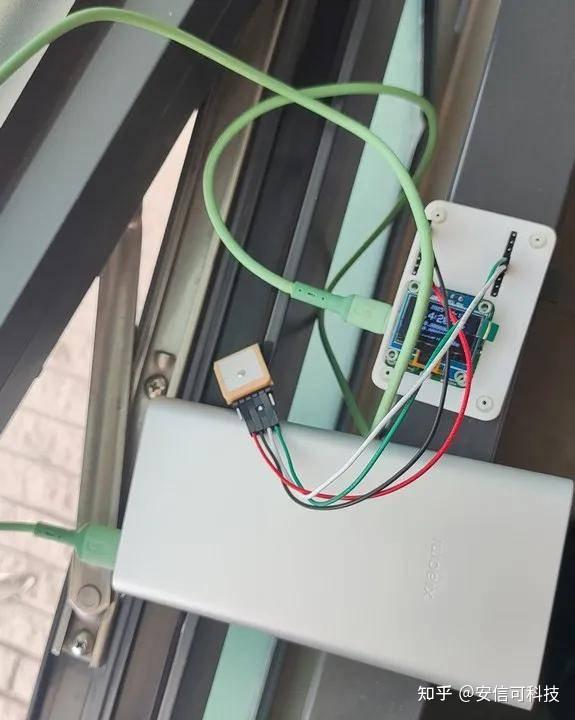
开发板详见:
立创开源硬件平台https://oshwhub.com/lijinlei0907/intelligent-portable-thermometer
OLED 显示
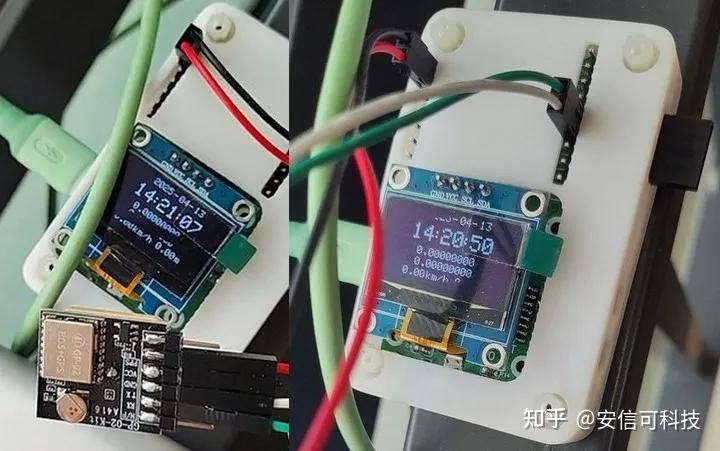
动态演示
审核编辑 黄宇
-
TB-02 Kit 开发板介绍 基于泰凌微TLSR8258国产BLE蓝牙芯片 精选资料分享2021-07-29 3632
-
渗透测试过程中所使用的抓包方法2023-02-01 2988
-
防静电ESD测试过程展示2021-09-30 3333
-
安信可Rd-Kit雷达蓝牙底板的使用教程2023-11-17 1998
-
LoRa-Kit开发板怎么使用? 安信可图文详解LoRa-Kit开发板使用步骤2024-05-11 1737
-
用安信可AI人脸识别开发板BW21-CBV-Kit驱动墨水屏2025-03-06 1135
-
【离线语音】安信可VC-01/02教程:中级入门篇2025-07-31 1113
-
安信可VC-01/02二次开发篇: 事件和GPIO控制2025-08-19 1585
-
安信可VC-01/02二次开发篇: PWM输出2025-08-27 1289
-
【离线语音】安信可VC-01/02二次开发篇:自定义音频播放控制2025-09-25 1109
全部0条评论

快来发表一下你的评论吧 !
