


 【CW32模块使用】0.96寸IIC单色屏
描述
一、模块来源
模块实物展示:
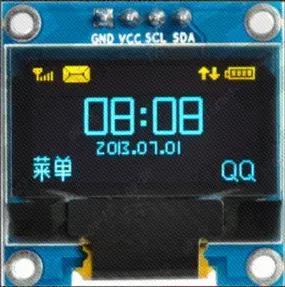
资料下载链接:https://pan.baidu.com/s/1xy2zH8-hs-S8-_AcVtBP_g
资料提取码:0jhj
二、规格参数
工作电压:3.3V
工作电流:9MA
模块尺寸:27.3 x 27.8 MM
像素大小:128(H) x 64(V)RGB
驱动芯片:SSD1306
通信协议:IIC
管脚数量:4 Pin(2.54mm间距排针)
以上信息见厂家资料文件
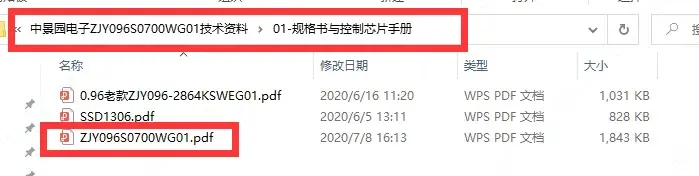
文件路径
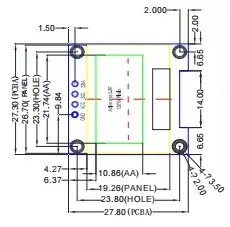
尺寸参数
三、移植过程
我们的目标是将例程移植至立创·CW32F030C8T6开发板上。按照以下步骤,即可完成移植。
将源码导入工程;
根据编译报错处进行粗改;
修改引脚配置;
修改时序配置;
移植验证。
3.1查看资料
打开厂家资料例程(例程下载见百度网盘链接下载)。具体路径见例程路径
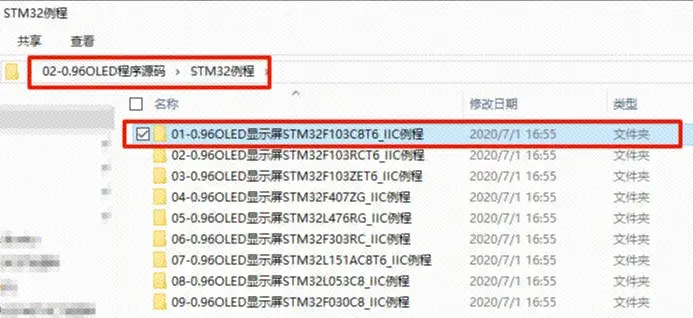
例程路径
3.2移植至工程
将厂家资料路径下的【LCD】文件夹,复制到自己的工程中。(工程可以参考入门手册工程模板)
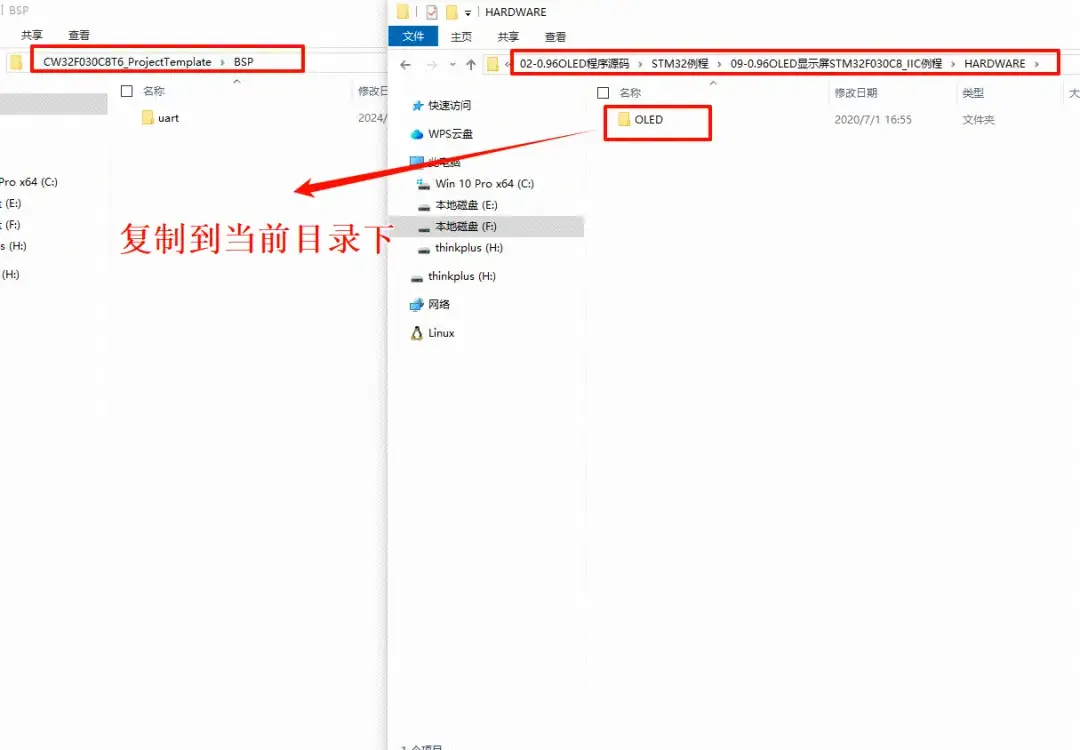
复制示意图
我们打开工程文件,将我们刚刚复制到文件夹中的文件,导入C文件和路径。
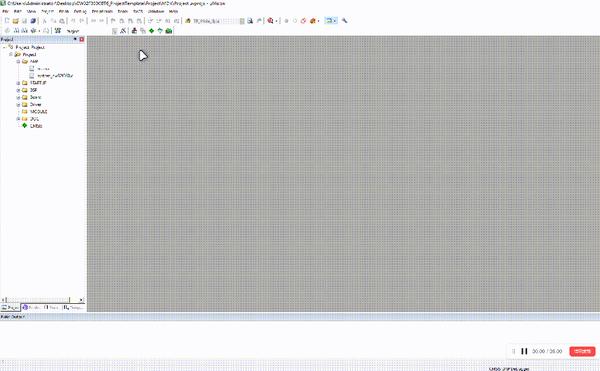
将 oled.h 文件下的 sys.h 改为 board.h。
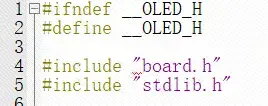
修改oled.h头文件
将 oled.c 文件下的 delay.h 注释掉。
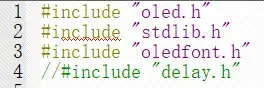
修改oled.c文件
在oled.h文件中定义三个宏,u8、u16、u32。
#ifndef u8
#define u8 uint8_t
#endif

#ifndef u16
#define u16 uint16_t
#endif

#ifndef u32
#define u32 uint32_t
#endif
3.3. 引脚选择
该屏幕需要设置4个接口,具体接口说明见 各引脚说明。
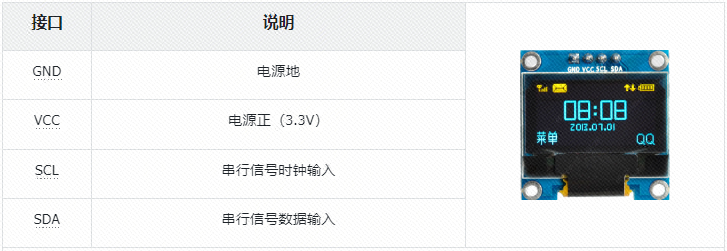
模块为IIC通信协议的从机,SCL为IIC信号线,SDA为IIC数据线。
3.4. 软件I2C移植
当前厂家源码使用的是软件IIC接口,IIC时序部分厂家已经完成,我们只需要将引脚和延时配置好即可。所以对应接入的屏幕引脚请按照你的需要。这里选择的引脚见下图。
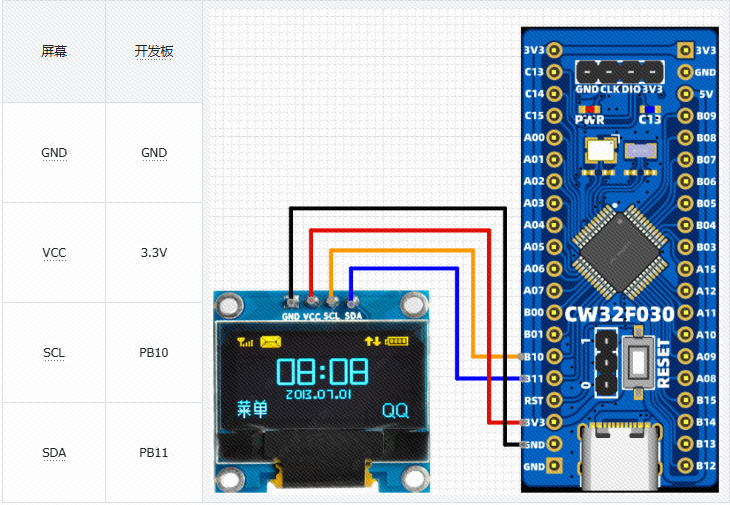
选择好引脚后,进入工程开始编写屏幕引脚初始化代码。
在oled.h中定义LCD端口移植宏
//-----------------OLED端口引脚移植定义----------------

#define OLED_RCC_ENABLE()        __RCC_GPIOB_CLK_ENABLE()

#define OLED_GPIO_PORT           CW_GPIOB

#define OLED_SCL_PIN             GPIO_PIN_10
#define OLED_SDA_PIN             GPIO_PIN_11
将oled.c源代码中的 void OLED_Init(void) 修改为如下代码。
//OLED的初始化
void OLED_Init(void)
{
    GPIO_InitTypeDef  GPIO_InitStructure;

    RCC_APB2PeriphClockCmd(RCC_APB2Periph_GPIOB,ENABLE);//使能GPIO时钟

    //GPIO初始化设置
    GPIO_InitStructure.GPIO_Pin = GPIO_Pin_10|GPIO_Pin_11;
    GPIO_InitStructure.GPIO_Mode = GPIO_Mode_Out_PP;//推挽输出模式
    GPIO_InitStructure.GPIO_Speed = GPIO_Speed_50MHz;//100MHz
    GPIO_Init(GPIOB, &GPIO_InitStructure);//初始化

    delay_ms(200);

    OLED_WR_Byte(0xAE,OLED_CMD);//--turn off oled panel
    OLED_WR_Byte(0x00,OLED_CMD);//---set low column address
    OLED_WR_Byte(0x10,OLED_CMD);//---set high column address
    OLED_WR_Byte(0x40,OLED_CMD);//--set start line address  Set Mapping RAM Display Start Line (0x00~0x3F)
    OLED_WR_Byte(0x81,OLED_CMD);//--set contrast control register
    OLED_WR_Byte(0xCF,OLED_CMD);// Set SEG Output Current Brightness
    OLED_WR_Byte(0xA1,OLED_CMD);//--Set SEG/Column Mapping     0xa0左右反置 0xa1正常
    OLED_WR_Byte(0xC8,OLED_CMD);//Set COM/Row Scan Direction   0xc0上下反置 0xc8正常
    OLED_WR_Byte(0xA6,OLED_CMD);//--set normal display
    OLED_WR_Byte(0xA8,OLED_CMD);//--set multiplex ratio(1 to 64)
    OLED_WR_Byte(0x3f,OLED_CMD);//--1/64 duty
    OLED_WR_Byte(0xD3,OLED_CMD);//-set display offset        Shift Mapping RAM Counter (0x00~0x3F)
    OLED_WR_Byte(0x00,OLED_CMD);//-not offset
    OLED_WR_Byte(0xd5,OLED_CMD);//--set display clock divide ratio/oscillator frequency
    OLED_WR_Byte(0x80,OLED_CMD);//--set divide ratio, Set Clock as 100 Frames/Sec
    OLED_WR_Byte(0xD9,OLED_CMD);//--set pre-charge period
    OLED_WR_Byte(0xF1,OLED_CMD);//Set Pre-Charge as 15 Clocks & Discharge as 1 Clock
    OLED_WR_Byte(0xDA,OLED_CMD);//--set com pins hardware configuration
    OLED_WR_Byte(0x12,OLED_CMD);
    OLED_WR_Byte(0xDB,OLED_CMD);//--set vcomh
    OLED_WR_Byte(0x40,OLED_CMD);//Set VCOM Deselect Level
    OLED_WR_Byte(0x20,OLED_CMD);//-Set Page Addressing Mode (0x00/0x01/0x02)
    OLED_WR_Byte(0x02,OLED_CMD);//
    OLED_WR_Byte(0x8D,OLED_CMD);//--set Charge Pump enable/disable
    OLED_WR_Byte(0x14,OLED_CMD);//--set(0x10) disable
    OLED_WR_Byte(0xA4,OLED_CMD);// Disable Entire Display On (0xa4/0xa5)
    OLED_WR_Byte(0xA6,OLED_CMD);// Disable Inverse Display On (0xa6/a7)
    OLED_Clear();
    OLED_WR_Byte(0xAF,OLED_CMD);
}
将lcd_init.h中的 OLED端口定义 宏。进行修改!
//-----------------OLED端口定义----------------

#define OLED_SCL_Clr() GPIO_WritePin(OLED_GPIO_PORT,OLED_SCL_PIN,GPIO_Pin_RESET)//SCL
#define OLED_SCL_Set() GPIO_WritePin(OLED_GPIO_PORT,OLED_SCL_PIN,GPIO_Pin_SET)

#define OLED_SDA_Clr() GPIO_WritePin(OLED_GPIO_PORT,OLED_SDA_PIN,GPIO_Pin_RESET)//SDA
#define OLED_SDA_Set() GPIO_WritePin(OLED_GPIO_PORT,OLED_SDA_PIN,GPIO_Pin_SET)

//#define OLED_RES_Clr() GPIO_ResetBits(GPIOA,GPIO_Pin_2)//RES
//#define OLED_RES_Set() GPIO_SetBits(GPIOA,GPIO_Pin_2)
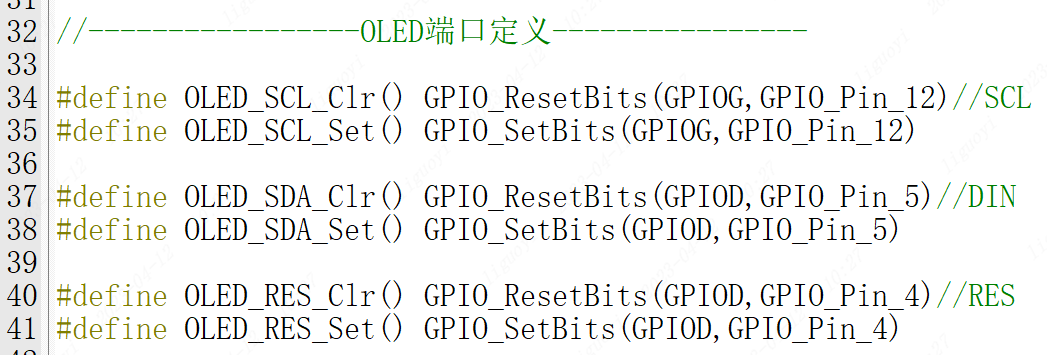
原来端口定义
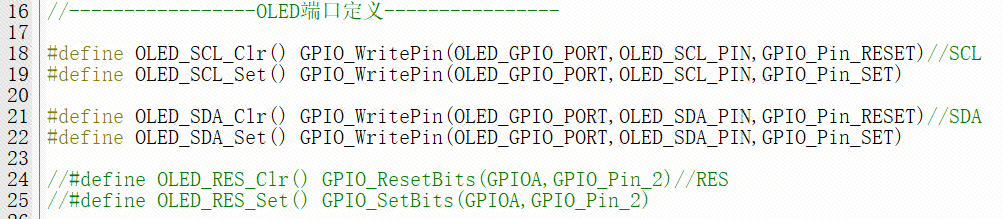
修改后端口定义
打开oled.c文件 找到 void IIC_delay(void) 函数,将里面的内容替换为
/**********************************************************
 * 函 数 名 称:IIC_delay
 * 函 数 功 能:延时
 * 传 入 参 数:无
 * 函 数 返 回:无
 * 作       者:www.lckfb.com
 * 备       注:
**********************************************************/
void IIC_delay(void)
{
        delay_us(5);
}
四. 移植验证
在main.c中输入代码如下
/*
 * 立创开发板软硬件资料与相关扩展板软硬件资料官网全部开源
 * 开发板官网:www.lckfb.com
 * 技术支持常驻论坛,任何技术问题欢迎随时交流学习
 * 立创论坛:https://oshwhub.com/forum
 * 关注bilibili账号:【立创开发板】,掌握我们的最新动态!
 * 不靠卖板赚钱,以培养中国工程师为己任
 * Change Logs:
 * Date           Author       Notes
 * 2024-06-18     LCKFB-LP    first version
 */
#include "board.h"
#include "stdio.h"
#include "bsp_uart.h"
#include "oled.h"

int32_t main(void)
{
    board_init();        // 开发板初始化

    uart1_init(115200);        // 串口1波特率115200

    OLED_Init();     //初始化OLED
    OLED_Clear();

    while(1)
    {
        OLED_ShowString(0,0,(uint8_t *)"ABC",8,1);//6*8 “ABC”
        OLED_ShowString(0,8,(uint8_t *)"ABC",12,1);//6*12 “ABC”
        OLED_ShowString(0,20,(uint8_t *)"ABC",16,1);//8*16 “ABC”
        OLED_ShowString(0,36,(uint8_t *)"ABC",24,1);//12*24 “ABC”
        OLED_Refresh();
        delay_ms(100);

    }
}
上电效果:
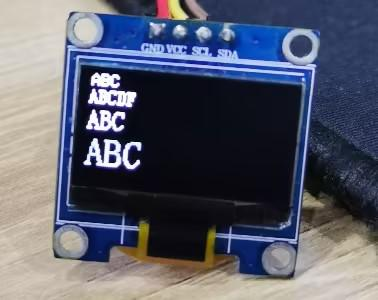
模块移植成功案例代码:
链接:https://pan.baidu.com/s/1YnMyfuDg7ax4LpDQ028dWQ?pwd=LCKF 提取码:LCKF
-
0.96寸4针IIC OLED显示模块的设计与使用指南2026-05-09 440
-
CW32模块使用 1.3寸单色OLED显示屏2025-07-01 902
-
【CW32模块使用】0.96寸SPI单色屏2025-03-29 3416
-
CW32快速开发入门2024-04-24 4003
-
【外设移植】0.96寸IIC单色屏+Ai-M61开发板2024-02-26 5548
-
基于CW32的RC522刷卡模块的应用2023-11-02 2869
-
cw32和stm32的区别2023-08-16 6768
-
【CW32移植Free-RTOS】CW32开发者扶持计划2023-04-18 7717
-
基于 SPI 协议在 0.96 寸 OLED上2021-11-30 2573
-
基于 SPI 协议在 0.96 寸 OLED上【平滑显示汉字】及【温湿度数据采集显示】2021-11-21 1852
-
利用51单片机+0.96寸iic接口oled显示图片或动图2021-11-10 1644
-
0.96寸单色OLED驱动板电路原理图免费下载2019-07-23 6016
-
0.96_OLED显示屏_C51系列_IIC无应答_例程2016-07-12 1287
-
0.96_OLED显示屏_arduino_IIC_例程2016-07-11 2072
全部0条评论

快来发表一下你的评论吧 !
