


CW32L010安全运行库保护的实现
描述
前言
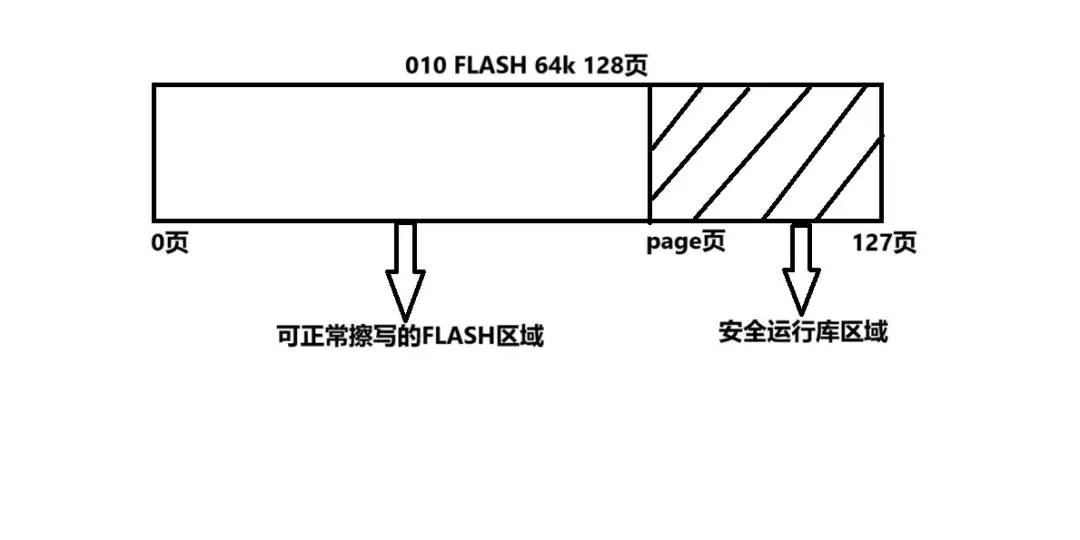
CW32L010的FLASH存储器支持安全运行库功能,方案商可将核心算法存储于安全运行库区域以供客户二次开发时调用。使能安全运行库保护功能后,用户代码可正常调用运行安全运行库区域内的函数,但无法通过任何方式(CPU、SWD、ISP)读出安全运行库区域的内容,只有提供正确的密码时才能通过ISP协议禁止安全运行库保护功能,同 时清空安全运行库存储空间的数据。
一、工作原理
通过将要保护的算法指定存放到FLASH对应的页面page(0
二、设置安全运行库的具体步骤
2.1.将算法函数指定到目标页面
只需要使用__attribute__((section(".ARM.__at_address")))就可以将变量、数组、函数指定到FLASH的任意地址。
常见的函数类型指定地址方法如下:
@font-face{
font-family:"Times New Roman";
}
@font-face{
font-family:"宋体";
}
@font-face{
font-family:"Calibri";
}
p.MsoNormal{
mso-style-name:正文;
mso-style-parent:"";
margin:0pt;
margin-bottom:.0001pt;
mso-pagination:none;
text-align:justify;
text-justify:inter-ideograph;
font-family:Calibri;
mso-fareast-font-family:宋体;
mso-bidi-font-family:'Times New Roman';
font-size:10.5000pt;
mso-font-kerning:1.0000pt;
}
p.MsoFooter{
mso-style-name:页脚;
mso-style-noshow:yes;
margin:0pt;
margin-bottom:.0001pt;
tab-stops:center blank 207.6500pt right blank 415.3000pt ;
layout-grid-mode:char;
mso-pagination:none;
text-align:left;
font-family:Calibri;
mso-fareast-font-family:宋体;
mso-bidi-font-family:'Times New Roman';
font-size:9.0000pt;
mso-font-kerning:1.0000pt;
}
span.msoIns{
mso-style-type:export-only;
mso-style-name:"";
text-decoration:underline;
text-underline:single;
color:blue;
}
span.msoDel{
mso-style-type:export-only;
mso-style-name:"";
text-decoration:line-through;
color:red;
}
@page{mso-page-border-surround-header:no;
	mso-page-border-surround-footer:no;}@page Section0{
}
div.Section0{page:Section0;}
void func1 (void);
void func1 (void) __attribute__((section(".ARM.__at_0x0000FE00")));
//指定func函数的地址为0x0000FE00,所在页面为127页

void func2 (uint8_t CNT);void func2 (uint8_t) __attribute__((section(".ARM.__at_0x0000FE50")));//指定func函数的地址为0x0000FE50,所在页面为127页

uint8_t func3 (uint8_t CNT1,uint8_t* p);
uint8_t func3 (uint8_t, uint8_t*) __attribute__(( section(".ARM.__at_0x0000FEA4" )));
//指定func函数的地址为0x0000FEA4,所在页面为127页
多个函数指定地址储存时,在指定地址前,需先在KEIL的map文件中找到各个函数的大小,免得指定地址时内存冲突。map文件如下:
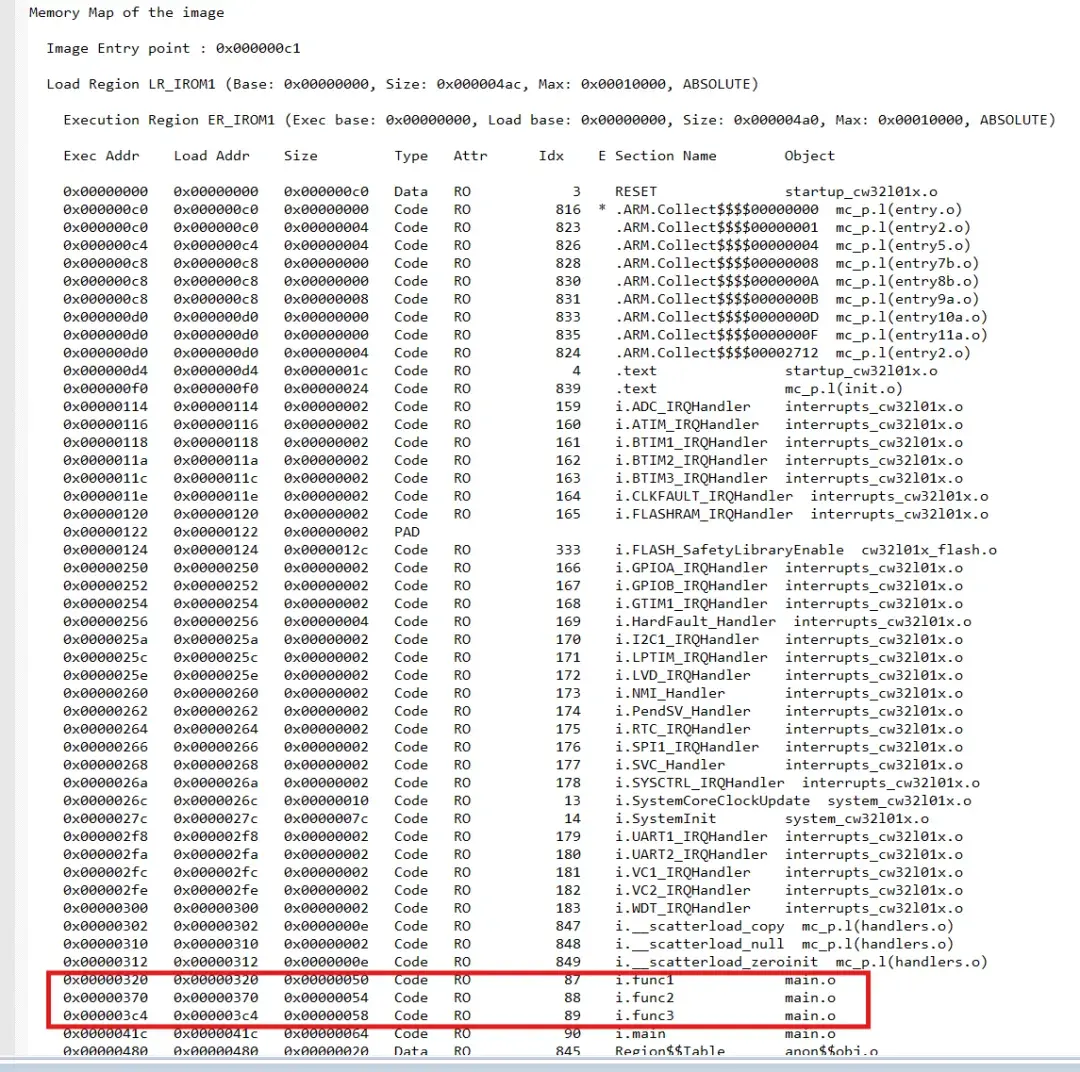
由此可以得到func1、func2、func3的字节大小分别是0x50、0x54、0x58,接下来就可以指定函数的存储地址了。
注意指定地址时,因为32位变量需要4字节对齐,也就是地址的最低位得是0、4、8、C才行,所以地址不能出现,如:0x0000FE01、0x0000FE02、0x0000FE03、0x0000FE05、0x0000FE06、0x0000FE07、0x0000FE09、0x0000FE0A、0x0000FE0B、0x0000FE0D、0x0000FE0E、0x0000FE0F
接着就可以指定func1的地址为0x0000FE00,func2的地址为0x0000FE00+0x50,func3的地址为0x0000FE00+0x50+0x54,如想指定其它地址,依次类推。
2.2.开启相应页面的安全运行库
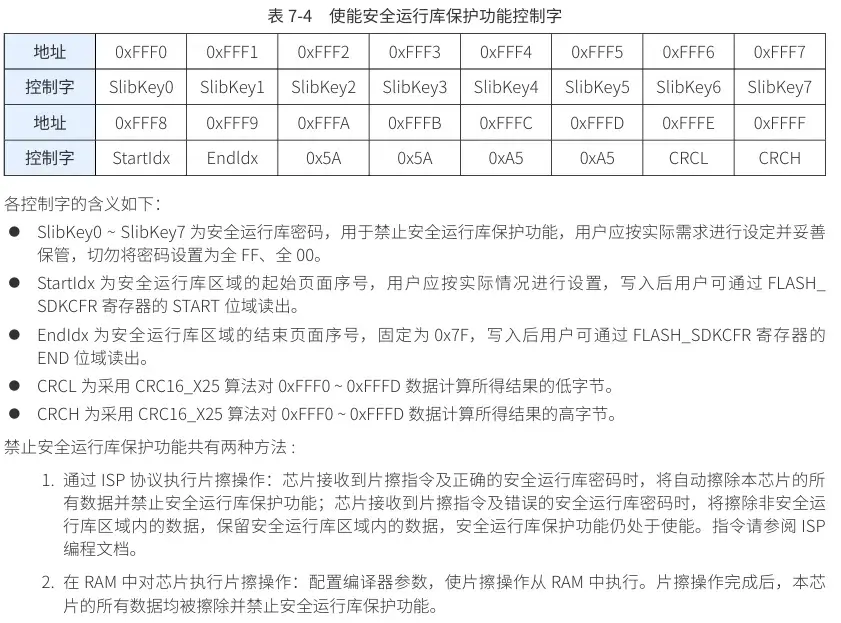
使能安全运行库保护功能的方法为:在地址0xFFF0~ 0xFFFF 写入特定控制字,如下表所示:
2.3.参考代码
文章及视频中使用到的例程源码文件:
通过网盘分享的文件:CW32L010 FLASH PROTECT.zip
链接: https://pan.baidu.com/s/1d5tj_zz-b1bQGkJkuAgbdQ?pwd=CW32
提取码: CW32
@font-face{
font-family:"Times New Roman";
}
@font-face{
font-family:"宋体";
}
@font-face{
font-family:"Calibri";
}
p.MsoNormal{
mso-style-name:正文;
mso-style-parent:"";
margin:0pt;
margin-bottom:.0001pt;
mso-pagination:none;
text-align:justify;
text-justify:inter-ideograph;
font-family:Calibri;
mso-fareast-font-family:宋体;
mso-bidi-font-family:'Times New Roman';
font-size:10.5000pt;
mso-font-kerning:1.0000pt;
}
p.MsoFooter{
mso-style-name:页脚;
mso-style-noshow:yes;
margin:0pt;
margin-bottom:.0001pt;
tab-stops:center blank 207.6500pt right blank 415.3000pt ;
layout-grid-mode:char;
mso-pagination:none;
text-align:left;
font-family:Calibri;
mso-fareast-font-family:宋体;
mso-bidi-font-family:'Times New Roman';
font-size:9.0000pt;
mso-font-kerning:1.0000pt;
}
span.msoIns{
mso-style-type:export-only;
mso-style-name:"";
text-decoration:underline;
text-underline:single;
color:blue;
}
span.msoDel{
mso-style-type:export-only;
mso-style-name:"";
text-decoration:line-through;
color:red;
}
@page{mso-page-border-surround-header:no;
	mso-page-border-surround-footer:no;}@page Section0{
}
div.Section0{page:Section0;}
void func1 (void) __attribute__((section(".ARM.__at_0x0000FE00")));//指定func函数的地址为0x0000FE00,所在页面为127页
void func2 (uint8_t ) __attribute__((section(".ARM.__at_0x0000FE50")));//指定func函数的地址为0x0000FE50,所在页面为127页
uint8_t func3 (uint8_t ,uint8_t* ) __attribute__((section(".ARM.__at_0x0000FEA4")));//指定func函数的地址为0x0000FEA4,所在页面为127页

void func1 (void)
{
 //PB03---LED1 推挽输出
    CW_GPIOB- >DIR_f.PIN3 = 0;
    CW_GPIOB- >ANALOG_f.PIN3 = 0;

 uint8_t cnt = 10;

    while(cnt--)
 {
  CW_GPIOB- >TOG_f.PIN3 = 1;
  uint32_t thisCnt = 0X9FFFF;
  while( thisCnt-- )
  {
   ;
  }
 }
}

void func2 (uint8_t CNT)
{
 //PB03---LED1 推挽输出
    CW_GPIOB- >DIR_f.PIN3 = 0;
    CW_GPIOB- >ANALOG_f.PIN3 = 0;

 uint8_t cnt = CNT;

    while(cnt--)
 {
  CW_GPIOB- >TOG_f.PIN3 = 1;
  uint32_t thisCnt = 0X9FFFF;
  while( thisCnt-- )
  {
   ;
  }
 }
}

uint8_t func3 (uint8_t CNT1,uint8_t* p)
{
 //PB03---LED1 推挽输出
    CW_GPIOB- >DIR_f.PIN3 = 0;
    CW_GPIOB- >ANALOG_f.PIN3 = 0;

 uint8_t cnt = CNT1 + *p;

    while(cnt--)
 {
  CW_GPIOB- >TOG_f.PIN3 = 1;
  uint32_t thisCnt = 0X9FFFF;
  while( thisCnt-- )
  {
   ;
  }
 }
 return 0;
}

int32_t main(void)
{
    uint8_t ret,temp;

    __SYSCTRL_FLASH_CLK_ENABLE();
    __SYSCTRL_CRC_CLK_ENABLE();
 __SYSCTRL_GPIOB_CLK_ENABLE();

    ret = FLASH_SafetyLibraryEnable(SlibKey, 0x7F, 0x7F);

    if (ret)
    {
        // 开启安全区失败
        while(1);
    }

 func1();

 func2(10);

 temp = 5;
 ret = func3(5,&temp);

    //结束
    while(1)
    {

    }
}
2.4.函数调用
函数调用时需要在指定的地址上加1,因为对于cortex M核的芯片,任何跳转相关地址的最低位,即BIT0都应是1。该位表示将用到的的指令集为Thumb指令。具体调用方法如下:
@font-face{
font-family:"Times New Roman";
}
@font-face{
font-family:"宋体";
}
@font-face{
font-family:"Calibri";
}
p.MsoNormal{
mso-style-name:正文;
mso-style-parent:"";
margin:0pt;
margin-bottom:.0001pt;
mso-pagination:none;
text-align:justify;
text-justify:inter-ideograph;
font-family:Calibri;
mso-fareast-font-family:宋体;
mso-bidi-font-family:'Times New Roman';
font-size:10.5000pt;
mso-font-kerning:1.0000pt;
}
p.MsoFooter{
mso-style-name:页脚;
mso-style-noshow:yes;
margin:0pt;
margin-bottom:.0001pt;
tab-stops:center blank 207.6500pt right blank 415.3000pt ;
layout-grid-mode:char;
mso-pagination:none;
text-align:left;
font-family:Calibri;
mso-fareast-font-family:宋体;
mso-bidi-font-family:'Times New Roman';
font-size:9.0000pt;
mso-font-kerning:1.0000pt;
}
span.msoIns{
mso-style-type:export-only;
mso-style-name:"";
text-decoration:underline;
text-underline:single;
color:blue;
}
span.msoDel{
mso-style-type:export-only;
mso-style-name:"";
text-decoration:line-through;
color:red;
}
@page{mso-page-border-surround-header:no;
	mso-page-border-surround-footer:no;}@page Section0{
}
div.Section0{page:Section0;}
#define  Slib_Led_Blink1     ((void (*)())(0x0000FE00UL + 1))
#define  Slib_Led_Blink2     ((void (*)(uint8_t))(0x0000FE50UL + 1))
#define  Slib_Led_Blink3     ((uint8_t (*)(uint8_t,uint8_t*))(0x0000FEA4UL + 1))

int32_t main(void)
{
    SYSCTRL_HSI_Enable(SYSCTRL_HSIOSC_DIV12);
 __SYSCTRL_GPIOB_CLK_ENABLE();

 Slib_Led_Blink1();//方法一:宏调用
 ((void (*)())(0x0000FE00UL + 1))();//方法二:直接调用
 void (*ppp1) ();//方法三;函数指针调用
 ppp1 = (void (*) ())(0xFE00 + 1);
 ppp1();

 Slib_Led_Blink2(10);//方法一:宏调用
 ((void (*)(uint8_t))(0x0000FE50UL + 1))(10);//方法二:直接调用
 void (*ppp2)(uint8_t);//方法三;函数指针调用
 ppp2 = ((void (*)(uint8_t))(0x0000FE50UL + 1));
 ppp2(10);

 uint8_t xx = 5;
 uint8_t temp = Slib_Led_Blink3(5,&xx);//方法一:宏调用
 ((uint8_t (*)(uint8_t,uint8_t*))(0x0000FEA4UL + 1))(5,&xx);//方法二:直接调用
 uint8_t (*ppp3)(uint8_t,uint8_t*);//方法三;函数指针调用
 ppp3 = (uint8_t (*)(uint8_t,uint8_t*))(0x0000FEA4+1);
 ppp3(5,&xx);

    while (1)
    {

    }
}
2.5.擦除安全运行库
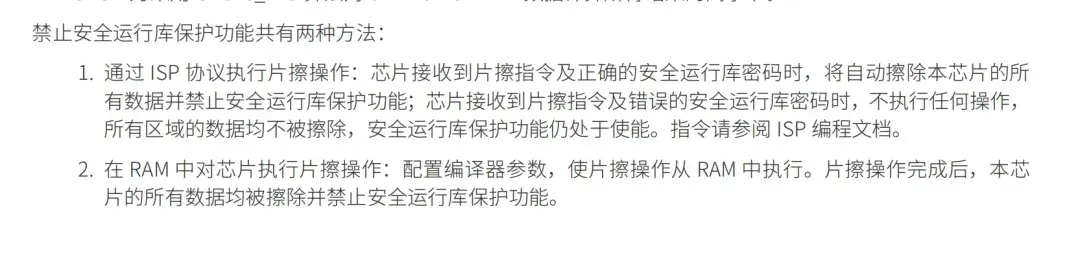
禁止安全运行库保护功能共有两种方法:
(1).通过ISP协议执行片擦操作:芯片接收到片擦指令及正确的安全运行库密码时,将自动擦除本芯片的所有数据并禁止安全运行库保护功能;。
需要用到上位机CW-Programmmer,具体连线请按上位机提示进行连接,上位机配置需按下图配置:
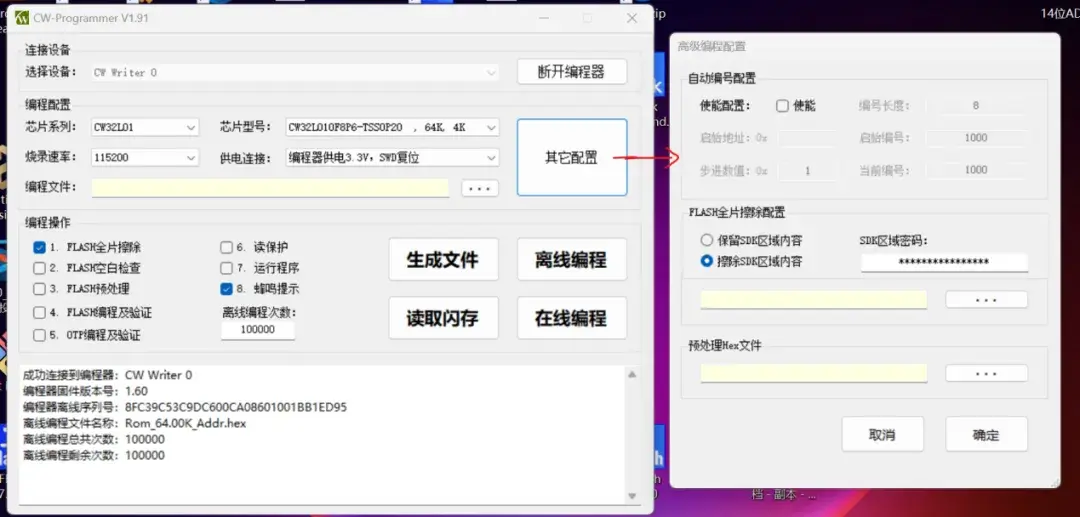
填写SDK区域密码时,需按16进制来填写密码,如:十进制1,0xF,'_','!','@','*','A','1',填写时为它们对应ascii值的16进制,分别是0x01、0x0F、0x5F、0x21、0x40、0x2A、0x41、0x31,所以密码应该填写010F5F21402A4131。
填写完密码后,点击在线编程,即可擦除安全运行库。
(2).在RAM中对芯片执行片擦操作:配置编译器参数,使片擦操作从RAM中执行。片擦操作完成后,本芯片的所有数据均被擦除并禁止安全运行库保护功能。
2.6.注意事项
(1).指定算法函数的地址不要太靠前,否则会与下载的代码起冲突,建议选择FLASH靠后的页面。
(2).储存在安全运行库页面里的函数,不可调用安全区外的函数。
(3).安全运行库代码下载到MCU后,要进行上电复位才能生效。
三、现象演示
将安全运行库的代码下载到CW32L010F8P6 StartKit REV01板子中后,断电后重新上电,DEBUG页面的memory中,127页显示不可读,全0,表示127页已经受到保护了。
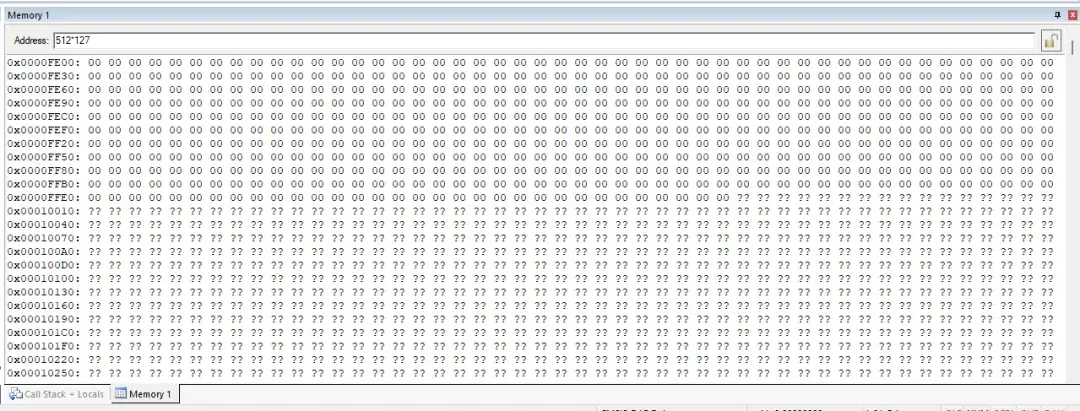
用户可以在其它工程中调用储存在安全运行库页面的函数,具体调用方法详情见2.4函数调用章节。
四、视频讲解
CW32L010黑客区安全运行库保护的实现 :1.FLASH及安全库区域原理_哔哩哔哩_bilibili
CW32L010黑客区安全运行库保护的实现 :2.算法编程调用及注意事项_哔哩哔哩_bilibili
CW32L010黑客区安全运行库保护的实现 :3. 实例代码运行讲解及FLASH读取验证_哔哩哔哩_bilibili
审核编辑 黄宇
-
CW32L010的2种启动模式介绍2025-11-28 216
-
CW32L010的串口输出2025-11-27 185
-
CW32L010新品安全低功耗MCU性能如何?有哪些优势?2025-11-24 342
-
CW32L010用jlink能去除读保护吗?2025-11-20 232
-
CW32L010的安全运行库保护是什么功能?2025-11-12 214
-
基于CW32L010的高性能温控器方案2025-07-02 746
-
CW32L010 Motor Control Driver无刷电机驱动板上手体验2024-12-26 2307
-
方案介绍|CW32L010安全低功耗MCU:驱动高速风筒新力量2024-12-10 1408
-
【产品方案】基于CW32L010低成本电动工具方案2024-11-28 3011
-
【CW32L010 Mini Board 测评】简介、点灯2024-11-17 3194
-
CW32L010学习笔记2024-11-15 5078
-
CW32L010 新品初体验2024-11-14 1975
全部0条评论

快来发表一下你的评论吧 !
