


HarmonyOS应用图像stride处理方案
描述
概述
在计算机图形学和图像处理中,stride通常指的是在内存中存储多维数组(如图像或纹理)时,行与行之间的字节间隔,即每一行的起始地址与下一行的起始地址之间的距离,在本文中stride指的是图像的一行数据在内存中实际占用的字节数,为了内存对齐和提高读取效率的要求,通常大于图像的宽度。在解析图像内容时,如果未考虑stride,直接通过使用width*height读取图像内容去解析图像,会导致相机预览异常;当预览流图像stride与width不一致时,需要对stride进行无效像素去除处理。
实现原理
当图像存储在内存中时,内存缓冲区可能在每行像素之后包含额外的填充字节。填充字节会影响图像在内存中的存储方式,但不会影响图像的显示方式。stride是内存中一行像素到内存中下一行像素的字节数;如果存在填充字节,则步幅比图像的宽度宽。
说明:stride在不同的平台底层上报的值不同,开发者需根据实际业务获取stride后做处理适配。在本文中通过预览流帧数据的返回值image.Component.rowStride获取stride。
如下图:在一个width为3,height为3,stride为4的图片上(例如定义了一个480*480分辨率的图像),实际分配内存并不是width*height即3*3(此处为定义的预览流分辨率的宽高比,即实际分配内存不是480*480),而是stride*height即4*3,这样实现了内存对齐,方便硬件处理。
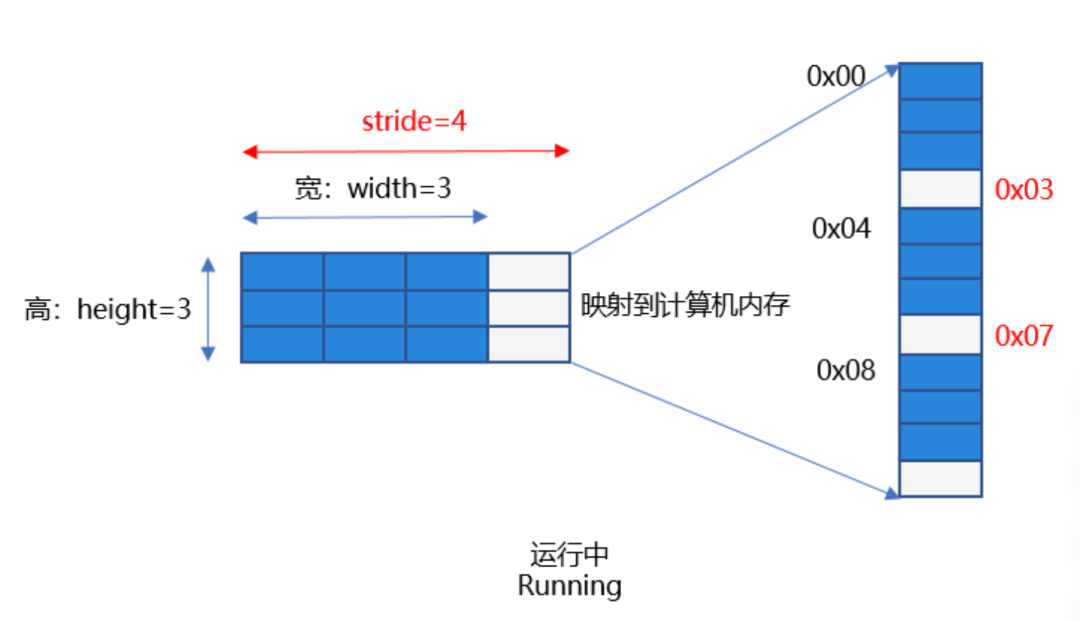
图1:需正确处理stride
如果开发者根据width和height数据去处理像素数据,即把0x00-0x09地址的数据当做像素去处理,就会出现解析了错误的像素数据的问题,并且使用了无效的像素0x03,0x07,会导致图片无法正常显示导致“相机花屏”现象。因此,要根据stride值处理预览数据流,去除无效的像素后送显,才能获取正确的预览流图像。
场景案例
以一种高频的用户使用场景为例,应用需要定义一个1080*1080分辨率的预览流图像,此时的stride在相关平台的返回值为1088,此时需要对stride进行处理,处理无效像素后解析出正确的像素数据,避免出现预览流花屏。
【反例】未处理stride:当开发者创建PixelMap解析buffer时,直接按照宽去读取每行数据,没有处理stride,此时若解析了无效像素数据并传给Image组件直接送显,可能会出现预览流花屏现象。
以下为部分示例代码:
1. 应用通过image.ImageReceiver注册imageArrival图像回调方法,获取每帧图像数据实例image.Image,应用通过定义一个width为1080*height为1080分辨率的预览流直接创建pixelMap,此时获取到的stride的值为1088,解析buffer时若直接按照宽去读取每行数据(使用了无效像素数据)并存储到全局变量stridePixel中,传给Image送显,会导致预览流花屏。
onImageArrival(receiver: image.ImageReceiver): void {
receiver.on('imageArrival', () => {
    receiver.readNextImage((err: BusinessError, nextImage: image.Image) => {
    if (err || nextImage === undefined) {
        Logger.error(TAG, `requestPermissionsFromUser call Failed! error: ${err.code}`);
        return;
    }
    if (nextImage) {
        nextImage.getComponent(image.ComponentType.JPEG, async (_err, component: image.Component) => {
        let width = 1080; // width为应用创建预览流分辨率对应的宽
        let height = 1080; // height为应用创建预览流分辨率对应的高
        // component.byteBuffer为相机返回的预览流数据,其中包含了stride对齐数据
        let pixelMap = await image.createPixelMap(component.byteBuffer, {
            size: {
            height: height,
            width: width
            },
            // 反例:width没有处理stride值,创建PixelMap解析buffer时直接按照宽去读取每行数据,可能使用了无效像素数据,导致预览流花屏。
            srcPixelFormat: image.PixelMapFormat.NV21
        })
        AppStorage.setOrCreate('stridePixel', pixelMap); // 将创建出的PixelMap存储到全局变量stridePixel中并传给Image组件送显。
        nextImage.release();
        })
    }
    });
})
}
2. 在初始相机模块时,调用onImageArrival(),将未处理的width和height作为size,创建PixelMap,通过在Image中传入被@StorageLink修饰的变量stridePixel进行数据刷新,图片送显。
@Component
export struct PageThree {
pathStack: NavPathStack = new NavPathStack();
@State isShowStridePixel: boolean = false;
@StorageLink('stridePixel') @Watch('onStridePixel') stridePixel: image.PixelMap | undefined = undefined;
@State imageWidth: number = 1080;
@State imageHeight: number = 1080;
@StorageLink('previewRotation') previewRotate: number = 0;
onStridePixel(): void {
    this.isShowStridePixel = true;
}
aboutToAppear(): void {
    CameraService.initCamera(0);
}
aboutToDisappear(): void {
    CameraService.releaseCamera();
}
// ...
build() {
    NavDestination() {
    // ...
    Column() {
        if (this.isShowStridePixel) {
        Image(this.stridePixel) // 反例:解析了错误的像素数据,并存储到全局变量stridePixel中,传给Image送显,会导致相机预览流花屏。
            .width(px2vp(this.imageWidth))
            .height(px2vp(this.imageHeight))
            .margin({ top: 150 })
            .rotate({
            z: 0.5,
            angle: this.previewRotate
            })
        }
        // ...
    }
    .justifyContent(FlexAlign.Center)
    .height('90%')
    .width('100%')
    }
    .backgroundColor(Color.White)
    .hideTitleBar(true)
    .onBackPressed(() => {
    this.pathStack.pop();
    return true;
    })
    .onReady((context: NavDestinationContext) => {
    this.pathStack = context.pathStack;
    })
}
}
【正例一】开发者使用width,height,stride三个值,处理相机预览流数据,处理stride方法一如下。分两种情况:
1. 当stride和width相等时,按宽读取buffer不影响结果。
2. 当stride和width不等时,将相机返回的预览流数据即component.byteBuffer的数据去除stride,拷贝得到新的dstArr数据进行数据处理,将处理后的dstArr数组buffer,通过width和height直接创建pixelMap, 并存储到全局变量stridePixel中,传给Image送显。
onImageArrival(receiver: image.ImageReceiver): void {
receiver.on('imageArrival', () => {
    receiver.readNextImage((err: BusinessError, nextImage: image.Image) => {
    // ...
    if (nextImage) {
        nextImage.getComponent(image.ComponentType.JPEG,
        async (err, component: image.Component) => {
            let width = 1080; // width为应用创建预览流分辨率对应的宽
            let height = 1080; // height为应用创建预览流分辨率对应的高
            let stride = component.rowStride; // 通过component.rowStride获取stride
            // 正例:情况1. 当图片的width等于相机预览流返回的行跨距stride,此时无需处理stride,通过width和height直接创建pixelMap,
            // 并存储到全局变量stridePixel中,传给Image送显。
            if (stride === width) {
            let pixelMap = await image.createPixelMap(component.byteBuffer, {
                size: { height: height, width: width },
                srcPixelFormat: image.PixelMapFormat.NV21,
            })
            AppStorage.setOrCreate('stridePixel', pixelMap);
            } else {
            // 正例:情况2. 当图片的width不等于相机预览流返回的行跨距stride,
            // 此时将相机返回的预览流数据component.byteBuffer去除掉stride,拷贝得到新的dstArr数据,数据处理后传给其他不支持stride的接口处理。
            const dstBufferSize = width * height * 1.5; // 创建一个width * height * 1.5的dstBufferSize空间,此处为NV21数据格式。
            const dstArr = new Uint8Array(dstBufferSize); // 存放去掉stride后的buffer。
            // 读取每行数据,相机支持的profile宽高均为偶数,不涉及取整问题。
            for (let j = 0; j < height * 1.5; j++) { // 循环dstArr的每一行数据。
                // 拷贝component.byteBuffer的每行数据前width个字节到dstArr中(去除无效像素,刚好每行得到一个width*height的八字节数组空间)。
                const srcBuf = new Uint8Array(component.byteBuffer, j * stride,
                width); // 将component.byteBuffer返回的buffer,每行遍历,从首位开始,每行截取出width字节。
                dstArr.set(srcBuf, j * width); // 将width*height大小的数据存储到dstArr中。
            }
            let pixelMap = await image.createPixelMap(dstArr.buffer, {
                // 将处理后的dstArr数组buffer,通过width和height直接创建pixelMap,并存储到全局变量stridePixel中,传给Image送显。
                size: { height: height, width: width },
                srcPixelFormat: image.PixelMapFormat.NV21,
            })
            AppStorage.setOrCreate('stridePixel', pixelMap);
            }
            nextImage.release();
        })
    }
    });
})
}
【正例二】开发者使用width,height,stride三个值,处理相机预览流数据,处理stride方法二如下。分两种情况:
1. 当stride和width相等时,与正例一情况一致,此处不再赘述。
2. 当stride和width不等时,如果应用想使用byteBuffer预览流数据创建pixelMap直接显示,可以根据stride*height字节的大小先创建pixelMap,然后调用PixelMap的cropSync方法裁剪掉多余的像素,从而正确处理stride,解决预览流花屏问题。
onImageArrival(receiver: image.ImageReceiver): void {
receiver.on('imageArrival', () => {
    receiver.readNextImage((err: BusinessError, nextImage: image.Image) => {
    // ...
    if (nextImage) {
        nextImage.getComponent(image.ComponentType.JPEG, async (_err, component: image.Component) => {
        let width = 1080; // width为应用创建预览流分辨率对应的宽
        let height = 1080; // height为应用创建预览流分辨率对应的高
        let stride = component.rowStride; // 通过component.rowStride获取stride
        Logger.info(TAG, `receiver getComponent width:${width} height:${height} stride:${stride}`);
        // stride和width相等,按宽读取buffer不影响结果
        if (stride === width) {
            let pixelMap = await image.createPixelMap(component.byteBuffer, {
            size: { height: height, width: width },
            srcPixelFormat: image.PixelMapFormat.NV21,
            })
            AppStorage.setOrCreate('stridePixel', pixelMap);
        } else {
            let pixelMap = await image.createPixelMap(component.byteBuffer, {
            // 正例:1、创建PixelMap时width传stride,
            size: { height: height, width: stride },
            srcPixelFormat: 8,
            })
            // 2、然后调用PixelMap的cropSync方法裁剪掉多余的像素。
            pixelMap.cropSync({
            size: { width: width, height: height },
            x: 0,
            y: 0
            }) // 根据输入的尺寸裁剪图片,从(0,0)开始,裁剪width*height字节的区域。
            let pixelBefore: PixelMap | undefined = AppStorage.get('stridePixel');
            await pixelBefore?.release();
            AppStorage.setOrCreate('stridePixel', pixelMap);
        }
        nextImage.release();
        })
    }
    });
})
}
常见问题
如何获取相机预览流帧数据
通过ImageReceiver中imageArrival事件监听获取底层返回的图像数据。
如何获取预览流图像的stride的值
可以通过预览流帧数据的返回值image.Component.rowStride获取stride。
-
模糊图像处理解决方案2014-06-11 20000
-
《DNK210使用指南 -CanMV版 V1.0》第三十五章 image图像特征检测实验2024-11-06 1091
-
ADAS方案设计成功关键:图像处理技术2014-09-01 4373
-
DSP图像处理系统中信号完整性问题及解决方案2021-06-01 1508
-
【资料】华为HarmonyOS 图像开发指南2021-08-12 6927
-
如何使用Stride模式?2023-08-28 701
-
Altera的视频和图像处理解决方案2010-06-08 961
-
图像处理技术是什么_图像处理技术现状和发展前景2018-01-12 56130
-
OmniTek 超清HDTV图像处理方案演示2018-06-01 6212
-
基于FPGA的HEIF图像处理加速方案2020-10-23 3563
-
HarmonyOS的组件化设计方案2021-10-13 3482
-
HarmonyOS测试技术与实战-分布式应用测试解决方案2021-10-23 2343
-
如何利用HLS功能创建图像处理解决方案2022-05-13 5243
-
机器视觉之图像增强和图像处理2023-10-23 4165
-
钉钉正式开源HarmonyOS图片编辑组件2026-01-05 813
全部0条评论

快来发表一下你的评论吧 !
