


【HarmonyOS 5】鸿蒙Web组件和内嵌网页双向通信DEMO示例
描述
【HarmonyOS 5】鸿蒙Web组件和内嵌网页双向通信DEMO示例
##鸿蒙开发能力 ##HarmonyOS SDK应用服务##鸿蒙金融类应用 (金融理财#
一、前言
在 ArkUI 开发中,Web 组件(Web)允许开发者在应用内嵌入网页,实现混合开发场景。
本文将通过完整 DEMO,详解如何通过WebviewController实现 ArkUI 与内嵌网页的双向通信,涵盖 ArkUI 调用网页 JS、网页调用 ArkUI 对象的核心技术点。
二、双向通信实现原理
1、双向通信概念
Web 到 ArkUI(反向通信)通过registerJavaScriptProxy将 ArkUI 对象注册到网页的window对象,允许网页通过window.xxx调用 ArkUI 暴露的方法。
ArkUI 到 Web(正向通信)通过runJavaScript执行网页 JS 代码,支持回调获取返回值,实现原生代码调用网页函数。
2、双向通信流程图
ArkUI Web
┌──────────────┐ ┌──────────────┐
│ registerJS ├─────────────▶ window.objName │
│ (反向注册) │ ├──────────────┤
├──────────────┤ │ call test() │
│ runJavaScript├─────────────▶ execute JS code │
│ (正向调用) │ ├──────────────┤
└──────────────┘ └──────────────┘
三、双向通信实现步骤
1、ArkUI 定义可被网页调用的对象
创建一个TestObj类,声明允许网页调用的方法(白名单机制):
class TestObj {
  // 网页可调用的方法1:返回字符串
  test(): string {
    return "ArkUI Web Component";
  }

  // 网页可调用的方法2:打印日志
  toString(): void {
    console.log('Web Component toString');
  }

  // 网页可调用的方法3:接收网页消息
  receiveMessageFromWeb(message: string): void {
    console.log(`Received from web: ${message}`);
  }
}
2、ArkUI 组件核心代码
初始化控制器与状态
@Entry
@Component
struct WebComponent {
  // Webview控制器
  controller: webview.WebviewController = new webview.WebviewController();
  // 注册到网页的ArkUI对象
  @State testObj: TestObj = new TestObj();
  // 注册名称(网页通过window.[name]访问)
  @State regName: string = 'objName';
  // 接收网页返回数据
  @State webResult: string = '';

  build() { /* 组件布局与交互逻辑 */ }
}
布局与交互按钮,添加三个核心功能按钮:
Column() {
  // 显示网页返回数据
  Text(`Web返回数据:${this.webResult}`).fontSize(16).margin(10);

  // 1. 注册ArkUI对象到网页
  Button('注册到Window')
    .onClick(() = > {
      this.controller.registerJavaScriptProxy(
        this.testObj,  // ArkUI对象
        this.regName,  // 网页访问名称
        ["test", "toString", "receiveMessageFromWeb"]  // 允许调用的方法白名单
      );
    })

  // 2. ArkUI调用网页JS
  Button('调用网页函数')
    .onClick(() = > {
      this.controller.runJavaScript(
        'webFunction("Hello from ArkUI!")',  // 执行网页JS代码
        (error, result) = > {  // 回调处理返回值
          if (!error) this.webResult = result || '无返回值';
        }
      );
    })

  // 3. Web组件加载
  Web({ src: $rawfile('index.html'), controller: this.controller })
    .javaScriptAccess(true)  // 开启JS交互权限
    .onPageEnd(() = > {  // 页面加载完成时触发
      // 页面加载后自动调用网页测试函数
      this.controller.runJavaScript('initWebData()');
    })
}
3. registerJavaScriptProxy的实际作用是,将 ArkUI 对象绑定到网页window,实现反向通信。
registerJavaScriptProxy(
  obj: Object,        // ArkUI中定义的对象
  name: string,       // 网页访问的名称(如window.name)
  methods: string[]   // 允许调用的方法白名单(严格匹配方法名)
);
源码示例
完整代码已上传至Gitee 仓库,欢迎下载调试!如果有任何问题,欢迎在评论区留言交流~
项目结构
├── xxx.ets # ArkUI组件代码
└── index.html # 内嵌网页文件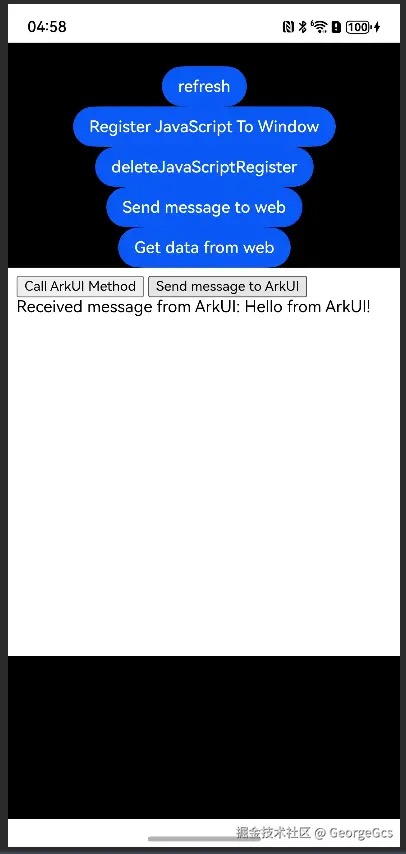
WebViewPage.ets
import { webview } from '@kit.ArkWeb';
import { BusinessError } from '@kit.BasicServicesKit';

class TestObj {
  constructor() {
  }

  test(): string {
    return "ArkUI Web Component";
  }

  toString(): void {
    console.log('Web Component toString');
  }

  receiveMessageFromWeb(message: string): void {
    console.log(`Received message from web: ${message}`);
  }
}

@Entry
@Component
struct WebViewPage {
  controller: webview.WebviewController = new webview.WebviewController();
  @State testObjtest: TestObj = new TestObj();
  @State name: string = 'objName';
  @State webResult: string = '';

  build() {
    Column() {
      Text(this.webResult).fontSize(20)
      Button('refresh')
        .onClick(() = > {
          try {
            this.controller.refresh();
          } catch (error) {
            console.error(`ErrorCode: ${(error as BusinessError).code},  Message: ${(error as BusinessError).message}`);
          }
        })
      Button('Register JavaScript To Window')
        .onClick(() = > {
          try {
            this.controller.registerJavaScriptProxy(this.testObjtest, this.name, ["test", "toString", "receiveMessageFromWeb"]);
          } catch (error) {
            console.error(`ErrorCode: ${(error as BusinessError).code},  Message: ${(error as BusinessError).message}`);
          }
        })
      Button('deleteJavaScriptRegister')
        .onClick(() = > {
          try {
            this.controller.deleteJavaScriptRegister(this.name);
          } catch (error) {
            console.error(`ErrorCode: ${(error as BusinessError).code},  Message: ${(error as BusinessError).message}`);
          }
        })
      Button('Send message to web')
        .onClick(() = > {
          try {
            this.controller.runJavaScript(
              'receiveMessageFromArkUI("Hello from ArkUI!")',
              (error, result) = > {
                if (error) {
                  console.error(`run JavaScript error, ErrorCode: ${(error as BusinessError).code},  Message: ${(error as BusinessError).message}`);
                  return;
                }
                console.info(`Message sent to web result: ${result}`);
              }
            );
          } catch (error) {
            console.error(`ErrorCode: ${(error as BusinessError).code},  Message: ${(error as BusinessError).message}`);
          }
        })
      Button('Get data from web')
        .onClick(() = > {
          try {
            this.controller.runJavaScript(
              'getWebPageData()',
              (error, result) = > {
                if (error) {
                  console.error(`run JavaScript error, ErrorCode: ${(error as BusinessError).code},  Message: ${(error as BusinessError).message}`);
                  return;
                }
                if (result) {
                  this.webResult = result;
                  console.info(`Data from web: ${result}`);
                }
              }
            );
          } catch (error) {
            console.error(`ErrorCode: ${(error as BusinessError).code},  Message: ${(error as BusinessError).message}`);
          }
        })
      Web({ src: $rawfile('index.html'), controller: this.controller })
        .javaScriptAccess(true)
        .onPageEnd(e = > {
          try {
            this.controller.runJavaScript(
              'test()',
              (error, result) = > {
                if (error) {
                  console.error(`run JavaScript error, ErrorCode: ${(error as BusinessError).code},  Message: ${(error as BusinessError).message}`);
                  return;
                }
                if (result) {
                  this.webResult = result;
                  console.info(`The test() return value is: ${result}`);
                }
              }
            );
            if (e) {
              console.info('url: ', e.url);
            }
          } catch (error) {
            console.error(`ErrorCode: ${(error as BusinessError).code},  Message: ${(error as BusinessError).message}`);
          }
        })
        .width("100%")
        .height("50%")
    }
    .width("100%")
    .height("100%")
    .backgroundColor(Color.Black)
  }
}
index.html
< !DOCTYPE html >
< html lang="en" >

< head >
    < meta charset="UTF-8" >
    < meta name="viewport" content="width=device-width, initial-scale=1.0" >
    < title >Web Communication< /title >
< /head >


"callArkUIMethod()"< /span > >Call ArkUI Method< /button >
"sendMessageToArkUI()"< /span > >Send message to ArkUI< /button >
"messageFromArkUI" >
< script >
    function callArkUIMethod() {
        const result = window.objName.test();
        console.log("Result from ArkUI: ", result);
    }

    function sendMessageToArkUI() {
        window.objName.receiveMessageFromWeb('Hello from web!');
    }

    function receiveMessageFromArkUI(message) {
        const messageDiv = document.getElementById('messageFromArkUI');
        messageDiv.textContent = `Received message from ArkUI: ${message}`;
    }

    function getWebPageData() {
        return "Data from web page";
    }

    function test() {
        return "Test function result from web";
    }
< /script >
< /body >

< /html >
注意
组件销毁时调用deleteJavaScriptRegister(name)取消注册,避免内存泄漏:
onDestroy() {
  this.controller.deleteJavaScriptRegister(this.regName);
}
审核编辑 黄宇
-
MCP2030双向通信演示套件:开启智能双向通信新体验2026-06-05 123
-
【HarmonyOS 5】金融应用开发鸿蒙组件实践2025-07-11 1236
-
【 HarmonyOS 5 入门系列 】鸿蒙HarmonyOS示例项目讲解2025-07-07 1320
-
鸿蒙ArkTS声明式组件:Web2024-07-04 2795
-
鸿蒙OS开发实例:【Web网页】2024-03-28 3155
-
鸿蒙开发基础-Web组件之cookie操作2024-01-14 391
-
HarmonyOS—使用Web组件加载页面2023-08-31 1164
-
HarmonyOS/OpenHarmony应用开发-Web组件开发体验2022-12-12 1732
-
NRF2401无线模块的双向通信怎么实现?2020-05-18 2421
-
DSPeCAN总线中断方式与上位机的双向通信2017-10-20 1196
-
基于8051的Proteus仿真-单片机之间双向通信2016-09-01 760
-
tcp/ip双向通信2014-07-20 6615
-
单线双向通信协议2014-06-10 6465
全部0条评论

快来发表一下你的评论吧 !
