


ESP32通过OTA无线局域网远程升级下载程序
电子说
描述
概要
ESP32 的 OTA(Over-The-Air)升级功能允许通过无线网络Wi-Fi远程更新设备固件程序,无需物理连接(如 USB/UART)。比如ESP32设备在机壳内部不好拆卸,人离设备比较远,不好接线的环境可用到OTA方式给ESP32设备下载程序。为实现此功能每次更新程序的时候都要在代码里面加入OTA的相关代码。
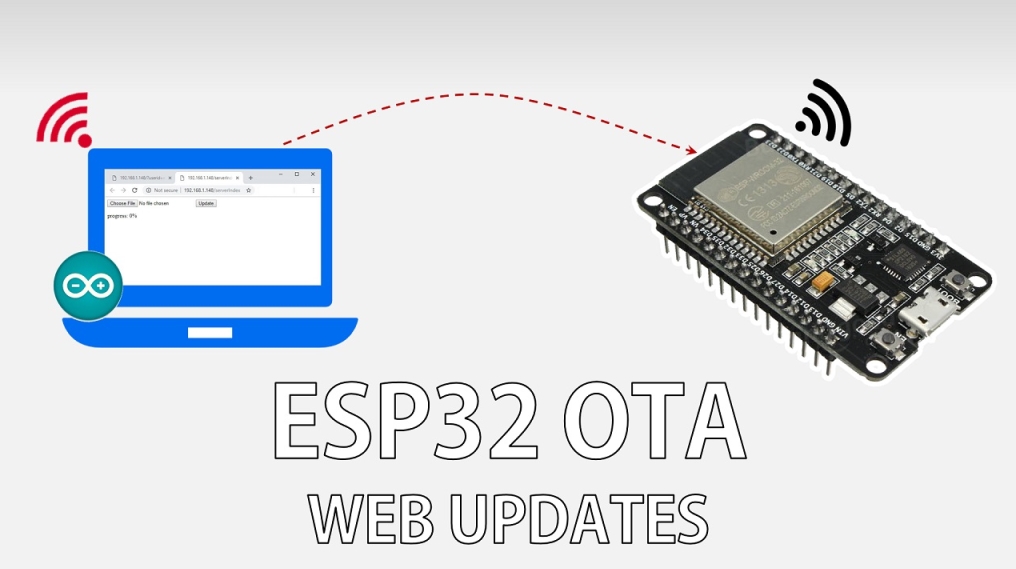
创建ESP32-OTA无线局域网网页版远程升级入口
打开Arduino IDE中自带ESP32—OTAWebUpdater示例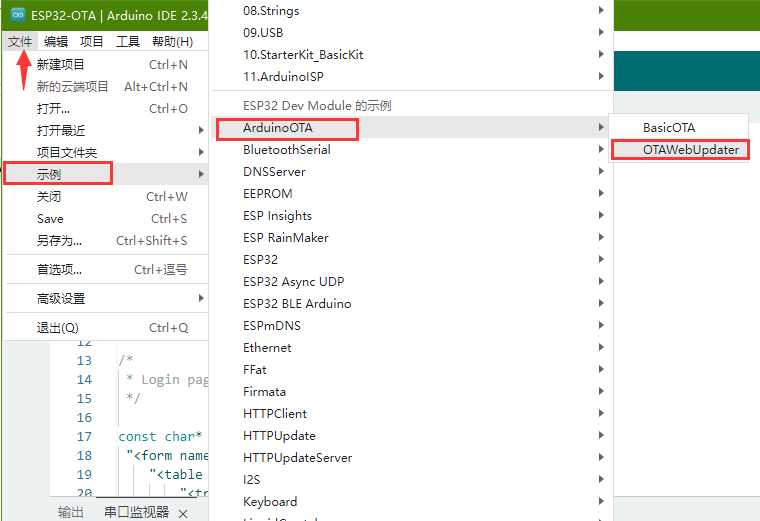
#include < WiFi.h >
#include < WiFiClient.h >
#include < WebServer.h >
#include < ESPmDNS.h >
#include < Update.h >

const char* host = "esp32";
const char* ssid = "YXDZ1";
const char* password = "YXDZ#2023#1";

WebServer server(80);

/*
 * Login page
 */

const char* loginIndex =
 "< form name='loginForm' >"
    "< table width='20%' bgcolor='A09F9F' align='center' >"
        "< tr >"
            "< td colspan=2 >"
                "< center >< font size=4 >ESP32 Login Page< /font >< /center >"
                "
"
            "< /td >"
            "
"
            "
"
        "< /tr >"
        "< tr >"
             "< td >Username:< /td >"
             "< td >< input type='text' size=25 name='userid' >
< /td >"
        "< /tr >"
        "
"
        "
"
        "< tr >"
            "< td >Password:< /td >"
            "< td >< input type='Password' size=25 name='pwd' >
< /td >"
            "
"
            "
"
        "< /tr >"
        "< tr >"
            "< td >< input type='submit' onclick='check(this.form)' value='Login' >< /td >"
        "< /tr >"
    "< /table >"
"< /form >"
"< script >"
    "function check(form)"
    "{"
    "if(form.userid.value=='ESP32-OTA' && form.pwd.value=='ESP32-OTA')"
    "{"
    "window.open('/serverIndex')"
    "}"
    "else"
    "{"
    " alert('Error Password or Username')/*displays error message*/"
    "}"
    "}"
"< /script >";

/*
 * Server Index Page
 */

const char* serverIndex =
"< script src='https://www.elecfans.com/images/chaijie_default.png' >< /script >"
"< form method='POST' action='#' enctype='multipart/form-data' id='upload_form' >"
   "< input type='file' name='update' >"
        "< input type='submit' value='Update' >"
    "< /form >"
 "progress: 0%"
 "< script >"
  "$('form').submit(function(e){"
  "e.preventDefault();"
  "var form = $('#upload_form')[0];"
  "var data = new FormData(form);"
  " $.ajax({"
  "url: '/update',"
  "type: 'POST',"
  "data: data,"
  "contentType: false,"
  "processData:false,"
  "xhr: function() {"
  "var xhr = new window.XMLHttpRequest();"
  "xhr.upload.addEventListener('progress', function(evt) {"
  "if (evt.lengthComputable) {"
  "var per = evt.loaded / evt.total;"
  "$('#prg').html('progress: ' + Math.round(per*100) + '%');"
  "}"
  "}, false);"
  "return xhr;"
  "},"
  "success:function(d, s) {"
  "console.log('success!')"
 "},"
 "error: function (a, b, c) {"
 "}"
 "});"
 "});"
 "< /script >";

/*
 * setup function
 */
void setup(void) {
  Serial.begin(115200);

  // Connect to WiFi network
  WiFi.begin(ssid, password);
  Serial.println("");

  // Wait for connection
  while (WiFi.status() != WL_CONNECTED) {
    delay(500);
    Serial.print(".");
  }
  Serial.println("");
  Serial.print("Connected to ");
  Serial.println(ssid);
  Serial.print("IP address: ");
  Serial.println(WiFi.localIP());

  /*use mdns for host name resolution*/
  if (!MDNS.begin(host)) { //http://esp32.local
    Serial.println("Error setting up MDNS responder!");
    while (1) {
      delay(1000);
    }
  }
  Serial.println("mDNS responder started");
  /*return index page which is stored in serverIndex */
  server.on("/", HTTP_GET, []() {
    server.sendHeader("Connection", "close");
    server.send(200, "text/html", loginIndex);
  });
  server.on("/serverIndex", HTTP_GET, []() {
    server.sendHeader("Connection", "close");
    server.send(200, "text/html", serverIndex);
  });
  /*handling uploading firmware file */
  server.on("/update", HTTP_POST, []() {
    server.sendHeader("Connection", "close");
    server.send(200, "text/plain", (Update.hasError()) ? "FAIL" : "OK");
    ESP.restart();
  }, []() {
    HTTPUpload& upload = server.upload();
    if (upload.status == UPLOAD_FILE_START) {
      Serial.printf("Update: %sn", upload.filename.c_str());
      if (!Update.begin(UPDATE_SIZE_UNKNOWN)) { //start with max available size
        Update.printError(Serial);
      }
    } else if (upload.status == UPLOAD_FILE_WRITE) {
      /* flashing firmware to ESP*/
      if (Update.write(upload.buf, upload.currentSize) != upload.currentSize) {
        Update.printError(Serial);
      }
    } else if (upload.status == UPLOAD_FILE_END) {
      if (Update.end(true)) { //true to set the size to the current progress
        Serial.printf("Update Success: %unRebooting...n", upload.totalSize);
      } else {
        Update.printError(Serial);
      }
    }
  });
  server.begin();
}

void loop(void) {
  server.handleClient();
  delay(1);
}
并对其中的代码做如下更改:
给ESP32开发板连接到自己电脑所在的局域网的路由器WIFI上,填上WIFI名称ssis和密码password
const char* host = "esp32";
const char* ssid = "YXDZ1";
const char* password = "YXDZ#2023#1";
host为ESP32作为Web服务器时,将ESP32以易记的主机名(如esp32.local)广播到局域网,其他设备可直接通过该名称访问,用户可通过http://esp32.local直接访问,无需记忆IP地址
const char* host = "esp32";

  /*use mdns for host name resolution*/
  if (!MDNS.begin(host)) { //http://esp32.local
    Serial.println("Error setting up MDNS responder!");
    while (1) {
      delay(1000);
    }
  }
更改好OTA无线局域网网页版入口的用户名和密码,这里都更改为ESP32-OTA
"if(form.userid.value=='ESP32-OTA' && form.pwd.value=='ESP32-OTA')"
通过有线方式连接电脑和ESP32开发板,并把代码编译通过先通过有线方式下载到ESP32开发板,让开发板创建无线OTA远程升级网页版入口
打开串口助手,按下ESP32开发板复位,会显示出所连接的局域网的IP地址,mDNS域名访问创建成功。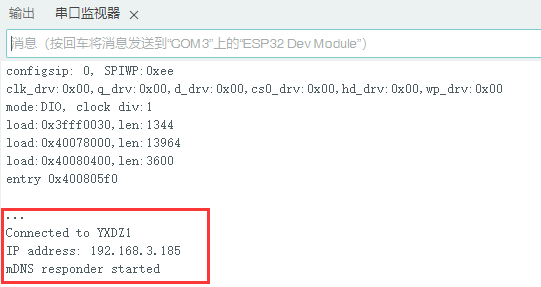
在浏览器输入IP地址或创建的http://esp32.local域名即可跳转到OTA远程升级网页版入口,输入创建好的用户名和密码并登录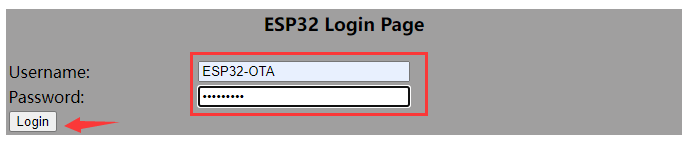
此时再跳转到程序下载界面,选择编译好的程序文件并上传到开发板内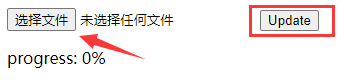
创建一个ESP32开发板进行OTA升级应用程序示例
若要每次都要对ESP32开发板进行OTA升级,新的应用程序中都要加入上述OTA无线局域网网页版远程升级入口的相关代码。下面为一个ESP32开发板GPIO2引脚上的闪灯程序的代码,并加入了OTA的相关代码,然后对OTA部分的代码进行上述一样的更改。
#include < WiFi.h >
#include < WiFiClient.h >
#include < WebServer.h >
#include < ESPmDNS.h >
#include < Update.h >

const char* host = "esp32";
const char* ssid = "YXDZ1";
const char* password = "YXDZ#2023#1";

//variabls to blink without delay:
const int led = 2;
unsigned long previousMillis = 0;        // will store last time LED was updated
const long interval = 1000;           // interval at which to blink (milliseconds)
int ledState = LOW;             // ledState used to set the LED

WebServer server(80);

/*
 * Login page
 */

const char* loginIndex =
 "< form name='loginForm' >"
    "< table width='20%' bgcolor='A09F9F' align='center' >"
        "< tr >"
            "< td colspan=2 >"
                "< center >< font size=4 >ESP32 Login Page< /font >< /center >"
                "
"
            "< /td >"
            "
"
            "
"
        "< /tr >"
        "< td >Username:< /td >"
        "< td >< input type='text' size=25 name='userid' >
< /td >"
        "< /tr >"
        "
"
        "
"
        "< tr >"
            "< td >Password:< /td >"
            "< td >< input type='Password' size=25 name='pwd' >
< /td >"
            "
"
            "
"
        "< /tr >"
        "< tr >"
            "< td >< input type='submit' onclick='check(this.form)' value='Login' >< /td >"
        "< /tr >"
    "< /table >"
"< /form >"
"< script >"
    "function check(form)"
    "{"
    "if(form.userid.value=='ESP32-OTA' && form.pwd.value=='ESP32-OTA')"
    "{"
    "window.open('/serverIndex')"
    "}"
    "else"
    "{"
    " alert('Error Password or Username')/*displays error message*/"
    "}"
    "}"
"< /script >";

/*
 * Server Index Page
 */

const char* serverIndex =
"< script src='https://www.elecfans.com/images/chaijie_default.png' >< /script >"
"< form method='POST' action='#' enctype='multipart/form-data' id='upload_form' >"
   "< input type='file' name='update' >"
        "< input type='submit' value='Update' >"
    "< /form >"
 "progress: 0%"
 "< script >"
  "$('form').submit(function(e){"
  "e.preventDefault();"
  "var form = $('#upload_form')[0];"
  "var data = new FormData(form);"
  " $.ajax({"
  "url: '/update',"
  "type: 'POST',"
  "data: data,"
  "contentType: false,"
  "processData:false,"
  "xhr: function() {"
  "var xhr = new window.XMLHttpRequest();"
  "xhr.upload.addEventListener('progress', function(evt) {"
  "if (evt.lengthComputable) {"
  "var per = evt.loaded / evt.total;"
  "$('#prg').html('progress: ' + Math.round(per*100) + '%');"
  "}"
  "}, false);"
  "return xhr;"
  "},"
  "success:function(d, s) {"
  "console.log('success!')"
 "},"
 "error: function (a, b, c) {"
 "}"
 "});"
 "});"
 "< /script >";

/*
 * setup function
 */
void setup(void) {
  pinMode(led, OUTPUT);

  Serial.begin(115200);

  // Connect to WiFi network
  WiFi.begin(ssid, password);
  Serial.println("");

  // Wait for connection
  while (WiFi.status() != WL_CONNECTED) {
    delay(500);
    Serial.print(".");
  }
  Serial.println("");
  Serial.print("Connected to ");
  Serial.println(ssid);
  Serial.print("IP address: ");
  Serial.println(WiFi.localIP());

  /*use mdns for host name resolution*/
  if (!MDNS.begin(host)) { //http://esp32.local
    Serial.println("Error setting up MDNS responder!");
    while (1) {
      delay(1000);
    }
  }
  Serial.println("mDNS responder started");
  /*return index page which is stored in serverIndex */
  server.on("/", HTTP_GET, []() {
    server.sendHeader("Connection", "close");
    server.send(200, "text/html", loginIndex);
  });
  server.on("/serverIndex", HTTP_GET, []() {
    server.sendHeader("Connection", "close");
    server.send(200, "text/html", serverIndex);
  });
  /*handling uploading firmware file */
  server.on("/update", HTTP_POST, []() {
    server.sendHeader("Connection", "close");
    server.send(200, "text/plain", (Update.hasError()) ? "FAIL" : "OK");
    ESP.restart();
  }, []() {
    HTTPUpload& upload = server.upload();
    if (upload.status == UPLOAD_FILE_START) {
      Serial.printf("Update: %sn", upload.filename.c_str());
      if (!Update.begin(UPDATE_SIZE_UNKNOWN)) { //start with max available size
        Update.printError(Serial);
      }
    } else if (upload.status == UPLOAD_FILE_WRITE) {
      /* flashing firmware to ESP*/
      if (Update.write(upload.buf, upload.currentSize) != upload.currentSize) {
        Update.printError(Serial);
      }
    } else if (upload.status == UPLOAD_FILE_END) {
      if (Update.end(true)) { //true to set the size to the current progress
        Serial.printf("Update Success: %unRebooting...n", upload.totalSize);
      } else {
        Update.printError(Serial);
      }
    }
  });
  server.begin();
}

void loop(void) {
  server.handleClient();
  delay(1);

  //loop to blink without delay
  unsigned long currentMillis = millis();

  if (currentMillis - previousMillis >= interval) {
    // save the last time you blinked the LED
    previousMillis = currentMillis;

    // if the LED is off turn it on and vice-versa:
    ledState = not(ledState);

    // set the LED with the ledState of the variable:
    digitalWrite(led, ledState);
  }
}
ESP32开发板OTA升级下载应用程序
编译并导出可供OTA升级下载的二进制bin应用程序文件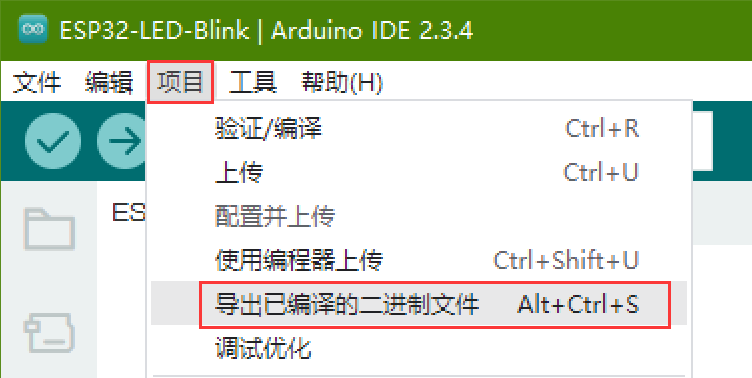
在项目文件夹下的build文件夹里可看到可供下载的bin应用程序文件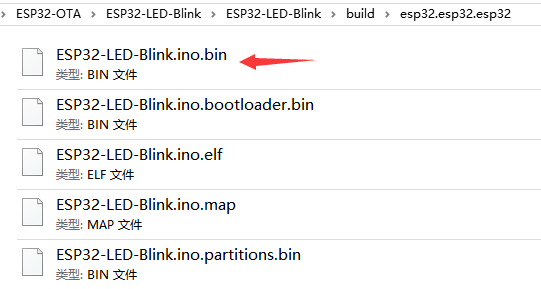
进入OTA无线局域网网页版远程升级入口,打开应用程序bin文件,并对ESP32开发板进行远程下载程序
-
GD32单片机STM32远程下载手机程序升级固件下载局域网网页升级工具2023-11-09 3803
-
ESP32到ESP32通过Internet进行通信2023-06-15 1850
-
wlan是无线网还是局域网 wlan包括哪些无线局域网协议2023-06-14 4591
-
无线局域网(WLAN)是什么?2023-05-17 2507
-
如何用esp32组建局域网?2023-03-09 831
-
ESP32通信amp;局域网刺破2023-02-13 3075
-
OTA的具体应用场景及远程升级的远程的含义具体是什么?2022-11-14 1175
-
乐鑫ESP32空中下载(OTA)解决方案实操2022-06-30 2363
-
无线局域网的优点有哪些2022-01-10 11284
-
嵌人式系统的无线局域网接入怎么实现?2020-03-06 2179
-
浅析思科无线局域网2019-07-01 2147
-
浅谈无线局域网的优点2018-11-14 3612
-
无线局域网简介2017-11-24 2890
全部0条评论

快来发表一下你的评论吧 !
