


使用恩智浦FRDM-MCXN947开发板LVGL移植触摸屏
描述
前言
恩智浦“FRDM-MCXN947”评测活动由安富利和与非网协同举办。本篇内容由与非网用户发布,已获转载许可。原文可在与非网(eefocus)工程师社区查看。
背景
上一期【用户测评(七):移植LVGL跑benchmark】已经实现了触摸屏的触摸效果,但是没有接入到LVGL,现在开干。
LVGL移植触摸屏详解
01对应的输入设备文件
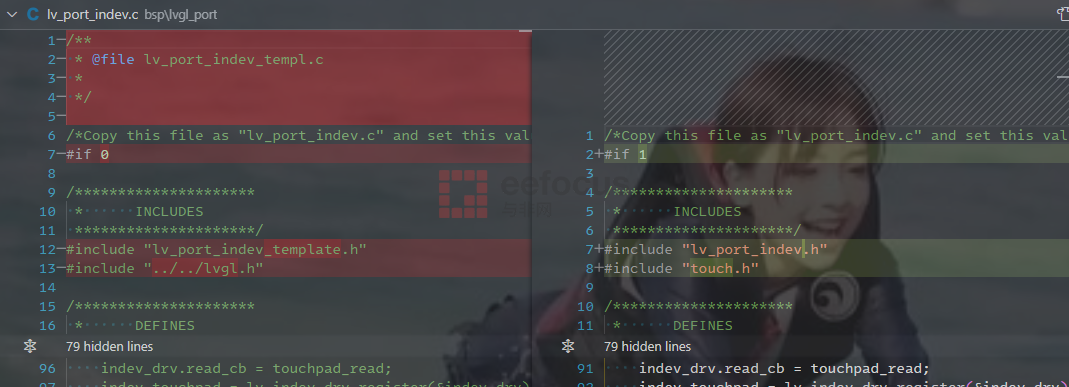
LVGL接入输入设备,可以参考其自带的示例,即examples/porting/lv_port_indev_template.c文件和对应的头文件。咱们先把这两个文件拷贝出来,放到bsp/lvgl_port/目录下,并重命名为lv_port_indev.c和lv_port_indev.h。
02修改lv_port_indev.c/.h
这两个文件都使用#if 0括了起来,需要改成#if 1使能,然后包含正确的头文件,如下图所示,仅包含lv_port_indev.h和touch.h文件即可。
03关键函数lv_port_indev_init()
文件lv_port_indev.c文件中的lv_port_indev_init()函数非常关键,从它注册输入设备到LVGL。它支持的输入设备有多种类型:
最常见的是触摸屏LV_INDEV_TYPE_POINTER
鼠标,对应LV_INDEV_TYPE_MOUSE
键盘,对应LV_INDEV_TYPE_KEYPAD
编码器,对应LV_INDEV_TYPE_ENCODER
按键,对应LV_INDEV_TYPE_BUTTON
这里只需要关注触摸屏,其他的全部用#if 0括起来。
最终lv_port_indev_init()函数简化如下:
void lv_port_indev_init(void)
{
    static lv_indev_drv_t indev_drv;


    /*------------------
     * Touchpad
     * -----------------*/


    /*Initialize your touchpad if you have*/
    touchpad_init();


    /*Register a touchpad input device*/
    lv_indev_drv_init(&indev_drv);
    indev_drv.type =LV_INDEV_TYPE_POINTER;
    indev_drv.read_cb = touchpad_read;
    indev_touchpad = lv_indev_drv_register(&indev_drv);
}
从这个代码片段看出,我们只需要实现touchpad_init()和touchpad_read()函数即可。
04touchpad_init()
这个函数的实现非常简单,调用我们之间写好的触摸屏初始化函数TP_Init()即可。
static void touchpad_init(void)
{
    /*Your code comes here*/
    // NOTE: 触摸屏已经在别的地方初始化了
    TP_Init();
}
05touchpad_read()
这个函数是LVGL提供的模版函数,我们不用做什么改动,只需要实现其中的touchpad_is_pressed()和touchpad_get_xy()即可。
从下面代码可以看出,touchpad_is_pressed()只需要调用TP_Scan(),如果有触摸则发回非0值即可,如果没有触摸则返回0,最终touchpad_is_pressed()返回逻辑值。
而touchpad_get_xy()更简单,直接调用TP_Get_XY()返回最近一次触摸的坐标即可。
/*Will be called by the library to read the touchpad*/
static void touchpad_read(lv_indev_drv_t * indev_drv, lv_indev_data_t * data)
{
  static lv_coord_t last_x =0;
    static lv_coord_t last_y =0;


    /*Save the pressed coordinates and the state*/
    if(touchpad_is_pressed()) {
        touchpad_get_xy(&last_x, &last_y);
        data->state =LV_INDEV_STATE_PR;
    }
    else {
        data->state =LV_INDEV_STATE_REL;
    }


    /*Set the last pressed coordinates*/
    data->point.x = last_x;
    data->point.y = last_y;
}


/*Return true is the touchpad is pressed*/
static bool touchpad_is_pressed(void)
{
  /*Your code comes here*/
  // TODO: 从这里开始一次扫描,获取触摸屏状态
  if (TP_Scan()) {
    returntrue;
  }


  returnfalse;
}


/*Get the x and y coordinates if the touchpad is pressed*/
static void touchpad_get_xy(lv_coord_t * x, lv_coord_t * y)
{
    /*Your code comes here*/
  TP_Get_XY((uint16_t*)x, (uint16_t*)y);
}
演示
运行LVGL几个示例程序,比之前的屏幕模组厂商的示例程序丝滑多了。主要是LVGL刷屏采用了DMA,比逐个打点方式快多了。
-
使用恩智浦FRDM-MCXN947开发板移植LVGL跑benchmark2025-06-20 2261
-
使用恩智浦FRDM-MCXN947开发板移植触摸屏2025-08-13 5596
-
TFT适配LVGL实践分享2024-09-04 3220
-
在恩智浦FRDM-MCXN947开发板部署DeepSeek大语言模型2025-04-10 3686
-
FRDM-MCXN947的纯Linux命令行环境搭建2024-07-28 5867
-
关于将Flash写入FRDM-MCXN947的问题求解2025-03-17 900
-
FRDM-MCXN947在初始化lpI2C时, I2C无法正常工作怎么解决?2025-03-25 831
-
FRDM-MCXN947板使用MCUXpresso IDE.二进制无法连接到核心2026-04-29 147
-
《恩智浦FRDM-MCXN947开发实践指南》上线啦2024-05-13 5081
-
使用VSCode调试FRDM MCXN947开发板2024-05-16 2555
-
基于Label CIFAR10 image on FRDM-MCXN947例程实现鞋和帽子的识别2025-01-13 1700
-
《恩智浦FRDM-MCXA156开发实践指南》上线啦2025-04-06 4387
-
探索NXP FRDM - MCXN947开发板:快速上手指南2025-12-24 1892
全部0条评论

快来发表一下你的评论吧 !
