


如何进行tflite模型量化
描述
开发AI应用分享来到了本系列最后一期分享。
在windows上,如果我们按照上一期的方式安装了tflite2pb,是不能直接运行的。因为命令行工具是为linux编译的。那我们的广大windows用户就无缘了吗?那可未必,小编给大家带来一个好办法,当然不仅仅适用于当前这个tflite2pb工具,话不多说,开始:
首先让我们找到tflite2pb的安装路径:
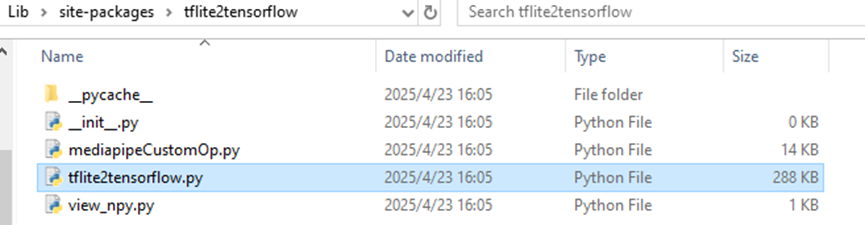
打开tflite2tensorflow.py文件,并定位到5641行:

我们可以看到,这是函数的主入口,并且添加了对于命令行参数的解析,而且既然是def定义的函数,那我们就可以通过import来进行导入。那接下来小编就要利用这个函数做一些文章,首先在我们编写的转换函数中导入这个叫做main的函数:
fromtflite2tensorflow.tflite2tensorflow import main
现在已经导入了进来,接下来是怎么传入main函数需要处理的参数,换句话来说,main函数实际上是处理系统命令行参数,那我们需要做的就是伪造一个系统命令行参数,那简单了,首先导入sys模块,然后开始系统参数伪造:
sys.argv = ['main.py', f'--model_path={tflite_model_name}.tflite', r'--flatc_path=flatc.exe', '--schema_path=schema.fbs', '--output_pb']
这里通过直接给sys.argv参数赋值,实际上相当于像系统命令行传入了参数,接下来直接调用main:
main()
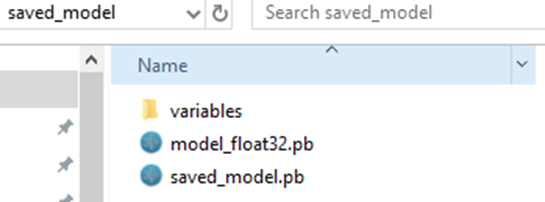
果不其然,成功运行,和在linux上运行效果一致,我们也获得了saved_model文件夹以及模型:
下面就是进行模型的量化:
# Convert the model
converter = tf.lite.TFLiteConverter.from_saved_model("saved_model")
converter.optimizations = [tf.lite.Optimize.DEFAULT]
converter.target_spec.supported_ops = [tf.lite.OpsSet.TFLITE_BUILTINS_INT8]
converter.representative_dataset = gen_representative_data_gen(represent_data)
converter.inference_input_type = tf.int8
converter.inference_output_type = tf.int8
tflite_model = converter.convert()
# Save the i8 model.
with open(f"{tflite_model_name}_i8_opt.tflite", "wb") as f:
   f.write(tflite_model)
熟悉tflite模型量化的伙伴应该是很熟悉了吧?首先声明converter导入我们刚才生成的pb格式模型的文件夹,接下来指定量化类型为:
tf.lite.OpsSet.TFLITE_BUILTINS_INT8
指定代表性数据集:
converter.representative_dataset = gen_representative_data_gen(represent_data)
为了快速验证模型,我们可以先随机出来一些数据来指导模型量化:
defgen_representative_data_gen(datas_path):
   datas = np.load(datas_path)
   datas = (np.random.randint(0, 255, size=(10, 1, 192,192,3), dtype='uint8') / 255).astype("float32")
   defrepresentative_data_gen(samples=datas):
       for sample in samples:
           yield [sample]
   returnrepresentative_data_gen
并且指定输入输出格式:
converter.inference_input_type = tf.int8
       converter.inference_output_type = tf.int8
最终保存量化好的模型:
with open(f"{tflite_model_name}_i8_opt.tflite", "wb") as f:
f.write(tflite_model)
当然,我们还可以打印出来模型的算子信息:
intepreter = tf.lite.Interpreter(model_path=f"{tflite_model_name}_i8_opt.tflite")
   op_names = sorted(set([x['op_name'] for x inintepreter._get_ops_details()]))
   print("len ops: ", len(op_names))
   print(op_names)
好了,至此,记站在巨人的肩膀上开发AI应用就到此完结了,此次系列分享给大家分享了小编的一次项目开发历程,尤其是涉及到如何将网上找到的,不包含推理代码的模型,如何一步步的进行分析,并最终转换为可以为我们所用的模型,希望能够帮助大家!
-
使用ml configurator进行tflite网络模型的转换不成功怎么解决?2024-01-31 668
-
如何进行YOLO模型转换?2025-08-14 300
-
后量化模型在 iMX93 NPU 上运行,但输出不正确怎么解决2026-03-18 239
-
将TensorFlowSavedModel转换为支持imx8mpNPU的tflite模型,没有成功是怎么回事?2026-04-16 319
-
模型量化会带来哪些好处?2021-09-28 2726
-
用tflite接口调用tensorflow模型进行推理2021-12-22 1643
-
如何在MIMXRT1064评估套件上部署tflite模型?2023-04-06 581
-
tflite + XNNPACK代表对量化网络的推理不起作用是怎么回事?2023-04-11 684
-
如何将DS_CNN_S.pb转换为ds_cnn_s.tflite?2023-04-19 579
-
RT1060注册内存被TFLite Micro模型中的其他函数覆盖了怎么解决?2023-04-20 696
-
【KV260视觉入门套件试用体验】Vitis AI 进行模型校准和来量化2023-10-15 11615
-
使用NVIDIA QAT工具包实现TensorRT量化网络的设计2022-06-21 5609
-
使用Arduino和TFlite进行下垂检测2023-06-15 744
-
【飞腾派4G版免费试用】第五章:使用C++部署tflite模型到飞腾派2023-12-28 4712
-
快速部署Tensorflow和TFLITE模型在Jacinto7 Soc2024-09-27 527
全部0条评论

快来发表一下你的评论吧 !
