


【干货分享】基于瑞萨RA4M2-SENSOR开发板,实现便携式 GPS 定位器
描述
本文介绍了 RA4M2-SENSOR 通过 IIC 协议实现 OLED 显示,并结合串口通信读取 GPS 模块数据,实现便携式 GPS 定位器的项目设计。
https://bbs.elecfans.com/jishu_2500317_1_1.html
RA4M2-SENSOR 是一款基于 RA4M2 系列微控制器的评估套件,支持 TrustZone 技术和片内安全加密引擎(SCE),提供硬件级安全保护,确保敏感数据安全。RA4M2 MCU 采用 40nm 工艺,具有出色的低功耗性能(CoreMark功耗低至 81µA/MHz)。
目录
一、硬件连接:GPS 模块和 OLED 分别与开发板的 UART0 和 SCI2-IIC 对应引脚连接;
二、工程创建:使用 e^2^ studio 软件实现空白工程创建;
三、工程配置:包括 GPIO 引脚、时钟树、UART堆栈、IIC 堆栈等配置;
四、工程代码:包括流程图、主程序代码、 GPS 解析代码和 OLED 驱动代码;
五、效果演示:OLED 显示实时卫星定位经纬度信息、串口打印读取到的 GPS 原始数据和解析数据。
一、硬件连接
1. OLED 与开发板连接方式如下
| OLED | RA4M2 | Note |
|---|---|---|
| SDA | SDA2 (P302) | Serial data |
| SCL | SCL2 (P301) | Serial clock |
| VCC | 3V3 | Power |
| GND | GND | Ground |
2. GPS 模块与开发板连接方式如下
| GPS module | RA4M2 | Note |
|---|---|---|
| RXD | TXD0 (P101) | Receive data |
| TXD | RXD0 (P100) | Transmit data |
| VCC | 3V3 | Power |
| GND | GND | Ground |
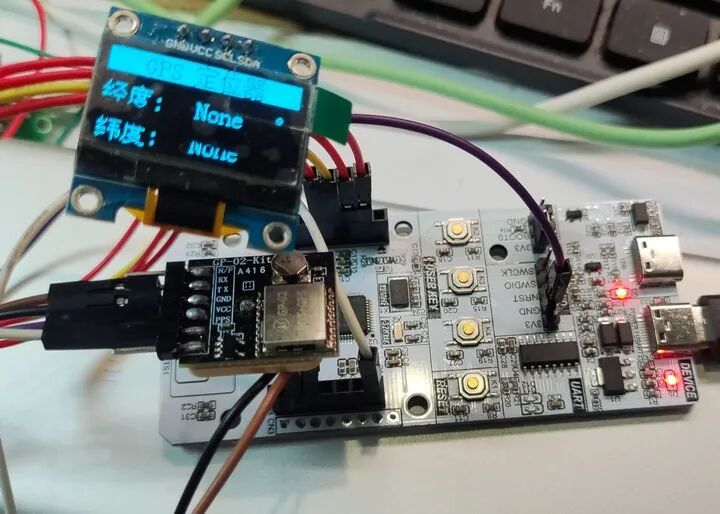
3. 实物连接图如下
二、工程创建
打开 e² studio 软件;
依次点击 文件 - 新建 - 瑞萨 C/C++ 项目 - Renesas RA ;
依次进行工程命名,路径设置,FSP版本,目标开发板选择,Device 选择 R7FA4M2AD3CFL ,工具链选择 GNU ARM Embedded ,调试器选择 J-Link ,完成工程创建 ;
三、工程配置
工程配置包括 Pins、Clock、Stacks 等配置。
GPIO 引脚
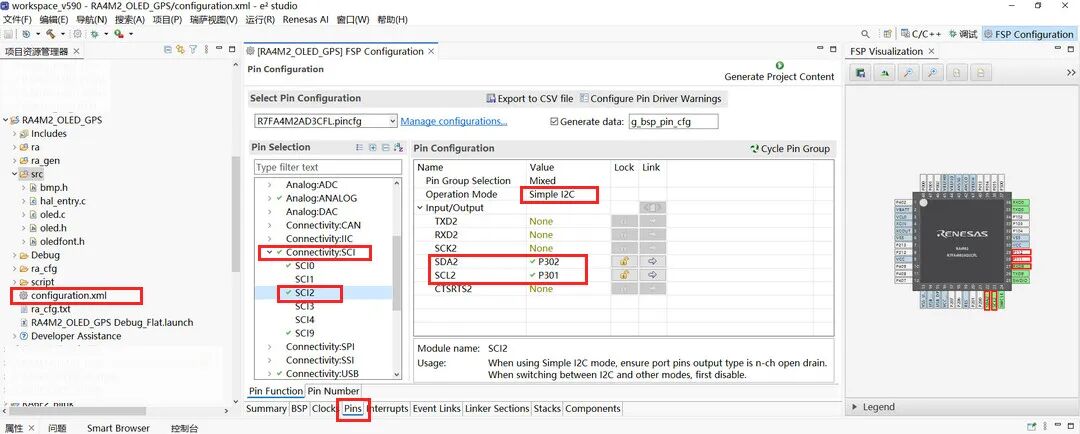
进入 FSP 配置界面,打开 Pins 标签页,根据原理图或开发板丝印,将 P109 和 P110 引脚分别配置为 TXD9 和 RXD9 串口模式;
同理,将 P101 和 P100 引脚分别配置为 TXD0 和 RXD0 串口模式;
将 SCI2 配置为 Simple I2C 模式,引脚定义为 P302 和 P301 分别对应 SDA2 和 SCL2 ;
时钟树
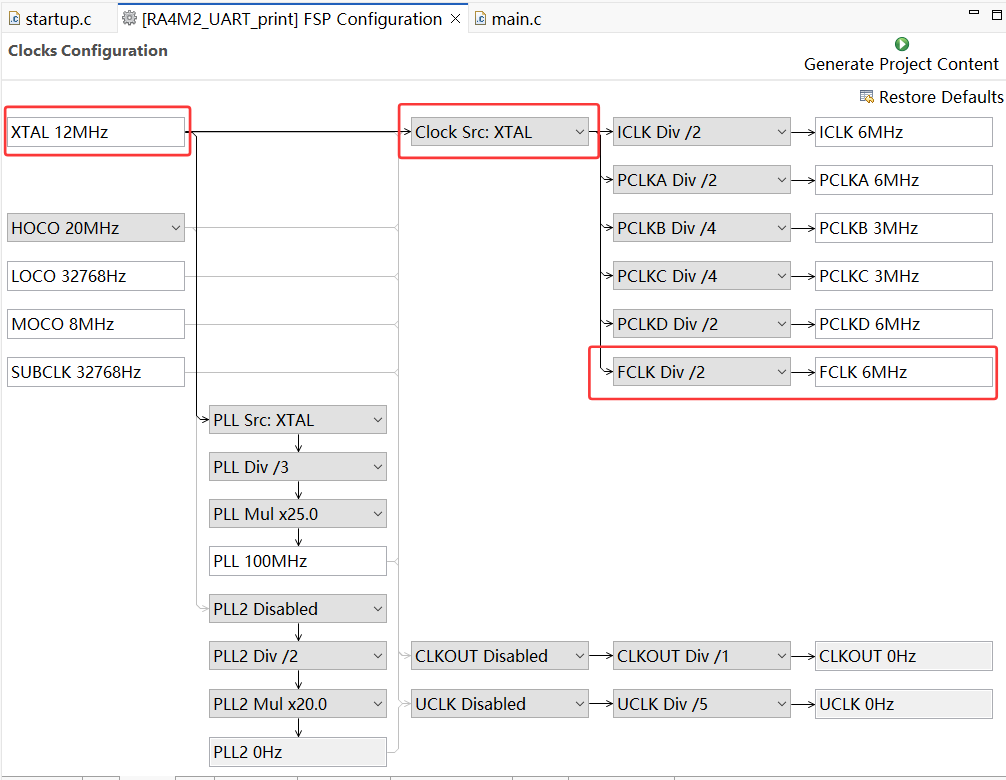
进入 Clock 时钟标签页,将 XTAL 外部高速晶振修改为 12MHz,FCLK Div 设置为 2 分频;
UART 堆栈
新建串口通信堆栈 New Stack - Connectivity - UART (r_sci_uart) ;
串口属性配置,General 标签下的 Channel 改为 9,名称改为 g_uart9,中断回调函数命名为 user_uart9_callback;
再次新建串口通信堆栈 New Stack - Connectivity - UART (r_sci_uart) ;
串口属性配置,General 标签下的 Channel 改为 0,名称改为 g_uart0,中断回调函数命名为 user_uart0_callback,注意波特率需要修改为 9600 并与 GPS 模块匹配;
IIC 堆栈
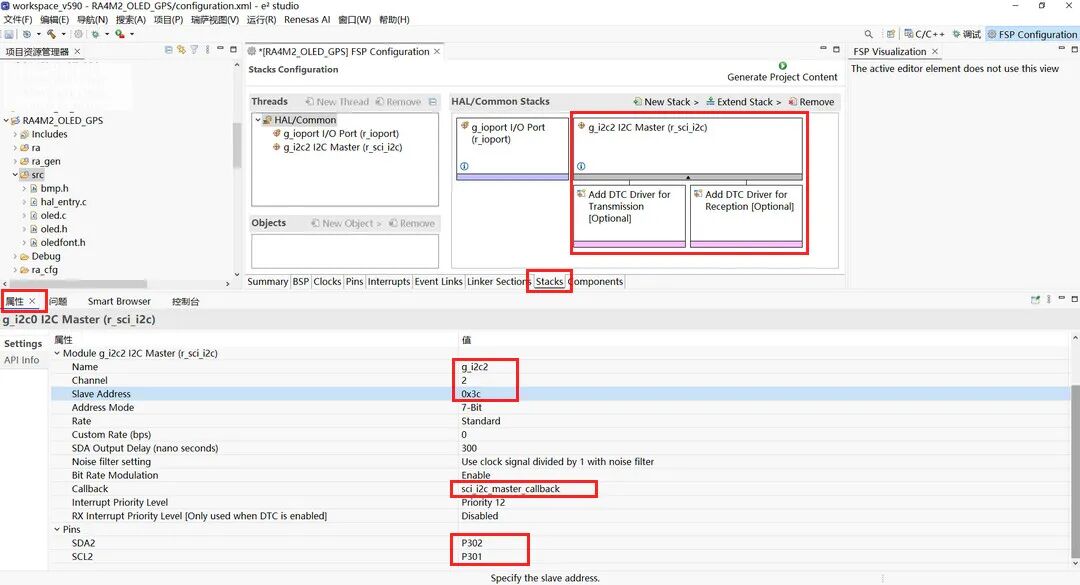
新建 IIC 通信堆栈
Stacks - New Stack - Connectivity - I2C Master (r_sci_i2c)
选中 iic 堆栈方框,打开属性标签,配置 IIC 参数;
属性设置: 属性 - Module g_i2c_master0 I2C Master (r_iic_master) ;
Slave Address 设置为 0x3C ;
回调函数默认为 sci_i2c_master_callback ;
点击 Generate Project Content 按钮,生成工程代码。
流程图
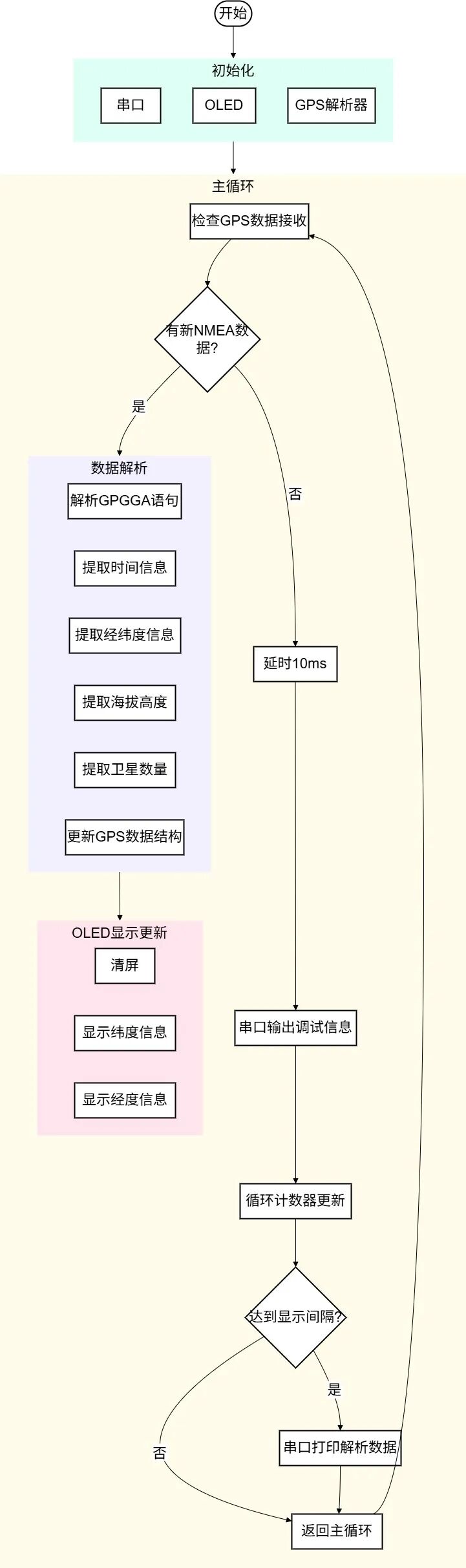
四、工程代码
在 .../src 目录下新建源文件 gps_parser.c 和头文件 gps_parser.h 用于配置 GPS 相关解析函数。
1. hal_entry.c
#include "hal_data.h"#include "oled.h"#include "bmp.h"#include "gps_parser.h"#include #include FSP_CPP_HEADERvoid R_BSP_WarmStart(bsp_warm_start_event_t event);FSP_CPP_FOOTERfsp_err_t err = FSP_SUCCESS;volatile bool uart_send_complete_flag = false;void user_uart9_callback (uart_callback_args_t * p_args){ if(p_args->event == UART_EVENT_TX_COMPLETE) { uart_send_complete_flag = true; }}/*------------- 串口重定向 -------------*/#ifdef __GNUC__ #define PUTCHAR_PROTOTYPE int __io_putchar(int ch)#else#endifPUTCHAR_PROTOTYPE{ err = R_SCI_UART_Write(&g_uart9_ctrl, (uint8_t *)&ch, 1); if(FSP_SUCCESS != err) __BKPT(); while(uart_send_complete_flag == false){} uart_send_complete_flag = false; return ch;}int _write(int fd,char *pBuffer,int size){ for(int i=0;i { __io_putchar(*pBuffer++); } return size;}// 全局变量volatile uint8_t gps_rx_buffer[256];volatile uint16_t gps_rx_index = 0;volatile bool gps_line_ready = false;gps_data_t current_gps_data;// SCI0回调函数(GPS数据接收)void user_uart0_callback(uart_callback_args_t * p_args){ if (p_args->event == UART_EVENT_RX_CHAR) { uint8_t rx_char = (uint8_t)p_args->data; // 存储接收到的字符 if (gps_rx_index < (sizeof(gps_rx_buffer) - 1)) { gps_rx_buffer[gps_rx_index++] = rx_char; // 检查是否收到换行符(一行结束) if (rx_char == '\n') { gps_rx_buffer[gps_rx_index] = '\0'; gps_line_ready = true; gps_rx_index = 0; } } else { // 缓冲区溢出,重置 gps_rx_index = 0; } }}// 初始化函数void init_system(void){ fsp_err_t err; printf("=== RA4M2 GPS Receiver ===\r\n"); printf("Initializing system...\r\n"); // 初始化GPS解析器 gps_parser_init(); // 打开SCI9(printf输出) err = R_SCI_UART_Open(&g_uart9_ctrl, &g_uart9_cfg); if (FSP_SUCCESS != err) { while(1); // 初始化失败 } printf("SCI9 (printf) initialized at 115200 baud\r\n"); // 打开SCI0(GPS数据接收) err = R_SCI_UART_Open(&g_uart0_ctrl, &g_uart0_cfg); if (FSP_SUCCESS != err) { printf("Error: Failed to initialize SCI0 for GPS\r\n"); while(1); } printf("SCI0 (GPS) initialized at 9600 baud\r\n"); printf("Waiting for GPS data...\r\n\r\n");}// 处理GPS数据void process_gps_data(void){ if (gps_line_ready) { // 禁用中断以防数据被修改 __disable_irq(); // 复制数据到本地缓冲区 char nmea_line[256]; strncpy(nmea_line, (char *)gps_rx_buffer, sizeof(nmea_line)); nmea_line[sizeof(nmea_line) - 1] = '\0'; gps_line_ready = false; // 使能中断 __enable_irq(); // 打印原始NMEA数据 printf("RAW: %s", nmea_line); // 解析GPGGA语句 if (strstr(nmea_line, "$GPGGA")) { if (parse_gpgga(nmea_line, ¤t_gps_data)) { print_gps_data(¤t_gps_data); } else { printf("Failed to parse GPGGA data\r\n"); } } // 可以添加其他NMEA语句的解析 else if (strstr(nmea_line, "$GPRMC")) { gps_time_t rmc_time; if (parse_gprmc(nmea_line, ¤t_gps_data, &rmc_time)) { // 如果GPGGA没有提供时间,使用GPRMC的时间 if (current_gps_data.time.hour == 0 && current_gps_data.time.minute == 0 && current_gps_data.time.second == 0) { current_gps_data.time = rmc_time; } } //printf("GPRMC sentence received\r\n"); } printf("\r\n"); }}// 打印解析后的GPS数据void print_parsed_gps_data(void){ static uint32_t last_print_time = 0; static uint32_t current_time = 0; current_time++; // 每2秒打印一次解析结果 if (current_time - last_print_time >= 200) { last_print_time = current_time; printf("\r\n=== PARSED GPS DATA ===\r\n"); if (current_gps_data.is_valid) { // 打印时间信息 print_gps_time(¤t_gps_data.time); printf("\r\n"); // 打印位置信息 printf("Latitude: %.6f°\r\n", current_gps_data.latitude); // 纬度 OLED_ShowDecimal(48, 6, current_gps_data.latitude, 2, 4, 16, 0); printf("Longitude: %.6f°\r\n", current_gps_data.longitude); //经度 OLED_ShowDecimal(48, 3, current_gps_data.longitude, 3, 4, 16, 0); printf("Altitude: %.1f m\r\n", current_gps_data.altitude); printf("Satellites: %d\r\n", current_gps_data.satellites); printf("Fix Quality: %d\r\n", current_gps_data.fix_quality); // 根据定位质量显示状态 switch (current_gps_data.fix_quality) { case 0: printf("Status: Invalid fix\r\n"); break; case 1: printf("Status: GPS fix\r\n"); break; case 2: printf("Status: DGPS fix\r\n"); break; default: printf("Status: Other fix (%d)\r\n", current_gps_data.fix_quality); break; } } else { // 即使没有有效定位,也显示时间和卫星信息 if (current_gps_data.time.hour != 0 || current_gps_data.time.minute != 0 || current_gps_data.time.second != 0) { print_gps_time(¤t_gps_data.time); printf("\r\n"); } printf("No valid GPS fix\r\n"); OLED_ShowString(60,6,"None",16,0); OLED_ShowString(60,3,"None",16,0); printf("Satellites in view: %d\r\n", current_gps_data.satellites); printf("Waiting for satellite lock...\r\n"); } printf("==========================\r\n"); }}i2c_master_event_t i2c_event = I2C_MASTER_EVENT_ABORTED;void sci_i2c_master_callback(i2c_master_callback_args_t *p_args){ i2c_event = I2C_MASTER_EVENT_ABORTED; if (NULL != p_args) { /* capture callback event for validating the i2c transfer event*/ i2c_event = p_args->event; }}//fsp_err_t err = FSP_SUCCESS;int timeout_ms = 100;void hal_entry(void){ /* TODO: add your own code here */ err = R_SCI_UART_Open(&g_uart9_ctrl, &g_uart9_cfg); assert(FSP_SUCCESS == err); printf("RA4M2 GPS Reader Started\r\n"); // 系统初始化 init_system(); uint32_t status_counter = 0; /* Initialize IIC OLED */ err = R_SCI_I2C_Open(&g_i2c2_ctrl, &g_i2c2_cfg); assert(FSP_SUCCESS == err); OLED_Init(); OLED_Clear(); OLED_DrawBMP(0,0,128,8,BMP1,0); // initialized page -> Renesas logo R_BSP_SoftwareDelay(200, BSP_DELAY_UNITS_MILLISECONDS); /*----------- Frame ------------*/ OLED_Clear(); OLED_ShowString(0,0," GPS ",16,1); OLED_ShowCHinese(56,0,0,1);//定 OLED_ShowCHinese(72,0,1,1);//位 OLED_ShowCHinese(88,0,2,1);//器 OLED_ShowString(104,0," ",16,1); //OLED_ShowString(4,3,"ADC",16,0); OLED_ShowCHinese(0,3,3,0);//经 OLED_ShowCHinese(16,3,5,0);//度 OLED_ShowChar(32,3,':',16,0); OLED_ShowCHinese(112,3,6,0); // ° OLED_ShowCHinese(0,6,4,0);//纬 OLED_ShowCHinese(16,6,5,0);//度 OLED_ShowChar(32,6,':',16,0); OLED_ShowCHinese(112,6,6,0); // °
while(1){ process_gps_data(); // 原始GPS数据 print_parsed_gps_data(); // 解析GPS数据 // 每隔一段时间打印状态 status_counter++; if (status_counter >= 1000) // 约每10秒 { printf("[Status] System running...\r\n"); if (current_gps_data.is_valid) { printf("[Status] GPS fix acquired\r\n"); } else { printf("[Status] Waiting for GPS fix\r\n"); } status_counter = 0; }
R_BSP_SoftwareDelay(10, BSP_DELAY_UNITS_MILLISECONDS); // 延时 }#if BSP_TZ_SECURE_BUILD /* Enter non-secure code */ R_BSP_NonSecureEnter();#endif}
GPS 模块解析代码 gps_parser.c 和 gps_parser.h 详见: 【RA4M2-SENSOR】串口读取 GPS .
OLED 驱动代码 oled.c 、oled.h、bmp.h 和 oledfont.h 详见:【RA2E1开发板】 - IIC 通信的 OLED 显示 .
2. 汉字取模
下载 并运行 PC2LCD2018 软件 ;
菜单栏模式设置为 字符模式 ;
点击工具栏中的 设置 按钮,配置字模选项:列行式取模、低位在前等,设置完成后点击 确定 保存配置;
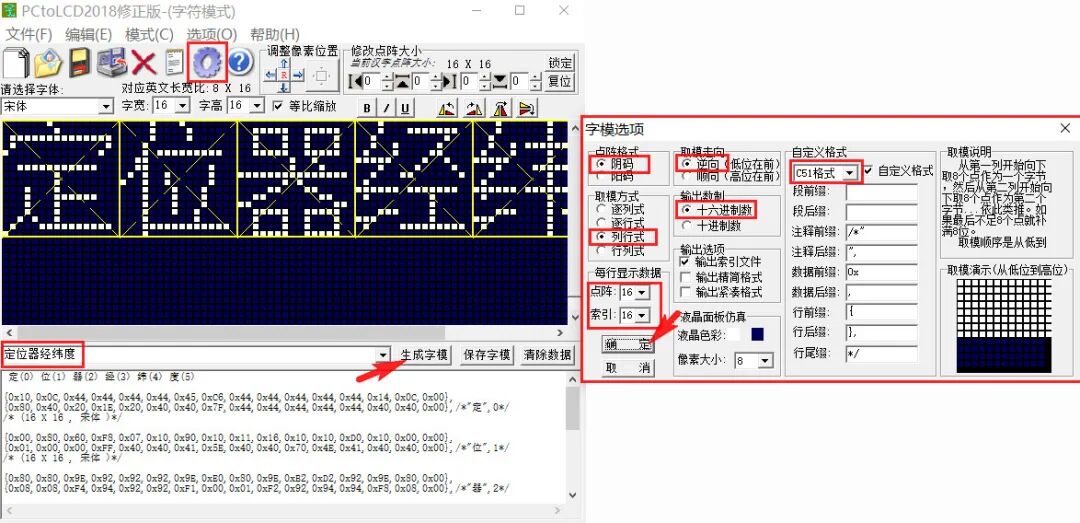
在文字输入选框输入目标汉字,点击 生成字模 ;
选中复制或保存字模,代码添加至 oledfont.h 文件。
五、效果演示
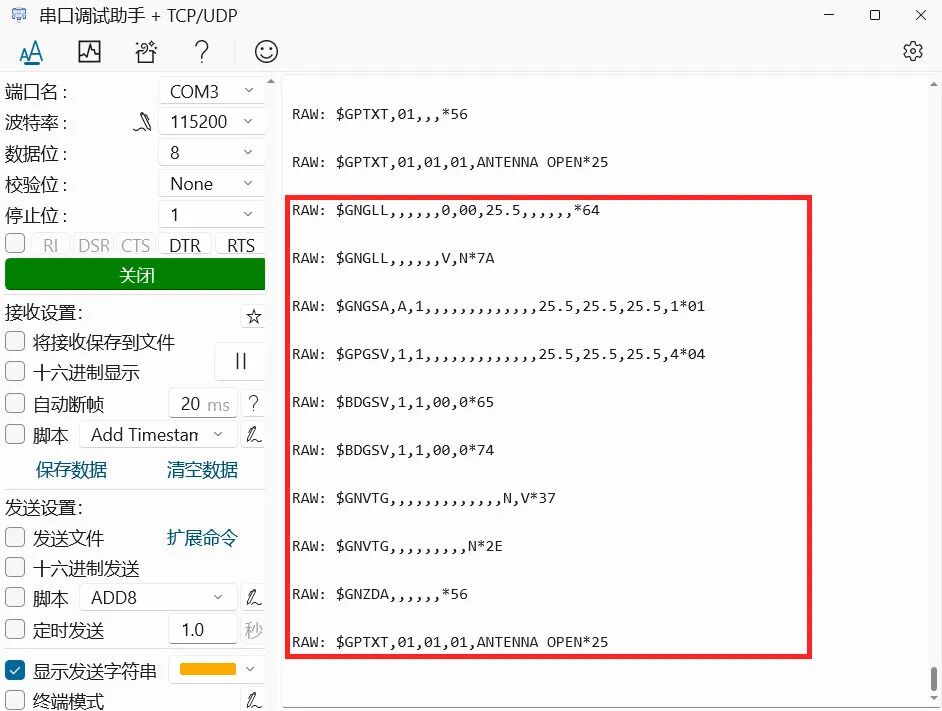
串口调试助手接收 GPS 原始数据和解析数据;
使用移动电源供电,实现便携式 GPS 定位器设计;
OLED 显示实时卫星定位经纬度信息
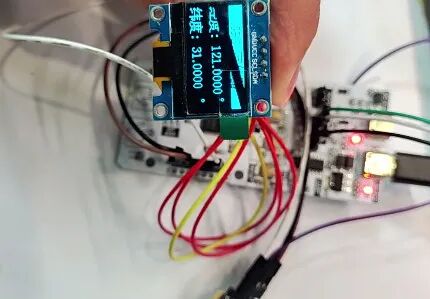
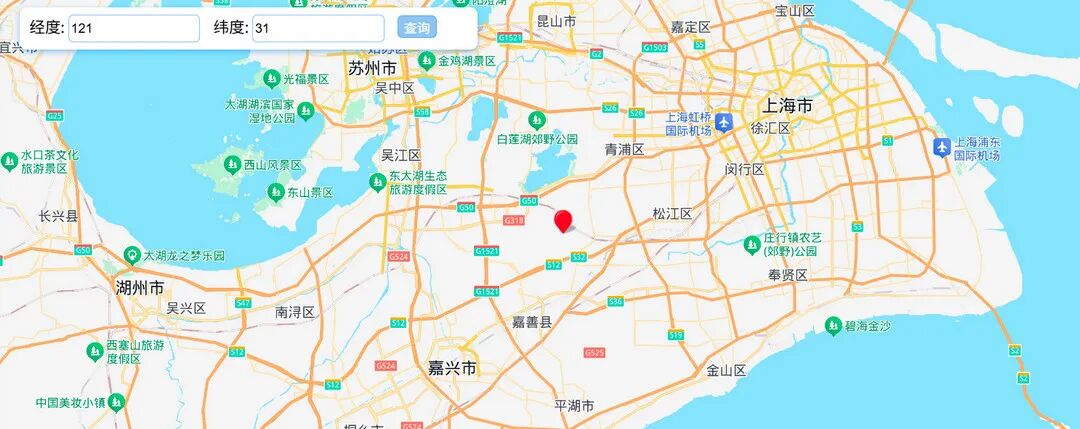
将上述采集得到的经纬坐标 (121,31) 输入网址 经纬度定位 ,点击 查询 按钮,可获得对应的地理位置
定位结果与实际位置 (121.45,31.03) 较为接近。
六、总结
本文介绍了 RA4M2-SENSOR 通过 IIC 协议实现 OLED 显示,并结合串口通信读取 GPS 模块数据,实现便携式卫星定位器的项目设计,为该产品的相关开发设计与快速应用提供了参考。
-
瑞萨FPB-RA0E2开发板的批量加载例程2026-01-29 7702
-
【RA4M2-SENSOR开发板评测】基础架构与环境感知2025-12-10 2666
-
【RA4M2-SENSOR】数字识读及实现2025-09-15 1471
-
【RA4M2-SENSOR】 Keil开发环境建立和跑马灯运行2025-09-11 1628
-
【RA4M2-SENSOR】便携 GPS 定位器2025-09-07 8852
-
【RA4M2-SENSOR】串口读取 GPS2025-09-05 2802
-
【RA4M2-SENSOR】介绍、环境搭建、工程测试2025-09-01 2779
-
【RA4M2-SENSOR】—— 2.串口通讯测试2025-08-31 886
-
【有奖评测 】RA4M2-SENSOR 开发板免费评测2025-08-12 1856
-
RA4M2-SENSOR开发板手册2025-07-21 3622
-
【野火启明6M5开发板体验】野火启明开发板和瑞萨RA MCU介绍2022-12-14 1551
-
【瑞萨RA4系列开发板体验】10. 我的试用总结2022-12-10 3359
-
【精品聚合】RA-Eco-RA4M2-100PIN开发板试用报告作品汇总2022-12-02 23355
-
【干货分享】从零学习使用瑞萨RA6M4开发板2022-11-25 2654
全部0条评论

快来发表一下你的评论吧 !
