


STM32项目分享:智能厨房安全系统(机智云)
描述
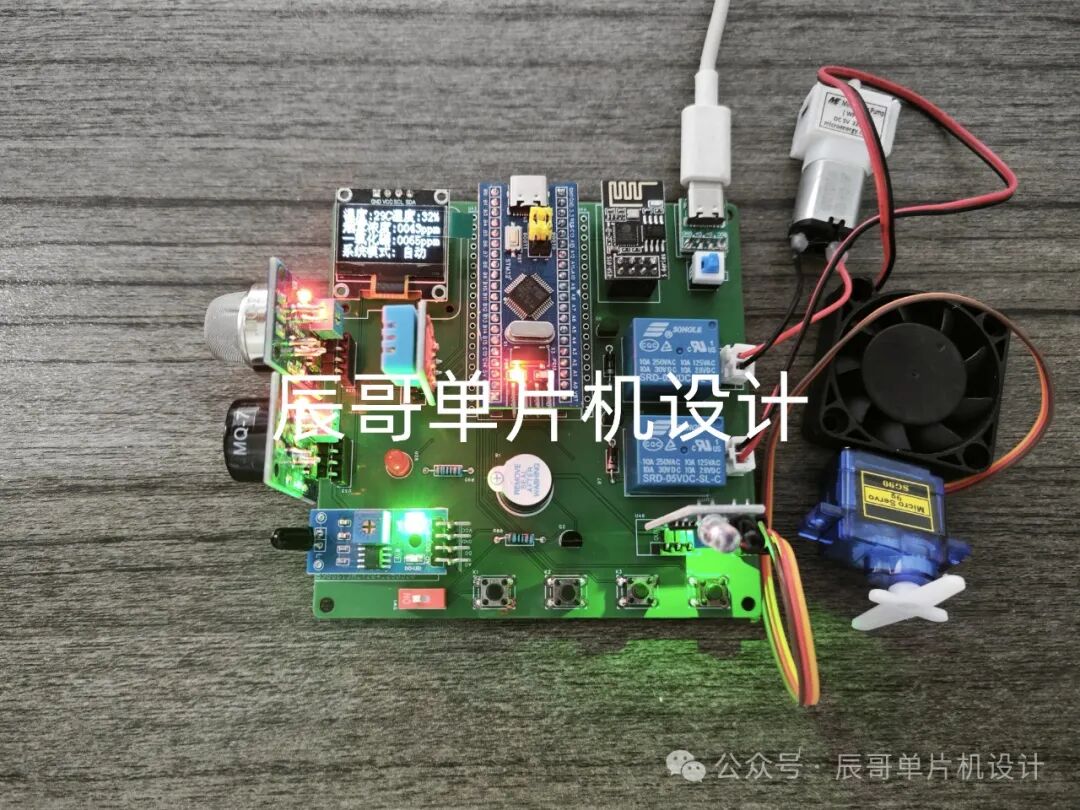
项目成品图片:
01
—
项目简介
1.功能详解
STM32智能厨房安全系统(机智云)
功能如下:
STM32F103C8T6单片机作为主控芯片
检测功能:检测环境温湿度、烟雾浓度、一氧化碳、火焰信号和人体信号
显示功能:OLED显示环境参数
手动控制:通过手机APP控制水泵、风扇、LED灯和阀门(舵机模拟)的开关
自动模式:系统检测到有人开启LED,温度高于阈值开启风扇,烟雾和一氧化碳超过阈值开启风扇并关闭阀门,发生火灾时关闭阀门、开启水泵
模式切换:可以在APP上切换模式
阈值调节:按键可调节阈值
机智云APP:接入机智云APP查看数据与控制下发
2.材料清单
STM32F103C8T6单片机
OLED 屏幕
DHT11温湿度传感器
MQ2烟雾传感器
MQ7一氧化碳传感器
火焰传感器
光电红外传感器
ESP8266模块(WIFI)
继电器
有源蜂鸣器
水泵
风扇模块
舵机
02
—
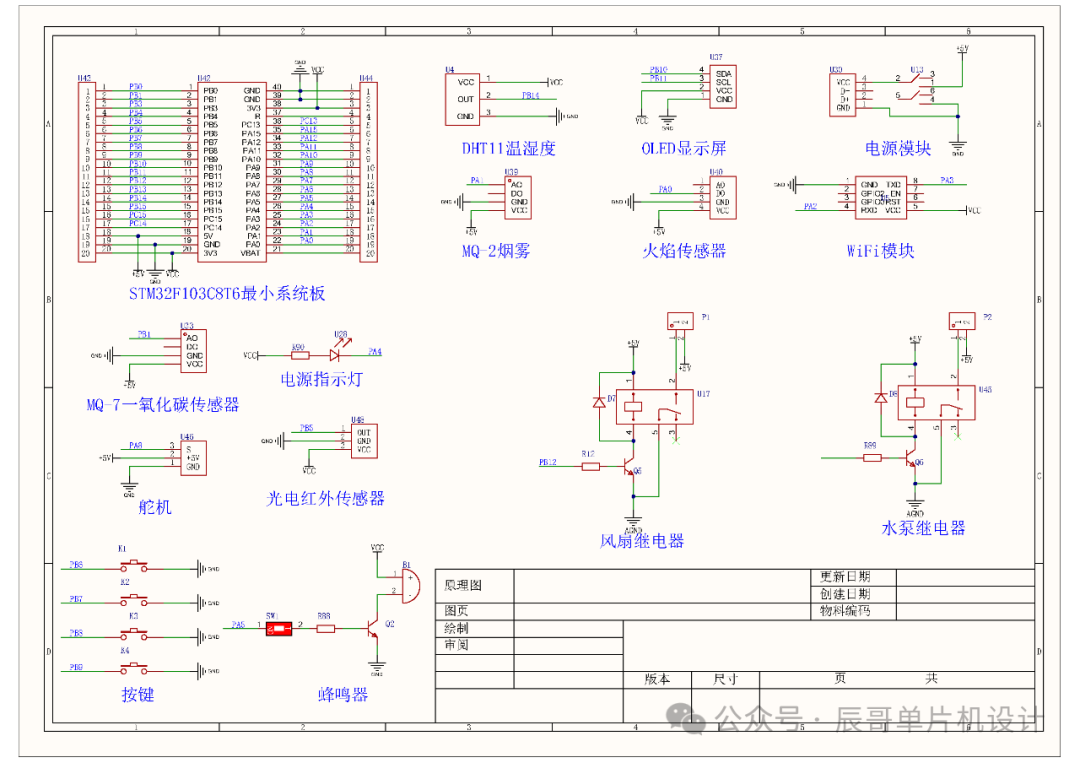
原理图设计
03
—
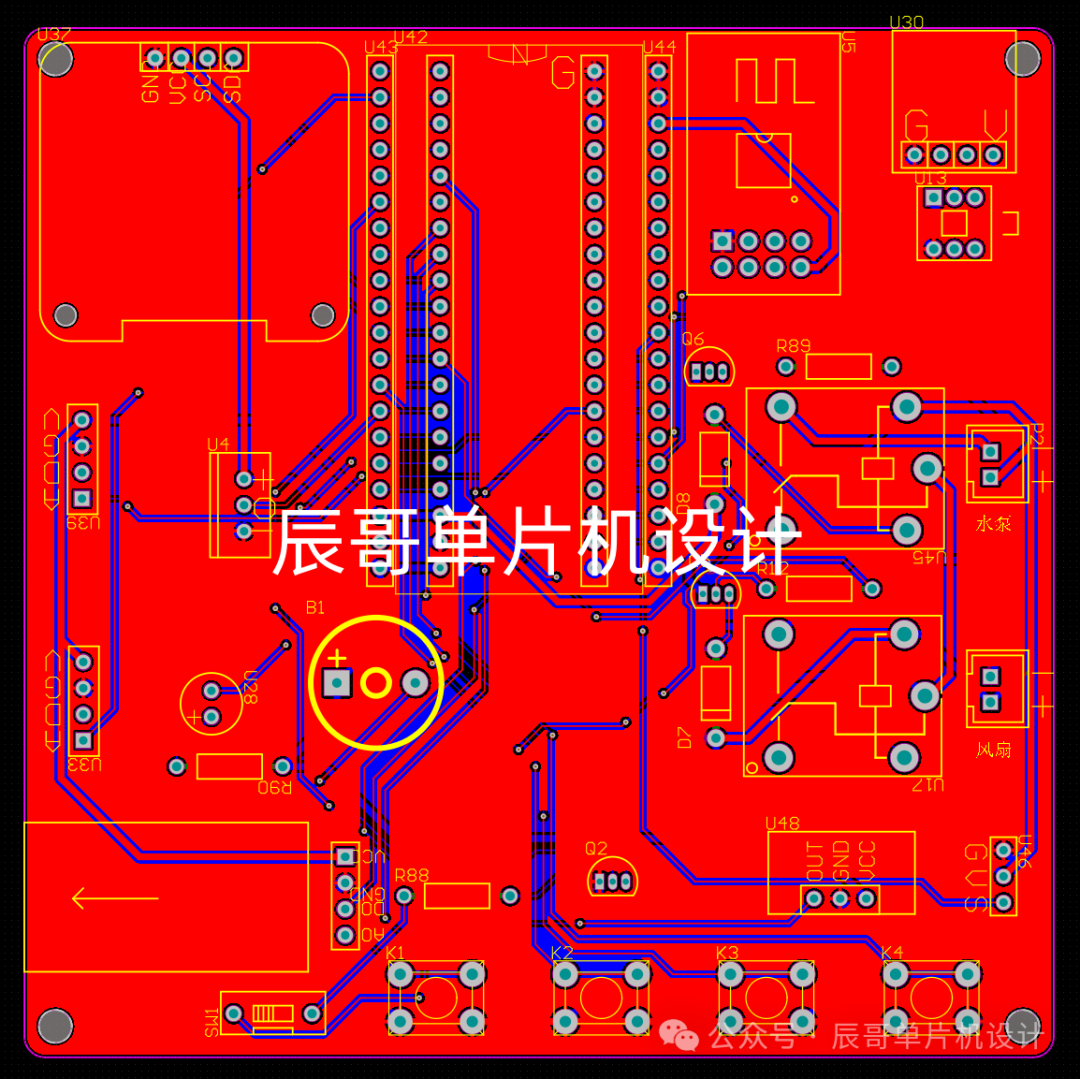
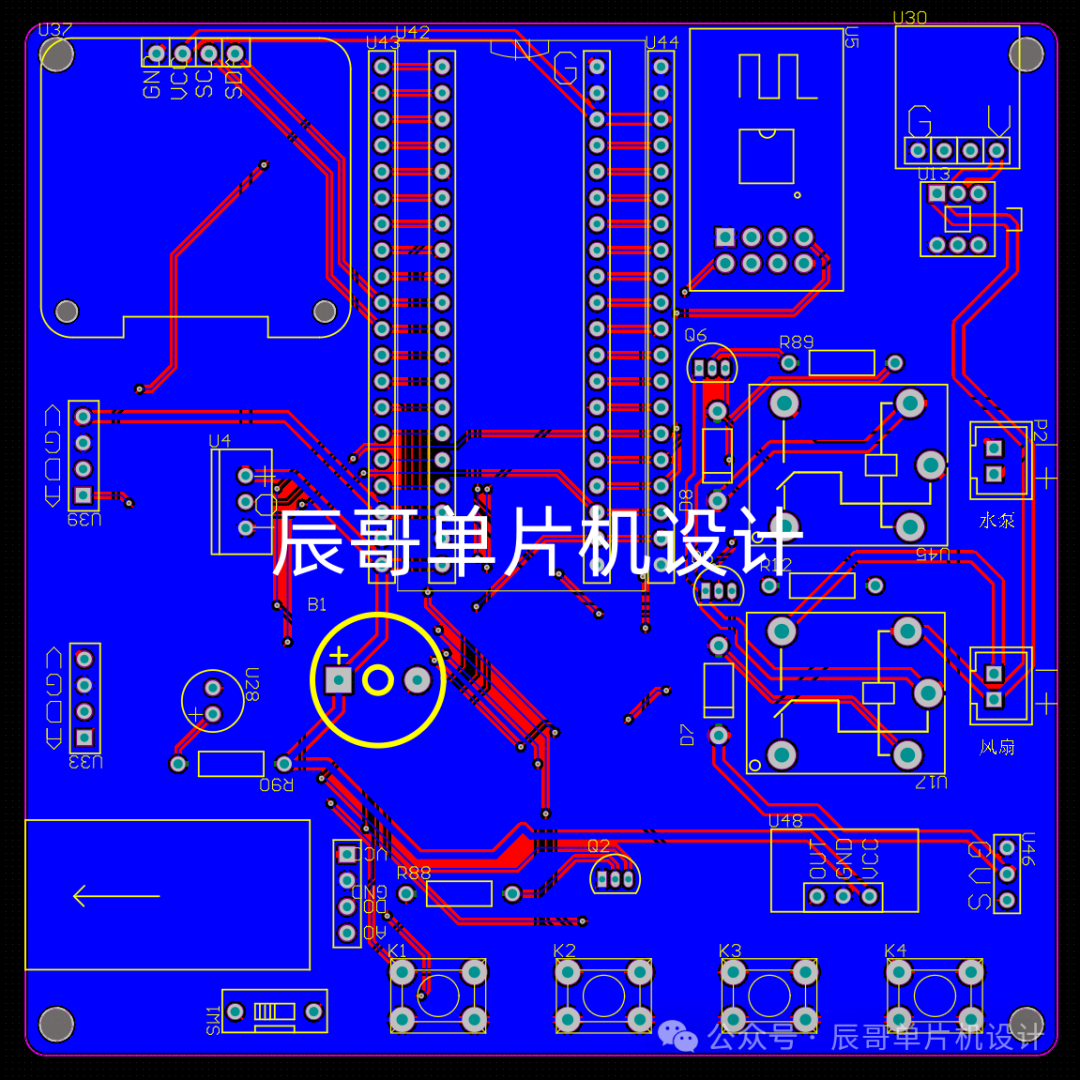
PCB硬件设计
PCB图
04
—
程序设计
#include "stm32f10x.h" // Device header#include "iwdg.h"#include "adcx.h"#include "oled.h"#include "dht11.h"#include "led.h"#include "key.h"#include "tim2.h" #include "tim3.h" #include "usart3.h" #include "usart.h"#include "sensormodules.h"#include "gizwits_product.h"#include "flash.h"#include "hc_sr501.h"#include "servo.h"#include "pwm.h"
#define KEY_11#define KEY_22#define KEY_33#define KEY_44
#define FLASH_START_ADDR0x0801f000//写入的起始地址
SystemStatesystemState;//声明系统状态结构体变量SensorModules sensorData;//声明传感器数据结构体变量SensorThresholdValue Sensorthreshold;//声明传感器阈值结构体变量
uint8_t menu = 1;//显示菜单变量uint8_t OLED_Clear_Flag;//阈值设置界面的清屏标志位uint8_t mode = 0;//系统模式
uint8_t displayPageNum;//主页面显示页面
uint8_t valveLockFlag;//阀门自锁标志位
enum {display_page1 = 1,display_page2,settingsPage
}MenuPages;
/** * @brief 显示菜单1的固定内容 * @param 无 * @retval 无 */void OLED_Menu1(void){//显示“温度: C”OLED_ShowChinese(1, 1, 0);OLED_ShowChinese(1, 2, 1);OLED_ShowChar(1, 5, ':');OLED_ShowChar(1, 8, 'C');
//显示“湿度: %”OLED_ShowChinese(1, 5, 2);OLED_ShowChinese(1, 6, 3);OLED_ShowChar(1, 13, ':');OLED_ShowChar(1, 16, '%');
//显示“烟雾浓度: ”OLED_ShowChinese(2, 1, 6);OLED_ShowChinese(2, 2, 7);OLED_ShowChinese(2, 3, 32);OLED_ShowChinese(2, 4, 33);OLED_ShowChar(2, 9, ':');OLED_ShowString(2, 14, "ppm");
//显示“一氧化碳: ”OLED_ShowChinese(3, 1, 42);OLED_ShowChinese(3, 2, 43);OLED_ShowChinese(3, 3, 44);OLED_ShowChinese(3, 4, 45);OLED_ShowChar(3, 9, ':');OLED_ShowString(3, 14, "ppm");
//显示“系统模式:”OLED_ShowChinese(4, 1, 24);OLED_ShowChinese(4, 2, 25);OLED_ShowChinese(4, 3, 26);OLED_ShowChinese(4, 4, 27);OLED_ShowChar(4, 9, ':');}
/** * @brief 显示菜单2的固定内容 * @param 无 * @retval 无 */void OLED_Menu2(void){//显示“火焰信号:”OLED_ShowChinese(1, 1, 8);OLED_ShowChinese(1, 2, 9);OLED_ShowChinese(1, 3, 10);OLED_ShowChinese(1, 4, 11);OLED_ShowChar(1, 9, ':');
//显示“人体信号:%”OLED_ShowChinese(2, 1, 12);OLED_ShowChinese(2, 2, 13);OLED_ShowChinese(2, 3, 14);OLED_ShowChinese(2, 4, 15);OLED_ShowChar(2, 9, ':');
}
/** * @brief 显示菜单1的传感器数据 * @param 无 * @retval 无 */void SensorDataDisplay1(void){//显示温度数据OLED_ShowNum(1, 6, sensorData.temp, 2);//显示湿度数据OLED_ShowNum(1, 14, sensorData.humi, 2);
//显示烟雾浓度数据OLED_ShowNum(2, 10, sensorData.smog, 4);
//显示甲烷浓度数据OLED_ShowNum(3, 10, sensorData.methane, 4);
//显示系统状态数据if (!mode){OLED_ShowChinese(4, 6, 30);OLED_ShowChinese(4, 7, 31);}else{OLED_ShowChinese(4, 6, 28);OLED_ShowChinese(4, 7, 29);}}
/** * @brief 显示菜单2的传感器数据 * @param 无 * @retval 无 */void SensorDataDisplay2(void){if (!sensorData.flame){OLED_ShowChinese(1, 6, 36);OLED_ShowChinese(1, 7, 37);}else{OLED_ShowChinese(1, 6, 34);OLED_ShowChinese(1, 7, 35);}
if (!sensorData.people){OLED_ShowChinese(2, 6, 40);OLED_ShowChinese(2, 7, 41);}else{OLED_ShowChinese(2, 6, 38);OLED_ShowChinese(2, 7, 39);}}
/** * @brief 显示阈值设置界面1的固定内容 * @param 无 * @retval 无 */void OLED_settingsPage1(void){//显示“温度阈值:”OLED_ShowChinese(1, 2, 0);OLED_ShowChinese(1, 3, 1);OLED_ShowChinese(1, 4, 18);OLED_ShowChinese(1, 5, 19);OLED_ShowChar(1, 11, ':');
//显示“火焰阈值:”OLED_ShowChinese(2, 2, 8);OLED_ShowChinese(2, 3, 9);OLED_ShowChinese(2, 4, 18);OLED_ShowChinese(2, 5, 19);OLED_ShowChar(2, 11, ':');
//显示“烟雾阈值:”OLED_ShowChinese(3, 2, 6);OLED_ShowChinese(3, 3, 7);OLED_ShowChinese(3, 4, 18);OLED_ShowChinese(3, 5, 19);OLED_ShowChar(3, 11, ':');
//显示“一氧阈值:”OLED_ShowChinese(4, 2, 42);OLED_ShowChinese(4, 3, 43);OLED_ShowChinese(4, 4, 18);OLED_ShowChinese(4, 5, 19);OLED_ShowChar(4, 11, ':');}
/** * @brief 显示阈值界面1的传感器数据 * @param 无 * @retval 无 */void settingsThresholdDisplay1(void){//显示温度阈值数据OLED_ShowNum(1, 13, Sensorthreshold.tempValue, 2);
//显示火焰阈值数据OLED_ShowNum(2, 13, Sensorthreshold.flameValue, 2);
//显示烟雾阈值数据OLED_ShowNum(3, 13, Sensorthreshold.smogValue, 3);
//显示甲烷阈值数据OLED_ShowNum(4, 13, Sensorthreshold.methaneValue, 3);}
/** * @brief 显示阈值界面的选择符号 * @param num 为显示的位置 * @retval 无 */void OLED_Option(uint8_t num){switch(num){case 1:OLED_ShowChar(1,1,'>');OLED_ShowChar(2,1,' ');OLED_ShowChar(3,1,' ');OLED_ShowChar(4,1,' ');break;
case 2:OLED_ShowChar(1,1,' ');OLED_ShowChar(2,1,'>');OLED_ShowChar(3,1,' ');OLED_ShowChar(4,1,' ');break;
case 3:OLED_ShowChar(1,1,' ');OLED_ShowChar(2,1,' ');OLED_ShowChar(3,1,'>');OLED_ShowChar(4,1,' ');break;
case 4:OLED_ShowChar(1,1,' ');OLED_ShowChar(2,1,' ');OLED_ShowChar(3,1,' ');OLED_ShowChar(4,1,'>');break;
default: break;}}
/** * @brief 记录阈值界面下按KEY1的次数 * @param 无 * @retval 返回次数 */uint8_t SetSelection(void){static uint8_t count = 1;if(KeyNum == KEY_1){KeyNum = 0;count++;if (count > 4){count = 1;}}return count;}
/** * @brief 对阈值界面的传感器阈值进行修改 * @param num 为当前用户需要更改的传感器阈值位置 * @retval 无 */void ThresholdModification(uint8_t num){switch (num){case 1:if (KeyNum == 3){KeyNum = 0;Sensorthreshold.tempValue++;if (Sensorthreshold.tempValue > 99){Sensorthreshold.tempValue = 0;}}else if (KeyNum == 4){KeyNum = 0;Sensorthreshold.tempValue--;if (Sensorthreshold.tempValue > 99){Sensorthreshold.tempValue = 99;}}break;
case 2:if (KeyNum == 3){KeyNum = 0;Sensorthreshold.flameValue++;if (Sensorthreshold.flameValue > 99){Sensorthreshold.flameValue = 0;}}else if (KeyNum == 4){KeyNum = 0;Sensorthreshold.flameValue--;if (Sensorthreshold.flameValue > 99){Sensorthreshold.flameValue = 99;}}break;
case 3:if (KeyNum == 3){KeyNum = 0;Sensorthreshold.smogValue++;if (Sensorthreshold.smogValue > 500){Sensorthreshold.smogValue = 0;}}else if (KeyNum == 4){KeyNum = 0;Sensorthreshold.smogValue--;if (Sensorthreshold.smogValue > 500){Sensorthreshold.smogValue = 500;}}break;
case 4:if (KeyNum == 3){KeyNum = 0;Sensorthreshold.methaneValue++;if (Sensorthreshold.methaneValue > 500){Sensorthreshold.methaneValue = 0;}}else if (KeyNum == 4){KeyNum = 0;Sensorthreshold.methaneValue--;if (Sensorthreshold.methaneValue > 500){Sensorthreshold.methaneValue = 500;}}break;
default: break;}}
/** * @brief 系统自动模式下的运行 * @param 无 * @retval 无 */void AutomaticMode(){if (mode){/*当系统检测到有人时会开启LED灯,没人时自动关闭*/if (sensorData.people){currentDataPoint.valueLED = 1;LED_ON();
}else{currentDataPoint.valueLED = 0;LED_OFF();
}
/*系统检测到温度高于阈值时会自动开启风扇*/if (sensorData.temp > Sensorthreshold.tempValue){currentDataPoint.valuefan = 1;Relay_ON(1);Buzzer_ON();
}
/*系统检测到火焰时,会自动开启水泵进行灭火并且关闭阀门*/if (sensorData.flame){Relay_ON(0);currentDataPoint.valuevalve = 1;currentDataPoint.valuewaterPump = 1;systemState.flameAlarm = 1;Buzzer_ON();
}else{systemState.flameAlarm = 0;currentDataPoint.valuewaterPump = 0;currentDataPoint.valuevalve = 0;
}
/*系统检测到烟雾浓度高于阈值,会自动开启风扇并且关闭阀门*/if (sensorData.smog > Sensorthreshold.smogValue){
currentDataPoint.valuefan = 1;systemState.smogAlarm = 1;Relay_ON(1);currentDataPoint.valuevalve = 1;Buzzer_ON();
}else{systemState.smogAlarm = 0;}
/*系统检测到甲烷浓度高于阈值,会自动开启风扇并且关闭阀门*/if (sensorData.methane > Sensorthreshold.methaneValue){
currentDataPoint.valuefan = 1;systemState.methaneAlarm = 1;Relay_ON(1);currentDataPoint.valuevalve = 1;Buzzer_ON();
}else{systemState.methaneAlarm = 0;}
/*控制舵机运行*/if ((sensorData.flame || sensorData.smog > Sensorthreshold.smogValue || sensorData.methane > Sensorthreshold.methaneValue)&& valveLockFlag == 0){valveLockFlag = 1;Servo_SetAngle(90);
}else if (valveLockFlag && !sensorData.flame && (sensorData.smog ) < Sensorthreshold.smogValue && (sensorData.methane ) < Sensorthreshold.methaneValue){valveLockFlag = 0;Relay_OFF(1);Relay_OFF(0);currentDataPoint.valuevalve = 0;Servo_SetAngle(0);}
/*控制风扇停止*/if (sensorData.temp < Sensorthreshold.tempValue && (sensorData.smog ) < Sensorthreshold.smogValue && (sensorData.methane ) < Sensorthreshold.methaneValue){currentDataPoint.valuefan = 0;Relay_OFF(1);}
/*控制蜂鸣器停止*/if (sensorData.temp < Sensorthreshold.tempValue && !sensorData.flame && (sensorData.smog ) < Sensorthreshold.smogValue && (sensorData.methane ) < Sensorthreshold.methaneValue){Buzzer_OFF();}}}
/** * @brief 传感器数据扫描 * @param 无 * @retval 无 */void SensorScan(void){DHT11_Read_Data(&sensorData.humi, &sensorData.temp);HC_SR501_Input(&sensorData.people);Get_Average_MQ2_PPM(&sensorData.smog);Get_Average_MQ4_PPM(&sensorData.methane);
if (Get_Average_Flame_Percent() < Sensorthreshold.flameValue){ sensorData.flame = 0;}else{sensorData.flame = 1;}}
int main(void){ADCX_Init();Timer2_Init(9,14398);Uart2_Init(9600);Uart1_Init(115200);Uart3_Init();IWDG_Init();//初始化看门狗PWM_Init();
OLED_Init();DHT11_Init();LED_Init();Buzzer_Init();Relay_Init();Key_Init();HC_SR501_Init();Servo_Init();
Sensorthreshold.tempValue = FLASH_R(FLASH_START_ADDR);//从指定页的地址读FLASHSensorthreshold.flameValue = FLASH_R(FLASH_START_ADDR+2);//从指定页的地址读FLASHSensorthreshold.smogValue = FLASH_R(FLASH_START_ADDR+4);//从指定页的地址读FLASHSensorthreshold.methaneValue = FLASH_R(FLASH_START_ADDR+6);
GENERAL_TIM_Init();userInit();//完成机智云初始赋值gizwitsInit();//开辟一个环形缓冲区gizwitsSetMode(WIFI_AIRLINK_MODE);
Delay_ms(1000);Servo_SetAngle(135);Buzzer_ON();Delay_ms(1000);Buzzer_OFF();Servo_SetAngle(45);KeyNum = 0;gizwitsSetMode(WIFI_AIRLINK_MODE);Delay_ms(1000);
while (1){/*阈值上传至机智云云平台*/do{currentDataPoint.valuetempValue = Sensorthreshold.tempValue;currentDataPoint.valueflameValue = Sensorthreshold.flameValue;currentDataPoint.valuesmogValue = Sensorthreshold.smogValue;currentDataPoint.valuemethaneValue = Sensorthreshold.methaneValue;
}while(0);
IWDG_ReloadCounter();
switch (menu){case display_page1:
SensorScan();//获取传感器数据if (!displayPageNum){SensorDataDisplay1();//显示传感器1数据OLED_Menu1();//显示主页面1固定信息}else{SensorDataDisplay2();//显示传感器2数据OLED_Menu2();//显示主页面2固定信息}
AutomaticMode();
if (KeyNum == KEY_1){Delay_ms(10);if(KeyNum == 1){KeyNum = 0;OLED_Clear();//清屏menu = settingsPage;}}
if (KeyNum == KEY_2)//是否按下按键2{KeyNum = 0;OLED_Clear();//清屏displayPageNum = !displayPageNum;}break;
case settingsPage:
settingsThresholdDisplay1();//显示传感器阈值1数据OLED_settingsPage1();//显示阈值设置界面1固定信息ThresholdModification(SetSelection());//调节传感器阈值
OLED_Option(SetSelection());//获取按键次数,从而判断“>”显示位置
if (KeyNum == KEY_2)//判断用户是否按下退出按键{KeyNum = 0;OLED_Clear();//清屏menu = display_page1;//回到主页面1
//存储修改的传感器阈值至flash内FLASH_W(FLASH_START_ADDR, Sensorthreshold.tempValue, Sensorthreshold.flameValue,Sensorthreshold.smogValue, Sensorthreshold.methaneValue);currentDataPoint.valuetempValue = Sensorthreshold.tempValue;currentDataPoint.valueflameValue = Sensorthreshold.flameValue;currentDataPoint.valuesmogValue = Sensorthreshold.smogValue;currentDataPoint.valuemethaneValue = Sensorthreshold.methaneValue;}break;default: break;}
/*机智云阈值更改后保存至Flash*/if (valueFlashFlag){valueFlashFlag = 0;FLASH_W(FLASH_START_ADDR, Sensorthreshold.tempValue, Sensorthreshold.flameValue,Sensorthreshold.smogValue, Sensorthreshold.methaneValue);}
userHandle();//更新机智云数据点变量存储的值gizwitsHandle((dataPoint_t *)¤tDataPoint);//数据上传至机智云}}
05
—
实验效果
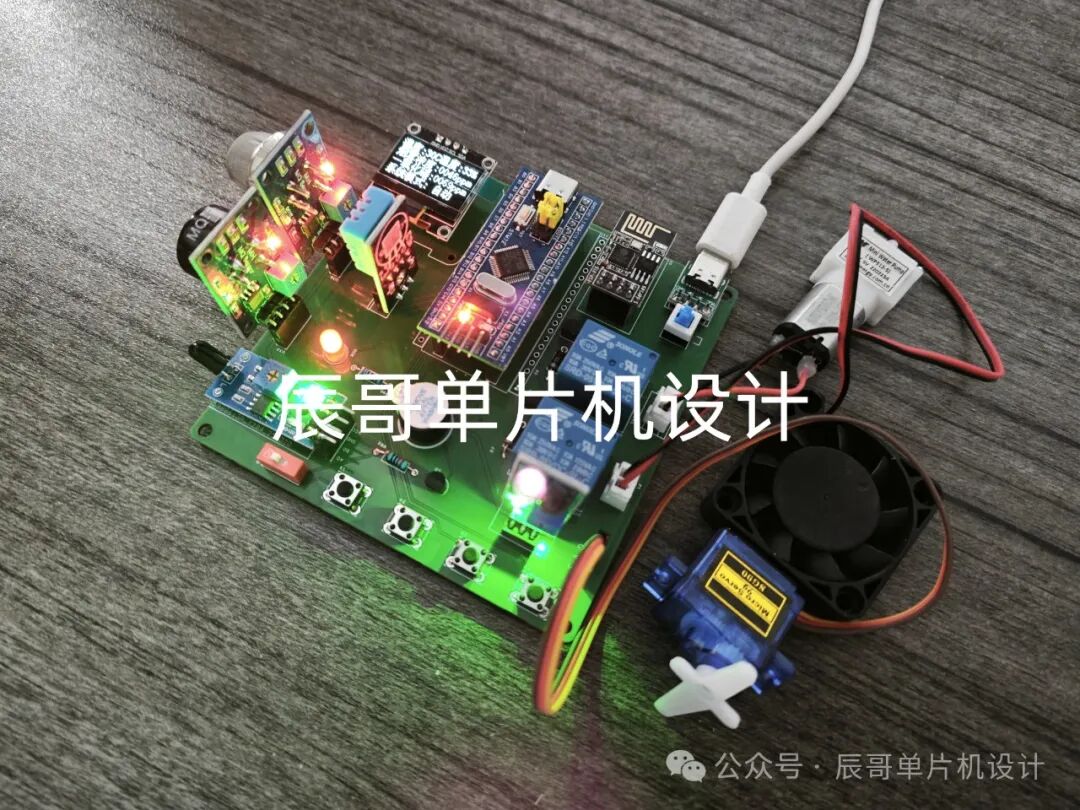
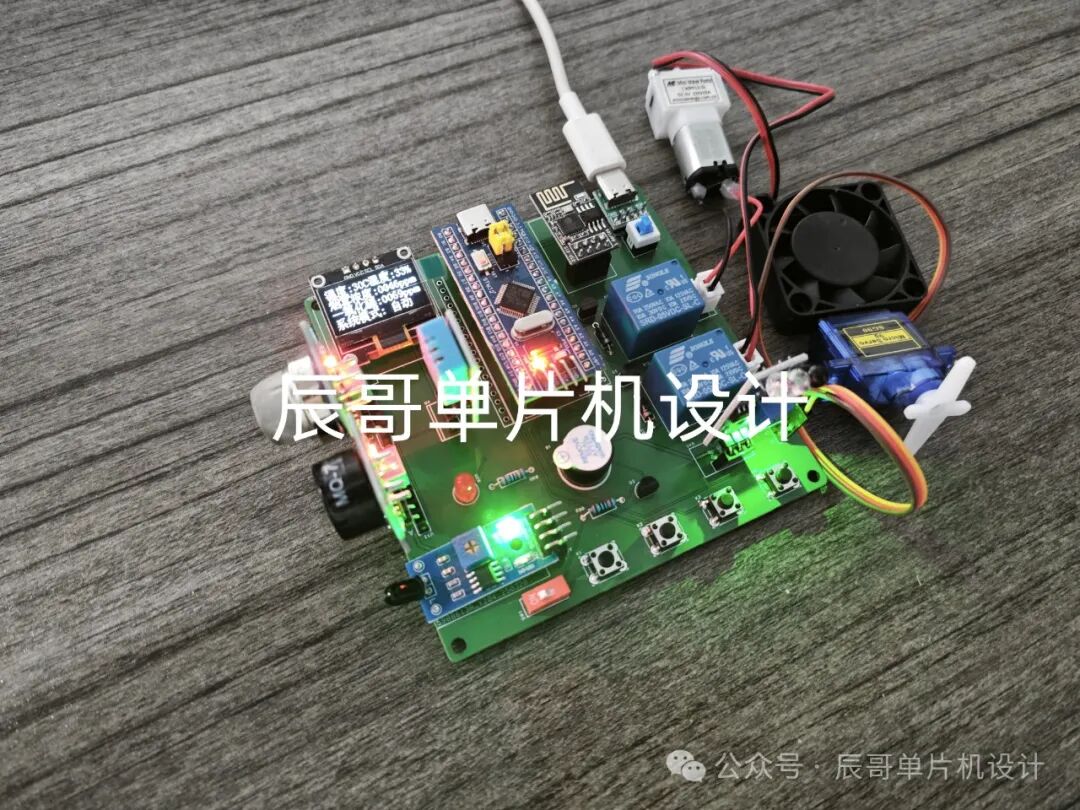
-
基于STM32与机智云的智能家居系统(完整项目)2026-05-15 706
-
STM32项目分享:智能语音台灯(机智云)2025-07-24 2200
-
STM32项目分享:智能家居(机智云)升级版2025-07-02 1386
-
STM32项目分享:智能台灯(机智云)系统2025-03-10 2760
-
STM32项目分享:机智云智慧农业系统2024-12-19 2723
-
STM32项目实战:基于STM32U5的火灾报警系统(LVGL),附项目教程/源码2024-11-13 3351
-
STM32项目实战:基于STM32U5的智能灯光控制系统(LVGL),附项目教程/源码2024-11-07 4092
-
STM32项目实战:基于STM32F4的智能灯光控制系统(LVGL),附项目教程/源码2024-10-17 3416
-
STM32项目分享:智能家居(机智云)系统2024-07-28 4803
-
基于机智云物联网平台的智能厨房监测系统2021-07-20 8554
-
机智云2016~2017优秀项目盘点2017-09-22 3173
-
基于机智云的智能家居系统设计与实现2017-09-15 6026
-
基于机智云的智能宿舍系统设计2017-09-01 5006
-
【小e物联网申请】基于小e物联网开发平台的厨房安全系统。2016-06-06 2715
全部0条评论

快来发表一下你的评论吧 !
