


 【NCS随笔】如何进入system_off深度睡眠模式以及配置GPIO中断唤醒
电子说
1.4w人已加入
描述
【NCS随笔】如何进入system_off深度睡眠模式以及配置GPIO中断唤醒
本文章主要是讲解NCS下面使用nRF54L15如何进入system_off模式,以及如何配置通过按键唤醒
一、如何进入system_off模式
在prj.conf里面添加CONFIG_POWEROFF=y
在主函数文件调用如下头文件#include
即可使用进入system_off模式的函数:sys_poweroff();
进入 System OFF 前,需确保所有 EasyDMA 事务结束,HFXO 停止,且 RESETREAS 清零,否则可能无法进入
二、配置GPIO中断唤醒
还是老规矩,使用hello_world例程,分别使用nrfx的gpio库和zephyr的库来唤醒
2.1 nrf_gpio库
1、头文件调用#include
2、main函数里面添加
#define BUTTON3_PIN 4 // P0.04 对应DK的BUTTON3
  // 配置 P0.04 为输入,上拉,并使能 SENSE 低电平唤醒
   nrf_gpio_cfg_input(BUTTON3_PIN, NRF_GPIO_PIN_PULLUP);
   nrf_gpio_cfg_sense_set(BUTTON3_PIN, NRF_GPIO_PIN_SENSE_LOW);
2.2 zephyr的API
1、头文件调用#include
2、添加宏定义CONFIG_GPIO=y
3、主函数配置gpio唤醒
#define BUTTON_NODE    DT_ALIAS(sw0)
#define BUTTON_PIN     DT_GPIO_PIN(BUTTON_NODE, gpios)
#define BUTTON_FLAGS   (GPIO_INPUT | DT_GPIO_FLAGS(BUTTON_NODE, gpios))

static const struct device *button_dev;

void main(void)
{
    int ret;
	printf("Hello World! %sn", CONFIG_BOARD_TARGET);
    button_dev = DEVICE_DT_GET(DT_GPIO_CTLR(BUTTON_NODE, gpios));
    if (!device_is_ready(button_dev)) {
        printk("Button device not readyn");
        return;
    }

    ret = gpio_pin_configure(button_dev, BUTTON_PIN, BUTTON_FLAGS);
    if (ret < 0) {
        printk("Failed to configure buttonn");
        return;
    }

    // 配置为唤醒源
    ret = gpio_pin_interrupt_configure(button_dev, BUTTON_PIN, GPIO_INT_EDGE_TO_ACTIVE | GPIO_INT_WAKEUP);
    if (ret < 0) {
        printk("Failed to configure button interruptn");
        return;
    }

    printk("Waiting 5 seconds before entering System OFF...n");
    k_sleep(K_SECONDS(5));

    printk("Entering System OFF moden");
    sys_poweroff();
    // 进入System OFF后,只有唤醒源(如按键)才能唤醒,唤醒后会复位
}
4、overlay里面设置BUTTON0的sense-edge-mask寄存器
&gpio1 {
    sense-edge-mask = < 0x00002000 >;
    //sense-edge-mask 的每一位对应一个 GPIO pin,bit0 对应 P0.00,bit1 对应 P0.01,……,bit31 对应 P0.31所以P1,13对应0x200
};
2.3、附上所有代码
main:
/*
 * Copyright (c) 2012-2014 Wind River Systems, Inc.
 *
 * SPDX-License-Identifier: Apache-2.0
 */

#include < stdio.h >
#include < zephyr/kernel.h >
#include < zephyr/device.h >
#include < zephyr/drivers/gpio.h >
#include < zephyr/pm/pm.h >
#include < zephyr/pm/policy.h >
#include < zephyr/sys/printk.h >
#include < zephyr/sys/poweroff.h >
#include < hal/nrf_gpio.h >
#define BUTTON_NODE    DT_ALIAS(sw0)
#define BUTTON_PIN     DT_GPIO_PIN(BUTTON_NODE, gpios)
#define BUTTON_FLAGS   (GPIO_INPUT | DT_GPIO_FLAGS(BUTTON_NODE, gpios))

static const struct device *button_dev;


#define BUTTON3_PIN 4 // P0.04 对应DK的BUTTON3

void main(void)
{
    int ret;
	printf("Hello World! %sn", CONFIG_BOARD_TARGET);
    button_dev = DEVICE_DT_GET(DT_GPIO_CTLR(BUTTON_NODE, gpios));
    if (!device_is_ready(button_dev)) {
        printk("Button device not readyn");
        return;
    }

    ret = gpio_pin_configure(button_dev, BUTTON_PIN, BUTTON_FLAGS);
    if (ret < 0) {
        printk("Failed to configure buttonn");
        return;
    }

    // 配置为唤醒源
    ret = gpio_pin_interrupt_configure(button_dev, BUTTON_PIN, GPIO_INT_EDGE_TO_ACTIVE | GPIO_INT_WAKEUP);
    if (ret < 0) {
        printk("Failed to configure button interruptn");
        return;
    }


    // 配置 P0.04 为输入,上拉,并使能 SENSE 低电平唤醒
    nrf_gpio_cfg_input(BUTTON3_PIN, NRF_GPIO_PIN_PULLUP);
    nrf_gpio_cfg_sense_set(BUTTON3_PIN, NRF_GPIO_PIN_SENSE_LOW);


    printk("Waiting 5 seconds before entering System OFF...n");
    k_sleep(K_SECONDS(5));

    printk("Entering System OFF moden");
    sys_poweroff();
    // 进入System OFF后,只有唤醒源(如按键)才能唤醒,唤醒后会复位
}
prj.conf
CONFIG_GPIO=y

CONFIG_POWEROFF=y
overlay:
&gpio1 {
    sense-edge-mask = < 0x00002000 >; // 只举例,实际bit需对应你的按键引脚
};
三测试
设置上电5S进入深度休眠模式,然后通过按键唤醒: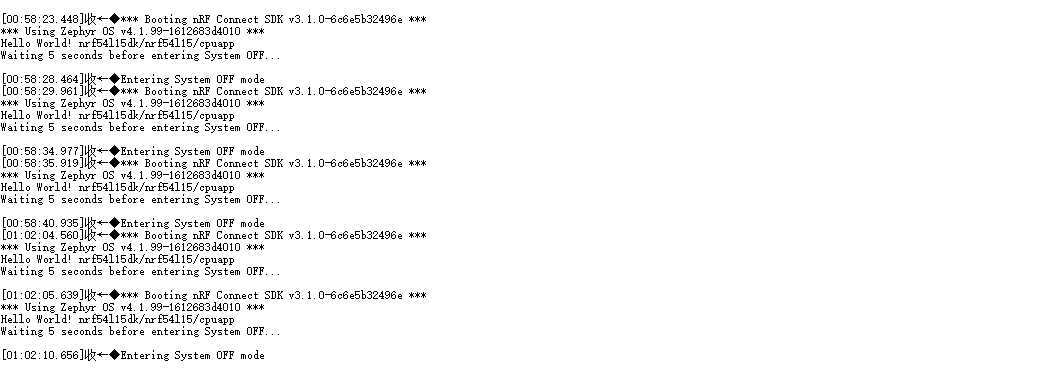
你的点赞、收藏和评论是对我最大的支持,有问题多多指教,如果有需要Nordic开发板、Nordic的芯片以及Nordic技术支持的可以在个人资料获取我的联系方式,感谢读者支持!
审核编辑 黄宇
声明:本文内容及配图由入驻作者撰写或者入驻合作网站授权转载。文章观点仅代表作者本人,不代表电子发烧友网立场。文章及其配图仅供工程师学习之用,如有内容侵权或者其他违规问题,请联系本站处理。
举报投诉
-
如何使用UART将TRAVEOTM T 2G设备从深度睡眠中唤醒2024-01-31 666
-
CY8C4247LQI-BL483使用GPIO中断作为唤醒源将芯片从深度睡眠模式中唤醒,为什么不起作用?2024-01-24 871
-
AT32F4如何进入深度睡眠模式2023-10-20 622
-
程序进入睡眠模式设置了定时器中断为什么不能唤醒睡眠?2023-10-19 587
-
M261芯片如何进入睡眠和深度睡眠模式,以及如何退出来?有没有C语言参考?2023-06-20 629
-
LPC55S16中的深度睡眠模式和掉电模式无法唤醒怎么解决?2023-05-22 643
-
AN010 从深度睡眠模式2唤醒并恢复2023-02-27 625
-
请问关于GS32G020 PA3深度睡眠唤醒设置方法2022-07-26 1725
-
小熊派GD32F303为什么会无法退出深度睡眠模式?2022-03-11 14146
-
GD32进入深度睡眠后通过外部中断唤醒发现系统时钟变慢的原因2022-01-26 1799
-
GD32低功耗:深度睡眠唤醒系统时钟变慢问题2021-12-02 3364
-
STM32进入和退出睡眠模式2018-04-03 12417
-
PSoC3/5如何进入睡眠模式以及唤醒例程2012-11-19 3015
-
LM3S系列单片机睡眠与深度睡眠应用笔记2010-04-03 880
全部0条评论

快来发表一下你的评论吧 !
