


 Linux/Android系统如何通过RTC实现自动开机?
电子说
描述
在嵌入式开发中,我们经常会遇到这样的需求:设备需要在指定时间自动开机(比如物联网网关定时唤醒采集数据、工业设备按班次启动、服务器远程维护后自动重启)。而实现这一功能的核心,往往离不开RTC(实时时钟) 芯片—— 它能在设备关机后依靠备用电池继续计时,到预设时间后触发硬件开机信号。
今天就以常见的 HYM8563 RTC 芯片(驱动已适配 Linux 6.1 内核)为例,手把手教你在 Linux 和 Android 系统中配置 RTC 自动开机,附带完整实操指令和问题排查技巧!
一、先搞懂:RTC 自动开机的原理
简单来说,RTC 自动开机的核心是 “RTC 唤醒闹钟(Wake Alarm)” 功能:
1.系统开机时,我们通过指令将「唤醒时间」写入 RTC 芯片的闹钟寄存器;
2.执行关机指令后,主板断电,但 RTC 芯片靠备用电池继续运行,并倒计时等待唤醒时间;
3.当 RTC 计时达到预设的唤醒时间,会输出一个硬件触发信号(如 IRQ 中断),触发主板开机。
本次实操的前提是:RTC 驱动已正常加载(如文档中适配的rtc-hym8563.c 驱动,已支持唤醒闹钟功能),且主板硬件支持 RTC 唤醒(大部分嵌入式主板默认支持)。
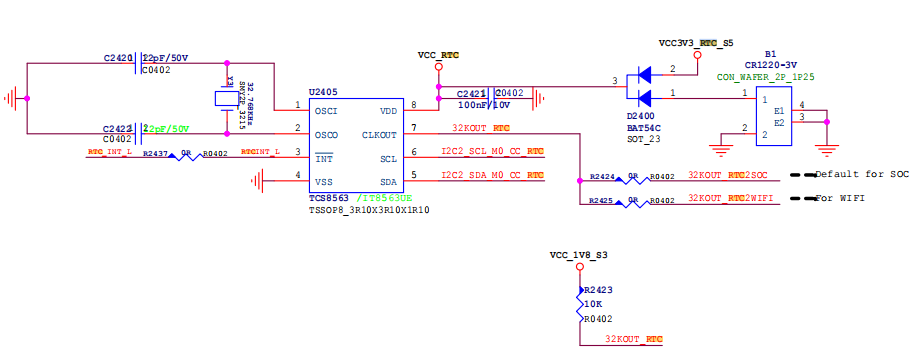
代码修改:
diff --git a/kernel-6.1/drivers/rtc/rtc-hym8563.c b/kernel-6.1/drivers/rtc/rtc-hym8563.cindex 59759e26d47..ac75a50aa5b 100644--- a/kernel-6.1/drivers/rtc/rtc-hym8563.c+++ b/kernel-6.1/drivers/rtc/rtc-hym8563.c* Author: Heiko Stuebner** based on rtc-HYM8563- * Copyright (C) 2010 Rockchip Electronics Co., Ltd.+ * Copyright (C) 2010 ROCKCHIP, Inc.*/#include#include#include#include+#include#define HYM8563_CTL10x00#define HYM8563_CTL1_TESTBIT(7)#define HYM8563_TMR_CTL_MASK3#define HYM8563_TMR_CNT0x0f-#define HYM8563_TMR_MAXCNT0xff-#define HYM8563_TMR_CFG(HYM8563_TMR_CTL_ENABLE | HYM8563_TMR_CTL_1)struct hym8563 {struct i2c_client*client;struct hym8563 {#ifdef CONFIG_COMMON_CLKstruct clk_hwclkout_hw;#endif-int alarm_or_timer_irq;-int alarm_tm_sec;};+static struct i2c_client *mClient = NULL;+static struct rtc_wkalrm __alarm;+/** RTC handling*/static int hym8563_rtc_read_time(struct device *dev, struct rtc_time *tm)int ret;ret = i2c_smbus_read_i2c_block_data(client, HYM8563_SEC, 7, buf);-if (ret < 0)-return ret;tm->tm_sec = bcd2bin(buf[0] & HYM8563_SEC_MASK);tm->tm_min = bcd2bin(buf[1] & HYM8563_MIN_MASK);static int hym8563_rtc_read_time(struct device *dev, struct rtc_time *tm)return 0;}+int hym8563_rtc_read_time_ex(struct rtc_time *tm) {+if(mClient == NULL) {+printk("%s failedn", __func__);+return -1;+}+return hym8563_rtc_read_time(&mClient->dev, tm);+}+EXPORT_SYMBOL(hym8563_rtc_read_time_ex);+static int hym8563_rtc_set_time(struct device *dev, struct rtc_time *tm){struct i2c_client *client = to_i2c_client(dev);static int hym8563_rtc_set_time(struct device *dev, struct rtc_time *tm)return 0;}+int hym8563_rtc_set_time_ex(struct rtc_time *tm) {+if(mClient == NULL) {+printk("%s failedn", __func__);+return -1;+}+return hym8563_rtc_set_time(&mClient->dev, tm);+}+EXPORT_SYMBOL(hym8563_rtc_set_time_ex);+static int hym8563_rtc_alarm_irq_enable(struct device *dev,unsigned int enabled){struct i2c_client *client = to_i2c_client(dev);-struct hym8563 *hym8563 = i2c_get_clientdata(client);int data;data = i2c_smbus_read_byte_data(client, HYM8563_CTL2);if (data < 0)return data;-if (enabled) {-if (hym8563->alarm_or_timer_irq)-data |= HYM8563_CTL2_TIE;-else-data |= HYM8563_CTL2_AIE;-} else {-data &= ~HYM8563_CTL2_TIE;+if (enabled)+data |= HYM8563_CTL2_AIE;+elsedata &= ~HYM8563_CTL2_AIE;-}return i2c_smbus_write_byte_data(client, HYM8563_CTL2, data);};static int hym8563_rtc_alarm_irq_enable(struct device *dev,static int hym8563_rtc_read_alarm(struct device *dev, struct rtc_wkalrm *alm){struct i2c_client *client = to_i2c_client(dev);-struct hym8563 *hym8563 = i2c_get_clientdata(client);struct rtc_time *alm_tm = &alm->time;u8 buf[4];int ret;static int hym8563_rtc_read_alarm(struct device *dev, struct rtc_wkalrm *alm)if (ret < 0)return ret;-alm_tm->tm_sec = hym8563->alarm_tm_sec;+/* The alarm only has a minute accuracy */+alm_tm->tm_sec = 0;alm_tm->tm_min = (buf[0] & HYM8563_ALM_BIT_DISABLE) ?-1 :static int hym8563_rtc_read_alarm(struct device *dev, struct rtc_wkalrm *alm)if (ret < 0)return ret;-if (ret & (HYM8563_CTL2_AIE | HYM8563_CTL2_TIE))+if (ret & HYM8563_CTL2_AIE)alm->enabled = 1;return 0;static int hym8563_rtc_read_alarm(struct device *dev, struct rtc_wkalrm *alm)static int hym8563_rtc_set_alarm(struct device *dev, struct rtc_wkalrm *alm){struct i2c_client *client = to_i2c_client(dev);-struct hym8563 *hym8563 = i2c_get_clientdata(client);struct rtc_time *alm_tm = &alm->time;-struct rtc_time tm;-time64_t now, alarm, interval;u8 buf[4];int ret;-ret = i2c_smbus_write_byte_data(client, HYM8563_TMR_CNT, 0);-if (ret < 0)-return ret;+/*+ * The alarm has no seconds so deal with it+ */+if (alm_tm->tm_sec) {+alm_tm->tm_sec = 0;+alm_tm->tm_min++;+if (alm_tm->tm_min >= 60) {+alm_tm->tm_min = 0;+alm_tm->tm_hour++;+if (alm_tm->tm_hour >= 24) {+alm_tm->tm_hour = 0;+alm_tm->tm_mday++;+if (alm_tm->tm_mday > 31)+alm_tm->tm_mday = 0;+}+}+}-ret = i2c_smbus_write_byte_data(client, HYM8563_CTL2, 0);+ret = i2c_smbus_read_byte_data(client, HYM8563_CTL2);if (ret < 0)return ret;-ret = hym8563_rtc_read_time(dev, &tm);+ret &= ~HYM8563_CTL2_AIE;++ret = i2c_smbus_write_byte_data(client, HYM8563_CTL2, ret);if (ret < 0)return ret;-alarm = rtc_tm_to_time64(alm_tm);-now = rtc_tm_to_time64(&tm);-interval = alarm - now;--/* store alarm tm_sec */-hym8563->alarm_tm_sec = alm_tm->tm_sec;--dev_info(dev, "%s: now: %ptRn", __func__, &tm);-dev_info(dev, "%s: expired:%ptRn", __func__, alm_tm);-if (interval < HYM8563_TMR_MAXCNT) {-hym8563->alarm_or_timer_irq = 1;-/* set timer */-i2c_smbus_write_byte_data(client, HYM8563_TMR_CNT, (u8)interval);-dev_info(&client->dev, "%s: set %dm%ds timer, interval=%dsn",- __func__, ((u8)interval)/60, ((u8)interval)%60, (u8)interval);-} else {-hym8563->alarm_or_timer_irq = 0;-/* set alarm */-alm_tm->tm_sec = 0;-dev_info(dev, "%s: set alarm %ptRn", __func__, alm_tm);-}buf[0] = (alm_tm->tm_min < 60 && alm_tm->tm_min >= 0) ?bin2bcd(alm_tm->tm_min) : HYM8563_ALM_BIT_DISABLE;static const struct rtc_class_ops hym8563_rtc_ops = {.set_alarm= hym8563_rtc_set_alarm,};+static int get_num(char *buf) {+char *index_start = buf;+int max_size;++if(buf == NULL)+return 0xff;++max_size = strlen(buf);+while('9' < *index_start || *index_start < '0') {+index_start++;+if(index_start - buf > max_size)+return 0xff;+}++return simple_strtol(index_start, NULL, 10);+}++static void get_alarm_from_usr(const char *buf) {+char *min_index, *hour_index, *mday_index, *wday_index;++min_index = strstr(buf, "min");+hour_index = strstr(buf, "hour");+mday_index = strstr(buf, "mday");+wday_index = strstr(buf, "wday");++__alarm.time.tm_min = get_num(min_index);+__alarm.time.tm_hour = get_num(hour_index);+__alarm.time.tm_mday = get_num(mday_index);+__alarm.time.tm_wday = get_num(wday_index);+__alarm.enabled = 1;+}++static ssize_t alarm_store(struct device *cd, struct device_attribute *attr,const char *buf, size_t count) {+get_alarm_from_usr(buf);+hym8563_rtc_set_alarm(&mClient->dev, &__alarm);+return count;+}++static ssize_t alarm_show(struct device *cd, struct device_attribute *attr, char *buf) {+if(__alarm.enabled)+return sprintf(buf, "alarm is enabled! wday:%d,mday:%d,hour:%d,min:%dn",+__alarm.time.tm_wday, __alarm.time.tm_mday, __alarm.time.tm_hour, __alarm.time.tm_min);+return sprintf(buf, "alarm is disabled!n");+}++static DEVICE_ATTR_RW(alarm);++static ssize_t enable_store(struct device *cd, struct device_attribute *attr,const char *buf, size_t count) {+if(simple_strtoul(buf, NULL, 10)) {+__alarm.enabled = 1;+hym8563_rtc_alarm_irq_enable(&mClient->dev, 1);+}+else {+__alarm.enabled = 0;+hym8563_rtc_alarm_irq_enable(&mClient->dev, 0);+}+return count;+}++static ssize_t enable_show(struct device *cd, struct device_attribute *attr, char *buf) {+return sprintf(buf, "%dn", __alarm.enabled);+}+++static DEVICE_ATTR_RW(enable);++static ssize_t time_show(struct device *cd, struct device_attribute *attr, char *buf) {+struct rtc_time tm;++hym8563_rtc_read_time(&mClient->dev, &tm);+return sprintf(buf,"%d/%d/%d %02d:%02d:%02d wday:%dn",+tm.tm_year + 1900, tm.tm_mon + 1, tm.tm_mday, tm.tm_hour, tm.tm_min, tm.tm_sec, tm.tm_wday);+}++static ssize_t time_store(struct device *cd, struct device_attribute *attr,const char *buf, size_t count) {+return count;+}+++static DEVICE_ATTR_RW(time);+++static struct attribute *time_ctrl_attrs[] = {+&dev_attr_alarm.attr,+&dev_attr_enable.attr,+&dev_attr_time.attr,+NULL,+};+ATTRIBUTE_GROUPS(time_ctrl);+++static struct class time_ctrl_class = {+.name = "time_ctrl",+.class_groups = time_ctrl_groups,+};++/** Handling of the clkout*/static int hym8563_clkout_prepare(struct clk_hw *hw)return hym8563_clkout_control(hw, 1);}+/*static void hym8563_clkout_unprepare(struct clk_hw *hw){hym8563_clkout_control(hw, 0);}+*/static int hym8563_clkout_is_prepared(struct clk_hw *hw){static int hym8563_clkout_is_prepared(struct clk_hw *hw)static const struct clk_ops hym8563_clkout_ops = {.prepare = hym8563_clkout_prepare,-.unprepare = hym8563_clkout_unprepare,+//.unprepare = hym8563_clkout_unprepare, //clk always on,mask for fix suspend crash.is_prepared = hym8563_clkout_is_prepared,.recalc_rate = hym8563_clkout_recalc_rate,.round_rate = hym8563_clkout_round_rate,static struct clk *hym8563_clkout_register_clk(struct hym8563 *hym8563)struct i2c_client *client = hym8563->client;struct device_node *node = client->dev.of_node;struct clk *clk;-struct clk_init_data init;+struct clk_init_data init = {};+int ret;++ret = i2c_smbus_write_byte_data(client, HYM8563_CLKOUT,0x80);+if (ret < 0)+return ERR_PTR(ret);init.name = "hym8563-clkout";init.ops = &hym8563_clkout_ops;-init.flags = CLK_IS_CRITICAL;+init.flags = 0;init.parent_names = NULL;init.num_parents = 0;hym8563->clkout_hw.init = &init;static irqreturn_t hym8563_irq(int irq, void *dev_id)goto out;}-dev_info(&client->dev, "%s: irq stat 0x%xn", __func__, data);data &= ~HYM8563_CTL2_AF;-/*clean timer irq and reset timer count down*/-data &= ~HYM8563_CTL2_TF;-i2c_smbus_write_byte_data(client, HYM8563_TMR_CNT, 0);ret = i2c_smbus_write_byte_data(client, HYM8563_CTL2, data);if (ret < 0) {static int hym8563_init_device(struct i2c_client *client){int ret;-ret = i2c_smbus_read_byte_data(client, HYM8563_CTL1);-if (ret < 0)-dev_err(&client->dev, "%s: error read i2c data %dn",-__func__, ret);-/* Clear stop flag if present */ret = i2c_smbus_write_byte_data(client, HYM8563_CTL1, 0);if (ret < 0)static int hym8563_init_device(struct i2c_client *client)ret &= ~HYM8563_CTL2_TI_TP;-/* Reset timer cnt and Set timer countdown 1s per count */-i2c_smbus_write_byte_data(client, HYM8563_TMR_CNT, 0);-i2c_smbus_write_byte_data(client, HYM8563_TMR_CTL, HYM8563_TMR_CFG);-return i2c_smbus_write_byte_data(client, HYM8563_CTL2, ret);}static int hym8563_suspend(struct device *dev)static int hym8563_resume(struct device *dev){struct i2c_client *client = to_i2c_client(dev);-int ret;--ret = i2c_smbus_read_byte_data(client, HYM8563_CTL1);-if (ret < 0)-dev_err(&client->dev, "%s: error read i2c data %dn",-__func__, ret);if (device_may_wakeup(dev))disable_irq_wake(client->irq);static int hym8563_probe(struct i2c_client *client){struct hym8563 *hym8563;int ret;+//int valid;/** hym8563 initial time(2021_1_1_1200),* avoid hym8563 read time errorstatic int hym8563_probe(struct i2c_client *client).tm_min = 0,.tm_sec = 0,};+printk("abc rtcDBG [%s] start n ",__FUNCTION__);hym8563 = devm_kzalloc(&client->dev, sizeof(*hym8563), GFP_KERNEL);if (!hym8563)return -ENOMEM;-hym8563->rtc = devm_rtc_allocate_device(&client->dev);-if (IS_ERR(hym8563->rtc))-return PTR_ERR(hym8563->rtc);-hym8563->client = client;i2c_set_clientdata(client, hym8563);static int hym8563_probe(struct i2c_client *client)return ret;}+mClient = client;if (client->irq > 0) {ret = devm_request_threaded_irq(&client->dev, client->irq,NULL, hym8563_irq,static int hym8563_probe(struct i2c_client *client)(tm_read.tm_mon == -1) || (rtc_valid_tm(&tm_read) != 0))hym8563_rtc_set_time(&client->dev, &tm);-hym8563->rtc->ops = &hym8563_rtc_ops;-clear_bit(RTC_FEATURE_UPDATE_INTERRUPT, hym8563->rtc->features);+hym8563_rtc_alarm_irq_enable(&client->dev, 0);+class_register(&time_ctrl_class);+hym8563->rtc = devm_rtc_device_register(&client->dev, client->name,+&hym8563_rtc_ops, THIS_MODULE);+if (IS_ERR(hym8563->rtc))+return PTR_ERR(hym8563->rtc);++/* the hym8563 alarm only supports a minute accuracy */+//hym8563->rtc->uie_unsupported = 1;#ifdef CONFIG_COMMON_CLKhym8563_clkout_register_clk(hym8563);#endif-return devm_rtc_register_device(hym8563->rtc);+printk("abc rtcDBG [%s] end n",__FUNCTION__);+return 0;}static const struct i2c_device_id hym8563_id[] = {MODULE_DEVICE_TABLE(of, hym8563_dt_idtable);static struct i2c_driver hym8563_driver = {.driver= {-.name= "rtc-hym8563",+.name= "haoyu,hym8563",.pm= &hym8563_pm_ops,.of_match_table= hym8563_dt_idtable,},
二、Linux 系统:RTC 自动开机实操
1. 第一步:同步系统时间到 RTC
首先需要确保系统时间正确,再将系统时间写入 RTC 芯片(避免 RTC 时间错乱导致唤醒失败)。
打开终端,执行以下两条指令:
|
# 1. 手动设置系统当前时间(格式:YYYYMMDD HHSS)
date -s "20241023 1100"
# 2. 将系统时间同步到 RTC 芯片(hwclock -w = write to RTC)
hwclock -w
|
��验证:执行hwclock -r(read RTC),若输出时间与刚才设置的一致,说明同步成功。
2. 第二步:配置 RTC 唤醒闹钟并关机
接下来设置“多久后自动开机”(这里以「1 分钟后唤醒」为例),然后关机等待。
依次执行以下三条指令:
|
# 1. 清空 RTC 现有唤醒闹钟配置(避免历史设置干扰)
echo 0 > /sys/class/rtc/rtc0/wakealarm
# 2. 设置唤醒时间:+60 表示“从当前时间起 60 秒后唤醒”
# 若要指定具体时间(如 2024-10-23 1100),可写时间戳(需用 date +%s 计算)
echo +60 > /sys/class/rtc/rtc0/wakealarm
# 3. 立即关机(shutdown -h now = halt now)
shutdown -h now
|
��操作后:设备会立即关机,等待约 1 分钟,即可看到系统自动开机。
3. 第三步:验证 RTC 唤醒配置(可选)
若想确认唤醒时间是否设置成功,可在关机前执行以下指令查看:
|
# 查看当前 RTC 唤醒闹钟的时间戳(单位:秒,从 1970-01-01 开始计算)
cat /sys/class/rtc/rtc0/wakealarm
# 查看 RTC 详细信息(包括当前时间、唤醒时间、闹钟状态等)
cat /proc/driver/rtc
|
示例输出(cat /proc/driver/rtc):
|
rtc_time : 1100
rtc_date : 2024-10-23
alrm_time : 1100
alrm_date : 2024-10-23
alarm_IRQ : yes
wakealarm : 1729684980 # 对应 2024-10-23 1100 的时间戳
|
三、Android 系统:RTC 自动开机实操
Android 系统的操作逻辑与 Linux 一致,但部分指令格式和关机命令有差异,需注意区分。
1. 第一步:同步系统时间到 RTC
Android 的 date 指令时间格式为「MMDDhhmmYYYY.ss」(月日时分年。秒),其他逻辑和 Linux 相同。
执行指令:
|
# 1. 手动设置系统时间(格式:MMDDhhmmYYYY.ss,示例:2025年8月26日1400)
date -s "082614302025.00"
# 2. 将系统时间同步到 RTC 芯片
hwclock -w
|
��验证:同样执行hwclock -r,确认 RTC 时间与系统时间一致。
2. 第二步:配置 RTC 唤醒闹钟并关机
Android 关机指令需用 reboot -p(power off),其他唤醒配置指令与 Linux 完全相同:
|
# 1. 清空现有唤醒闹钟
echo 0 > /sys/class/rtc/rtc0/wakealarm
# 2. 设置 1 分钟后唤醒
echo +60 > /sys/class/rtc/rtc0/wakealarm
# 3. 立即关机(Android 专用关机指令)
reboot -p
|
��操作后:设备关机,等待 1 分钟左右自动开机,效果与 Linux 一致。
3. 第三步:验证配置(与 Linux 相同)
|
# 查看唤醒时间戳
cat /sys/class/rtc/rtc0/wakealarm
# 查看 RTC 详细信息
cat /proc/driver/rtc
|
四、常见问题排查:设置后不自动开机?
如果按步骤操作后设备未自动唤醒,可从以下 4 个维度排查:
1. 检查 RTC 驱动是否正常加载
首先确认 RTC 驱动已加载,以 HYM8563 为例:
|
# Linux/Android 通用:查看是否加载 hym8563 驱动
lsmod | grep rtc-hym8563
# 若未加载,需手动加载(需提前编译驱动为 ko 模块)
insmod rtc-hym8563.ko
|
2. 确认 RTC 节点路径是否正确
部分设备的 RTC 节点可能不是 rtc0(如rtc1),需先查看实际节点:
|
# 列出所有 RTC 节点
ls /sys/class/rtc/
# 若节点是 rtc1,指令需改为:
echo 0 > /sys/class/rtc/rtc1/wakealarm
echo +60 > /sys/class/rtc/rtc1/wakealarm
|
3. 检查 RTC 备用电池是否正常
RTC 芯片在设备关机后需靠备用电池(如纽扣电池)供电,若电池没电或接触不良,RTC 会停止计时,自然无法唤醒。
��排查:开机后执行hwclock -r,若时间显示为“1970 年” 或错乱,说明 RTC 电池没电,需更换电池。
4. 确认唤醒时间格式是否正确
•避免直接写“HHSS”(如 echo 1100 > ...),需用「时间戳」或「+ 秒数」格式;
•若指定具体时间,需先计算时间戳:date -d "20241023 1100" +%s,再将结果写入 wakealarm。
五、总结
RTC 自动开机是嵌入式系统中非常实用的功能,核心是通过 sysfs 接口操作 RTC 唤醒闹钟,步骤可归纳为:
1.同步系统时间到 RTC(确保时间基准正确);
2.清空历史唤醒配置,设置新唤醒时间;
3.执行关机指令,等待 RTC 触发开机。
无论是 Linux 还是 Android,操作逻辑一致,仅需注意指令格式和关机命令的差异。如果你的设备使用其他 RTC 芯片(如 DS3231、PCF8563),操作步骤也基本相同,只需确保驱动支持唤醒功能即可。
快去你的嵌入式设备上试试吧!如果遇到问题,欢迎在评论区留言讨论~
-
Firefly-rk3288定时开机的基本实现思路分享2022-06-27 5588
-
安卓手机通电自动开机,自动执行脚本,断电关机,连接电源手机自动开机,断电关机2022-01-07 2277
-
如何实现安卓手机接通电源自动开机2021-12-29 5362
-
怎样改手机为自动开机的车载导航仪2021-09-14 2268
-
上电自动开机电路原理2021-03-31 4009
-
mt8735如何实现插上电池自动开机2019-03-10 2548
-
GSM自动开机电路如何实现2019-02-26 2318
-
ARM Linux系统开机自动运行特定应用方法的实验分析2017-10-25 790
-
新手第一帖 长虹电视通电自动开机 开机不定时自动关机或突然黑屏 有声音无画面2017-03-09 6844
-
好记星 K3自动开机2016-06-09 3940
-
新买个车载蓝牙需要设计自动开机2013-02-06 4629
-
电脑关机后又自动开机,怎么办?(详解)2010-02-25 211801
-
[转帖]电脑接通电源就自动开机的情况2010-02-23 2809
-
如何解决iphone自动开机?2010-02-02 11698
全部0条评论

快来发表一下你的评论吧 !
