在传统网络流量监测场景中,分流器(TAP)或网络数据包代理(NPB)设备通常依赖Web界面进行手动配置。面对实际业务中成千上万的配置条目及周期性调整需求,传统手工运维模式显得力不从心:操作极其繁琐,每台设备需独立登录、逐条配置,耗时往往长达数小时甚至一整天;人工干预难以避免配置遗漏或错误,带来运维风险;整体效率低下,无法实现策略的批量同步与快速更新。即便部分NPB设备已支持集群内批量同步,但基于Web界面的“拖拽点选”式操作依然无法从根本上提升运维效率与可靠性,自动化转型已成为必然趋势。
星融元在NPB 2.0方案中实现了架构与运维的双重突破:在架构上摒弃了传统专用硬件,转为在交换机上以容器化方式部署NPB功能组件;在运维上引入Ansible自动化工具,通过调用SONiC CLI实现设备的批量、标准化配置管理。该方案适用于园区网及数据中心场景,能支持策略的快速部署、版本追溯与零差错运维。

Ansible是一款由Red Hat维护的开源自动化运维工具,其核心特点是采用无代理(Agentless)架构,通过SSH或WinRM协议直接管理设备,无需安装客户端。它基于声明式模型,允许用户使用YAML编写Playbook来定义系统的目标状态,而非具体操作步骤。此外,Ansible具备良好的跨平台支持,可统一管理网络设备、云主机、容器集群等多种基础设施。如今,它已成为DevOps与云原生技术栈中的重要组成部分,有效助力企业实现运维自动化与标准化。
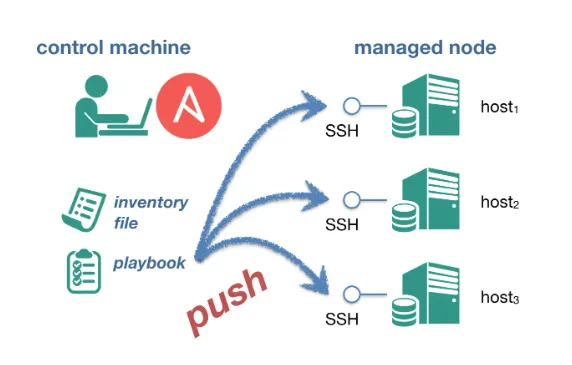
现已开发并适配 Asterfusion AsterNOS Collection Ansible模块集,包括cliconf插件与asternos_command模块,支持通过Playbook直接调用SONiC设备命令行接口。
运维人员根据实际需求使用上述的 CLI 模块编写 Playbook 任务并运行,即可快速完成 NPB 策略下发、ACL 更新、端口配置等批量操作,几秒钟内即可将规则同步到所有 NPB 设备(SONiC 设备),并在 Git 中追踪变更历史。
pip3 install ansible
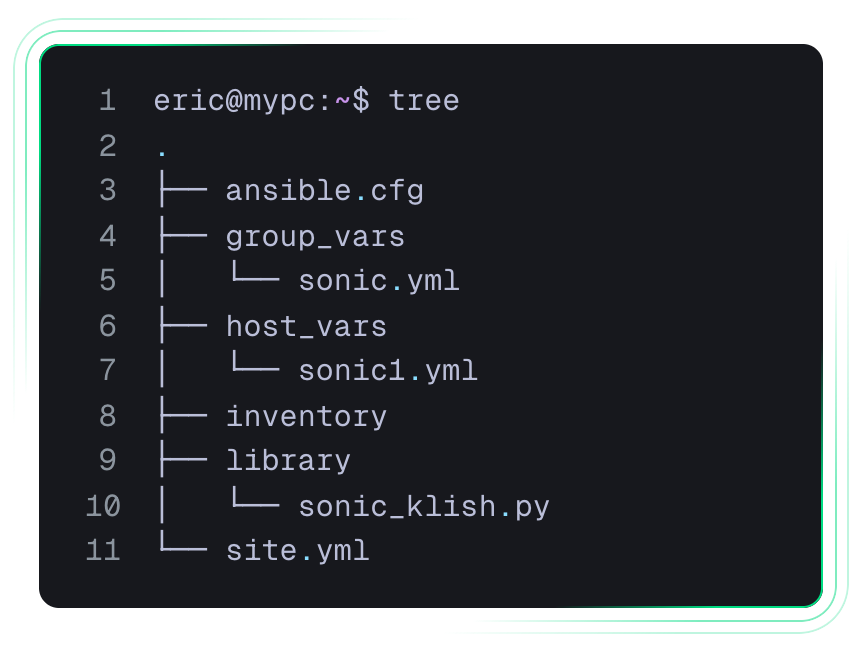
我们所提供的demo文件结构如下
eric@mypc:~$ tree . ├── ansible.cfg ├── group_vars │ └── sonic.yml ├── host_vars │ └── sonic1.yml ├── inventory ├── library │ └── sonic_klish.py └── site.yml
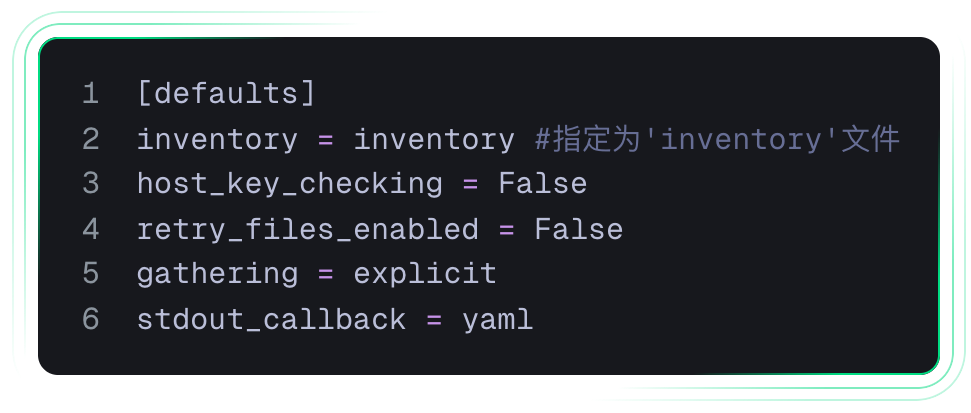
[defaults] inventory = inventory #指定为'inventory'文件 host_key_checking = False retry_files_enabled = False gathering = explicit stdout_callback = yaml
[sonic] sonic1 ansible_host=192.168.1.x ansible_user=x ansible_password=x
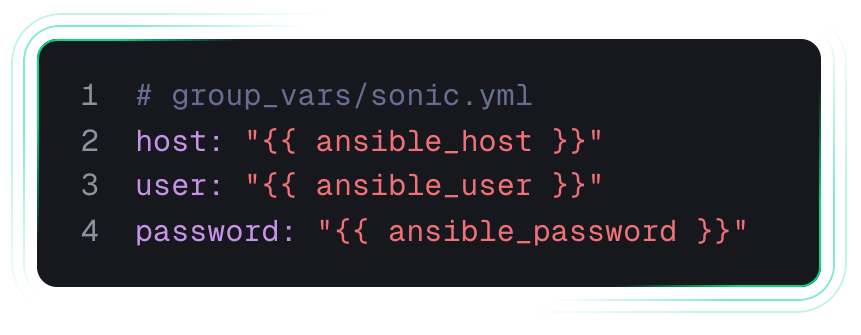
# group_vars/sonic.yml host: "{{ ansible_host }}" user: "{{ ansible_user }}" password: "{{ ansible_password }}"
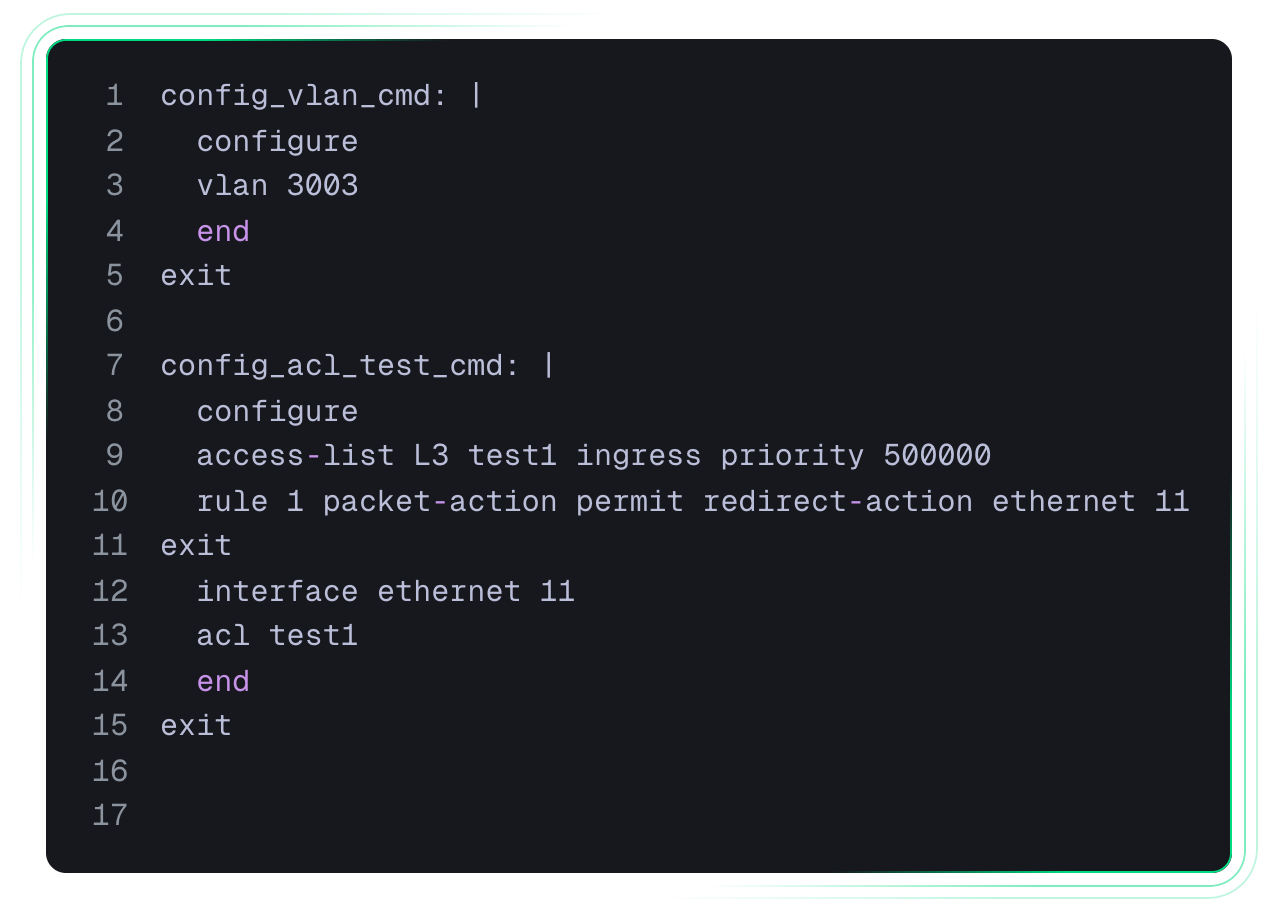
以下为两组示例的命令行配置
config_vlan_cmd: | configure vlan 3003 end exit config_acl_test_cmd: | configure access-list L3 test1 ingress priority 500000 rule 1 packet-action permit redirect-action ethernet 11 exit interface ethernet 11 acl test1 end exit
新增两个task分别调用config_acl_test_cmd和config_vlan_cmd
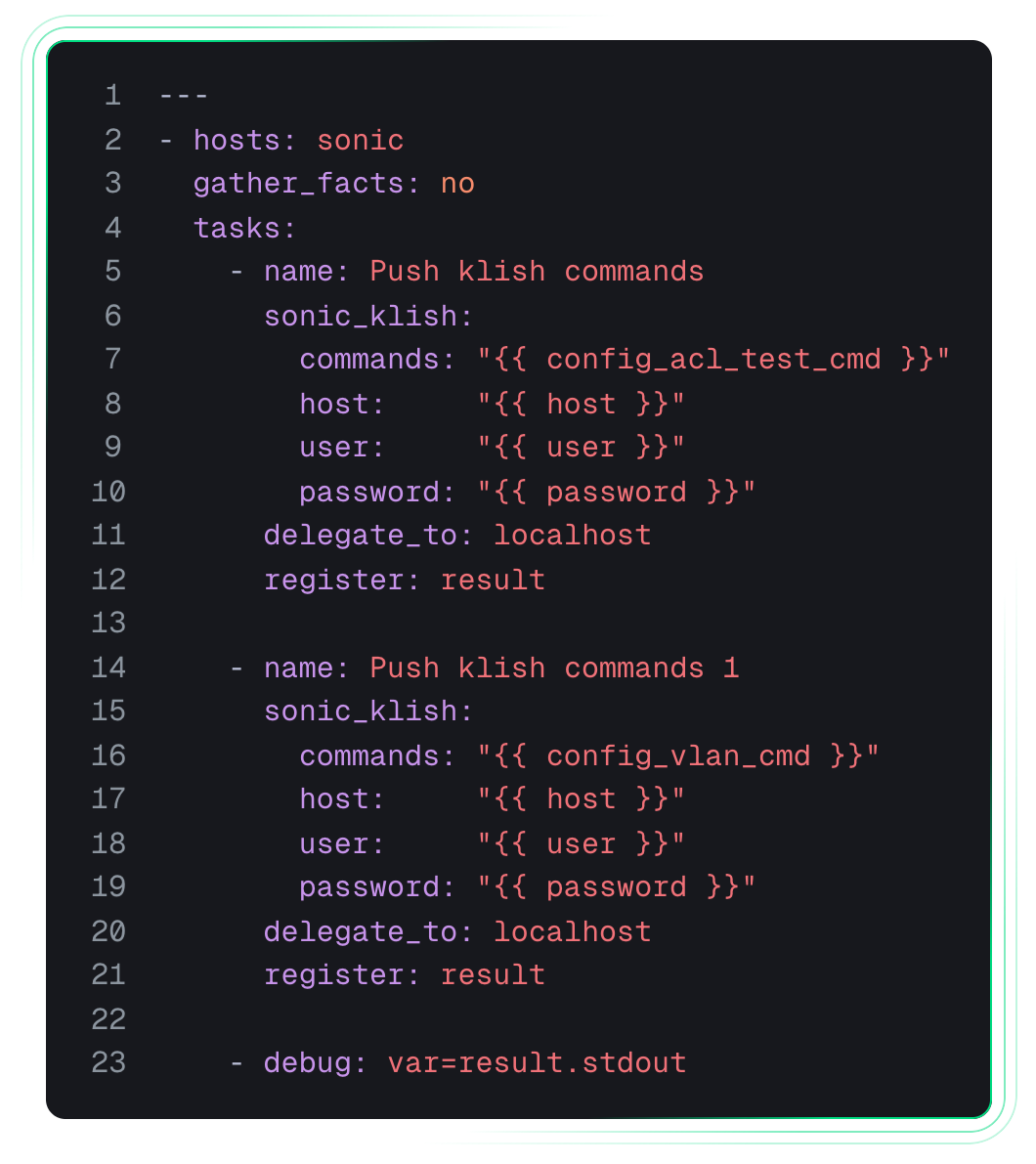
--- - hosts: sonic gather_facts: no tasks: - name: Push klish commands sonic_klish: commands: "{{ config_acl_test_cmd }}" host: "{{ host }}" user: "{{ user }}" password: "{{ password }}" delegate_to: localhost register: result - name: Push klish commands 1 sonic_klish: commands: "{{ config_vlan_cmd }}" host: "{{ host }}" user: "{{ user }}" password: "{{ password }}" delegate_to: localhost register: result - debug: var=result.stdout
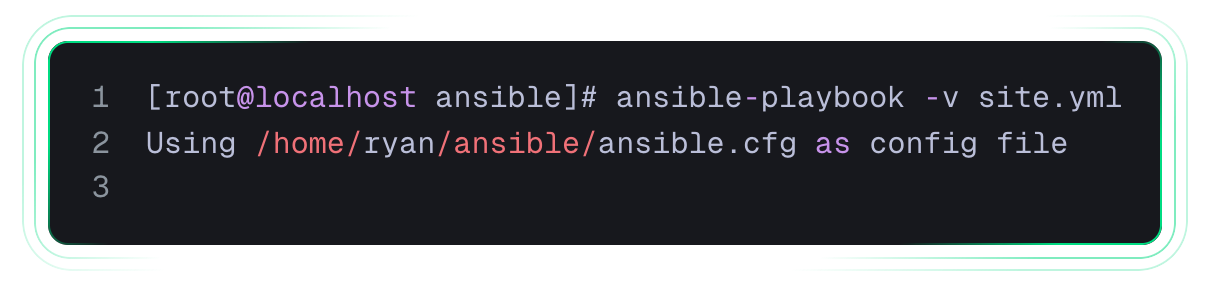
[root@localhost ansible]# ansible-playbook -v site.yml Using /home/ryan/ansible/ansible.cfg as config file
打印如下,则执行完毕:
PLAY [sonic] ********************* TASK [Push klish commands] **************** changed: [sonic1 -> localhost] => changed=true stdout: |- Warning: Permanently added '192.168.1.102' (RSA) to the list of known hosts. ...Entering cli view, please wait... stty: 'standard input': Inappropriate ioctl for device stty: 'standard input': Inappropriate ioctl for device sonic# configure sonic(config)# access-list L3 test1 ingress priority 500000 sonic(config-L3-acl-test1)# rule 1 packet-action permit redirect-action ethernet 13 sonic(config-L3-acl-test1)# exit[J sonic(config)# interface ethernet 13 sonic(config-if-13)# acl test1[J sonic(config-if-13)# end[J sonic# exit stdout_lines: TASK [debug] *********************** ok: [sonic1] => result.stdout: |- Warning: Permanently added '192.168.1.102' (RSA) to the list of known hosts. ...Entering cli view, please wait... stty: 'standard input': Inappropriate ioctl for device stty: 'standard input': Inappropriate ioctl for device sonic# configure sonic(config)# access-list L3 test1 ingress priority 500000 sonic(config-L3-acl-test1)# rule 1 packet-action permit redirect-action ethernet 13 sonic(config-L3-acl-test1)# exit[J sonic(config)# interface ethernet 13 sonic(config-if-13)# acl test1[J sonic(config-if-13)# end[J sonic# exit TASK [Push klish commands] ***************** changed: [sonic1 -> localhost] => changed=true stdout: |- Warning: Permanently added '192.168.1.102' (RSA) to the list of known hosts. ...Entering cli view, please wait... stty: 'standard input': Inappropriate ioctl for device stty: 'standard input': Inappropriate ioctl for device sonic# configure sonic(config)# vlan 3003 sonic(config-vlan-3003)# end[J sonic# exit stdout_lines: TASK [debug] ********************* ok: [sonic1] => result.stdout: |- Warning: Permanently added '192.168.1.102' (RSA) to the list of known hosts. ...Entering cli view, please wait... stty: 'standard input': Inappropriate ioctl for device stty: 'standard input': Inappropriate ioctl for device sonic# configure sonic(config)# vlan 3003 sonic(config-vlan-3003)# end[J sonic# exit PLAY RECAP ************************ sonic1 : ok=4 changed=2 unreachable=0 failed=0 skipped=0 rescued=0 ignored=0
通过Ansible自动化配置,原本需手工操作数小时的千余条策略,现可在几秒内同步至全部设备。所有配置变更均可通过Git进行版本管理与审计回溯,不仅大幅降低了人为错误,更显著提升了网络策略的一致性与运维可靠性。
通过引入Ansible自动化运维体系,星融元NPB 2.0方案实现了从“手工配置”到“代码化运维”的转型。运维人员可将重复性操作转化为可版本化、可重复执行的自动化任务,显著提升网络运维的响应速度、准确性与标准化水平。
该方案特别适用于需要频繁调整监测策略、大规模部署NPB功能的现代网络环境,为企业构建高效、可靠的智能网络监测平台提供了坚实的技术支撑。
全部0条评论
快来发表一下你的评论吧 !