


【瑞萨FPB-RA6E2试用】W25Q128
电子说
1.4w人已加入
描述
W25Q128和FPB_RA6E2的连接:
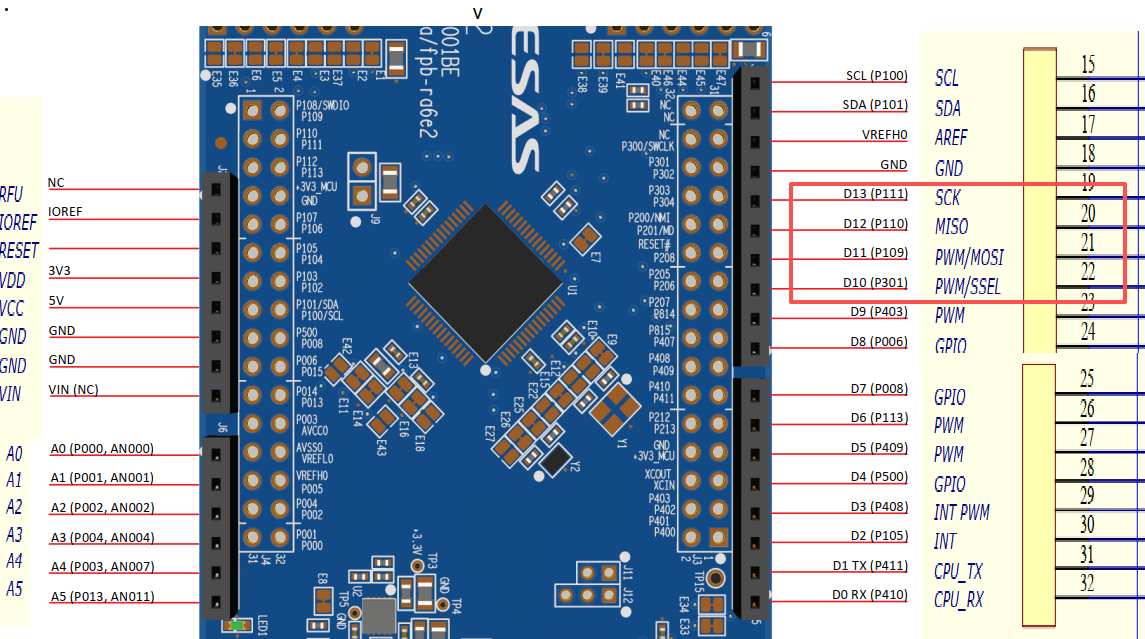
w25q128   fpb_ra6e2
VCC         VCC
GND         GND
DI          P109 (D11 / MOSI / PWM)
DO          P110 (D12 / MISO / PWM)
CLK         P111 (D13 / SCK)
CS          P301 (D10 / SS / PWM)
修改设备树fpb_ra6e2.overlay
&spi0 {
    status = "okay";

    /* w25q128 节点定义 */
    w25q128: w25q128@0 {
        compatible = "jedec,spi-nor";
        reg = < 0 >; // 对应 cs-gpios 的第 0 个索引
        spi-max-frequency = < 40000000 >; // 最大频率 40MHz

        /* w25q128 的 JEDEC ID: 厂商ID(ef), 内存类型(40), 容量(18) */
        jedec-id = [ef 40 18];

		/* 134217728 bits = 16 Mbytes */
		size = < 0x8000000 >;

        /* 定义状态 */
        status = "okay";
    };
};
增加测试代码main.c:
#include < inttypes.h >
#include < stddef.h >
#include < stdint.h >

#include < zephyr/device.h >
#include < zephyr/devicetree.h >
#include < zephyr/kernel.h >
#include < zephyr/sys/printk.h >
#include < zephyr/sys/util.h >
#include < zephyr/sys/__assert.h >
#include < zephyr/logging/log.h >


#include < zephyr/drivers/flash.h >
#include < zephyr/storage/flash_map.h >

/* size of stack area used by each thread */
#define STACKSIZE 1024

/* scheduling priority used by each thread */
#define PRIORITY 7

/*
w25q128	  fpb_ra6e2
VCC			VCC
GND			GND
DI			P109 (D11 / MOSI / PWM)
DO			P110 (D12 / MISO / PWM)
CLK			P111 (D13 / SCK)
CS			P301 (D10 / SS / PWM)
*/
/* 注册日志模块 */
LOG_MODULE_REGISTER(spi_task, LOG_LEVEL_INF);

/* 通过设备树获取 w25q128 设备实例 */
/* 这里的 w25q128 必须与overlay 文件中的节点标签一致 */
#define FLASH_DEVICE_NODE DT_NODELABEL(w25q128)

void spi_task(void)
{
    const struct device *flash_dev = DEVICE_DT_GET(FLASH_DEVICE_NODE);

    /* 1. 检查设备是否就绪 */
    if (!device_is_ready(flash_dev)) {
        LOG_ERR("Flash device %s is not ready!", flash_dev- >name);
        return;
    }
    LOG_INF("Found Flash device: %s", flash_dev- >name);

    /* 2. 定义测试数据 */
    const off_t test_offset = 0x0000;           // 测试起始地址
    const size_t test_size = 4;                 // 测试数据大小
    uint8_t write_data[] = {0xAA, 0xBB, 0xCC, 0xDD};
    uint8_t read_data[4] = {0};
    int ret;

    /* 3. 擦除操作 (Flash 写入前必须按扇区擦除) */
    /* w25q128 的最小擦除单位通常是 4096 字节 (4KB) */
    LOG_INF("Erasing sector at offset 0x%lx...", (long)test_offset);
    ret = flash_erase(flash_dev, test_offset, 4096);
    if (ret != 0) {
        LOG_ERR("Flash erase failed! (err: %d)", ret);
        return;
    }

    /* 4. 写入数据 */
    LOG_INF("Writing data: 0x%02X %02X %02X %02X",
            write_data[0], write_data[1], write_data[2], write_data[3]);
    ret = flash_write(flash_dev, test_offset, write_data, sizeof(write_data));
    if (ret != 0) {
        LOG_ERR("Flash write failed! (err: %d)", ret);
        return;
    }

    /* 5. 读取数据验证 */
    ret = flash_read(flash_dev, test_offset, read_data, sizeof(read_data));
    if (ret != 0) {
        LOG_ERR("Flash read failed! (err: %d)", ret);
        return;
    }
    LOG_INF("Readback data: 0x%02X %02X %02X %02X",
            read_data[0], read_data[1], read_data[2], read_data[3]);

    /* 6. 校验结果 */
    if (memcmp(write_data, read_data, sizeof(write_data)) == 0) {
        LOG_INF("SPI Flash Test PASSED!");
    } else {
        LOG_WRN("SPI Flash Test FAILED! Data mismatch.");
    }

    return;
}

K_THREAD_DEFINE(spi_id, STACKSIZE, spi_task, NULL, NULL, NULL,
		PRIORITY, 0, 0);
修改prj.conf
# 开启 SPI 支持
CONFIG_SPI=y
# 开启 Flash 驱动子系统
CONFIG_FLASH=y
# 开启 JEDEC 标准的 SPI Flash 驱动
CONFIG_SPI_NOR=y
# 调试建议:开启打印日志查看 Flash 是否识别成功
CONFIG_LOG=y
CONFIG_FLASH_LOG_LEVEL_DBG=y
测试结果:
[00:00:00.000,000] < inf > ra_spi: frequency: 40000000
*** Booting Zephyr OS build v4.3.0-3782-gc611a16ecd7f ***
ADC reading[0]:
- adc@40170000, channel 0: Set up button at gpio@40080060 pin 4
Generating sawtooth signal at DAC channel 0.
PWM-based LED fade. Found 1 LEDs
[00:00:00.000,000] < inf > spi_task: Found Flash device: w25q128@0
[00:00:00.000,000] < inf > spi_task: Erasing sector at offset 0x0...
Watchdog sample application
Callback in RESET_SOC disabled for this platform
[00:00:00.000,000] < inf > wdt_renesas_ra: actual window min = 0.00 ms
[00:00:00.000,000] < inf > wdt_renesas_ra: actual window max = 1006.50 ms
[00:00:00.000,000] < inf > wdt_renesas_ra: wdt timeout was set successfully
Feeding watchdog 5 times
Feeding watchdog...
541 = 435 mV
- adc@40170000, channel 2: 1918 = 1545 mV
[00:00:00.050,000] < inf > spi_task: Writing data: 0xAA BB CC DD
Feeding watchdog...
[00:00:00.050,000] < inf > spi_task: Readback data: 0xAA BB CC DD
[00:00:00.050,000] < inf > spi_task: SPI Flash Test PASSED!
综合代码工程参考:FreeRTOS/zephyr_fpb_ra6e2
审核编辑 黄宇
声明:本文内容及配图由入驻作者撰写或者入驻合作网站授权转载。文章观点仅代表作者本人,不代表电子发烧友网立场。文章及其配图仅供工程师学习之用,如有内容侵权或者其他违规问题,请联系本站处理。
举报投诉
-
基于瑞萨FPB-RA0E2开发板实现OLED驱动显示2026-05-19 7768
-
【瑞萨AI挑战赛-FPB-RA6E2】+ 从零开始:FPB-RA6E2 开箱测评与 e2 studio 环境配置2026-03-10 8724
-
【瑞萨FPB-RA6E2试用】入门级GPIO测试2026-02-14 1110
-
【瑞萨FPB-RA6E2试用】GPIO-Zephyr RTOS 闪烁程序及设备树理解2026-01-13 1272
-
【瑞萨FPB-RA6E2试用】SPI通信:W25Q64+LittleFS2026-01-11 1237
-
【瑞萨FPB-RA6E2试用】在 FPB-RA6E2 上实现 LED 闪烁(GPIO)2026-01-07 518
-
【瑞萨FPB-RA6E2试用】基础功能使用3(SPI + IIC)2026-01-05 2996
-
【瑞萨FPB-RA6E2试用】【原创】【瑞萨RA × Zephyr开发板评测】+两款开发板之间到底差了啥2026-01-04 794
-
【瑞萨FPB-RA6E2试用】【原创】基于【瑞萨FPB-RA6E2】Windows 下Zephyr RTOS自定义项目开发全流程(创建-编译-烧录-串口调试)2026-01-01 39835
-
【瑞萨FPB-RA6E2试用】基础功能使用22025-12-30 2509
-
【瑞萨FPB-RA6E2试用】基于瑞萨FPB-RA6E2,在Windows环境的Zephyr-RTOS安装教程2025-12-28 834
-
瑞萨 FPB-RA6E2 评估板入门学习2024-12-11 1934
-
瑞萨e2studio----串口获取数据通过SPI存储于W25Q128外部flash2021-12-02 4355
-
W25Q128芯片简介2021-08-13 5027
全部0条评论

快来发表一下你的评论吧 !
