


基于玄铁K230 + RT-Thread Smart:手把手教你实现YOLOv8-Pose实时坐姿检测 | 技术集结
描述
随着现代办公和学习方式的改变,长时间坐在电脑前已成为常态。然而,不良的坐姿习惯会导致各种健康问题,如颈椎病、腰椎病、高低肩等。据统计,青少年体态异常率高达60%以上,其中圆肩占60.5%、颈部前倾占58.1%、高低肩占52.3%。
本项目基于玄铁K230开发板,利用AI视觉技术实现实时坐姿体态检测,能够自动识别5种常见的不良坐姿,并提供智能提醒功能。
目录
项目背景及功能
效果演示
RT-Thread使用情况概述
硬件设计
软件设计
实现过程
未来展望
1 项目背景及功能
1.1 项目创新点
本项目运行在 RT-Thread Smart 操作系统上,基于 YOLOv8-Pose 模型,实现实时人体关键点检测。
1.2 核心功能
头部前倾检测: 检测头部相对肩部的前倾角度
高低肩检测: 检测两肩高度差异
驼背检测: 检测上半身前倾程度
身体倾斜检测: 检测身体左右倾斜角度
圆肩检测: 检测肩部前移程度
所有检测结果分为正常、轻度、中度、重度四个等级,并实时显示在屏幕上。
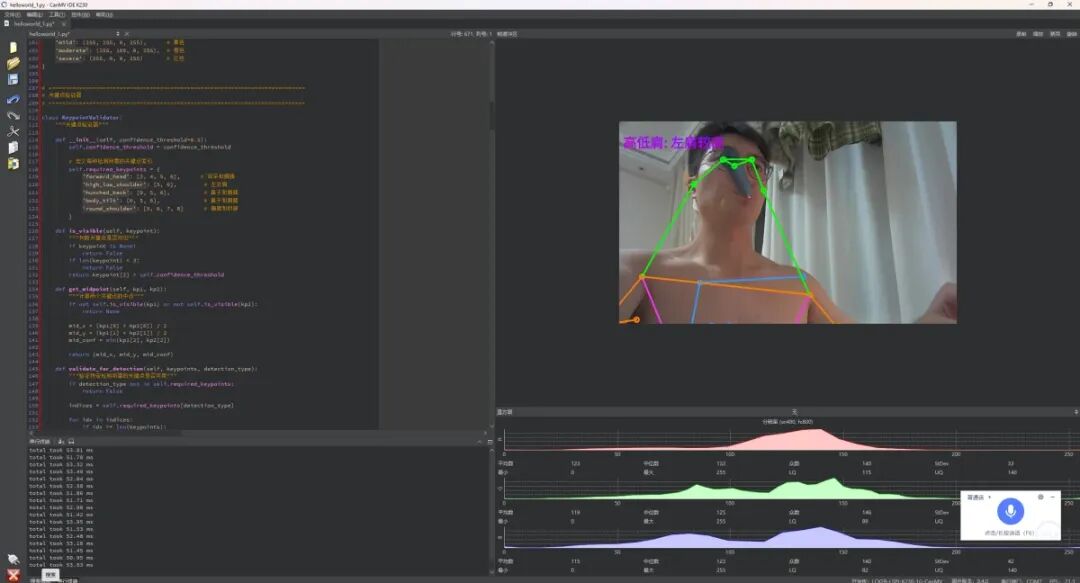
2 效果演示
本系统能够实时检测人体姿态并分析坐姿问题。在实际测试中:
检测帧率: 约10-15 FPS (取决于模型和硬件配置)
检测延迟: < 200ms
检测准确率: 头部前倾和高低肩检测准确率达80%以上
稳定性: 可连续运行1小时以上无崩溃
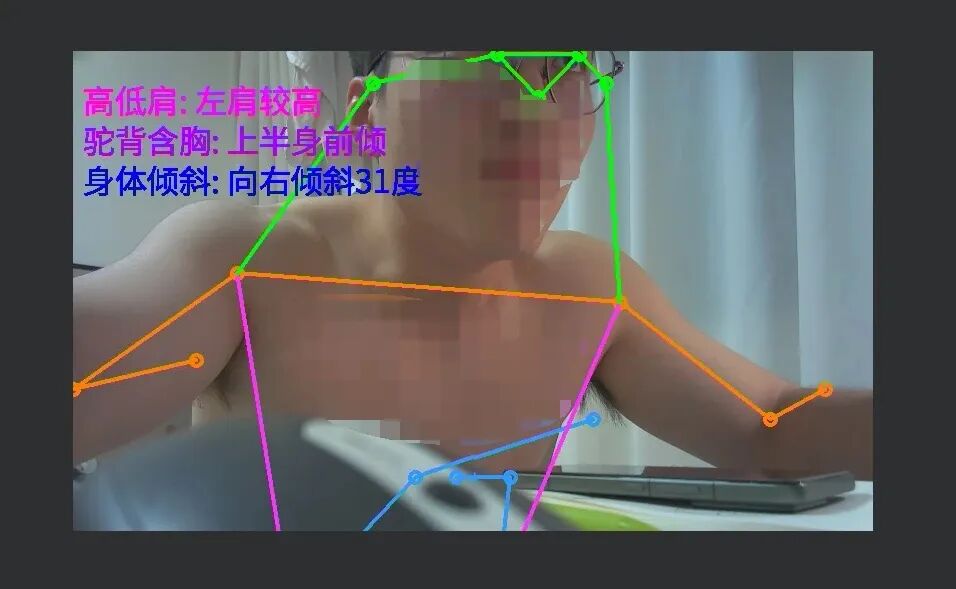
系统会在屏幕上实时显示:
人体骨架(17个关键点及连线)
检测到的体态问题及严重程度
不同严重程度用不同颜色标识(绿色正常、黄色轻度、橙色中度、红色重度)
3 RT-Thread使用情况概述
本项目基于RT-Thread Smart操作系统开发,充分利用了RT-Thread的特性:
3.1 操作系统层面
RT-Thread Smart: K230的CanMV固件底层就是基于RT-Thread Smart实现的
用户态应用: 我们的Python应用运行在RT-Thread Smart的用户态
硬件抽象: 使用RT-Thread提供的设备驱动框架
3.2 使用的 RT-Thread 组件
摄像头驱动: 通过RT-Thread的CSI2驱动获取图像
显示驱动: 通过RT-Thread的LCD/HDMI驱动输出画面
GPIO驱动: 控制蜂鸣器和LED
内存管理: RT-Thread的内存管理机制
4 硬件设计
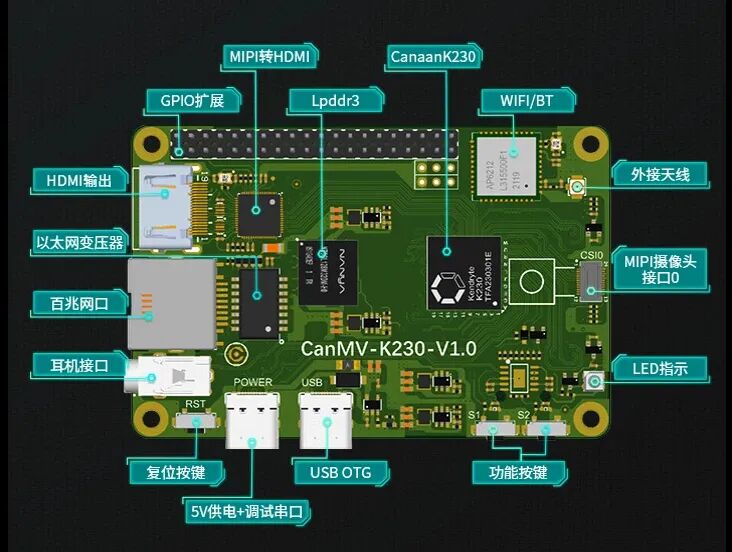
4.1 硬件框图
本系统的硬件架构如下:
5 软件设计
5.1 软件架构框图
本系统采用分层架构设计:
┌─────────────────────────────────────────────────┐│ 应用层 (Python) ││ ┌──────────────────────────────────────────┐ ││ │ 主程序: 图像采集 + AI推理 + 结果显示 │ ││ └──────────────────────────────────────────┘ │└───────────────────┬─────────────────────────────┘ │┌───────────────────┴─────────────────────────────┐│ 业务逻辑层 (Python) ││ ┌──────────────┐ ┌──────────────────────┐ ││ │关键点验证模块│ │ 体态分析模块 │ ││ │- 可见性判断 │ │- 角度计算 │ ││ │- 中点计算 │ │- 比例计算 │ ││ │- 检测可行性 │ │- 严重程度判断 │ ││ └──────────────┘ └──────────────────────┘ │└───────────────────┬─────────────────────────────┘ │┌───────────────────┴─────────────────────────────┐│ AI推理层 (nncase_runtime) ││ ┌──────────────────────────────────────────┐ ││ │ YOLOv8-Pose模型 (KPU硬件加速) │ ││ │ - 17个人体关键点检测 │ ││ │ - 关键点置信度输出 │ ││ └──────────────────────────────────────────┘ │└───────────────────┬─────────────────────────────┘ │┌───────────────────┴─────────────────────────────┐│ CanMV框架层 (MicroPython) ││ ┌──────────┐ ┌──────────┐ ┌──────────┐ ││ │PipeLine │ │ AI2D │ │ Media │ ││ │图像管道 │ │图像预处理│ │媒体管理 │ ││ └──────────┘ └──────────┘ └──────────┘ │└───────────────────┬─────────────────────────────┘ │┌───────────────────┴─────────────────────────────┐│ RT-Thread ││ ┌──────────┐ ┌──────────┐ ┌──────────┐ ││ │CSI2驱动 │ │显示驱动 │ │GPIO驱动 │ ││ └──────────┘ └──────────┘ └──────────┘ │└───────────────────┬─────────────────────────────┘ │┌───────────────────┴─────────────────────────────┐│ K230硬件层 (RISC-V) ││ ┌──────────┐ ┌──────────┐ ┌──────────┐ ││ │ 摄像头 │ │ KPU/NPU │ │ 显示 │ ││ └──────────┘ └──────────┘ └──────────┘ │└─────────────────────────────────────────────────┘
5.2 技术栈说明
操作系统: RT-Thread Smart
开发环境: CanMV (基于MicroPython)
AI模型: YOLOv8n-Pose (COCO格式,17个关键点)
AI编译器: nncase (嘉楠科技的AI编译工具链)
推理引擎: nncase_runtime
图像处理: AI2D (K230的图像预处理加速器)
编程语言: Python (MicroPython)
6 实现过程
6.1 玄铁K230开发环境搭建
本项目使用CanMV开发环境,这是K230官方提供的基于MicroPython的开发环境。
6.1.1 环境说明
玄铁K230支持多种开发环境:
CanMV: 大核跑RT-Smart + MicroPython,适合快速开发AI应用
RT-Smart Only: 纯RT-Smart开发,适合底层开发
Linux: 大核跑Linux,适合复杂应用
Linux + RT-Smart: 双核异构,功能最强大
本项目选择CanMV环境。
6.2 人体关键点检测实现
6.2.1 YOLOv8-Pose模型说明
本项目使用YOLOv8n-Pose模型进行人体关键点检测。该模型基于COCO数据集训练,可以检测17个人体关键点:
关键点定义(COCO格式):
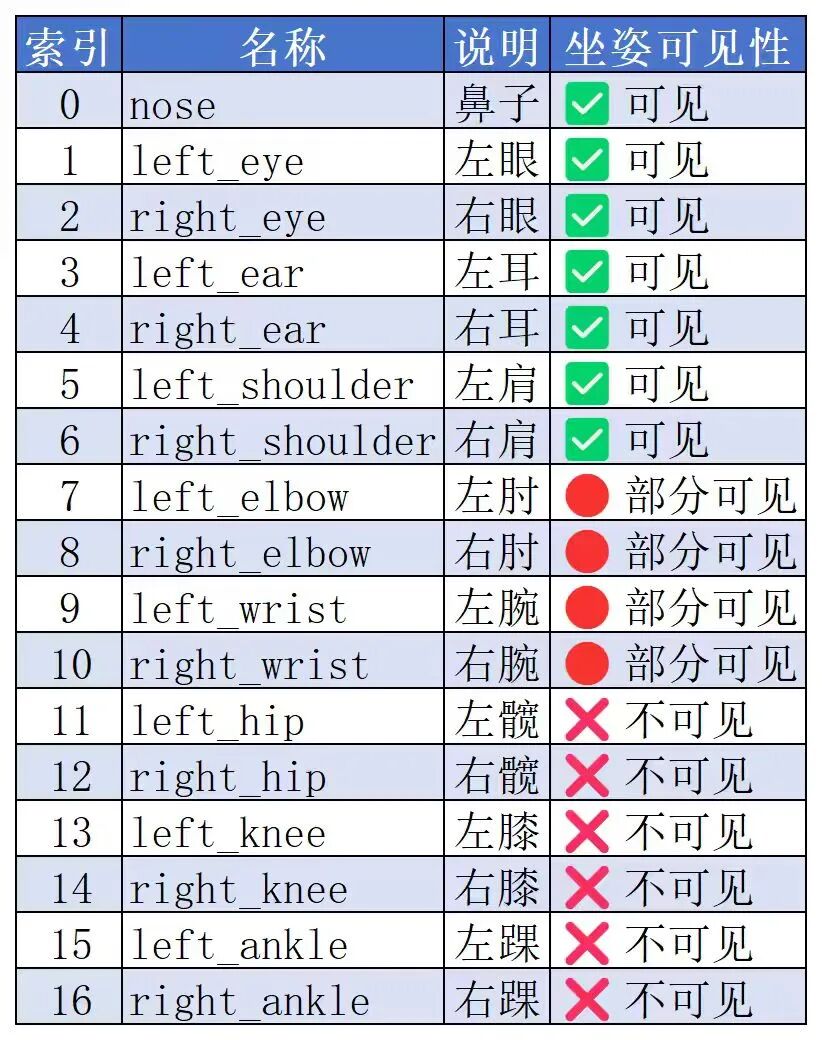
坐姿场景的挑战:
坐在桌子前时,下半身(髋部、膝盖、脚踝)通常被桌子遮挡,因此传统的体态检测算法(依赖髋部关键点)无法直接使用。这是本项目需要解决的核心问题。
6.2.2 模型推理代码
from libs.PipeLine import PipeLine, ScopedTimingfrom libs.AIBase import AIBasefrom libs.AI2D import Ai2dimport nncase_runtime as nnimport ulab.numpy as npclass PersonKeyPointApp(AIBase): def __init__(self, kmodel_path, model_input_size, confidence_threshold=0.2, nms_threshold=0.5, rgb888p_size=[1920,1080], display_size=[1920,1080], debug_mode=0): super().__init__(kmodel_path, model_input_size, rgb888p_size, debug_mode) self.kmodel_path = kmodel_path self.model_input_size = model_input_size self.confidence_threshold = confidence_threshold self.nms_threshold = nms_threshold self.rgb888p_size = [ALIGN_UP(rgb888p_size[0], 16), rgb888p_size[1]] self.display_size = [ALIGN_UP(display_size[0], 16), display_size[1]] self.debug_mode = debug_mode self.ai2d = Ai2d(debug_mode) self.ai2d.set_ai2d_dtype(nn.ai2d_format.NCHW_FMT, nn.ai2d_format.NCHW_FMT, np.uint8, np.uint8) def config_preprocess(self, input_image_size=None): with ScopedTiming("set preprocess config", self.debug_mode > 0): ai2d_input_size = input_image_size if input_image_size else self.rgb888p_size self.ai2d.resize(nn.interp_method.tf_bilinear, nn.interp_mode.half_pixel) self.ai2d.build([1,3,ai2d_input_size[1],ai2d_input_size[0]], [1,3,self.model_input_size[1],self.model_input_size[0]]) def postprocess(self, results): with ScopedTiming("postprocess", self.debug_mode > 0): # 使用aidemo库的后处理接口 dets = aidemo.person_kp_postprocess(results, [self.rgb888p_size[1], self.rgb888p_size[0]], self.model_input_size, self.confidence_threshold, self.nms_threshold) return dets
关键点:
使用AI2D进行图像预处理(resize)
使用KPU进行模型推理
使用aidemo库进行后处理,得到关键点坐标和置信度
6.3 关键点验证模块实现
由于坐姿场景下部分关键点不可见,我们需要先验证关键点的有效性。
6.3.1 关键点验证类
classKeypointValidator: """关键点验证器,用于判断关键点可见性和计算中点""" def __init__(self, confidence_threshold=0.5): self.confidence_threshold = confidence_threshold def is_keypoint_valid(self, keypoint): """判断单个关键点是否有效""" if keypoint is None or len(keypoint) < 3: return False x, y, conf = keypoint[0], keypoint[1], keypoint[2] return conf >= self.confidence_threshold and x > 0and y > 0 def get_midpoint(self, kp1, kp2): """计算两个关键点的中点""" ifnot self.is_keypoint_valid(kp1) ornot self.is_keypoint_valid(kp2): return None x = (kp1[0] + kp2[0]) / 2 y = (kp1[1] + kp2[1]) / 2 conf = min(kp1[2], kp2[2]) return [x, y, conf] def can_detect_forward_head(self, keypoints): """判断是否可以检测头部前倾""" # 需要耳朵和肩膀 left_ear = keypoints[3] right_ear = keypoints[4] left_shoulder = keypoints[5] right_shoulder = keypoints[6] ear_valid = self.is_keypoint_valid(left_ear) or self.is_keypoint_valid(right_ear) shoulder_valid = self.is_keypoint_valid(left_shoulder) and self.is_keypoint_valid(right_shoulder) return ear_valid and shoulder_valid
设计思路:
每个关键点都有置信度,只有置信度足够高才认为有效
计算中点时,取两个关键点置信度的最小值
针对每种体态问题,判断所需关键点是否都有效
6.4 体态分析算法实现
这是本项目的核心部分,我们针对坐姿场景重新设计了检测算法。
6.4.1 算法设计原理
传统算法的问题:
传统驼背检测需要肩-髋连线,但坐姿下髋部不可见
传统身体倾斜检测需要肩-髋-膝连线,同样不可用
我们的解决方案:
头部前倾: 使用耳朵-肩膀连线与垂直轴的夹角
高低肩: 使用左右肩高度差与肩宽的比例
驼背: 使用鼻子-肩膀的水平偏移与垂直距离的比例(修订算法)
身体倾斜: 使用鼻子-肩膀中点连线与垂直轴的夹角(修订算法)
圆肩: 使用肩膀-肘部的前移距离(需要肘部可见)
6.4.2 核心算法代码
classPostureAnalyzer: """体态分析器""" def __init__(self, thresholds): self.thresholds = thresholds self.validator = KeypointValidator() def calculate_angle(self, point1, point2): """计算两点连线与垂直轴的夹角(度)""" dx = point2[0] - point1[0] dy = point2[1] - point1[1] angle_rad = math.atan2(abs(dx), abs(dy)) angle_deg = math.degrees(angle_rad) return angle_deg def detect_forward_head(self, keypoints): """检测头部前倾""" # 获取耳朵和肩膀 left_ear = keypoints[3] right_ear = keypoints[4] left_shoulder = keypoints[5] right_shoulder = keypoints[6] # 计算耳朵和肩膀的中点 ear = self.validator.get_midpoint(left_ear, right_ear) shoulder = self.validator.get_midpoint(left_shoulder, right_shoulder) if ear is None or shoulder is None: return None, None # 计算角度 angle = self.calculate_angle(shoulder, ear) # 判断严重程度 thresholds = self.thresholds['forward_head'] if angle < thresholds['normal']: severity = 'normal' elif angle < thresholds['mild']: severity = 'mild' elif angle < thresholds['moderate']: severity = 'moderate' else: severity = 'severe' return severity, angle def detect_high_low_shoulder(self, keypoints): """检测高低肩""" left_shoulder = keypoints[5] right_shoulder = keypoints[6] ifnot self.validator.is_keypoint_valid(left_shoulder) or \ not self.validator.is_keypoint_valid(right_shoulder): return None, None # 计算肩宽和高度差 shoulder_width = abs(left_shoulder[0] - right_shoulder[0]) height_diff = abs(left_shoulder[1] - right_shoulder[1]) if shoulder_width == 0: return None, None # 计算比例 ratio = height_diff / shoulder_width # 判断严重程度 thresholds = self.thresholds['high_low_shoulder'] if ratio < thresholds['normal']: severity = 'normal' elif ratio < thresholds['mild']: severity = 'mild' elif ratio < thresholds['moderate']: severity = 'moderate' else: severity = 'severe' return severity, ratio def detect_hunched_back(self, keypoints): """检测驼背(修订算法)""" nose = keypoints[0] left_shoulder = keypoints[5] right_shoulder = keypoints[6] shoulder = self.validator.get_midpoint(left_shoulder, right_shoulder) ifnot self.validator.is_keypoint_valid(nose) or shoulder is None: return None, None # 计算水平偏移和垂直距离 horizontal_offset = abs(nose[0] - shoulder[0]) vertical_distance = abs(nose[1] - shoulder[1]) if vertical_distance == 0: return None, None # 计算前倾比例 forward_ratio = horizontal_offset / vertical_distance # 判断严重程度 thresholds = self.thresholds['hunched_back'] if forward_ratio < thresholds['normal']: severity = 'normal' elif forward_ratio < thresholds['mild']: severity = 'mild' elif forward_ratio < thresholds['moderate']: severity = 'moderate' else: severity = 'severe' return severity, forward_ratio
6.5 结构渲染和显示
6.5.1 绘制骨架
def draw_skeleton(self, img, keypoints): """绘制人体骨架""" # 定义骨架连接关系 skeleton = [ [0, 1], [0, 2], [1, 3], [2, 4], # 头部 [5, 6], # 肩膀 [5, 7], [7, 9], # 左臂 [6, 8], [8, 10], # 右臂 [5, 11], [6, 12], # 躯干 [11, 12], # 髋部 [11, 13], [13, 15], # 左腿 [12, 14], [14, 16] # 右腿 ] # 绘制连线 for connection in skeleton: kp1 = keypoints[connection[0]] kp2 = keypoints[connection[1]] if self.validator.is_keypoint_valid(kp1) and \ self.validator.is_keypoint_valid(kp2): x1, y1 = int(kp1[0] * scale_x), int(kp1[1] * scale_y) x2, y2 = int(kp2[0] * scale_x), int(kp2[1] * scale_y) img.draw_line(x1, y1, x2, y2, color=(255, 255, 0, 255), thickness=2) # 绘制关键点 for kp in keypoints: if self.validator.is_keypoint_valid(kp): x, y = int(kp[0] * scale_x), int(kp[1] * scale_y) img.draw_circle(x, y, 5, color=(0, 255, 0, 255), thickness=-1)
6.5.2 显示检测结果
def draw_posture_results(self, img, results): """显示体态检测结果""" y_offset = 30 for problem, (severity, value) in results.items(): if severity is None: continue # 根据严重程度选择颜色 color = self.color_config[severity] # 格式化显示文本 text = f"{problem}: {severity} ({value:.2f})" # 绘制文本 img.draw_string(10, y_offset, text, color=color, scale=2) y_offset += 30
6.6 完整应用集成
6.6.1 主程序流程
def main(): # 初始化PipeLine pl = PipeLine(rgb888p_size=[1920, 1080], display_mode='lcd') pl.create() # 初始化人体关键点检测 kp_detect = PersonKeyPointApp( kmodel_path='/sdcard/examples/kmodel/yolov8n-pose.kmodel', model_input_size=[320, 320], confidence_threshold=0.2, nms_threshold=0.5, rgb888p_size=[1920, 1080], display_size=pl.get_display_size() ) kp_detect.config_preprocess() # 初始化体态分析器 analyzer = PostureAnalyzer(POSTURE_THRESHOLDS) print("系统启动成功,开始检测...") try: while True: # 获取图像帧 img = pl.get_frame() # 运行关键点检测 keypoints = kp_detect.run(img) if keypoints: # 分析体态 results = analyzer.analyze_all(keypoints) # 绘制结果 kp_detect.draw_skeleton(pl.osd_img, keypoints) kp_detect.draw_posture_results(pl.osd_img, results) # 显示画面 pl.show_image() # 垃圾回收 gc.collect() except Exception as e: print(f"错误: {e}") finally: kp_detect.deinit() pl.destroy()if __name__ == "__main__": main()
7 未来展望
短期计划
优化算法: 进一步提高检测准确率
增加数据统计: 记录每日坐姿数据,生成健康报告
RISC-V优化: 使用RVV向量扩展优化算法性能
模型优化: 尝试模型量化和剪枝,提高推理速度
功能扩展: 支持多人检测、远程监控等功能
仓库地址:https://github.com/yidianyiko/posture_detection_k230
-
RT-Thread BSP全面支持玄铁全系列RISC-V 处理器 | 技术集结2025-07-03 3701
-
RT-Thread Nano硬核移植指南:手把手实现VGLite图形驱动适配 | 技术集结2025-07-17 3900
-
RT-Thread生成玄铁RISC-V BSP的CDK工程开发指南 | 技术集结2025-09-28 4894
-
手搓一个RT-Thread工地巡检机器人要几步? | 技术集结2025-12-29 4547
-
【K230/K230D 新技能点亮】手把手教你在RTOS系统添加一个屏幕|保姆级教程2026-05-23 3806
-
K230使用RT-Smart SDK开发怎么连接Wifi?2025-06-10 574
-
手把手教你实战RT-Thread Nano,不信都这样了你还不会2017-11-23 7202
-
手把手教你如何开始DSP编程2018-04-09 1504
-
手把手教你学LabVIEW视觉设计2019-03-06 3631
-
RT-Thread全球技术大会:RT-Thread Smart更好的兼容Linux生态2022-05-27 3599
-
嘉楠科技K230发布!支持Linux + RT-Thread Smart 双操作系统运行2023-07-25 4301
-
【RT-Thread×玄铁 | 硬核直播】RISC-V新核E901发布!RT-Thread手把手带你玩转玄铁生态! | 博观讲堂2025-10-21 865
-
RT-Smart、玄铁C908与嘉楠K230的端侧AI软硬生态 | 问学直播2025-11-21 2484
-
玄铁K230 + RT-Smart + MicroPython:打造高实时性FOC云台控制系统 | 技术集结2026-02-05 8138
-
RT-Thread新开发工具支持:e2studio手把手适配教程 | 技术集结2026-04-02 3834
全部0条评论

快来发表一下你的评论吧 !
