


 RK3576 USB 口插上没反应?从 dmesg 到 DTS 的完整排查实战
电子说
描述
适用场景:拿到一块新的 RK3576 板子,系统启动了,但 USB 口插 U 盘没反应、插电脑不识别、或者认到 USB 2.0 但 3.0 跑不起来。
一、RK3576 USB 子系统架构
RK3576 集成 两个 DWC3 USB 3.1 OTG 控制器,每个控制器都有独立的 USB2 PHY 和 USB3 PHY。但两条路的"用料"完全不同,搞混了排查方向就偏了。
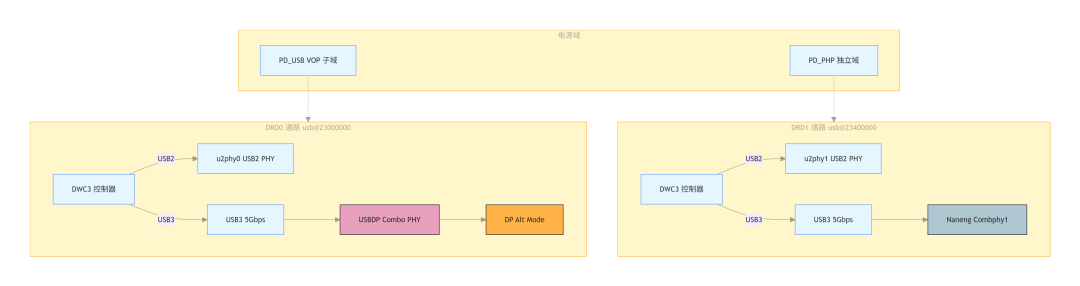
关键区别只有三点,背下来能省一半排查时间:
|
对比项 |
DRD0(usb@23000000) |
DRD1(usb@23400000) |
|
USB3 PHY |
USBDP Combo PHY(三星 IP) |
Naneng Combphy(Rockchip IP) |
|
电源域 |
PD_USB(VOP 子域) |
PD_PHP(独立域) |
|
特殊能力 |
支持 DP Alt Mode 视频输出 |
与 PCIe/SATA 三选一 |
|
调试路径 |
/sys/kernel/debug/usb/23000000.usb/ |
/sys/kernel/debug/usb/23400000.usb/ |
|
TCPM 端口 |
tcpm-2-004e(配合 HUSB311/FUSB302) |
无 Type-C 支持 |
二、排查第一站:确认你用的是哪个口
插 DRD0 不出 USB3,大概率是 USBDP PHY 没初始化好;插 DRD1 不出 USB3,大概率是 Combphy 被 PCIe 占了。
# 1. 看 UDC 注册情况ls /sys/class/udc/# 正常输出: 23000000.usb 23400000.usb# 2. 看 UDC 当前状态cat /sys/class/udc/23000000.usb/state# 正常输出: configured / not-attached / attachedcat /sys/class/udc/23000000.usb/current_speed# 正常输出: SuperSpeed / HighSpeed# 3. 看 DWC3 注册日志dmesg | grep -i dwc3 | head -5# 正常输出:# [ 8.695969] dwc3 23000000.usb: device reset# 4. 看 USB debugfs 路径ls /sys/kernel/debug/usb/# 你的板子输出:# 23000000.usb 23400000.usb devices ohci tcpm-2-004e usbmon uvcvideo xhci
如果 UDC 里一个都没有?继续往下看。
三、通过 dmesg 定位问题阶段
USB 初始化失败,几乎每次都会在 dmesg 里留下痕迹。
3.1 正常启动日志
# USB core 注册[ 1.908247] usbcore: registered new interface driver usbfs[ 1.908272] usbcore: registered new interface driver hub[ 1.908298] usbcore: registered new device driver usb# PHY 注册[ 1.864016] platform 2b010000.phy: Fixed dependency cycle(s) with /i2c@2ac50000/husb311@4e/connector[ 1.956490] rockchip-usb2phy 2602e000.syscon:usb2-phy@0: refclk freq 24000000[ 1.957973] rockchip-usb2phy 2602e000.syscon:usb2-phy@2000: refclk freq 24000000# DWC3 复位[ 8.695969] dwc3 23000000.usb: device reset
3.2 常见异常日志及排查方向
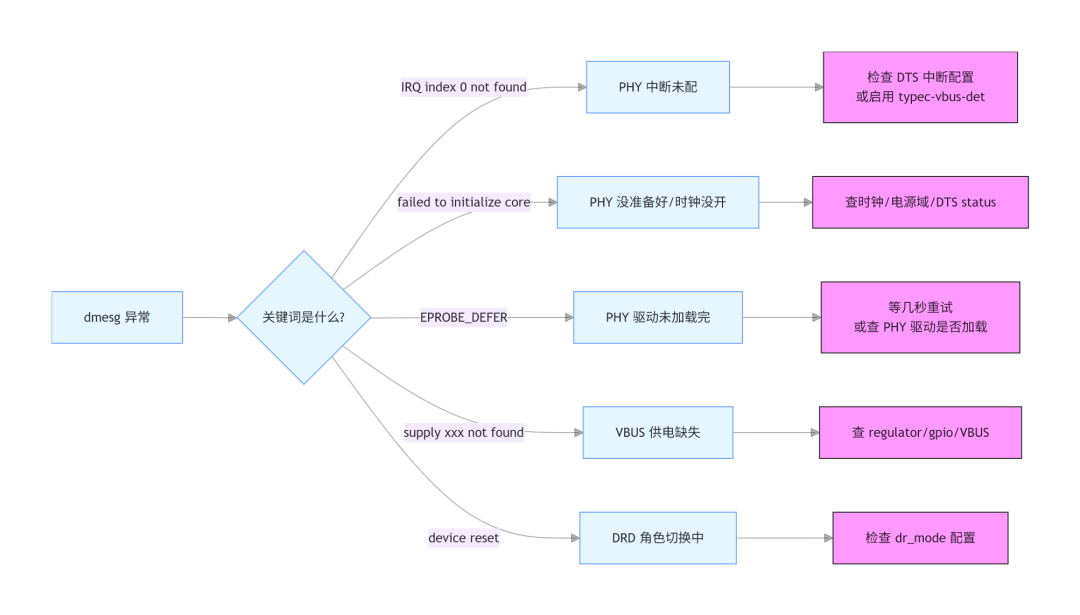
异常①:PHY IRQ 找不到
[ 1.956385] rockchip-usb2phy 2602e000.syscon:usb2-phy@0: error -ENXIO: IRQ index 0 not found[ 1.957872] rockchip-usb2phy 2602e000.syscon:usb2-phy@2000: error -ENXIO: IRQ index 0 not found
原因:USB2 PHY 定义了三组中断(otg-bvalid、otg-id、linestate),但 DTS 里没配或 GPIO 控制器没初始化好。
排查:
# 检查 DTS 中 PHY 中断配置cat /sys/firmware/devicetree/base/usb@23000000/phy-names# 正常: usb2-phy usb3-phycat /sys/firmware/devicetree/base/usb2-phy@0/otg-port/interrupts 2>/dev/null# 正常:# 看 PHY 相关日志dmesg | grep -i phy | grep -i irq
修复:
•如果板子有 Type-C CC 芯片(HUSB311/FUSB302),在 DTS 中加 rockchip,typec-vbus-det;,让 CC 芯片处理 VBUS 检测,PHY 中断就不是必须的
•如果没有 CC 芯片,检查 DTS 中 otg-port 的 interrupts 和interrupt-names 属性
异常②:DWC3 初始化失败
dwc3 23000000.usb: failed to initialize coredwc3 23000000.usb: error -EPROBE_DEFER: probe with driver dwc3 failed
原因:PHY 驱动还没加载完,DWC3 probe 被推迟。
排查:
# 等几秒再看sleep 5 && dmesg | grep dwc3 | tail -3# 查 PHY 是否加载dmesg | grep -i "usb2phy|usbdp|combphy"# 查 USB 时钟cat /sys/kernel/debug/clk/clk_summary | grep -E "usb|phy" | head -10# 关注 enable count 是否 > 0# 查 USB 电源域ls /sys/kernel/debug/pm_genpd/ | grep -i usb
异常③:VBUS 供电缺失
dwc3 23000000.usb: supply vusb_d not found, using dummy regulatordwc3 23000000.usb: supply vusb_a not found, using dummy regulator
排查:
# 查看 regulator 状态ls /sys/kernel/debug/regulator/ | grep -i usb# 正常输出: USB30_HOST_PWREN1_H vcc5v0_typec 等cat /sys/kernel/debug/regulator/regulator_summary | grep -i usb# 如果 USB 口无输出,看对应 GPIOls /sys/kernel/debug/gpio | grep -i usb
四、通过 sysfs/debugfs 验证硬件状态
4.1 USB debugfs 路径
ls /sys/kernel/debug/usb/# 23000000.usb 23400000.usb devices ohci tcpm-2-004e usbmon uvcvideo xhci# 查看 USB 设备树cat /sys/kernel/debug/usb/devices# 输出格式:# T: Bus=01 Lev=00 Prnt=00 Port=00 Cnt=00 Dev#= 1 Spd=480 MxCh= 1# D: Ver= 2.00 Cls=09(hub ) Sub=00 Prot=00 MxPS=64 #Cfgs= 1# 查看 XHCI 主机状态ls /sys/kernel/debug/usb/xhci/
4.2 UDC(USB Device Controller)状态
# 查看 UDC 列表ls /sys/class/udc/# 正常: 23000000.usb# 查看 UDC 属性ls /sys/class/udc/23000000.usb/# state current_speed uevent ...cat /sys/class/udc/23000000.usb/state# 正常: configured / not-attached / attached / powered / default / addresscat /sys/class/udc/23000000.usb/current_speed# 正常: SuperSpeed / HighSpeed / FullSpeed / LowSpeed
4.3 TCPM(Type-C Port Manager)日志
板子有 HUSB311/FUSB302,TCPM 会处理 Type-C 角色切换:
# 查看 TCPM 路径ls /sys/kernel/debug/usb/tcpm-2-004e/# 查看 TCPM 日志cat /sys/kernel/debug/usb/tcpm-2-004e/log | tail -30# 正常输出:# [2024-xx-xx 1000.000] state change SNK_UNATTACHED -> SNK_ATTACH_WAIT# [2024-xx-xx 1000.100] state change SNK_ATTACH_WAIT -> SNK_DEBOUNCED# [2024-xx-xx 1000.200] state change SNK_DEBOUNCED -> SNK_ATTACHED# [2024-xx-xx 1000.300] state change SNK_ATTACHED -> SNK_STARTUP# [2024-xx-xx 1000.400] state change SNK_STARTUP -> SNK_DISCOVERY
4.4 regulator 和 GPIO 状态
# 查看 regulatorls /sys/kernel/debug/regulator/ | grep -i usbcat /sys/kernel/debug/regulator/regulator_summary | grep -i usb# 查看 GPIOls /sys/kernel/debug/gpio | head -20
五、DTS 配置逐一核对
5.1 DRD0 节点 — Type-C OTG + DP 口
&usb_drd0_dwc3 {compatible = "rockchip,rk3576-dwc3", "snps,dwc3";reg = <0x0 0x23000000 0x0 0x400000>;dr_mode = "otg"; // ① OTG 模式usb-role-switch; // ② 配合 Type-C CC 控制器status = "okay";phys = <&u2phy0_otg>, <&usbdp_phy_u3>; // ③ PHY 引用phy-names = "usb2-phy", "usb3-phy";port {usb_drd0_role_switch: endpoint {remote-endpoint = <&usbc0_role_sw>; // ④ 连接到 CC 控制器};};// 标准 quirk 配置snps,dis-u1-entry-quirk;snps,dis-u2-entry-quirk;snps,dis-enblslpm_quirk;snps,parkmode-disable-hs-quirk;snps,parkmode-disable-ss-quirk;};
每行说明:
•① dr_mode = "otg":OTG 模式。可换为 "host"(固定主机)或"peripheral"(固定设备)
•② usb-role-switch:启用内核角色切换框架。如果板子没有 Type-C CC 芯片,不要加这个属性,改用extcon = <&u2phy0>
•③ phys:引用 USB2 PHY 和 USB3 PHY。DRD0 的 USB3 走 USBDP Combo PHY
•④ remote-endpoint:连接到 Type-C CC 控制器的 endpoint
5.2 USB2 PHY 节点
&u2phy0_otg {rockchip,typec-vbus-det; // ① 有 Type-C CC 芯片时加status = "okay";};&u2phy1_otg {// phy-supply = <&vcc5v0_host>; // ② 没有 CC 芯片时用这个status = "okay";};
•① rockchip,typec-vbus-det:告诉 USB2 PHY:VBUS 检测由外部 Type-C CC 控制器负责。如果板子没有 CC 芯片,不要加这行。否则 PHY 认为 VBUS 一直无效
•② phy-supply:没有 CC 芯片时,用 regulator 控制 VBUS
5.3 USBDP Combo PHY 节点
&usbdp_phy {compatible = "rockchip,rk3576-usbdp-phy";orientation-switch; // ① 支持 Type-C 正反插svid = <0xff01>; // ② DP Alt Mode SVIDsbu1-dc-gpios = <&gpio2 RK_PA6 GPIO_ACTIVE_HIGH>; // ③ SBU 检测sbu2-dc-gpios = <&gpio2 RK_PA7 GPIO_ACTIVE_HIGH>;rockchip,dp-lane-mux = <2 3>; // ④ DP Lane 映射status = "okay";usbdp_phy_dp: dp-port {status = "okay";};usbdp_phy_u3: u3-port {status = "okay";};};
六、通过 sysfs 验证 DTS 配置
6.1 查看 USB 控制器节点
# 查看 DRD0 的 dr_modecat /sys/firmware/devicetree/base/usb@23000000/dr_mode# 正常: otg# 查看 USB 角色切换cat /sys/firmware/devicetree/base/usb@23000000/usb-role-switch# 存在即表示已开启# 查看 PHY 引用cat /sys/firmware/devicetree/base/usb@23000000/phy-names# 正常: usb2-phy usb3-phy# 查看 PHY 路径cat /sys/firmware/devicetree/base/usb@23000000/phys
6.2 查看 PHY 节点
# 查看 USBDP PHY 状态cat /sys/firmware/devicetree/base/phy@2b010000/status# 正常: okaycat /sys/firmware/devicetree/base/phy@2b010000/orientation-switch# 存在即表示已配置cat /sys/firmware/devicetree/base/phy@2b010000/u3-port/status# 正常: okaycat /sys/firmware/devicetree/base/phy@2b010000/dp-port/status# 正常: okay 或 disabled
七、实战案例
7.1 案例一:自己画的板,USB 口完全不识别
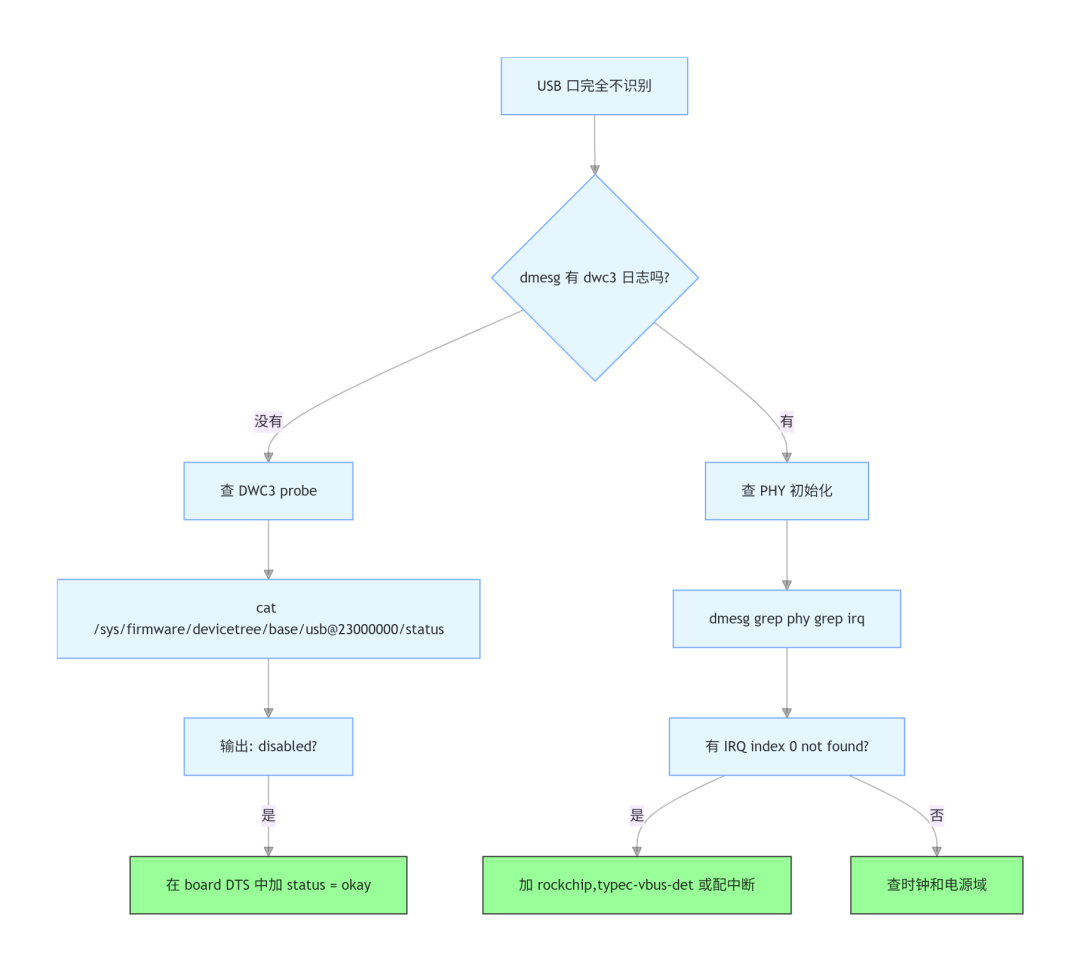
排查过程:
# 1. 查 DWC3 是否注册dmesg | grep dwc3# 输出空 → DWC3 根本没 probe# 2. 查 device tree 节点状态cat /sys/firmware/devicetree/base/usb@23000000/status# 输出: "disabled" ← 问题找到了# 3. 查 PHY 是否注册dmesg | grep -i "usb2phy|usbdp|combphy"# 有 IRQ index 0 not found → PHY 中断没配好
根因:DTS 中 board 文件里忘了 &usb_drd0_dwc3 { status = "okay"; };
修复:在 board DTS 中 enable USB 节点
7.2 案例二:DRD1 只能跑 USB 2.0,3.0 不工作
# 1. 查 UDC 状态cat /sys/class/udc/23400000.usb/current_speed# 输出: HighSpeed ← 只跑了 USB 2.0# 2. 查 DTS 中 PHY 引用cat /sys/firmware/devicetree/base/usb@23400000/phy-names# 输出: usb2-phy usb3-phy ← DTS 里有引用# 3. 查 Combphy 状态cat /sys/firmware/devicetree/base/phy@2b060000/status# 输出: okay# 4. 查是否被其他控制器占用dmesg | grep combphy# 如果有 PCIe 注册日志 → Combphy 被 PCIe 占了
根因:combphy1_psu 同时被 PCIe 控制器和 USB DRD1 引用,驱动先被 PCIe 占了,USB 拿不到 PHY
修复:DTS 中确认 combphy1_psu 只有一个使用者
7.3 案例三:Type-C 正着插能用,反着插没反应
# 1. 检查 orientation switch 是否配置cat /sys/firmware/devicetree/base/phy@2b010000/orientation-switch# 输出空 → orientation-switch 没配# 2. 检查 SBU GPIO 配置cat /sys/firmware/devicetree/base/phy@2b010000/sbu1-dc-gpioscat /sys/firmware/devicetree/base/phy@2b010000/sbu2-dc-gpios# 如果输出空或不对 → SBU 引脚没配
根因:usbdp_phy 节点缺少orientation-switch; 属性,或者 SBU GPIO 配置不正确
修复:DTS 中补上 orientation-switch 和正确的 SBU GPIO
7.4 案例四:USB3 只能跑到 2.0
[ 1.235000] xhci-hcd: xHCI Host Controller[ 1.235100] xhci-hcd: new USB bus registered, assigned bus number 1[ 1.235200] xhci-hcd: hcc params 0x0258f06d hci version 0x110[ 1.240000] usb 1-1: new high-speed USB device number 2 using xhci-hcd
排查顺序:
# 1. USB3 PHY 是否 enablecat /sys/firmware/devicetree/base/phy@*/u3-port/status# 2. DTS 中 phys 是否引用了 USB3 PHYcat /sys/firmware/devicetree/base/usb@23000000/phy-names# 3. Type-C 线缆是否支持 USB3(很多 Type-C 线只有 USB2)# 4. USBDP PHY 是否被 DP Alt Mode 占用(4-lane DP 会关闭 USB3)cat /sys/firmware/devicetree/base/phy@2b010000/dp-port/status
7.5 案例五:USB 插上但枚举失败
# 1. 查看 USB 设备树cat /sys/kernel/debug/usb/devices# 2. 查看 UDC 状态cat /sys/class/udc/23000000.usb/state# 如果是 configured 但设备不工作,看设备描述符# 3. 查看 TCPM 日志cat /sys/kernel/debug/usb/tcpm-2-004e/log | tail -30# 看 PD 协商是否成功
根因:可能是 USB 设备描述符不匹配,或者 PD 协商失败导致供电不足
修复:检查设备端配置,确认 VBUS 电压稳定在 5V
八、调试命令速查表
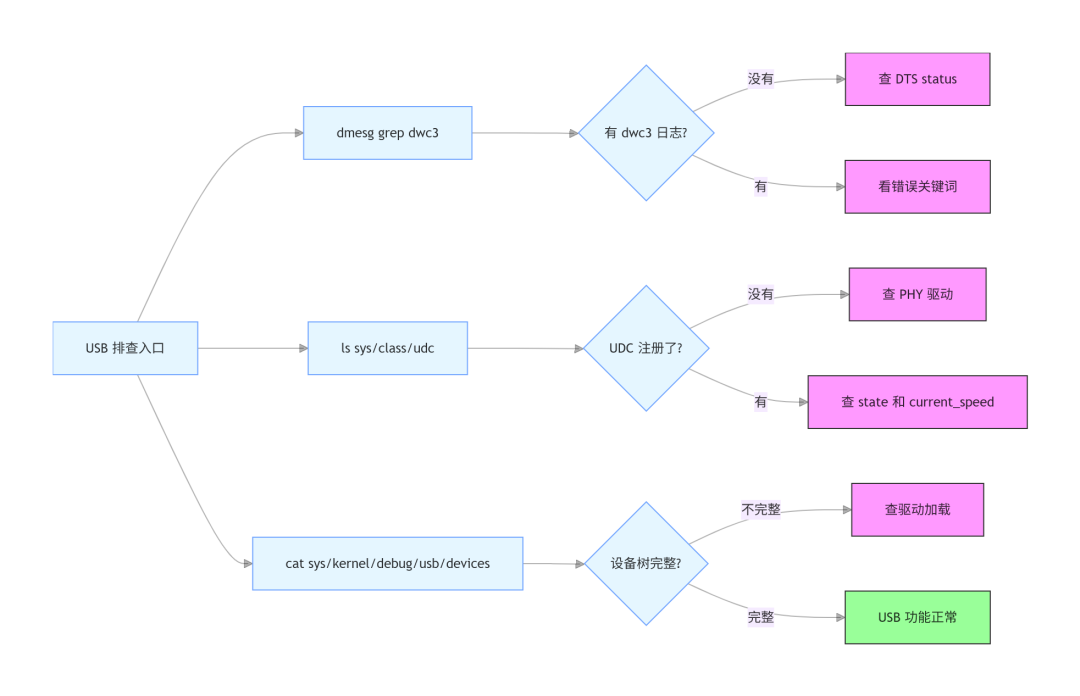
核心命令:
|
目标 |
命令 |
正常输出示例 |
|
DWC3 是否注册 |
dmesg | grep dwc3 |
dwc3 23000000.usb: device reset |
|
UDC 是否注册 |
ls /sys/class/udc/ |
23000000.usb |
|
UDC 当前状态 |
cat /sys/class/udc/*/state |
configured |
|
USB 当前速度 |
cat /sys/class/udc/*/current_speed |
SuperSpeed |
|
DTS dr_mode |
cat /sys/firmware/devicetree/base/usb@23000000/dr_mode |
otg |
|
PHY 引用 |
cat /sys/firmware/devicetree/base/usb@23000000/phy-names |
usb2-phy usb3-phy |
|
USB 设备树 |
cat /sys/kernel/debug/usb/devices |
T: Bus=01 Lev=00 Prnt=00 Port=00... |
|
TCPM 日志 |
cat /sys/kernel/debug/usb/tcpm-2-004e/log |
state change SNK_UNATTACHED -> SNK_ATTACH_WAIT |
|
regulator 状态 |
ls /sys/kernel/debug/regulator/ | grep USB |
USB30_HOST_PWREN1_H |
|
GPIO 状态 |
ls /sys/kernel/debug/gpio | head |
各 GPIO 状态列表 |
|
USB debugfs |
ls /sys/kernel/debug/usb/ |
23000000.usb 23400000.usb devices xhci |
|
XHCI 状态 |
ls /sys/kernel/debug/usb/xhci/ |
各端口状态 |
九、总结
RK3576 USB 排查的核心要点:
1.先搞清楚用的是哪个口:DRD0 走 USBDP Combo PHY(支持 DP),DRD1 走 Naneng Combphy(与 PCIe/SATA 三选一)
2.dmesg 是第一步:IRQ not found、failed to initialize core、EPROBE_DEFER、supply not found 各有不同排查方向
3.DTS 配置是根:dr_mode、usb-role-switch、phys、PHY 节点的 status 和 orientation-switch,任何一个配错都会导致问题
4.sysfs/debugfs 验证:/sys/class/udc/、/sys/kernel/debug/usb/、/sys/firmware/devicetree/base/ 是确认配置是否生效的关键路径
5.Type-C 相关:TCPM 日志、orientation-switch、SBU GPIO,这三个是正反插检测的核心
你在调试 USB 时遇到过什么"玄学"问题?欢迎留言说说。
审核编辑 黄宇
-
米尔RK3576和RK3588怎么选?-看这篇就够了2024-12-27 2052
-
【米尔RK3576开发板评测】+项目名称值得购买的米尔RK3576开发板2025-01-08 2571
-
从性能到成本,深度剖析 RK3588 与 RK3576 怎么选2025-02-09 2014
-
RK3576 Android 14.0 SDK开发指南(第一集)2025-05-20 2320
-
RK3576 vs RK3588:为何越来越多的开发者转向RK3576?2025-05-30 12843
-
Mpp支持RK3576么2025-06-13 6180
-
RK这2款旗舰芯片RK3588 PK RK3576,谁是最优选2025-07-10 3251
-
【作品合集】米尔RK3576开发板测评2025-09-11 56846
-
USB插上没反应不能枚举的原因2021-08-10 1556
-
新品体验 | RK3576开发板2024-11-01 3578
-
RK3576单板发布倒计时:RK3399与RK3576对比2024-12-03 2941
-
迅为如何在RK3576上部署YOLOv5;基于RK3576构建智能门禁系统2025-11-25 2128
-
RK3576基于UVC协议USB摄像头配置指南,手把手教你搞定2026-01-16 1476
-
RK3576平台Android HAL层故障排查:从lshal命令看透问题本质2026-02-06 811
-
RK3576 MIPI Camera ISP调试:主观调优与工程实战(下)2026-05-14 6396
全部0条评论

快来发表一下你的评论吧 !
