


RT-Thread + GD32F527I + LVGL:环境检测仪开发实录
描述
目录
项目基本信息
开发环境与资源使用
项目设计过程及测试效果
总结与建议
1 项目基本信息
本次项目是基于兆易创新GD32F527高性能MCU,RT-Thread实时操作系统,以及LVGL显示GUI库实现的一个环境质量检测设备。该设备使用板载的lcd显示屏以及瑞萨RRH62000多合一环境传感器。通过lvgl库设计界面显示,RRH62000多合一环境传感器采集环境信息,将采集信息显示在LCD屏上。
GD32F527高性能MCU为Cortex-M33内核、主频200MHz、7.5MB片上Flash、576KB片上SRAM、内置TLI液晶显示控制器等外设。板载的LCD屏分辨率为480*272,使用电阻触摸输入控制。
瑞萨RRH62000多合一环境传感器集成温湿度、颗粒物、eCO2、TVOC等多种检测功能,减少硬件复杂度。硬件通过I2C接口与MCU开发板通信。
2 开发环境与资源使用
本次开发使用ENV配置项目,使用 RT-Thread 5.2.2版本系统,编译开发使用KEIL集成开发环境。
主要使用内核和组件:
1、 RT-Thread 5.2.2 RTOS,Device设备驱动等
2、MCU 外设驱动库
3、LVGL 8.3 GUI组件库
4、XPT2046电阻触摸屏组件库
3 项目设计过程及测试效果
整个项目初始参考大佬们的例子实现了 RT-Thread 基本运行,后面增加自己的设备驱动,通过调试修改实现。
3.1 TLI外设LCD控制器调试
首先就是LCD显示驱动,这里参考论坛帖子代码实现了TLI控制器的LCD显示设备驱动,实现了LCD屏幕操作。
LCD显示使用板载的SDRAM作为显存,初始化TLI控制器引脚和LCD背光控制引脚,以及TLI外设和IPA外设。要注意背光引脚控制,否则lcd无显示。
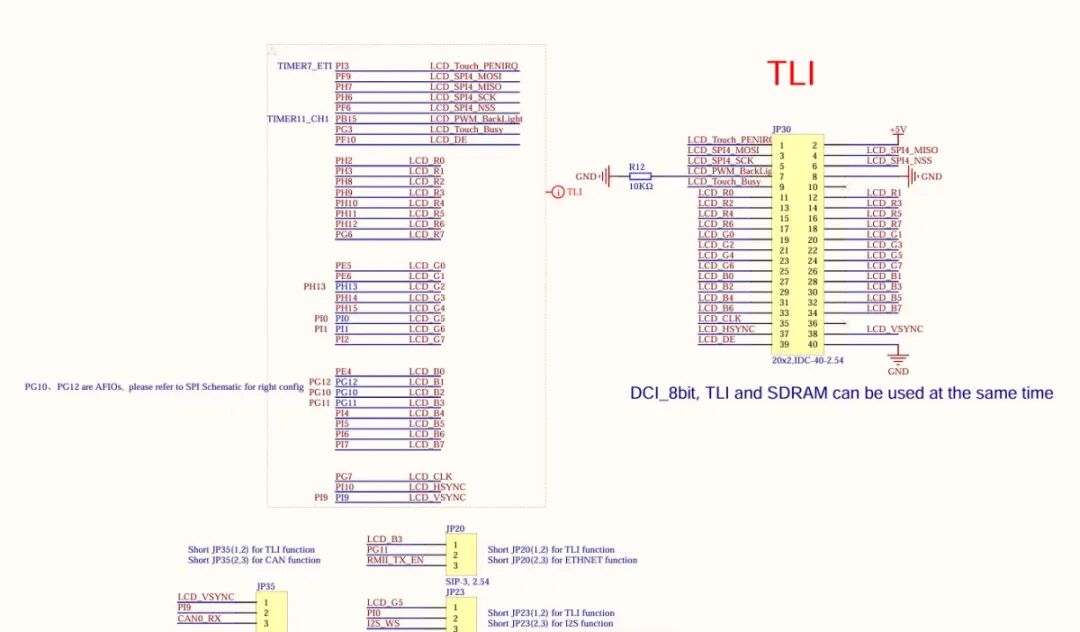
/******************************************************************************************//* tli pin configuration structure */structtli_pin_config{ constchar *pin_name; /* Pin name in format "PxY" */ constchar *alternate; /* Alternate function in format "AFx" */};/* tli configuration structure */structtli_config{ conststructtli_pin_config *pins; uint32_t pin_count; rcu_periph_enum tli_clk; uint32_t speed; /* GPIO speed - common for all pins */ uint8_t otype; /* Output type - common for all pins */ uint8_t pupd; /* Pull-up/pull-down - common for all pins */};/* configure HSYNC(PI10), VSYNC(PI9), PCLK(PG7) *//* configure LCD_R7(PG6), LCD_R6(PH12), LCD_R5(PH11), LCD_R4(PH10), LCD_R3(PH9), LCD_R2(PH8), LCD_R1(PH3), LCD_R0(PH2), LCD_G7(PI2), LCD_G6(PI1), LCD_G5(PI0), LCD_G4(PH15), LCD_G3(PH14), LCD_G2(PH13), LCD_G1(PE6), LCD_G0(PE5), LCD_B7(PI7), LCD_B6(PI6), LCD_B5(PI5), LCD_B4(PI4), LCD_B3(PG11), LCD_B2(PG10), LCD_B1(PG12), LCD_B0(PE4) *//* configure TLI pins AF function */conststructtli_pin_configtli_pins[] ={ /* LCD_R0 */ {"PH2", "AF14"}, /* LCD_R1 */ {"PH3", "AF14"}, /* LCD_R2 */ {"PH8", "AF14"}, /* LCD_R3 */ {"PH9", "AF14"}, /* LCD_R4 */ {"PH10", "AF14"}, /* LCD_R5 */ {"PH11", "AF14"}, /* LCD_R6 */ {"PH12", "AF14"}, /* LCD_R7 */ {"PG6", "AF14"}, /* LCD_G0 */ {"PE5", "AF14"}, /* LCD_G1 */ {"PE6", "AF14"}, /* LCD_G2 */ {"PH13", "AF14"}, /* LCD_G3 */ {"PH14", "AF14"}, /* LCD_G4 */ {"PH15", "AF14"}, /* LCD_G5 */ {"PI0", "AF14"}, /* LCD_G6 */ {"PI1", "AF14"}, /* LCD_G7 */ {"PI2", "AF14"}, /* LCD_B0 */ {"PE4", "AF14"}, /* LCD_B1 */ {"PG12", "AF14"}, /* LCD_B2 */ {"PG10", "AF14"}, /* LCD_B3 */ {"PG11", "AF14"}, /* LCD_B4 */ {"PI4", "AF14"}, /* LCD_B5 */ {"PI5", "AF14"}, /* LCD_B6 */ {"PI6", "AF14"}, /* LCD_B7 */ {"PI7", "AF14"}, /* LCD_VSYNC */ {"PI9", "AF14"}, /* LCD_HSYNC */ {"PI10", "AF14"}, /* DCI_PCLK */ {"PG7", "AF14"},};/* tli configuration */conststructtli_configtli_cfg = { .pins = tli_pins, .pin_count = sizeof(tli_pins) / sizeof(tli_pins[0]), .tli_clk = RCU_TLI, .speed = GPIO_OSPEED_MAX, .otype = GPIO_OTYPE_PP, .pupd = GPIO_PUPD_NONE,};/** * @brief Configure a single tli pin * @param pin_cfg: pointer to pin configuration * @retval RT_EOK on success, error code on failure */staticrt_err_ttli_pin_configure(const struct tli_pin_config *pin_cfg){ uint32_t port, pin, af; rcu_periph_enum clk; /* Get pin configuration */ if (get_pin_config(pin_cfg->pin_name, &port, &pin, &clk) == -RT_ERROR) { LOG_E("Invalid pin name: %s", pin_cfg->pin_name); return -RT_EINVAL; } /* Get alternate function */ if (pin_alternate_config(pin_cfg->alternate, &af) == -RT_ERROR) { LOG_E("Invalid alternate function: %s", pin_cfg->alternate); return -RT_EINVAL; } /* Enable GPIO clock */ rcu_periph_clock_enable(clk); /* Configure GPIO with common parameters */ gpio_mode_set(port, GPIO_MODE_AF, tli_cfg.pupd, pin); gpio_output_options_set(port, tli_cfg.otype, tli_cfg.speed, pin); gpio_af_set(port, af, pin); LOG_D("Configured pin %s with %s", pin_cfg->pin_name, pin_cfg->alternate); return RT_EOK;}/** * @brief Initialize TLI GPIO configuration * @param emac: pointer to TLI device structure * @retval RT_EOK on success, error code on failure */rt_err_tgd32_tli_gpio_init(void){ rt_uint32_t i; rt_err_t result; /* Configure all TLI pins */ for (i = 0; i < tli_cfg.pin_count; i++) { result = tli_pin_configure(&tli_cfg.pins[i]); if (result != RT_EOK) { LOG_E("Failed to configure pin %s", tli_cfg.pins[i].pin_name); return result; } } /* LCD PWM backlight(PB15) */ rcu_periph_clock_enable(RCU_GPIOB);/* enable GPIO clock */ gpio_mode_set(GPIOB, GPIO_MODE_OUTPUT, GPIO_PUPD_PULLUP, GPIO_PIN_15); gpio_output_options_set(GPIOB, GPIO_OTYPE_PP, GPIO_OSPEED_50MHZ, GPIO_PIN_15); gpio_bit_set(GPIOB, GPIO_PIN_15); /* Enable tli peripheral clock */ rcu_periph_clock_enable(tli_cfg.tli_clk); LOG_I("TLI GPIO initialization completed successfully"); return RT_EOK;}/*! \brief IPA initialize and configuration \param[in] baseaddress: base address \param[out] none \retval none*/staticvoidipa_config(ipa_cfg_t *ipa_cfg){ ipa_destination_parameter_struct ipa_destination_init_struct; ipa_foreground_parameter_struct ipa_fg_init_struct; rcu_periph_clock_enable(RCU_IPA); ipa_deinit(); /* configure IPA pixel format convert mode */ ipa_pixel_format_convert_mode_set(IPA_FGTODE); /* configure destination pixel format */ ipa_destination_init_struct.destination_pf = IPA_DPF_RGB565; /* configure destination memory base address */ ipa_destination_init_struct.destination_memaddr = ((uint32_t)(ipa_cfg->dst_ddress)); /* configure destination pre-defined alpha value RGB */ ipa_destination_init_struct.destination_pregreen = 0; ipa_destination_init_struct.destination_preblue = 0; ipa_destination_init_struct.destination_prered = 0; ipa_destination_init_struct.destination_prealpha = 0; /* configure destination line offset */ ipa_destination_init_struct.destination_lineoff = 0; /* configure height of the image to be processed */ ipa_destination_init_struct.image_height = 480; /* configure width of the image to be processed */ ipa_destination_init_struct.image_width = 272; /* IPA destination initialization */ ipa_destination_init(&ipa_destination_init_struct); /* configure IPA foreground */ ipa_fg_init_struct.foreground_memaddr = (uint32_t)(ipa_cfg->src_ddress); ipa_fg_init_struct.foreground_pf = FOREGROUND_PPF_RGB565; ipa_fg_init_struct.foreground_alpha_algorithm = IPA_FG_ALPHA_MODE_0; ipa_fg_init_struct.foreground_prealpha = 0x0; ipa_fg_init_struct.foreground_preblue = 0x0; ipa_fg_init_struct.foreground_pregreen = 0x0; ipa_fg_init_struct.foreground_prered = 0x0; ipa_fg_init_struct.foreground_lineoff = 0x0; /* foreground initialization */ ipa_foreground_init(&ipa_fg_init_struct);}/*! \brief configure TLI peripheral and display blend image \param[in] none \param[out] none \retval none*/staticrt_err_ttli_layer_config(consttli_layer_cfg_t *cfg){ tli_layer_parameter_struct tli_layer_init_struct; tli_layer_struct_para_init(&tli_layer_init_struct); tli_layer_init_struct.layer_window_leftpos = cfg->win_x + HORIZONTAL_SYNCHRONOUS_PULSE + HORIZONTAL_BACK_PORCH; tli_layer_init_struct.layer_window_rightpos = cfg->win_x + cfg->win_w + HORIZONTAL_SYNCHRONOUS_PULSE + HORIZONTAL_BACK_PORCH - 1; tli_layer_init_struct.layer_window_toppos = cfg->win_y + VERTICAL_SYNCHRONOUS_PULSE + VERTICAL_BACK_PORCH; tli_layer_init_struct.layer_window_bottompos= cfg->win_y + cfg->win_h + VERTICAL_SYNCHRONOUS_PULSE + VERTICAL_BACK_PORCH - 1; tli_layer_init_struct.layer_ppf = LAYER_PPF_RGB565; tli_layer_init_struct.layer_sa = 0xFF; tli_layer_init_struct.layer_acf1 = LAYER_ACF1_PASA; tli_layer_init_struct.layer_acf2 = LAYER_ACF2_PASA; tli_layer_init_struct.layer_default_alpha = 0; tli_layer_init_struct.layer_default_blue = 0; tli_layer_init_struct.layer_default_green = 0; tli_layer_init_struct.layer_default_red = 0; tli_layer_init_struct.layer_frame_bufaddr = cfg->framebuffer; tli_layer_init_struct.layer_frame_line_length = (cfg->win_w * 2) + 3; tli_layer_init_struct.layer_frame_buf_stride_offset = cfg->win_w * 2; tli_layer_init_struct.layer_frame_total_line_number = cfg->win_h; tli_layer_init(cfg->layer_id, &tli_layer_init_struct); tli_layer_enable(cfg->layer_id); return RT_EOK;}voidIPA_IRQHandler(void){ if (ipa_interrupt_flag_get(IPA_INT_FLAG_FTF) == SET) { ipa_interrupt_flag_clear(IPA_INT_FLAG_FTF); rt_sem_release(ipa_ftf_sem); }}voidTLI_ER_IRQHandler(void){ rt_uint32_t int_status; if (tli_interrupt_flag_get(TLI_INT_FLAG_FE) == SET) { tli_interrupt_flag_clear(TLI_INT_FLAG_FE); } if (tli_interrupt_flag_get(TLI_INT_FLAG_LCR) == SET) { tli_interrupt_flag_clear(TLI_INT_FLAG_LCR); } if (tli_interrupt_flag_get(TLI_INT_FLAG_TE) == SET) { tli_interrupt_flag_clear(TLI_INT_FLAG_TE); } if (tli_interrupt_flag_get(TLI_INT_FLAG_LM) == SET) { tli_interrupt_flag_clear(TLI_INT_FLAG_LM); }}/*! \brief configure TLI peripheral \param[in] none \param[out] none \retval none*//* ========================== * TLI 硬件初始化 * ========================== */staticrt_err_ttli_hw_init(rt_device_t dev){ tli_parameter_struct tli_init_struct;// tli_layer_parameter_struct tli_layer_init_struct; gd32_tli_gpio_init(); if(ERROR == rcu_pllsai_r_config(240, 2)) { while(1); } rcu_tli_clock_div_config(RCU_PLLSAIR_DIV8); rcu_osci_on(RCU_PLLSAI_CK); if(ERROR == rcu_osci_stab_wait(RCU_PLLSAI_CK)) { while(1) { } } /* configure TLI parameter struct */ tli_init_struct.signalpolarity_hs = TLI_HSYN_ACTLIVE_LOW; tli_init_struct.signalpolarity_vs = TLI_VSYN_ACTLIVE_LOW; tli_init_struct.signalpolarity_de = TLI_DE_ACTLIVE_LOW; tli_init_struct.signalpolarity_pixelck = TLI_PIXEL_CLOCK_TLI; /* LCD display timing configuration */ tli_init_struct.synpsz_hpsz = HORIZONTAL_SYNCHRONOUS_PULSE - 1; tli_init_struct.synpsz_vpsz = VERTICAL_SYNCHRONOUS_PULSE - 1; tli_init_struct.backpsz_hbpsz = HORIZONTAL_SYNCHRONOUS_PULSE + HORIZONTAL_BACK_PORCH - 1; tli_init_struct.backpsz_vbpsz = VERTICAL_SYNCHRONOUS_PULSE + VERTICAL_BACK_PORCH - 1; tli_init_struct.activesz_hasz = HORIZONTAL_SYNCHRONOUS_PULSE + HORIZONTAL_BACK_PORCH + ACTIVE_WIDTH - 1; tli_init_struct.activesz_vasz = VERTICAL_SYNCHRONOUS_PULSE + VERTICAL_BACK_PORCH + ACTIVE_HEIGHT - 1; tli_init_struct.totalsz_htsz = HORIZONTAL_SYNCHRONOUS_PULSE + HORIZONTAL_BACK_PORCH + ACTIVE_WIDTH + HORIZONTAL_FRONT_PORCH - 1; tli_init_struct.totalsz_vtsz = VERTICAL_SYNCHRONOUS_PULSE + VERTICAL_BACK_PORCH + ACTIVE_HEIGHT + VERTICAL_FRONT_PORCH - 1; /* configure LCD background R,G,B values */ tli_init_struct.backcolor_red = 0xFF; tli_init_struct.backcolor_green = 0xFF; tli_init_struct.backcolor_blue = 0xFF; tli_init(&tli_init_struct); return RT_EOK;}voidipa_sem_init(void){ ipa_ftf_sem = rt_sem_create("ipa", 0, RT_IPC_FLAG_FIFO);}rt_err_tipa_wait_ftf(rt_uint32_t timeout_ms){ return rt_sem_take(ipa_ftf_sem, rt_tick_from_millisecond(timeout_ms));}/*! \brief configure TLI peripheral and display blend image \param[in] none \param[out] none \retval none*/staticrt_err_ttli_control(rt_device_t dev, int cmd, void *args){ tli_layer_cfg_t *cfg; ipa_cfg_t *ipa_cfg; switch (cmd) { case RTGRAPHIC_CTRL_TLI_LAYER_CFG: if (!args) return RT_EINVAL; cfg = (tli_layer_cfg_t *)args; return tli_layer_config(cfg); case RTGRAPHIC_CTRL_TLI_LAYER_ON: if (!args) return RT_EINVAL; cfg = (tli_layer_cfg_t *)args; tli_layer_enable(cfg->layer_id); break; case RTGRAPHIC_CTRL_TLI_LAYER_OFF: if (!args) return RT_EINVAL; cfg = (tli_layer_cfg_t *)args; tli_layer_disable(cfg->layer_id); break; case RTGRAPHIC_CTRL_TLI_BLANK_RELOAD: tli_reload_config(TLI_FRAME_BLANK_RELOAD_EN); break; case RTGRAPHIC_CTRL_TLI_REQUEST_RELOAD: tli_reload_config(TLI_REQUEST_RELOAD_EN); break; case RTGRAPHIC_CTRL_IPA_CFG: if (!args) return RT_EINVAL; ipa_cfg = (ipa_cfg_t *)(args); ipa_config(ipa_cfg); break; case RTGRAPHIC_CTRL_IPA_EN: ipa_transfer_enable(); break; case RTGRAPHIC_CTRL_TLI_EN: tli_enable(); break; case RTGRAPHIC_CTRL_TLI_UNEN: tli_disable(); break; case RTGRAPHIC_CTRL_IPA_SEM_INIT: ipa_sem_init(); break; case RTGRAPHIC_CTRL_IPA_WAIT: if (!args) return RT_EINVAL; rt_uint32_t timeout_ms = (rt_uint32_t)(args); ipa_wait_ftf(timeout_ms); break; //======================================= case RTGRAPHIC_CTRL_GET_INFO : if (!args) return RT_EINVAL; structrt_device_graphic_info *tli_graphic_info; tli_graphic_info = (struct rt_device_graphic_info *)args; tli_graphic_info->bits_per_pixel = 16; tli_graphic_info->pixel_format = RTGRAPHIC_PIXEL_FORMAT_RGB565; tli_graphic_info->pitch = 480*2; tli_graphic_info->width = TLI_LCD_WIDTH; tli_graphic_info->height = TLI_LCD_HEIGHT; tli_graphic_info->framebuffer = (void *)TLI_FB_ADDR(0); args = &tli_graphic_info; break; case RTGRAPHIC_CTRL_RECT_UPDATE : case RTGRAPHIC_CTRL_POWERON : case RTGRAPHIC_CTRL_POWEROFF : case RTGRAPHIC_CTRL_SET_MODE : case RTGRAPHIC_CTRL_GET_EXT : case RTGRAPHIC_CTRL_SET_BRIGHTNESS : case RTGRAPHIC_CTRL_GET_BRIGHTNESS : case RTGRAPHIC_CTRL_GET_MODE : case RTGRAPHIC_CTRL_GET_STATUS : case RTGRAPHIC_CTRL_PAN_DISPLAY : case RTGRAPHIC_CTRL_WAIT_VSYNC : default: return RT_EINVAL; } return RT_EOK;}tli_layer_cfg_t layer0 ={ .layer_id = LAYER0, .win_x = 0, .win_y = 0, .win_w = 480, .win_h = 272, .framebuffer = (uint32_t)TLI_FB_ADDR(0),};tli_layer_cfg_t layer1 ={ .layer_id = LAYER1, .win_x = 80, .win_y = 20, .win_w = 247, .win_h = 118, .framebuffer = ((uint32_t)TLI_FB_ADDR(1)),};/* ========================== * 驱动注册 * ========================== */intrt_hw_tli_init(void){ rt_err_t ret; structrt_device *tli; tli_graphic_ops.set_pixel = lcd_set_pixel; tli_graphic_ops.get_pixel = lcd_get_pixel; tli_graphic_ops.draw_hline = lcd_draw_hline; tli_graphic_ops.draw_vline = lcd_draw_vline; tli_graphic_ops.blit_line = lcd_blit_line; tli_device.type = RT_Device_Class_Graphic; tli_device.init = tli_hw_init; tli_device.open = RT_NULL; tli_device.close = RT_NULL; tli_device.write = RT_NULL; tli_device.read = RT_NULL; tli_device.control = tli_control; tli_device.user_data = &tli_graphic_ops; ret = rt_device_register(&tli_device, "lcd0", RT_DEVICE_FLAG_RDWR); if(ret == RT_EOK) { rt_hw_sdram_init(); rt_kprintf("GD32F527 TLI driver register ok.\n"); } /********TEST**********/ tli = rt_device_find("lcd0"); if (tli) { rt_device_init(tli); rt_device_control(tli, RTGRAPHIC_CTRL_TLI_LAYER_CFG, &layer0); rt_device_control(tli, RTGRAPHIC_CTRL_TLI_LAYER_ON, &layer0); rt_device_control(tli, RTGRAPHIC_CTRL_TLI_BLANK_RELOAD, RT_NULL); rt_device_control(tli, RTGRAPHIC_CTRL_TLI_EN, RT_NULL);// rt_device_control(tli, RTGRAPHIC_CTRL_TLI_LAYER_CFG, &layer1);// rt_device_control(tli, RTGRAPHIC_CTRL_TLI_LAYER_ON, &layer1);// rt_device_control(tli, RTGRAPHIC_CTRL_TLI_REQUEST_RELOAD, RT_NULL);// rt_device_control(tli, RTGRAPHIC_CTRL_TLI_EN, RT_NULL);// ipa_sem_init();// rt_device_control(tli, RTGRAPHIC_CTRL_IPA_CFG, (void *)&gImage_image1);// ipa_transfer_enable();// ipa_wait_ftf(1000); delay_ms(10); lcd_clear(LCD_COLOR_RED); } return ret;}INIT_BOARD_EXPORT(rt_hw_tli_init);
上下、左右滑动查看
3.2 LCD电阻触摸控制器XPT2046驱动
板载的lcd使用电阻触摸XPT2046,这里需要在ENV中选择XPT2046的驱动组件包。组件包需要配置SPI总线接口,以及片选和触摸中断信号引脚。
触摸接口如下,使用SPI4总线,以及PF6片选和PI3的触摸中断信号。
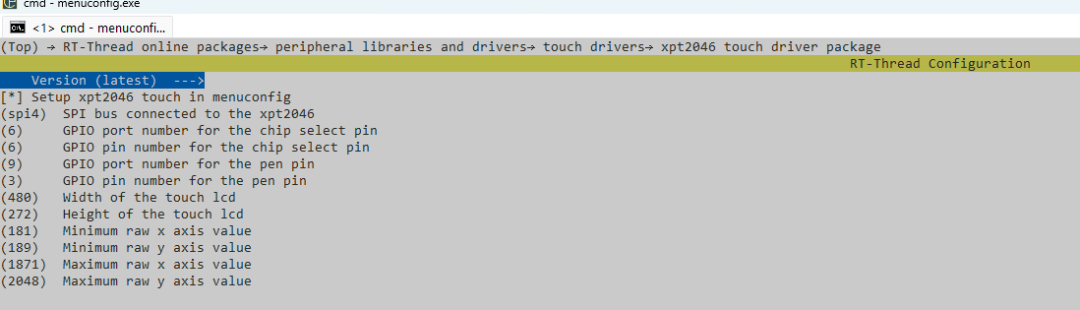
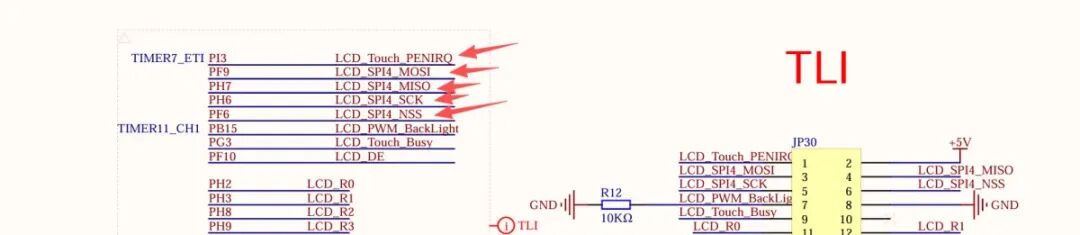
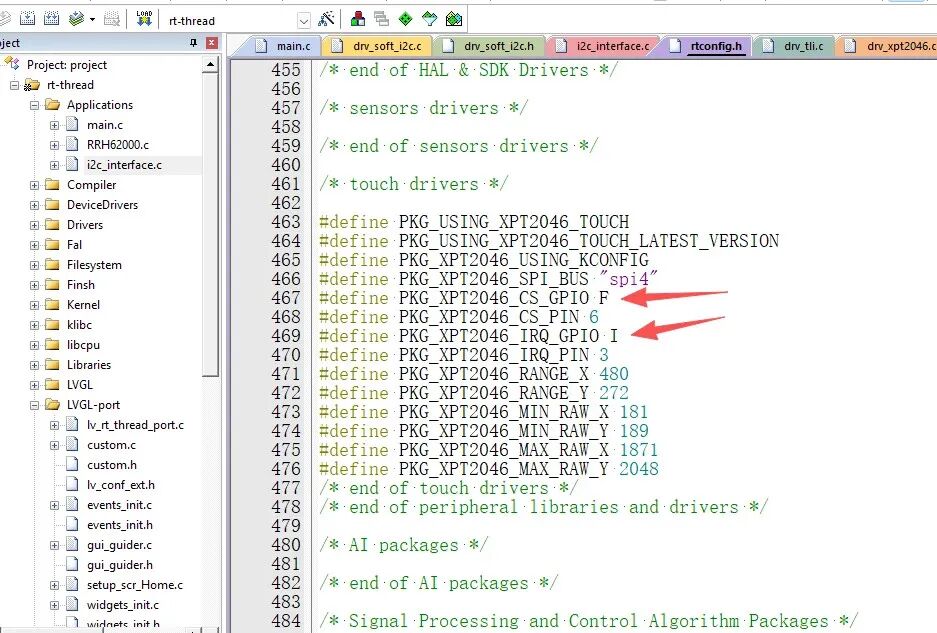
1、这里要注意在ENV中配置PF6片选和PI3的触摸中断信号引脚时,ENV要求使用数字,但是代码中需要GPIO端口PORT字符,否则会有编译错误。
2、电阻触摸屏的XY轴触摸和屏幕显示坐标不一致,需要把电阻触摸坐标旋转180度。即X和Y坐标交换,并且都要镜像。
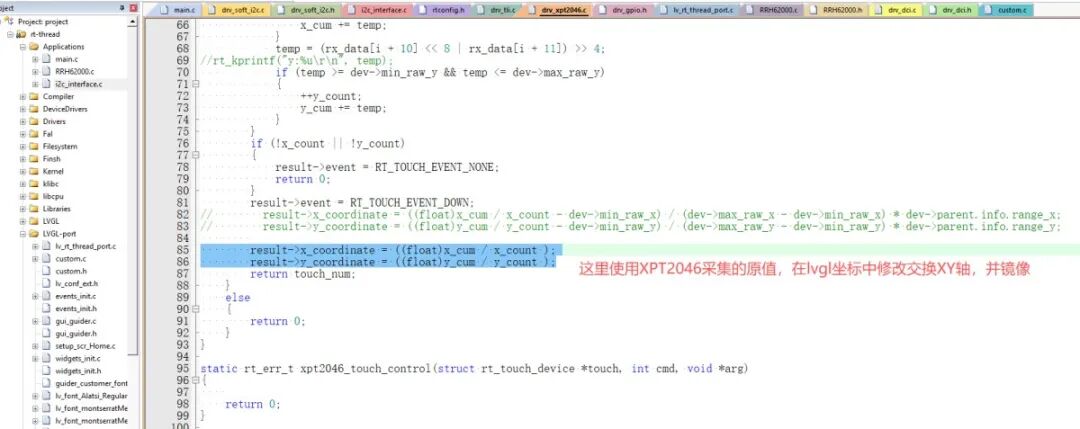
3.3 LVGL移植
实现lcd显示及触摸设备驱动之后就可以继续LVGL的移植显示了。下面是lvgl的lcd 显示控制移植。需在ENV中选择LVGL的开发包。然后调用LCD的初始化及图形显示驱动。
1、显示驱动代码部分:
staticvoiddisp_init(void);staticvoiddisp_flush(lv_disp_drv_t * disp_drv, constlv_area_t * area, lv_color_t * color_p);staticlv_color_t buf_2_1[480 * 10]; /*A buffer for 10 rows*/staticlv_color_t buf_2_2[480 * 10]; /*An other buffer for 10 rows*/voidlv_port_disp_init(void){/*------------------------- * Initialize your display * -----------------------*/ disp_init();/*----------------------------- * Create a buffer for drawing *----------------------------*//** * LVGL requires a buffer where it internally draws the widgets. * Later this buffer will passed to your display driver's `flush_cb` to copy its content to your display. * The buffer has to be greater than 1 display row * * There are 3 buffering configurations: * 1. Create ONE buffer: * LVGL will draw the display's content here and writes it to your display * * 2. Create TWO buffer: * LVGL will draw the display's content to a buffer and writes it your display. * You should use DMA to write the buffer's content to the display. * It will enable LVGL to draw the next part of the screen to the other buffer while * the data is being sent form the first buffer. It makes rendering and flushing parallel. * * 3. Double buffering * Set 2 screens sized buffers and set disp_drv.full_refresh = 1. * This way LVGL will always provide the whole rendered screen in `flush_cb` * and you only need to change the frame buffer's address. *//* Example for 2) */staticlv_disp_draw_buf_t draw_buf_dsc_2; lv_disp_draw_buf_init(&draw_buf_dsc_2, buf_2_1, buf_2_2, 480 * 10); /*Initialize the display buffer*//*----------------------------------- * Register the display in LVGL *----------------------------------*/staticlv_disp_drv_t disp_drv; /*Descriptor of a display driver*/ lv_disp_drv_init(&disp_drv); /*Basic initialization*//*Set up the functions to access to your display*//*Set the resolution of the display*/ disp_drv.hor_res = 480; disp_drv.ver_res = 272;/*Used to copy the buffer's content to the display*/ disp_drv.flush_cb = disp_flush;/*Set a display buffer*/ disp_drv.draw_buf = &draw_buf_dsc_2;/*Required for Example 3)*///disp_drv.full_refresh = 1;/* Fill a memory array with a color if you have GPU. * Note that, in lv_conf.h you can enable GPUs that has built-in support in LVGL. * But if you have a different GPU you can use with this callback.*///disp_drv.gpu_fill_cb = gpu_fill;/*Finally register the driver*/ lv_disp_drv_register(&disp_drv);}/********************** * STATIC FUNCTIONS **********************//*Initialize your display and the required peripherals.*/staticvoiddisp_init(void){/*You code here*/}volatilebool disp_flush_enabled = true;/* Enable updating the screen (the flushing process) when disp_flush() is called by LVGL */voiddisp_enable_update(void){ disp_flush_enabled = true;}/* Disable updating the screen (the flushing process) when disp_flush() is called by LVGL */voiddisp_disable_update(void){ disp_flush_enabled = false;}/*Flush the content of the internal buffer the specific area on the display *You can use DMA or any hardware acceleration to do this operation in the background but *'lv_disp_flush_ready()' has to be called when finished.*/staticvoiddisp_flush(lv_disp_drv_t * disp_drv, constlv_area_t * area, lv_color_t * color_p){if(disp_flush_enabled) {/*The most simple case (but also the slowest) to put all pixels to the screen one-by-one*/ lcd_draw_image(area->x1,area->y1,area->x2-area->x1 +1,area->y2-area->y1 +1,(uint16_t *)color_p); }/*IMPORTANT!!! *Inform the graphics library that you are ready with the flushing*/ lv_disp_flush_ready(disp_drv);}voidlcd_draw_image(uint16_t xpos, uint16_t ypos,uint16_t width, uint16_t height, uint16_t *fb_color){uint32_t x,y = 0;for (y = 0; y < height; y++) {for (x = 0; x < width; x++) { *(__IO uint16_t*)(current_framebuffer + (2*(x+xpos) + (y+ypos) * TLI_LCD_WIDTH * 2)) = *fb_color++; } }}
上下、左右滑动查看
2、触摸驱动的初始化
针对触摸坐标输入需要先校准。校准如下:
#include#define TOUCH_DEVICE_NAME "xpt0" // 设备名称,rt_touch框架注册的设备名staticrt_xpt2046_t touch_dev; // 触摸设备句柄staticvoidxpt2046_calibration(void){ /* Find the TFT LCD device */ constchar* lcd_name = "lcd0"; constchar* touch_name = "xpt0"; rt_device_t lcd = rt_device_find(lcd_name); if (lcd == RT_NULL) { LOG_E(LOG_TAG" cannot find lcd device named %s\n", lcd_name); return; } if (rt_device_open(lcd, RT_DEVICE_OFLAG_RDWR) != RT_EOK) { LOG_E(LOG_TAG" cannot open lcd device named %s\n", lcd_name); return; } rt_xpt2046_t touch = (rt_xpt2046_t)rt_device_find(touch_name); if (touch == RT_NULL) { LOG_E(LOG_TAG" cannot find touch device named %s\n", touch_name); return; } if (rt_device_open((rt_device_t)touch, RT_DEVICE_FLAG_INT_RX) != RT_EOK) { LOG_E(LOG_TAG" cannot open touch device named %s\n", touch_name); return; } structrt_device_graphic_infolcd_info; rt_device_control(lcd, RTGRAPHIC_CTRL_GET_INFO, &lcd_info); for (rt_uint32_t y = 0; y < lcd_info.height; ++y) { constuint32_t white = 0xFFFFFFFF; rt_graphix_ops(lcd)->draw_hline((constchar *)(&white), 0, lcd_info.width, y); } rt_uint32_t cross_size = (lcd_info.width > lcd_info.height ? lcd_info.height : lcd_info.width) / 10; rt_uint32_t x0 = cross_size; rt_uint32_t y0 = cross_size; rt_uint32_t x1 = lcd_info.width - cross_size; rt_uint32_t y1 = cross_size; rt_uint32_t x2 = lcd_info.width - cross_size; rt_uint32_t y2 = lcd_info.height - cross_size; rt_uint32_t x3 = cross_size; rt_uint32_t y3 = lcd_info.height - cross_size; constrt_uint32_t black = 0x0; // Upper left cross rt_graphix_ops(lcd)->draw_hline((constchar *)(&black), 0, x0+cross_size, y0); rt_graphix_ops(lcd)->draw_vline((constchar *)(&black), x0, 0, y0+cross_size); touch->min_raw_x = 0; touch->min_raw_y = 0; touch->max_raw_x = 4096; touch->max_raw_y = 4096; touch->parent.info.range_x = 4096; touch->parent.info.range_y = 4096; rt_uint16_t x_raw[4]; rt_uint16_t y_raw[4]; rt_uint8_t raw_idx = 0; rt_memset(&x_raw, 0, sizeof(rt_uint32_t)*4); rt_memset(&y_raw, 0, sizeof(rt_uint32_t)*4); while (1) { structrt_touch_dataread_data; rt_memset(&read_data, 0, sizeof(struct rt_touch_data)); if (rt_device_read((rt_device_t)touch, 0, &read_data, 1) == 1) { x_raw[raw_idx] = read_data.x_coordinate; y_raw[raw_idx++] = read_data.y_coordinate; LOG_I(LOG_TAG" %d point capture", raw_idx-1);rt_kprintf("%d=%d-%d.\n",raw_idx-1,read_data.x_coordinate,read_data.y_coordinate); for (rt_uint32_t y = 0; y < lcd_info.height; ++y) { constuint32_t white = 0xFFFFFFFF; rt_graphix_ops(lcd)->draw_hline((constchar *)(&white), 0, lcd_info.width, y); } rt_thread_mdelay(1000); if (raw_idx >= 4) { break; } switch(raw_idx) { case1: // Upper right cross rt_graphix_ops(lcd)->draw_hline((constchar *)(&black), x1-cross_size, lcd_info.width, y1); rt_graphix_ops(lcd)->draw_vline((constchar *)(&black), x1, 0, y1+cross_size); break; case2: // lower right cross rt_graphix_ops(lcd)->draw_hline((constchar *)(&black), x2-cross_size, lcd_info.width, y2); rt_graphix_ops(lcd)->draw_vline((constchar *)(&black), x2, y2-cross_size, lcd_info.height); break; case3: // lower left cross rt_graphix_ops(lcd)->draw_hline((constchar *)(&black), 0, x3+cross_size, y3); rt_graphix_ops(lcd)->draw_vline((constchar *)(&black), x3, y3-cross_size, lcd_info.height); break; default: break; } } rt_thread_mdelay(10); } rt_uint32_t min_x = (x_raw[2]+x_raw[3])/2; rt_uint32_t max_x = (x_raw[0]+x_raw[1])/2; rt_uint32_t min_y = (y_raw[1]+y_raw[2])/2; rt_uint32_t max_y = (y_raw[0]+y_raw[3])/2; rt_uint32_t x_raw_cnt_per_pixel = (max_x-min_x) / (lcd_info.height - cross_size*2); rt_uint32_t y_raw_cnt_per_pixel = (max_y-min_y) / (lcd_info.width - cross_size*2); min_x -= cross_size * x_raw_cnt_per_pixel; max_x += cross_size * x_raw_cnt_per_pixel; min_y -= cross_size * y_raw_cnt_per_pixel; max_y += cross_size * y_raw_cnt_per_pixel; touch->min_raw_x = min_x; touch->min_raw_y = min_y; touch->max_raw_x = max_x; touch->max_raw_y = max_y; touch->parent.info.range_x = lcd_info.height; touch->parent.info.range_y = lcd_info.width; LOG_I(LOG_TAG" Calibration result, min_x:%d, min_y:%d, max_x:%d, max_y:%d", min_x, min_y, max_x, max_y); rt_kprintf(" Calibration result, min_x:%d, min_y:%d, max_x:%d, max_y:%d", min_x, min_y, max_x, max_y); rt_device_close(lcd); rt_device_close((rt_device_t)touch);}
上下、左右滑动查看
再就是LVGL中触摸设备初始化:
/* X轴映射函数:原始触摸值 -> 屏幕X坐标 */staticint16_tmap_x(uint16_t raw_x){ if (touch_dev == RT_NULL) { return0; } int32_t min_x = touch_dev->min_raw_x; int32_t max_x = touch_dev->max_raw_x; int32_t range_x = touch_dev->parent.info.range_x; /* 防止除零错误(未校准时min_x == max_x) */ if (max_x <= min_x) { return0; } /* 限制原始数据范围 */ if (raw_x < min_x) raw_x = min_x; if (raw_x > max_x) raw_x = max_x; /* 线性映射 */ int32_t screen_x = (int32_t)(raw_x - min_x) * range_x / (max_x - min_x); /* 限制屏幕范围 */ if (screen_x < 0) screen_x = 0; if (screen_x >= range_x) screen_x = range_x - 1; return (int16_t)screen_x;}/* Y轴映射函数:原始触摸值 -> 屏幕Y坐标 */staticint16_tmap_y(uint16_t raw_y){ if (touch_dev == RT_NULL) { return0; } int32_t min_y = touch_dev->min_raw_y; int32_t max_y = touch_dev->max_raw_y; int32_t range_y = touch_dev->parent.info.range_y; if (max_y <= min_y) { return0; } if (raw_y < min_y) raw_y = min_y; if (raw_y > max_y) raw_y = max_y; int32_t screen_y = (int32_t)(raw_y - min_y) * range_y / (max_y - min_y); if (screen_y < 0) screen_y = 0; if (screen_y >= range_y) screen_y = range_y - 1; return (int16_t)screen_y;}/* 触摸屏读取回调函数 */staticvoidtouchpad_read(lv_indev_drv_t * indev_drv, lv_indev_data_t * data){ structrt_touch_dataread_data; rt_size_t res; staticrt_int16_t last_x = 0, last_y = 0; rt_memset(&read_data, 0, sizeof(struct rt_touch_data)); /* 从RT-Thread触摸设备读取一个触摸点数据 */ res = rt_device_read((rt_device_t)touch_dev, 0, &read_data, 1); if (res != 1) { data->state = LV_INDEV_STATE_REL; return; } /* 检查触摸点有效性并上报数据 */ if (read_data.event == RT_TOUCH_EVENT_DOWN || read_data.event == RT_TOUCH_EVENT_MOVE) { // 将触摸屏坐标映射到屏幕分辨率 // 例如 read_data->x_coordinate 是原始触摸值 (0-4095), 需要转换为屏幕像素坐标 // map_x() 和 map_y() 根据实际校准实现的转换函数 data->point.y = 272 - map_x(read_data.x_coordinate); data->point.x = 480 - map_y(read_data.y_coordinate); data->state = LV_INDEV_STATE_PR; last_x = data->point.y; last_y = data->point.y; rt_kprintf("P=%d:%d.\n",data->point.x,data->point.y); } else { // 没有触摸或触摸抬起时,可选择上报最后一次的坐标或设为释放状态 data->point.x = last_x; data->point.y = last_y; data->state = LV_INDEV_STATE_REL; }}/* 触摸输入设备初始化 */voidlv_port_indev_init(void){ /* 1. 查找并打开RT-Thread触摸设备 */ touch_dev = (rt_xpt2046_t)rt_device_find(TOUCH_DEVICE_NAME); if (touch_dev == RT_NULL) { rt_kprintf("Can't find touch device: %s\n", TOUCH_DEVICE_NAME); return; } if (rt_device_open((rt_device_t)touch_dev, RT_DEVICE_FLAG_INT_RX) != RT_EOK) { rt_kprintf("Open touch device failed!\n"); return; } /* 2. 注册一个LVGL输入设备 */ staticlv_indev_drv_t indev_drv; lv_indev_drv_init(&indev_drv); // 初始化驱动类型 indev_drv.type = LV_INDEV_TYPE_POINTER; // 触摸屏属于指针类型输入设备 indev_drv.read_cb = touchpad_read; // 设置读取回调函数 lv_indev_drv_register(&indev_drv); // 注册到LVGL}
上下、左右滑动查看
注意获取触摸坐标时需要转换坐标:
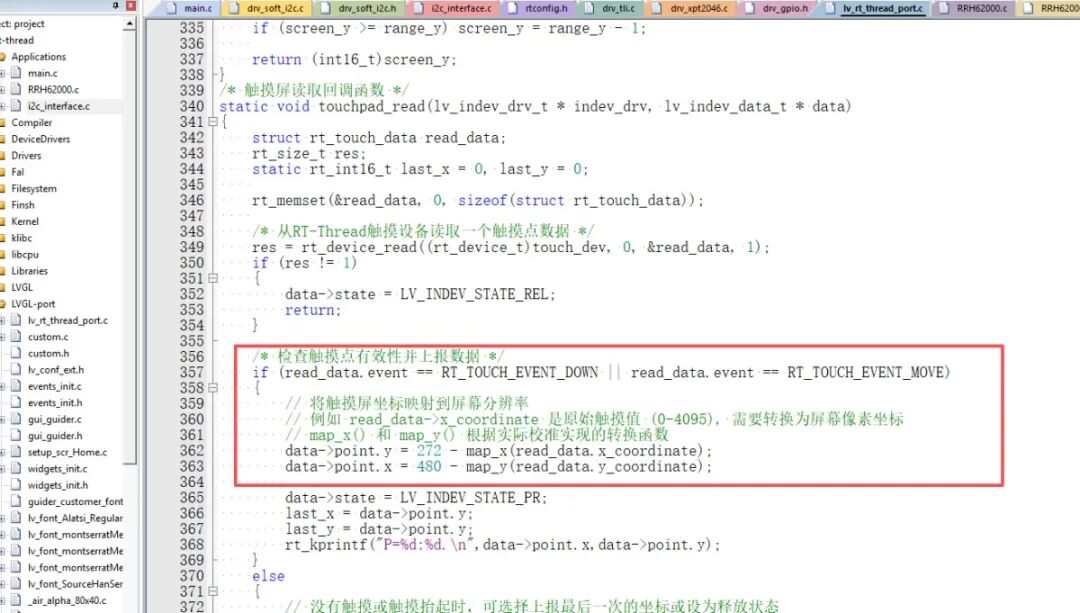
3.4 LVGL界面设计
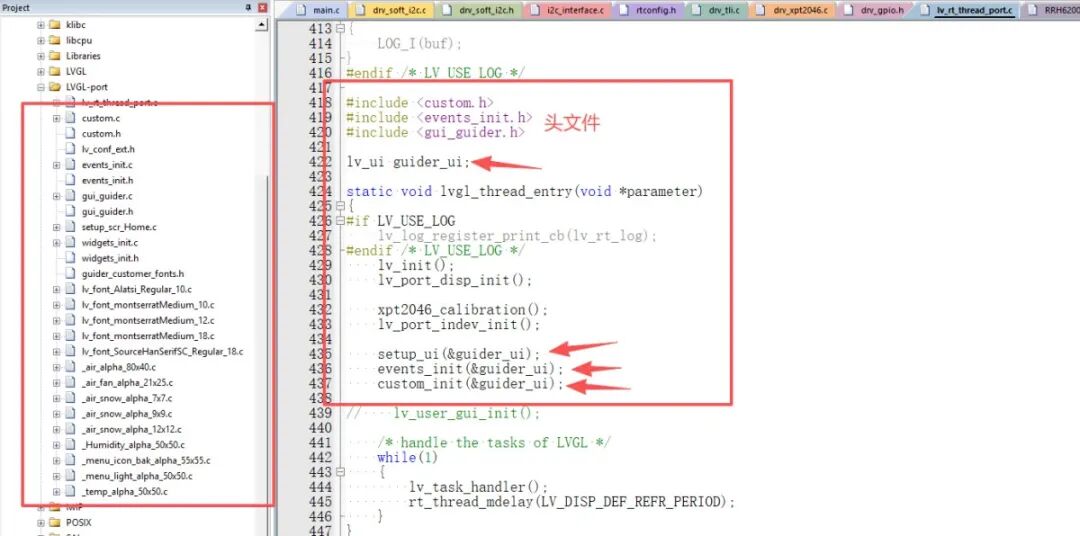
这里使用GUI-Guider软件设计LVGL界面。
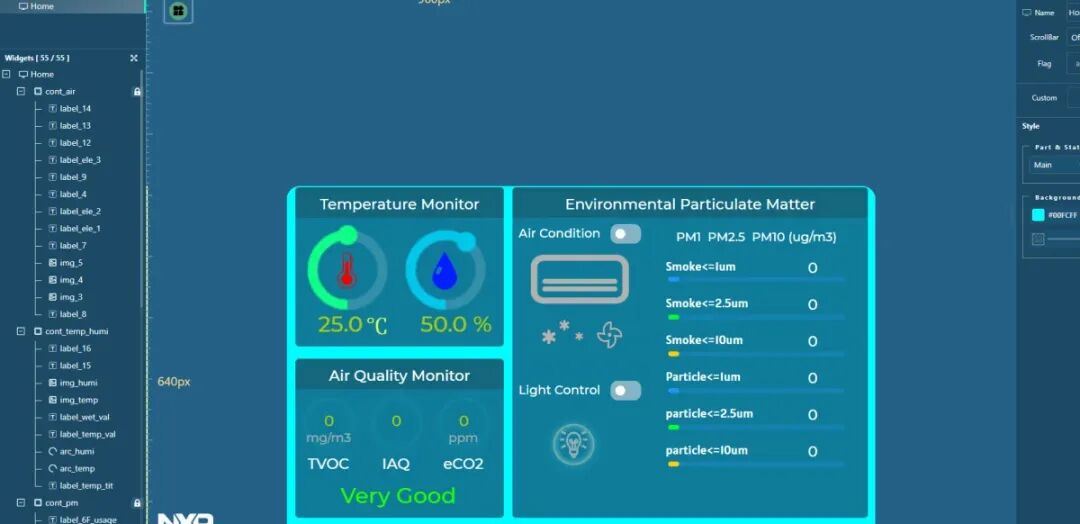
将生成的代码添加到工程中。主要是如下两个文件夹内代码。
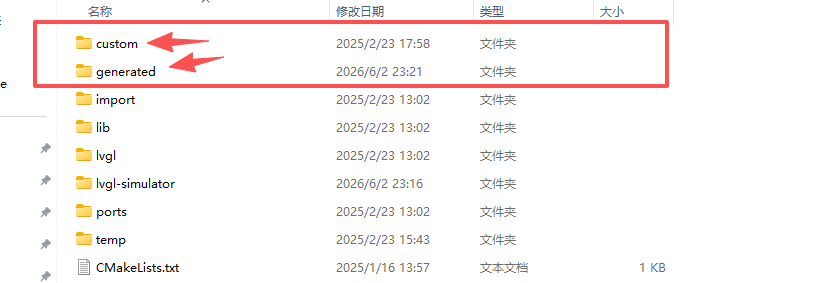
3.5 传感器数据获取和显示设计
RRH62000传感器使用I2C接口,这里在ENV中配置I2C设备引脚为PB6和PB7。
驱动代码如下:
uint8_tI2C_Write(void *i2cbus,uint32_t dev_addr, uint8_t *cmd,uint32_t len,uint8_t *str,uint32_t num){ structrt_i2c_msgmsgs[2]; uint8_t *pbuf; pbuf = rt_calloc(1, num+len); if(pbuf == NULL) return RT_ENOMEM; rt_memcpy(&pbuf[0],cmd,len); rt_memcpy(&pbuf[len],str,num); msgs[0].addr = dev_addr; /* Slave address */ msgs[0].flags = RT_I2C_WR; /* Write flag */ msgs[0].buf = pbuf; /* Slave register address */ msgs[0].len = len + num; /* Number of bytes sent */ if(dev_addr > 0xff) { msgs[0].flags |= RT_I2C_ADDR_10BIT; /* Write flag */ } if (rt_i2c_transfer((struct rt_i2c_bus_device *)i2cbus, msgs, 1) != 1) { if (pbuf) rt_free(pbuf); return RT_ERROR; } if (pbuf) rt_free(pbuf); return RT_EOK;}uint8_tI2C_Read(void *i2cbus,uint32_t dev_addr, uint8_t *cmd,uint32_t len,uint8_t *str,uint32_t num){ structrt_i2c_msgmsgs[2]; msgs[0].addr = dev_addr; /* Slave address */ msgs[0].flags = RT_I2C_WR | RT_I2C_NO_STOP; /* Write flag */ msgs[0].buf = (rt_uint8_t *) cmd; /* Slave register address */ msgs[0].len = len; /* Number of bytes sent */ msgs[1].addr = dev_addr; /* Slave address */ msgs[1].flags = RT_I2C_RD; /* Write flag */ msgs[1].buf = (rt_uint8_t *) str; /* Slave register address */ msgs[1].len = num; /* Number of bytes sent */ if(dev_addr > 0xff) { msgs[0].flags |= RT_I2C_ADDR_10BIT; /* Write flag */ msgs[1].flags |= RT_I2C_ADDR_10BIT; /* Write flag */ } if (rt_i2c_transfer((struct rt_i2c_bus_device *)i2cbus, msgs, 2) != 2) { return RT_ERROR; } return RT_EOK;}#define I2C_NAME "i2c0"structrt_i2c_bus_device *rrh62000_i2c_bus_dev;#define I2C_BUS_DEV rrh62000_i2c_bus_dev#define I2C_BUS_NUM I2C_BUS_DEV/****************************************** class RRH62000 for PM1.0, PM2.5, PM10 ******************************************/// converts 2 received bytes to uint16_tstaticuint16_tRRH62000_toInt(char MSB, char LSB){ uint16_t buf = ((uint16_t)MSB << 8) | LSB; return buf;}uint8_tRRH62000_Init(RRH62000_Data_t * rrh62000){ I2C_BUS_DEV = I2C_FindDevice(I2C_NAME); if (I2C_BUS_DEV == NULL) { return1; } RRH62000_getID(rrh62000->_unique_id); RRH62000_getAlgoVersion(rrh62000->_algoVersion); RRH62000_getAlgoVersion(rrh62000->_fwVersion); rrh62000->_tvoc_cleaning_status = RRH62000_tvoc_is_cleaned();// reading ZMOD cleaning status return0;}// command for writing and start reading with repeated startvoidRRH62000_writeRead(char* tx, uint8_t size_tx, char* rx, uint8_t size_rx){ }// command for writing data to i2cvoidRRH62000_write(char* tx, uint8_t size_tx){}uint8_tRRH62000_getID(uint8_t *_unique_id){ uint8_t cmd[1],res; cmd[0] = RRH62000_UID ; res = I2C_Read(I2C_BUS_NUM, RRH62000_I2C_ADR, cmd, 1, _unique_id, 6); return res;}uint8_tRRH62000_getAlgoVersion(uint8_t * _algoVersion){ uint8_t cmd[1],res; cmd[0] = RRH62000_ARGID ; res = I2C_Read(I2C_BUS_NUM, RRH62000_I2C_ADR, cmd, 1, _algoVersion, 3); return res;}uint8_tRRH62000_getFWversion(uint8_t * _fwVersion){ uint8_t cmd[1],res; cmd[0] = RRH62000_FWVER ; res = I2C_Read(I2C_BUS_NUM, RRH62000_I2C_ADR, cmd, 1, _fwVersion, 2); return res;}// requests new data from the sensor and stores it localvoidRRH62000_refreshData(RRH62000_Data_t * rrh62000){ uint8_t cmd[1]; uint8_t rx[37]; cmd[0] = RRH62000_READ ; I2C_Read(I2C_BUS_NUM, RRH62000_I2C_ADR, cmd, 1, rx, 37); rrh62000->_status = RRH62000_toInt(rx[ 0], rx[ 1]); rrh62000->_nc_0p3 = RRH62000_toInt(rx[ 2], rx[ 3]) * 0.1; rrh62000->_nc_0p5 = RRH62000_toInt(rx[ 4], rx[ 5]) * 0.1; rrh62000->_nc_1p0 = RRH62000_toInt(rx[ 6], rx[ 7]) * 0.1; rrh62000->_nc_2p5 = RRH62000_toInt(rx[ 8], rx[ 9]) * 0.1; rrh62000->_nc_4p0 = RRH62000_toInt(rx[10], rx[11]) * 0.1; rrh62000->_pm_1p0 = RRH62000_toInt(rx[12], rx[13]) * 0.1; rrh62000->_pm_2p5 = RRH62000_toInt(rx[14], rx[15]) * 0.1; rrh62000->_pm_10p0 = RRH62000_toInt(rx[16], rx[17]) * 0.1; rrh62000->_pm_1p0_s = RRH62000_toInt(rx[18], rx[19]) * 0.1; rrh62000->_pm_2p5_s = RRH62000_toInt(rx[20], rx[21]) * 0.1; rrh62000->_pm_10p0_s = RRH62000_toInt(rx[22], rx[23]) * 0.1; rrh62000->_temperature = RRH62000_toInt(rx[24], rx[25]) * 0.01; rrh62000->_humidity = RRH62000_toInt(rx[26], rx[27]) * 0.01; rrh62000->_tvoc = RRH62000_toInt(rx[28], rx[29]) * 0.01; rrh62000->_eco2 = RRH62000_toInt(rx[30], rx[31]); rrh62000->_iaq = RRH62000_toInt(rx[32], rx[33]) * 0.01; cmd[0] = RRH62000_RMOX ; I2C_Read(I2C_BUS_NUM, RRH62000_I2C_ADR, cmd, sizeof(cmd), rx, sizeof(rx)); rrh62000->_rmox = (unsignedlong) (rx[0] << 24 | rx[1] << 16 | rx[2] << 8 | rx[3]);}// resets RRH62000voidRRH62000_reset(){ uint8_t cmd[2] = { RRH62000_RESET , 0x81}; I2C_Write(I2C_BUS_NUM, RRH62000_I2C_ADR, cmd , 2, NULL, 0);}// send RRH62000 to sleepvoidRRH62000_sleep(){ uint8_t cmd[2] = { RRH62000_SLEEP , 0x00}; I2C_Write(I2C_BUS_NUM, RRH62000_I2C_ADR, cmd , 2, NULL, 0);}// return RRH62000 from sleepvoidRRH62000_wakeup(){ uint8_t cmd[2] = { RRH62000_SLEEP , 0x80}; I2C_Write(I2C_BUS_NUM, RRH62000_I2C_ADR, cmd , 2, NULL, 0);}// return if TVOC sensor is cleaned// check for new status if notuint8_tRRH62000_tvoc_is_cleaned(){ uint8_t res; uint8_t buf[1]; // creating buffer variable for multiple readings uint8_t cmd[1]; buf[0] = 0; cmd[0] = RRH62000_CSTATUS; // creating command for reading cleaning status res = I2C_Read(I2C_BUS_NUM, RRH62000_I2C_ADR, cmd, 1, buf, 1); // writes command and reads 1 byte into buf return buf[0];}
上下、左右滑动查看
在LVGL中更新传感器数据如下:
/********************* * INCLUDES *********************/#include
上下、左右滑动查看
3.6 项目最终效果展示
上电初始先进行触摸屏校准,校准逻辑大致是:采集四个角(左上、右上、右下、左下)的原始触摸坐标,计算每个方向的 min/max 原始值,然后基于 LCD 实际尺寸计算出每像素对应的原始计数(x_raw_cnt_per_pixel 和 y_raw_cnt_per_pixel)。然后再根据交叉线的偏移(cross_size)进行微调得到最终的 min/max 原始范围。最终 touch->min_raw_x, max_raw_x, min_raw_y, max_raw_y 就是有效原始坐标的边界,而 range_x 和 range_y 是 LCD 的宽高。
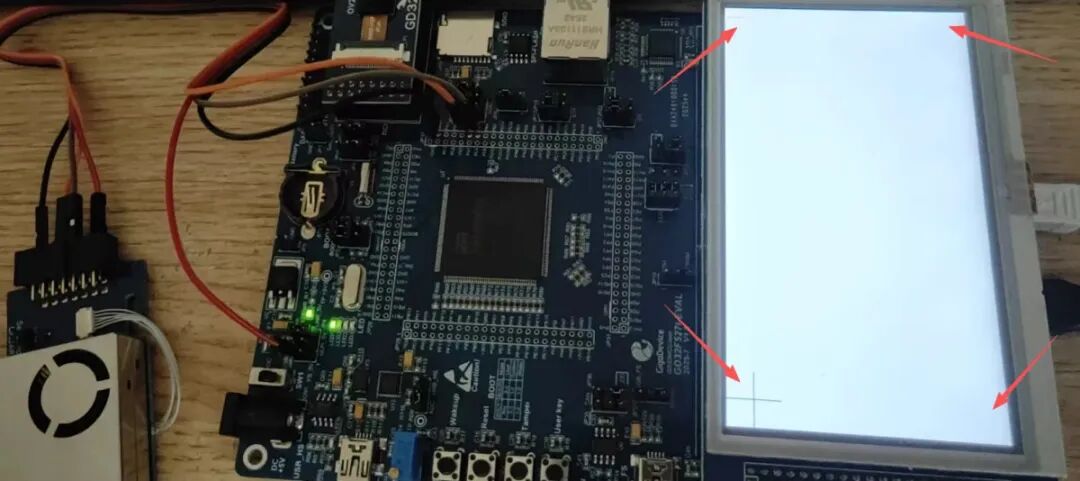
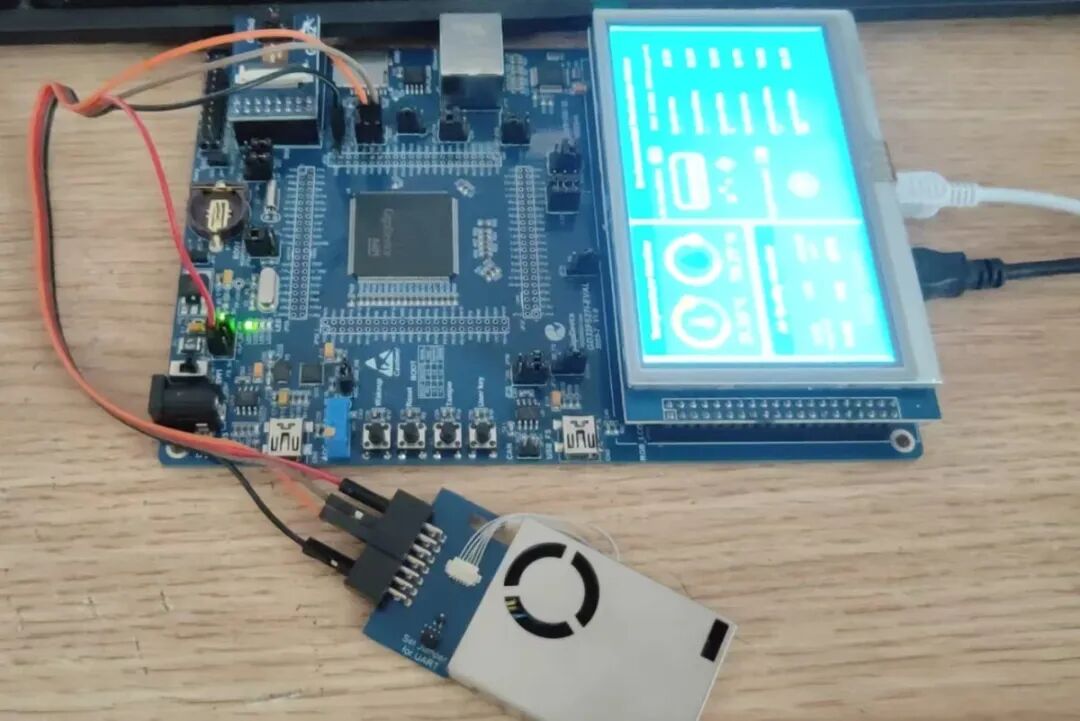
然后进入项目界面,环境参数显示。
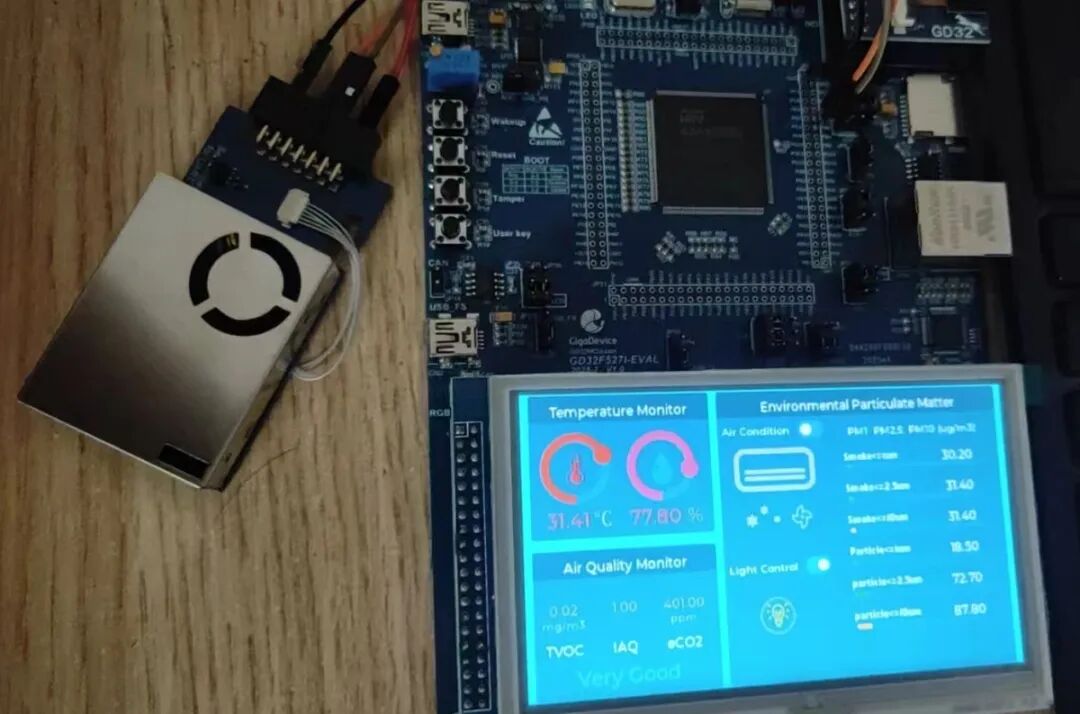
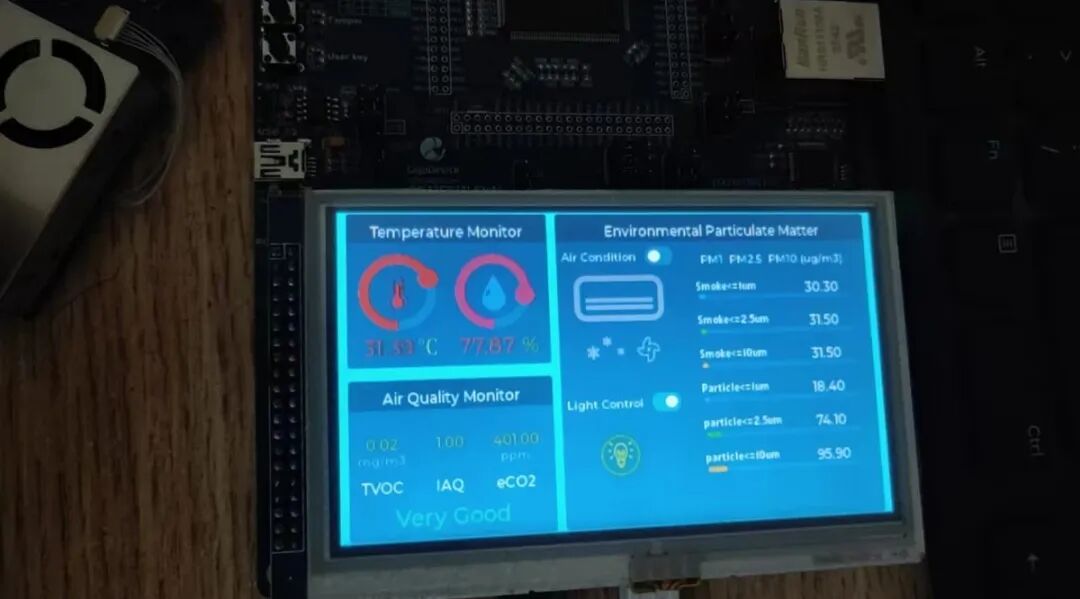
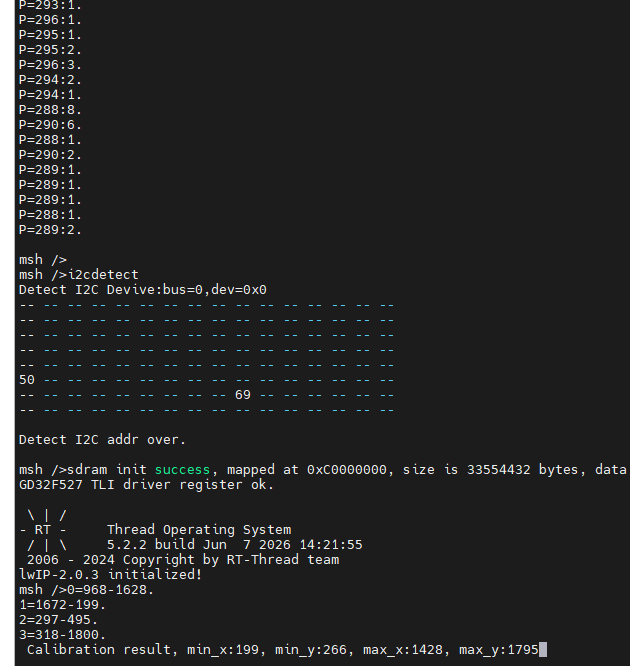
4 总结与建议
本次项目花费了不少时间用于各个模块的调试,终于是完成了。在使用GD32F527单片机开发过程中,MCU在RT-Thread实时操作系统多任务运行及LVGL图形界面应用表现很优异。该MCU资源非常充足,是实现工业控制、互联网设备以及HMI图形控制显示设备等高端项目应用的优选方案。
-
RT-Thread记录(一、版本开发环境及配合CubeMX)2022-06-20 7957
-
RT-Thread NUC97x 移植 LVGL2022-07-08 2395
-
rt-thread studio新建gd32f450工程2023-09-28 3331
-
基于RT-Thread与兆易创新GD32F527的工业级网络-CAN透传网关设计与实现 | 技术集结2026-02-10 17522
-
rt-thread开发环境2021-08-06 2111
-
在基于PC的RT-Thread模拟器上搭建LVGL图形库2022-06-13 3079
-
如何将RT-Thread系统移植到GD32F427上呢2022-12-13 1568
-
RT-Thread移植到GD32F150系列MCU2021-12-07 1087
-
RT-Thread STM32 配置系统时钟(使用外部晶振)2021-12-14 2401
-
机智云设备移植RT-Thread2022-04-19 2241
-
RT-Thread使用Soft RTC(软件模拟RTC)2023-10-12 2110
-
【直播预告】GD32F527高性能MCU全方位解析,与RT-Thread的全栈开发实战 | 博观讲堂2025-10-07 1490
-
基于RT-Thread与GD32F527I-EVAL的多媒体门禁系统 | 技术集结2025-11-25 1628
-
基于RT-Thread和兆易创新GD32F527系列MCU的健康监测站 | 技术集结2026-01-20 9438
-
基于RT-Thread的GD32F527I_EVAL开发板VSCode工具调配教程,含OpenOCD2026-07-18 343
全部0条评论

快来发表一下你的评论吧 !
