


 RK U-Boot想加一条调试专用命令怎么搞?——自定义命令
电子说
描述
| 问题:在 U‑Boot 命令行中想读取 SoC 温度、查看一个寄存器的值、或执行一个产测功能,但 U‑Boot 没有现成的命令。如何快速添加一条自定义命令?只需三步:U_BOOT_CMD 宏注册命令、实现do_xxx 函数(特定签名:int do_xxx(cmd_tbl_t *, int, int, char * const []))、在cmd/Makefile 中添加一行编译目标。 |
| 导读:U‑Boot 的交互式命令行允许开发者添加自定义命令,用于硬件调试、固件烧录、产测等场景。通过 U_BOOT_CMD 宏注册命令,只需实现一个符合签名的函数,再在cmd/Makefile 中添加一行即可。本文从宏定义到完整示例,讲解如何添加一条可编译的自定义命令。 |
一、U_BOOT_CMD 宏的完整定义
U_BOOT_CMD 是 U‑Boot 命令注册的核心宏,定义在 include/command.h 中:
// include/command.h (精简)#define U_BOOT_CMD(_name, _maxargs, _rep, _cmd, _usage, _help) U_BOOT_CMD_COMPLETE(_name, _maxargs, _rep, _cmd, _usage, _help, NULL)// 展开后的实际声明:#define U_BOOT_CMD_COMPLETE(_name, _maxargs, _rep, _cmd, _usage, _help, _comp) ll_entry_declare(cmd_tbl_t, _name, cmd) = { #_name, _maxargs, _rep, _cmd, _usage, _CMD_HELP(_help) _CMD_COMPLETE(_comp) }
每个参数的含义:
| 参数 | 类型 | 说明 |
| _name | 标识符 | 命令名称(成为cmd_tbl_t 结构体变量名) |
| _maxargs | int | 最大参数个数(含命令本身,典型值 3~8) |
| _rep | int | 是否支持自动重复(1 = 支持,0 = 不支持) |
| _cmd | 函数指针 | 实现函数:int do_xxx(cmd_tbl_t *, int, int, char * const []) |
| _usage | 字符串 | 简短用法说明(help输出第一行) |
| _help | 字符串 | 详细帮助文本(help cmd输出) |
U_BOOT_CMD 展开后通过链接器列表机制(ll_entry_declare)将cmd_tbl_t 结构体放入特定的.u_boot_list_cmd 段。U‑Boot 启动时,find_cmd() 遍历该段查找匹配的命令名。
二、do_xxx 函数签名
自定义命令的入口函数必须遵循以下签名:
// 标准签名(cmd_tbl_t 是 struct cmd_tbl_s 的 typedef)int do_xxx(cmd_tbl_t *cmdtp, int flag, int argc, char * const argv[]);/* 参数说明: * cmdtp - 命令表项指针(指向当前命令的描述) * flag - 标志位,CMD_FLAG_REPEAT=重复执行,CMD_FLAG_BOOTD=来自bootd * argc - 参数个数(argv[0]是命令本身) * argv - 参数字符串数组 * * 返回值: * CMD_RET_SUCCESS (0) - 命令执行成功 * CMD_RET_FAILURE (1) - 命令执行失败 * CMD_RET_USAGE (-1) - 参数错误,框架自动调用cmd_usage() */
// include/command.h 中 cmd_tbl_t 的完整定义struct cmd_tbl_s { char *name; /* 命令名称 */ int maxargs; /* 最大参数个数 */ int repeatable; /* 是否支持自动重复 */ int (*cmd)(struct cmd_tbl_s *, int, int, char * const []); /* 实现函数 */ char *usage; /* 简短用法("help"输出第一行) */#ifdef CONFIG_SYS_LONGHELP char *help; /* 详细帮助("help cmd"输出) */#endif#ifdef CONFIG_AUTO_COMPLETE int (*complete)(int argc, char * const argv[], char last_char, int maxv, char *cmdv[]);#endif};typedef struct cmd_tbl_s cmd_tbl_t;
三、cmd/Makefile 注册
新命令的.c 文件放入cmd/ 目录后,需要在cmd/Makefile 中添加一行才能参与编译:
# cmd/Makefile (位于 cmd/ 目录)# 格式: obj-$(CONFIG_CMD_XXXX) += my_command.o# 示例——RK平台已有命令:obj-$(CONFIG_CMD_BOOT_ANDROID) += boot_android.o android.oobj-$(CONFIG_CMD_BOOT_FIT) += bootfit.oobj-$(CONFIG_CMD_AVB) += avb.oobj-$(CONFIG_CMD_CLK) += clk.oobj-$(CONFIG_CMD_GPIO) += gpio.oobj-$(CONFIG_CMD_TEMPERATURE) += temperature.o # 我们的新命令
对应的 Kconfig 选项:
# cmd/Kconfig 中按字母顺序添加config CMD_TEMPERATURE bool "temperature - read SoC/board temperature sensors" default n help Read temperature from SoC internal sensor or external sensor via the U‑Boot driver model (UCLASS_THERMAL).
四、命令执行完整流程
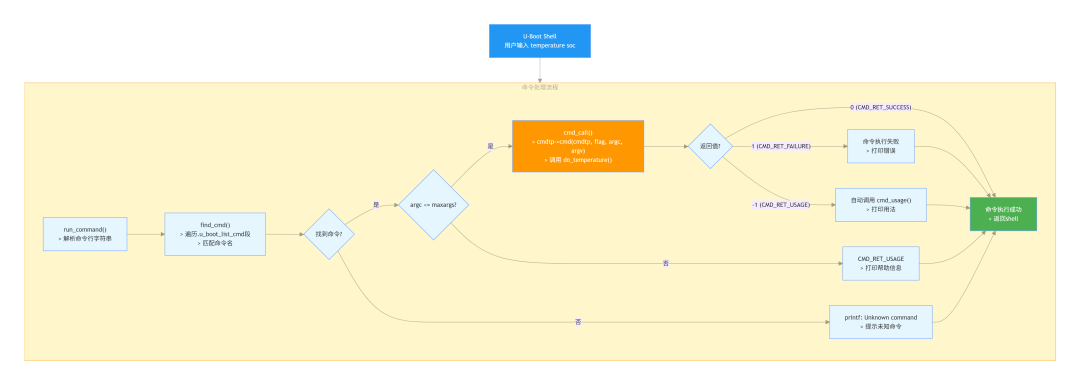
五、完整示例:temperature 命令
以下是一个完整的自定义命令,通过 U‑Boot 的 thermal 驱动模型读取 SoC 温度:
/* cmd/temperature.c — 完整的可编译示例 */#include #include #include #include /* * do_temperature - 读取SoC温度传感器 * * 用法: * temperature - 列出所有温度传感器 * temperature soc - 读取SoC内部温度 * temperature soc 0 - 读取传感器0的温度 */static int do_temperature(cmd_tbl_t *cmdtp, int flag, int argc, char * const argv[]){struct udevice *dev;int ret, i, temp;switch (argc) {case 1:/* 无参数: 列出所有thermal设备 */printf("Thermal devices:n");for (i = 0; i < 4; i++) {char name[32];snprintf(name, sizeof(name), "thermal@%d", i);ret = uclass_get_device_by_name(UCLASS_THERMAL, name, &dev);if (ret)break;printf(" %s: foundn", name);}if (i == 0)printf(" (no thermal devices found)n");return CMD_RET_SUCCESS;case 2:/* 一个参数: 读取温度 */if (strcmp(argv[1], "soc") == 0) {/* 查找SoC thermal设备 */ret = uclass_get_device(UCLASS_THERMAL, 0, &dev);if (ret) {printf("Failed to get thermal device: %dn", ret);return CMD_RET_FAILURE;}ret = thermal_get_temp(dev, &temp);if (ret) {printf("Failed to read temperature: %dn", ret);return CMD_RET_FAILURE;}/* thermal_get_temp 返回毫摄氏度 */printf("SoC temperature: %d.%03d Cn", temp / 1000, temp % 1000);return CMD_RET_SUCCESS;}return CMD_RET_USAGE;default:return CMD_RET_USAGE;}}/* 注册命令 (对应CONFIG_CMD_TEMPERATURE) */U_BOOT_CMD(temperature, 3, 0, do_temperature,"Read SoC/board temperature","n - List thermal devicesn""temperature socn"" - Read SoC temperature from first thermal sensorn");
编译与测试
# 1. 创建文件$ cat > u‑boot/cmd/temperature.c << 'EOF'... (上述代码) ...EOF# 2. 修改 cmd/Makefile,添加一行$ echo "obj-$(CONFIG_CMD_TEMPERATURE) += temperature.o" >> cmd/Makefile# 3. 启用Kconfig选项$ make menuconfig # → Command line interface → temperature# 或直接修改 defconfig:$ echo "CONFIG_CMD_TEMPERATURE=y" >> configs/evb_rk3576_defconfig# 4. 编译$ make CROSS_COMPILE=aarch64‑linux‑gnu‑# 5. 运行结果U‑Boot> temperatureThermal devices: thermal@0: foundU‑Boot> temperature socSoC temperature: 42.315 °CU‑Boot> temperature bad_argUsage:temperature - Read SoC/board temperature - List thermal devicestemperature soc - Read SoC temperature from first thermal sensor
六、命令参数解析详解
U‑Boot 命令的参数解析遵循标准的 argc/argv 模式:
/* argc/argv 示例: "temperature soc 0" * argc = 3 * argv[0] = "temperature" <- 命令名 * argv[1] = "soc" <- 子命令 * argv[2] = "0" <- 传感器编号 * * 常用解析模式: * 模式1: 字符串比较 (子命令分发) * 模式2: 数字参数 (simple_strtoul 无错误检查) * 模式3: 十六进制参数 * 模式4: 可选参数 *//* 模式1: 字符串比较 (子命令分发) */if (!strcmp(argv[1], "soc")) handle_soc();else if (!strcmp(argv[1], "board")) handle_board();else return CMD_RET_USAGE;/* 模式2: 数字参数 (simple_strtoul 无错误检查) */int value = simple_strtoul(argv[2], NULL, 10);/* 模式3: 十六进制参数 */ulong addr = hextoul(argv[1], NULL);/* 模式4: 可选参数 */if (argc >= 3) handle_with_arg(argv[2]);else handle_default();
| 注意:simple_strtoul 不会报告转换错误—— 如果参数不是有效数字,它静默返回 0。如果需要严格校验,可以用 strict_strtoul 或自行检查转换终点指针。 |
七、添加命令的最佳实践
1.使用 Kconfig 控制编译 — 为每条命令添加独立的 CONFIG_CMD_XXX 开关,避免在非目标平台强制编译
2.善用CMD_RET_USAGE — 参数错误时返回 CMD_RET_USAGE,框架会自动打印帮助信息
3.help 文本格式 — usage 参数写简短描述(help命令显示),help参数写详细用法(help cmd显示)
4.利用驱动模型 — 优先通过 uclass_get_device() 访问硬件,而非直接操作寄存器
5.内存安全 — 命令行环境可用内存有限,避免大块栈分配,使用 malloc/free
/* 更完整的命令模板 */static int do_mycmd(cmd_tbl_t *cmdtp, int flag, int argc, char * const argv[]){ if (argc < 2) return CMD_RET_USAGE; if (!strcmp(argv[1], "info")) { /* 信息查询 */ } else if (!strcmp(argv[1], "set")) { if (argc < 3) return CMD_RET_USAGE; /* 设置操作 */ } else { return CMD_RET_USAGE; } return CMD_RET_SUCCESS;}
审核编辑 黄宇
-
嵌入式Linux学习引导-Uboot移植之添加自定义命令2017-02-16 3404
-
U-Boot命令介绍2017-11-07 1117
-
基于linux下自定义一个脚本来替代rm命令2018-02-01 4618
-
Linux环境下U-boot常用命令讲解的详细资料说明2019-06-21 1483
-
u-boot常用的命令合集2022-02-11 887
-
创建自定义的u-boot命令2022-08-08 2107
-
嵌入式Linux开发-编写自定义uboot命令2022-08-14 2713
-
uboot自定义命令2022-09-17 3073
-
Linux U-Boot开发指南2023-03-06 3206
-
u-boot命令之EMMC和SD卡操作命令详解2023-07-12 6235
-
uboot命令的执行过程是什么2023-12-04 1996
-
RK3568驱动指南|驱动基础进阶篇-进阶5 自定义实现insmod命令实验2024-02-20 1970
-
深入解析U-Boot命令处理核心文件:功能、调试与开发价值2026-02-03 1294
-
RK平台U-Boot开发系列:U-Boot是什么?2026-07-15 436
-
RK平台U-Boot驱动层全景与调试定位技巧2026-07-20 421
全部0条评论

快来发表一下你的评论吧 !
