


c语言在线编译
更多
C语言在线编译器实现思路
要在网页上实现一个C语言在线编译器,需要解决几个关键技术问题:
实现思路
- 前端界面:提供代码编辑区、编译按钮和结果显示区
- 后端服务:接收代码、调用编译器、返回结果
- 安全沙箱:隔离用户代码执行环境
技术挑战
- 用户代码的安全性隔离
- 资源消耗限制(CPU、内存)
- 编译错误处理和结果展示
下面是一个概念性的前端实现,展示了编译器的基本界面和功能:
<!DOCTYPE html>
<html lang="zh-CN">
<head>
<meta charset="UTF-8">
<meta name="viewport" content="width=device-width, initial-scale=1.0">
<title>C语言在线编译器</title>
<link rel="stylesheet" href="https://cdnjs.cloudflare.com/ajax/libs/font-awesome/6.4.0/css/all.min.css">
<link href="https://fonts.googleapis.com/css2?family=Noto+Sans+SC:wght@400;500;700&display=swap" rel="stylesheet">
<script src="https://cdnjs.cloudflare.com/ajax/libs/ace/1.4.12/ace.js"></script>
<style>
* {
margin: 0;
padding: 0;
box-sizing: border-box;
font-family: 'Noto Sans SC', sans-serif;
}
body {
background: linear-gradient(135deg, #1a2a6c, #b21f1f, #1a2a6c);
background-size: 400% 400%;
animation: gradientBG 15s ease infinite;
color: #fff;
min-height: 100vh;
padding: 20px;
}
@keyframes gradientBG {
0% { background-position: 0% 50%; }
50% { background-position: 100% 50%; }
100% { background-position: 0% 50%; }
}
.container {
max-width: 1200px;
margin: 0 auto;
}
header {
text-align: center;
padding: 20px 0;
margin-bottom: 30px;
}
h1 {
font-size: 2.8rem;
margin-bottom: 10px;
text-shadow: 0 2px 10px rgba(0,0,0,0.3);
}
.subtitle {
font-size: 1.2rem;
opacity: 0.9;
max-width: 600px;
margin: 0 auto;
line-height: 1.6;
}
.compiler-container {
display: grid;
grid-template-columns: 1fr 1fr;
gap: 20px;
margin-bottom: 30px;
}
@media (max-width: 768px) {
.compiler-container {
grid-template-columns: 1fr;
}
}
.panel {
background: rgba(25, 30, 45, 0.85);
border-radius: 12px;
padding: 20px;
box-shadow: 0 10px 30px rgba(0,0,0,0.3);
backdrop-filter: blur(10px);
border: 1px solid rgba(255,255,255,0.1);
}
.panel-header {
display: flex;
justify-content: space-between;
align-items: center;
margin-bottom: 15px;
padding-bottom: 10px;
border-bottom: 1px solid rgba(255,255,255,0.1);
}
.panel-title {
font-size: 1.4rem;
font-weight: 600;
display: flex;
align-items: center;
gap: 10px;
}
.editor-container {
height: 450px;
border-radius: 8px;
overflow: hidden;
margin-bottom: 15px;
border: 1px solid rgba(255,255,255,0.1);
}
#editor {
height: 100%;
width: 100%;
font-size: 16px;
}
.output-container {
height: 200px;
background: #1e1e1e;
border-radius: 8px;
padding: 15px;
overflow-y: auto;
font-family: monospace;
white-space: pre-wrap;
margin-top: 15px;
border: 1px solid rgba(255,255,255,0.1);
}
.controls {
display: flex;
gap: 15px;
margin-top: 20px;
}
.btn {
padding: 12px 25px;
border: none;
border-radius: 8px;
font-size: 1rem;
font-weight: 600;
cursor: pointer;
display: flex;
align-items: center;
gap: 8px;
transition: all 0.3s ease;
}
.btn-run {
background: linear-gradient(45deg, #4CAF50, #8BC34A);
color: white;
}
.btn-reset {
background: rgba(255, 255, 255, 0.1);
color: white;
}
.btn:hover {
transform: translateY(-2px);
box-shadow: 0 5px 15px rgba(0,0,0,0.3);
}
.examples {
grid-column: span 2;
}
@media (max-width: 768px) {
.examples {
grid-column: span 1;
}
}
.examples-grid {
display: grid;
grid-template-columns: repeat(auto-fill, minmax(300px, 1fr));
gap: 15px;
margin-top: 15px;
}
.example-card {
background: rgba(255, 255, 255, 0.08);
border-radius: 8px;
padding: 15px;
cursor: pointer;
transition: all 0.3s ease;
border: 1px solid rgba(255,255,255,0.05);
}
.example-card:hover {
background: rgba(255, 255, 255, 0.15);
transform: translateY(-3px);
}
.example-title {
font-weight: 600;
margin-bottom: 8px;
display: flex;
align-items: center;
gap: 8px;
}
.example-desc {
font-size: 0.9rem;
opacity: 0.8;
line-height: 1.5;
}
footer {
text-align: center;
margin-top: 40px;
padding: 20px;
font-size: 0.9rem;
opacity: 0.7;
border-top: 1px solid rgba(255,255,255,0.1);
}
.success {
color: #4CAF50;
}
.error {
color: #F44336;
}
.warning {
color: #FFC107;
}
.info {
color: #2196F3;
}
</style>
</head>
<body>
<div class="container">
<header>
<h1><i class="fas fa-code"></i> C语言在线编译器</h1>
<p class="subtitle">在浏览器中编写、编译和运行C语言代码 - 无需安装任何开发环境</p>
</header>
<div class="compiler-container">
<div class="panel">
<div class="panel-header">
<h2 class="panel-title"><i class="fas fa-edit"></i> 代码编辑器</h2>
<div class="controls">
<button class="btn btn-reset" id="resetBtn"><i class="fas fa-redo"></i> 重置代码</button>
<button class="btn btn-run" id="runBtn"><i class="fas fa-play"></i> 运行代码</button>
</div>
</div>
<div class="editor-container">
<div id="editor">#include <stdio.h>
int main() {
printf("你好,世界!\\n");
// 计算斐波那契数列
int n = 10, t1 = 0, t2 = 1;
printf("斐波那契数列前 %d 项: ", n);
for (int i = 1; i <= n; ++i) {
printf("%d, ", t1);
int nextTerm = t1 + t2;
t1 = t2;
t2 = nextTerm;
}
return 0;
}</div>
</div>
</div>
<div class="panel">
<div class="panel-header">
<h2 class="panel-title"><i class="fas fa-terminal"></i> 输出结果</h2>
</div>
<div class="output-container" id="output">点击"运行代码"按钮查看结果...</div>
</div>
<div class="panel examples">
<div class="panel-header">
<h2 class="panel-title"><i class="fas fa-lightbulb"></i> 示例程序</h2>
</div>
<div class="examples-grid">
<div class="example-card" data-example="1">
<div class="example-title"><i class="fas fa-calculator"></i> 简单计算器</div>
<div class="example-desc">实现加减乘除运算的计算器程序</div>
</div>
<div class="example-card" data-example="2">
<div class="example-title"><i class="fas fa-sort-numeric-up"></i> 数组排序</div>
<div class="example-desc">使用冒泡排序算法对数组进行排序</div>
</div>
<div class="example-card" data-example="3">
<div class="example-title"><i class="fas fa-user"></i> 结构体示例</div>
<div class="example-desc">使用结构体存储和显示学生信息</div>
</div>
<div class="example-card" data-example="4">
<div class="example-title"><i class="fas fa-file"></i> 文件操作</div>
<div class="example-desc">读写文本文件的简单示例</div>
</div>
</div>
</div>
</div>
<footer>
<p>注意:这是一个前端模拟演示。实际在线编译器需要后端服务支持,使用gcc/clang编译并在安全沙箱中执行代码。</p>
<p>© 2023 C语言在线编译器 | 仅用于教学演示</p>
</footer>
</div>
<script>
// 初始化代码编辑器
const editor = ace.edit("editor");
editor.setTheme("ace/theme/monokai");
editor.session.setMode("ace/mode/c_cpp");
editor.setFontSize(16);
editor.setOptions({
enableBasicAutocompletion: true,
enableLiveAutocompletion: true,
enableSnippets: true
});
// 获取DOM元素
const runBtn = document.getElementById('runBtn');
const resetBtn = document.getElementById('resetBtn');
const outputEl = document.getElementById('output');
const exampleCards = document.querySelectorAll('.example-card');
// 示例代码库
const examples = {
1: `#include <stdio.h>
int main() {
char operator;
double num1, num2;
printf("输入运算符 (+, -, *, /): ");
scanf("%c", &operator);
printf("输入两个操作数: ");
scanf("%lf %lf", &num1, &num2);
switch(operator) {
case '+':
printf("%.2lf + %.2lf = %.2lf", num1, num2, num1 + num2);
break;
case '-':
printf("%.2lf - %.2lf = %.2lf", num1, num2, num1 - num2);
break;
case '*':
printf("%.2lf * %.2lf = %.2lf", num1, num2, num1 * num2);
break;
case '/':
if (num2 != 0.0)
printf("%.2lf / %.2lf = %.2lf", num1, num2, num1 / num2);
else
printf("错误! 除数不能为零.");
break;
default:
printf("错误! 无效的运算符");
}
return 0;
}`,
2: `#include <stdio.h>
void bubbleSort(int arr[], int n) {
for (int i = 0; i < n-1; i++) {
for (int j = 0; j < n-i-1; j++) {
if (arr[j] > arr[j+1]) {
// 交换元素
int temp = arr[j];
arr[j] = arr[j+1];
arr[j+1] = temp;
}
}
}
}
int main() {
int arr[] = {64, 34, 25, 12, 22, 11, 90};
int n = sizeof(arr)/sizeof(arr[0]);
printf("排序前数组: \\n");
for (int i=0; i < n; i++)
printf("%d ", arr[i]);
bubbleSort(arr, n);
printf("\\n排序后数组: \\n");
for (int i=0; i < n; i++)
printf("%d ", arr[i]);
return 0;
}`,
3: `#include <stdio.h>
#include <string.h>
struct Student {
char name[50];
int age;
float gpa;
};
int main() {
struct Student student1;
strcpy(student1.name, "张三");
student1.age = 20;
student1.gpa = 3.8;
printf("学生信息:\\n");
printf("姓名: %s\\n", student1.name);
printf("年龄: %d\\n", student1.age);
printf("平均绩点: %.2f\\n", student1.gpa);
return 0;
}`,
4: `#include <stdio.h>
int main() {
FILE *fptr;
// 写入文件
fptr = fopen("example.txt", "w");
if (fptr == NULL) {
printf("创建文件时出错!");
return 1;
}
fprintf(fptr, "这是文件写入示例\\n");
fprintf(fptr, "第二行文本\\n");
fclose(fptr);
// 读取文件
char content[100];
fptr = fopen("example.txt", "r");
printf("文件内容:\\n");
while(fgets(content, sizeof(content), fptr)) {
printf("%s", content);
}
fclose(fptr);
return 0;
}`
};
// 运行按钮事件
runBtn.addEventListener('click', () => {
const code = editor.getValue();
outputEl.innerHTML = '<span class="info">正在编译运行...</span>';
outputEl.scrollTop = 0;
// 模拟编译运行过程
setTimeout(() => {
// 在实际应用中,这里应该发送代码到后端服务器进行编译
// 然后接收编译结果和执行输出
outputEl.innerHTML = `<span class="success">编译成功!执行结果:</span>\n\n`;
// 这里是模拟输出
if (code.includes("printf(\"你好,世界\"")) {
outputEl.innerHTML += `你好,世界!
斐波那契数列前 10 项: 0, 1, 1, 2, 3, 5, 8, 13, 21, 34,
程序执行完毕,返回值: 0`;
} else if (code.includes("bubbleSort")) {
outputEl.innerHTML += `排序前数组:
64 34 25 12 22 11 90
排序后数组:
11 12 22 25 34 64 90
程序执行完毕,返回值: 0`;
} else if (code.includes("struct Student")) {
outputEl.innerHTML += `学生信息:
姓名: 张三
年龄: 20
平均绩点: 3.80
程序执行完毕,返回值: 0`;
} else if (code.includes("fopen")) {
outputEl.innerHTML += `文件内容:
这是文件写入示例
第二行文本
程序执行完毕,返回值: 0`;
} else {
outputEl.innerHTML += `你好,世界!\n这是程序的标准输出示例\n程序执行完毕,返回值: 0`;
}
}, 1500);
});
// 重置按钮事件
resetBtn.addEventListener('click', () => {
editor.setValue(`#include <stdio.h>
int main() {
printf("你好,世界!\\n");
// 计算斐波那契数列
int n = 10, t1 = 0, t2 = 1;
printf("斐波那契数列前 %d 项: ", n);
for (int i = 1; i <= n; ++i) {
printf("%d, ", t1);
int nextTerm = t1 + t2;
t1 = t2;
t2 = nextTerm;
}
return 0;
}`);
outputEl.innerHTML = '点击"运行代码"按钮查看结果...';
});
// 示例代码点击事件
exampleCards.forEach(card => {
card.addEventListener('click', () => {
const exampleId = card.getAttribute('data-example');
editor.setValue(examples[exampleId]);
outputEl.innerHTML = `已加载示例代码。点击"运行代码"按钮查看结果。`;
});
});
</script>
</body>
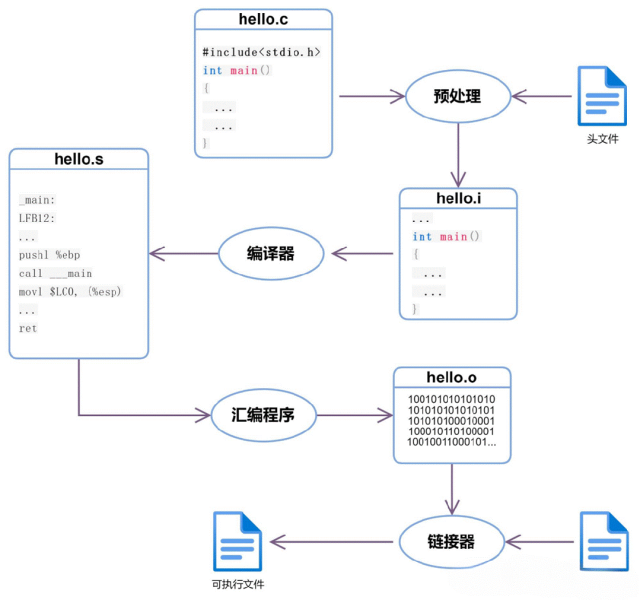
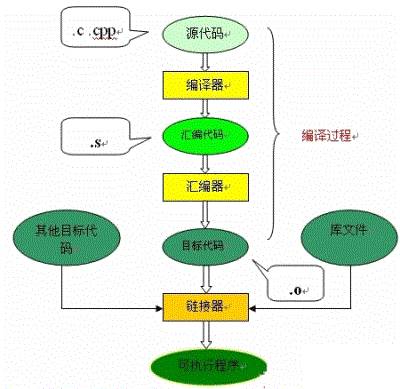
</html>实际在线编译器的工作流程
- 前端:用户输入



主流的C语言编译器详细介绍
于Windows操作系统之外,主要用于Unix/Linux操作系统。像现在很多版本的Linux都默认使用GCC作为C语言编译器。而像FreeBS
资料下载
 佚名
2019-09-05 17:27:00
佚名
2019-09-05 17:27:00


7天热门专题
 换一换
换一换
换一换
- 如何分清usb-c和type-c的区别
- 中国芯片现状怎样?芯片发展分析
- vga接口接线图及vga接口定义
- 芯片的工作原理是什么?
- 华为harmonyos是什么意思,看懂鸿蒙OS系统!
- 什么是蓝牙?它的主要作用是什么?
- ssd是什么意思
- 汽车电子包含哪些领域?
- TWS蓝牙耳机是什么意思?你真的了解吗
- 什么是单片机?有什么用?
- 升压电路图汇总解析
- plc的工作原理是什么?
- 再次免费公开一肖一吗
- 充电桩一般是如何收费的?有哪些收费标准?
- ADC是什么?高精度ADC是什么意思?
- dtmb信号覆盖城市查询
- EDA是什么?有什么作用?
- 苹果手机哪几个支持无线充电的?
- type-c四根线接法图解
- 华为芯片为什么受制于美国?
- 怎样挑选路由器?
- 元宇宙概念股龙头一览
- 锂电池和铅酸电池哪个好?
- 什么是场效应管?它的作用是什么?
- 如何进行编码器的正确接线?接线方法介绍
- 虚短与虚断的概念介绍及区别
- 晶振的作用是什么?
- 大疆无人机的价格贵吗?大约在什么价位?
- 苹果nfc功能怎么复制门禁卡
- amoled屏幕和oled区别
- 单片机和嵌入式的区别是什么
- 复位电路的原理及作用
- BLDC电机技术分析
- dsp是什么意思?有什么作用?
- 苹果无线充电器怎么使用?
- iphone13promax电池容量是多少毫安
- 芯片的组成材料有什么
- 特斯拉充电桩充电是如何收费的?收费标准是什么?
- 直流电机驱动电路及原理图
- 传感器常见类型有哪些?
- 自举电路图
- 通讯隔离作用
- 苹果笔记本macbookpro18款与19款区别
- 新斯的指纹芯片供哪些客户
- 伺服电机是如何进行工作的?它的原理是什么?
- 无人机价钱多少?为什么说无人机烧钱?
- 以太网VPN技术概述
- 手机nfc功能打开好还是关闭好
- 十大公认音质好的无线蓝牙耳机
- 元宇宙概念龙头股一览

湘ICP备2023036445号-105