资料下载


Altium_Designer_官方培训教材(合集)_全_1-23_Module

ailixin88
分享资料个
关于PCB设计的需求
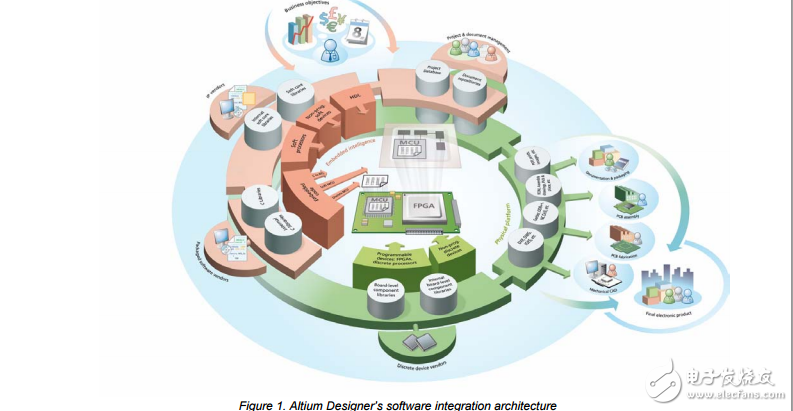
1.1 Introduction to Altium Designer Underlying the Altium Designer environment is a software integration platform that brings together all the tools necessary to create a complete environment for electronic product development, in a single application. Altium Designer includes tools for all design tasks: from schematic and HDL design capture, circuit simulation, signal integrity analysis, PCB design, and FPGA-based embedded system design and development. In addition, the Altium Designer environment can be customized to meet a wide variety of user requirements.
1.1.1 The Altium Designer Integration Platform When you select All Programs » Altium Designer Summer 09 from the Windows Start menu to run Altium Designer, you are actually launching DXP.EXE. The DXP platform underlies Altium Designer, supporting each of the editors that you use to create your design. The application interface is automatically configured to suit the document you are working on. For example, if you open a schematic sheet, appropriate toolbars, menus and shortcut keys are activated. This feature means that you can switch from routing a PCB, to producing a Bill of Materials report, to running a transient circuit analysis, and so on – and the correct menus, toolbars and shortcuts will be readily available. Also, all toolbars, menus and shortcut keys can also be configured to suit how you like to configure your design environment.
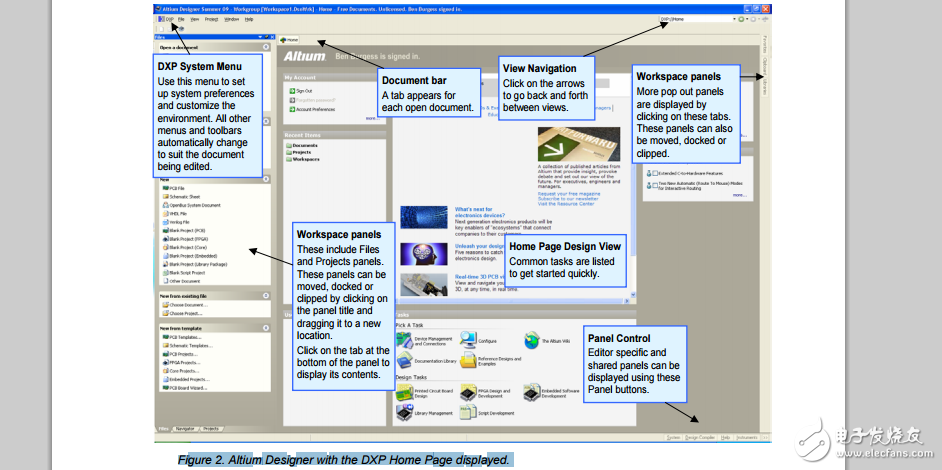
1.2 The Altium Designer environment The Altium Designer environment consists of two main elements: • The main document editing area of Altium Designer, shown on the right side in Figure 2. Figure 2. Altium Designer with the DXP Home Page displayed. • The Workspace Panels. There are a number of panels in Altium Designer, the default is that some are docked on the left side of the application, some are available in pop-out mode on the right side, some are floating, and others are hidden. When you open Altium Designer, the most common initial tasks are displayed for easy selection in a special view, called the Home Page.
声明:本文内容及配图由入驻作者撰写或者入驻合作网站授权转载。文章观点仅代表作者本人,不代表电子发烧友网立场。文章及其配图仅供工程师学习之用,如有内容侵权或者其他违规问题,请联系本站处理。 举报投诉
- 相关下载
- 相关文章